
-
Search Results
-
Topic: image hover
hi
I was wondering if it possible in Enfold to replicate the image hover as can be seen on this page:i.e. the image has a title overlay, on mouse hover the image fades and text, description and link button can be seen?
Topic: Theme Settings
Hi there,
Had a huge accident (client let their domain name expire) so I’m starting their site on a new domain temporarily from a backup but sadly the theme options have vanished after migrating which I know always happens but I don’t have access to the old site obviously with the domain expiring so is there a way of converting the below code into an Enfold-theme-settings.txt file?
a:1:{s:4:”avia”;a:159:{s:9:”frontpage”;s:4:”1019″;s:9:”undefined”;s:25:”menu_display::burger_menu”;s:8:”blogpage”;s:2:”19″;s:4:”logo”;s:69:”http://wolfscastle.com/wp-content/uploads/2016/06/WolfscastleLogo.png”;s:7:”favicon”;s:69:”http://wolfscastle.com/wp-content/uploads/2016/07/wolfscastle-fav.png”;s:9:”preloader”;s:8:”disabled”;s:21:”preloader_transitions”;s:21:”preloader_transitions”;s:14:”preloader_logo”;s:0:””;s:15:”lightbox_active”;s:15:”lightbox_active”;s:8:”lock_alb”;s:8:”disabled”;s:19:”lock_alb_for_admins”;s:8:”disabled”;s:6:”markup”;s:0:””;s:16:”color-body_style”;s:9:”stretched”;s:17:”color-frame_width”;s:2:”15″;s:15:”header_position”;s:10:”header_top”;s:20:”layout_align_content”;s:20:”content_align_center”;s:18:”sidebarmenu_sticky”;s:18:”conditional_sticky”;s:19:”sidebarmenu_widgets”;s:0:””;s:18:”sidebarmenu_social”;s:8:”disabled”;s:17:”responsive_active”;s:17:”responsive_active”;s:15:”responsive_size”;s:6:”1310px”;s:13:”content_width”;s:2:”73″;s:14:”combined_width”;s:2:”80″;s:12:”color_scheme”;s:4:”Blue”;s:24:”colorset-header_color-bg”;s:7:”#ffffff”;s:25:”colorset-header_color-bg2″;s:7:”#ffffff”;s:29:”colorset-header_color-primary”;s:7:”#58595b”;s:31:”colorset-header_color-secondary”;s:7:”#58595b”;s:27:”colorset-header_color-color”;s:7:”#9d9251″;s:26:”colorset-header_color-meta”;s:7:”#58595b”;s:29:”colorset-header_color-heading”;s:7:”#58595b”;s:28:”colorset-header_color-border”;s:11:”transparent”;s:25:”colorset-header_color-img”;s:0:””;s:33:”colorset-header_color-customimage”;s:0:””;s:25:”colorset-header_color-pos”;s:8:”top left”;s:28:”colorset-header_color-repeat”;s:9:”no-repeat”;s:28:”colorset-header_color-attach”;s:6:”scroll”;s:22:”colorset-main_color-bg”;s:7:”#ffffff”;s:23:”colorset-main_color-bg2″;s:7:”#f8f6f2″;s:27:”colorset-main_color-primary”;s:7:”#58595b”;s:29:”colorset-main_color-secondary”;s:7:”#9c9c9c”;s:25:”colorset-main_color-color”;s:7:”#58595b”;s:24:”colorset-main_color-meta”;s:7:”#58595b”;s:27:”colorset-main_color-heading”;s:7:”#58595b”;s:26:”colorset-main_color-border”;s:11:”transparent”;s:23:”colorset-main_color-img”;s:0:””;s:31:”colorset-main_color-customimage”;s:0:””;s:23:”colorset-main_color-pos”;s:8:”top left”;s:26:”colorset-main_color-repeat”;s:9:”no-repeat”;s:26:”colorset-main_color-attach”;s:6:”scroll”;s:27:”colorset-alternate_color-bg”;s:7:”#ffffff”;s:28:”colorset-alternate_color-bg2″;s:7:”#ebebeb”;s:32:”colorset-alternate_color-primary”;s:7:”#ffffff”;s:34:”colorset-alternate_color-secondary”;s:7:”#ffffff”;s:30:”colorset-alternate_color-color”;s:7:”#58595b”;s:29:”colorset-alternate_color-meta”;s:7:”#58595b”;s:32:”colorset-alternate_color-heading”;s:7:”#58595b”;s:31:”colorset-alternate_color-border”;s:7:”#ebebeb”;s:28:”colorset-alternate_color-img”;s:0:””;s:36:”colorset-alternate_color-customimage”;s:0:””;s:28:”colorset-alternate_color-pos”;s:8:”top left”;s:31:”colorset-alternate_color-repeat”;s:9:”no-repeat”;s:31:”colorset-alternate_color-attach”;s:6:”scroll”;s:24:”colorset-footer_color-bg”;s:7:”#838744″;s:25:”colorset-footer_color-bg2″;s:7:”#838744″;s:29:”colorset-footer_color-primary”;s:7:”#ffffff”;s:31:”colorset-footer_color-secondary”;s:7:”#ffffff”;s:27:”colorset-footer_color-color”;s:7:”#ffffff”;s:26:”colorset-footer_color-meta”;s:7:”#ffffff”;s:29:”colorset-footer_color-heading”;s:7:”#ffffff”;s:28:”colorset-footer_color-border”;s:11:”transparent”;s:25:”colorset-footer_color-img”;s:0:””;s:33:”colorset-footer_color-customimage”;s:0:””;s:25:”colorset-footer_color-pos”;s:8:”top left”;s:28:”colorset-footer_color-repeat”;s:9:”no-repeat”;s:28:”colorset-footer_color-attach”;s:6:”scroll”;s:24:”colorset-socket_color-bg”;s:7:”#e2e2e2″;s:25:”colorset-socket_color-bg2″;s:7:”#342f29″;s:29:”colorset-socket_color-primary”;s:7:”#5b5b5b”;s:31:”colorset-socket_color-secondary”;s:7:”#5b5b5b”;s:27:”colorset-socket_color-color”;s:7:”#5b5b5b”;s:26:”colorset-socket_color-meta”;s:7:”#5b5b5b”;s:29:”colorset-socket_color-heading”;s:7:”#5b5b5b”;s:28:”colorset-socket_color-border”;s:7:”#e2e2e2″;s:25:”colorset-socket_color-img”;s:0:””;s:33:”colorset-socket_color-customimage”;s:0:””;s:25:”colorset-socket_color-pos”;s:8:”top left”;s:28:”colorset-socket_color-repeat”;s:9:”no-repeat”;s:28:”colorset-socket_color-attach”;s:6:”scroll”;s:16:”color-body_color”;s:7:”#eeeeee”;s:14:”color-body_img”;s:0:””;s:22:”color-body_customimage”;s:0:””;s:14:”color-body_pos”;s:8:”top left”;s:17:”color-body_repeat”;s:9:”no-repeat”;s:17:”color-body_attach”;s:6:”scroll”;s:14:”google_webfont”;s:5:”Alice”;s:12:”default_font”;s:5:”Cardo”;s:23:”color-default_font_size”;s:4:”16px”;s:9:”quick_css”;s:7082:”/* ROOMS STYLING */
#av_section_2 > div > div > div > div > div.flex_column.av_one_fourth.flex_column_div.av-zero-column-padding.avia-builder-el-10.el_after_av_one_fourth.el_before_av_one_fourth {
margin-top:30px !important;
}
#av_section_2 > div > div > div > div > div.flex_column.av_one_fourth.flex_column_div.av-zero-column-padding.avia-builder-el-12.el_after_av_one_fourth.el_before_av_one_fourth {
margin-top:30px !important;
}
#av_section_2 > div > div > div > div > div.flex_column.av_one_fourth.flex_column_div.av-zero-column-padding.avia-builder-el-18.el_after_av_one_fourth.el_before_av_one_fourth.column-top-margin {
margin-top:30px !important;
}
#av_section_2 > div > div > div > div > div.flex_column.av_one_fourth.flex_column_div.av-zero-column-padding.avia-builder-el-20.el_after_av_one_fourth.el_before_av_one_half.column-top-margin {
margin-top:30px !important;
}/* SECONDARY MENU FONT SIZE */
#avia2-menu {
font-size: 14px;
}/* HIDE "TEL:…" FROM HEADER */
#header_meta > div > nav > span {
display:none;
}/* SLIDER THEME COLOR BUTTON COLOR */
#top .main_color .avia-color-theme-color {
color: #ffffff;
border-color: #9d9251;
background-color: #9d9251;
}/* CAPTION POSITIONING */
.avia_transform .av_slideshow_full .active-slide .avia-caption-content, .avia_transform .av_fullscreen .active-slide .avia-caption-content {
margin-top: -32px;
}@media screen and (max-width: 768px) {
.avia-builder-el-0.av-minimum-height-100 .container, .avia-builder-el-0.avia-fullscreen-slider .avia-slideshow {
height: 200px !important;
}
}@media screen and (max-width: 768px) {
#fullscreen_slider_0 > div > ul > li.slide-1 {
background-position: center center;
height: 200px;
}
}
@media screen and (max-width: 768px) {
#fullscreen_slider_0 > div > ul > li.slide-2 {
background-position: center center;
height: 200px;
}
}
@media screen and (max-width: 768px) {
#fullscreen_slider_0 > div > ul > li.slide-3 {
background-position: center center;
height: 200px;
}
}
@media screen and (max-width: 768px) {
#fullscreen_slider_0 > div > ul > li.slide-4 {
background-position: center center;
height: 200px;
}
}.caption_framed .slideshow_caption .avia-caption-content p, .caption_framed .slideshow_caption .avia-caption-title, .avia-caption .avia-caption-content p, .avia-caption .avia-caption-title {
background: rgba(157,146,81, 1) !important;
}/* "FOUR STAR LUXURY…" ITALIC */
#av_section_1 > div > div > div > div > div > div.av-special-heading.av-special-heading-h1.custom-color-heading.blockquote.modern-quote.modern-centered.avia-builder-el-3.el_before_av_hr.avia-builder-el-first.av-inherit-size > h1 {
font-style:italic;
}/* MARGIN ABOVE TEL AND EMAIL */
#header_meta > div > div > span {
margin-bottom:20px;
}#footer {
border-top: #9d9251 30px solid;
}.avia-button {
font-size: 12px !important;
}#header_main > div > div > nav {
margin-top:20px;
}.phone-info {
font-size:16px;
}html, body, div, span, applet, object, iframe, h1, h2, h3, h4, h5, h6, p, blockquote, pre, a, abbr, acronym, address, big, cite, code, del, dfn, em, img, ins, kbd, q, s, samp, small, strike, strong, sub, sup, tt, var, b, u, i, center, dl, dt, dd, ol, ul, li, fieldset, form, label, legend, table, caption, tbody, tfoot, thead, tr, th, td, article, aside, canvas, details, embed, figure, figcaption, footer, header, hgroup, menu, nav, output, ruby, section, summary, time, mark, audio, video {
font-weight: 100 !important;
}.main_menu {
text-transform: uppercase;
}#search-bar {
width: 100%;
min-height: 50px;
margin-top: 173px;
background: #9d9251;
}.avia-menu-fx {
display:none;
}.logo{
margin: 0 auto !important;
height:75%;
}
#top .header_color.av_header_transparency .avia-menu-fx {
display:none;
}.avia-menu-text {
font-size: 12.5px;
letter-spacing: 1.5px;
}.html_header_top.html_bottom_nav_header .main_menu>div, .html_header_top.html_bottom_nav_header .main_menu ul:first-child {
height:45px!important;
}.avia-caption-content p {
max-width:700px;
margin:0 auto;
}h2.avia-caption-title {
margin-bottom:35px!important;
}#top .av_header_glassy.av_header_transparency #header_main {
background: rgba(0,0,0,0.35)!important;
}#top .scroll-down-link {
font-size:150px!important;
}.avia-section.av-minimum-height .container .content {
vertical-align:top;
}#home-c2a {
border-top:3px solid #ab933d!important;
}#home-c2a .container, #about-pembs .container {
padding:0px!important;
}#home-c2a div .av_one_fifth {
margin-left: 0%!important;
width: 20%!important;
}#home-c2a div .av_one_fourth {
margin-left: 0%!important;
width: 25%!important;
}#home-c2a .responsive .av_one_fourth.first.el_before_av_one_fourth.flex_column_div, .responsive .av_one_fourth.first + .av_one_fourth + .av_one_fourth.flex_column_div, .responsive .av_one_half.first + .av_one_fourth.el_before_av_one_fourth.flex_column_div, .responsive .av_one_fourth.first + .av_one_fourth + .av_one_half.flex_column_div, .responsive .avia-content-slider-inner .av_one_fourth.first.flex_column_div, #home-c2a .responsive .av_one_half.first + .av_one_fourth.flex_column_div, .responsive .av_one_half.first + .av_one_fourth + .av_one_fourth.flex_column_div, .responsive .av_one_fourth.first + .av_one_fourth + .av_one_fourth.flex_column_div, .responsive .av_one_fourth.first + .av_one_fourth + .av_one_fourth + .av_one_fourth.flex_column_div, .responsive .av_one_fourth.first + .av_one_fourth + .av_one_half.flex_column_div, #home-c2a .column-top-margin {
clear:none!important;
margin-top:0px!important;
}.av-image-caption-overlay-center p {
background-color:#ab933d;
position: absolute;
bottom: 0;
left: 0;
padding: 10px 20px;
font-size:21px!important;
}@media screen and (max-width: 768px) {
#home-c2a {
display:none;
}}
.entry-content p, #main-copy p {
text-align:justify;
font-size:16px;
color:#323232;
}#about-pembs-header h2 {
line-height:100px;
}.av-catalogue-content {
font-size:16px;
}.center-text p {
text-align:center!important;
font-size:16px!important;
color#323232!important;
}/* SPECIAL EVENTS SIDEBAR STYLE */
.page-id-559 #search-2 {
display:none;
}.page-id-559 #main > div.main_color.container_wrap_first.container_wrap.sidebar_right > div > aside {
background-color: #dadada;
}.page-id-559 #newsbox-2 {
display:none;
}.page-id-559 #tribe-events-list-widget-2 > h3 {
margin-bottom:30px;
}.page-id-559 .content, .sidebar {
padding-top: 40px;
padding-bottom: 0px;
}.page-id-559 .sidebar .widget:first-child, .content .sidebar .widget:first-child {
padding-right: 30px;
}.page-id-559 #tribe-events-list-widget-2 > ol {
margin-left:2px;
}.page-id-559 #main > div.main_color.container_wrap_first.container_wrap.sidebar_right > div {
margin-top: 30px;
margin-bottom: 30px;
}”;s:16:”advanced_styling”;a:6:{i:0;a:10:{s:2:”id”;s:13:”hover_overlay”;s:13:”overlay_style”;s:4:”hide”;s:5:”color”;s:0:””;s:10:”icon_color”;s:0:””;s:16:”background_color”;s:0:””;s:12:”header_color”;s:4:”true”;s:10:”main_color”;s:4:”true”;s:15:”alternate_color”;s:4:”true”;s:12:”footer_color”;s:4:”true”;s:12:”socket_color”;s:4:”true”;}i:1;a:11:{s:2:”id”;s:12:”headings_all”;s:5:”color”;s:0:””;s:16:”background_color”;s:0:””;s:11:”font_family”;s:0:””;s:11:”font_weight”;s:0:””;s:14:”text_transform”;s:4:”none”;s:12:”header_color”;s:8:”disabled”;s:10:”main_color”;s:4:”true”;s:15:”alternate_color”;s:8:”disabled”;s:12:”footer_color”;s:8:”disabled”;s:12:”socket_color”;s:8:”disabled”;}i:2;a:7:{s:2:”id”;s:18:”main_menu_dropdown”;s:5:”color”;s:7:”#ffffff”;s:16:”background_color”;s:7:”#000000″;s:12:”border_color”;s:0:””;s:9:”font_size”;s:0:””;s:11:”line_height”;s:0:””;s:12:”hover_active”;s:4:”true”;}i:3;a:7:{s:2:”id”;s:18:”main_menu_dropdown”;s:5:”color”;s:7:”#000000″;s:16:”background_color”;s:7:”#ffffff”;s:12:”border_color”;s:0:””;s:9:”font_size”;s:0:””;s:11:”line_height”;s:0:””;s:12:”hover_active”;s:8:”disabled”;}i:4;a:5:{s:2:”id”;s:7:”top_bar”;s:5:”color”;s:7:”#666666″;s:16:”background_color”;s:7:”#ffffff”;s:12:”border_color”;s:0:””;s:11:”font_family”;s:0:””;}i:5;a:11:{s:2:”id”;s:12:”headings_all”;s:5:”color”;s:7:”#ffffff”;s:16:”background_color”;s:0:””;s:11:”font_family”;s:0:””;s:11:”font_weight”;s:0:””;s:14:”text_transform”;s:0:””;s:12:”header_color”;s:8:”disabled”;s:10:”main_color”;s:8:”disabled”;s:15:”alternate_color”;s:4:”true”;s:12:”footer_color”;s:8:”disabled”;s:12:”socket_color”;s:8:”disabled”;}}s:13:”header_layout”;s:36:”logo_left main_nav_header menu_right”;s:11:”header_size”;s:6:”custom”;s:18:”header_custom_size”;s:3:”120″;s:12:”menu_display”;s:0:””;s:18:”header_menu_border”;s:22:”seperator_small_border”;s:12:”header_style”;s:0:””;s:16:”header_title_bar”;s:16:”hidden_title_bar”;s:13:”header_sticky”;s:13:”header_sticky”;s:16:”header_shrinking”;s:8:”disabled”;s:18:”header_unstick_top”;s:8:”disabled”;s:14:”header_stretch”;s:8:”disabled”;s:17:”header_searchicon”;s:17:”header_searchicon”;s:13:”header_social”;s:0:””;s:21:”header_secondary_menu”;s:35:”secondary_right extra_header_active”;s:19:”header_phone_active”;s:37:”phone_active_left extra_header_active”;s:5:”phone”;s:40:”Tel: 01437 741225 | (Email address hidden if logged out) “;s:23:”header_replacement_logo”;s:82:”http://wolfscastle.com/wp-content/uploads/2015/09/Wolfscastle-Web-White-Shadow.png”;s:23:”header_replacement_menu”;s:7:”#ffffff”;s:24:”header_mobile_activation”;s:18:”mobile_menu_tablet”;s:22:”header_mobile_behavior”;s:22:”header_mobile_behavior”;s:14:”archive_layout”;s:8:”fullsize”;s:11:”blog_layout”;s:8:”fullsize”;s:13:”single_layout”;s:8:”fullsize”;s:11:”page_layout”;s:8:”fullsize”;s:19:”smartphones_sidebar”;s:8:”disabled”;s:16:”page_nesting_nav”;s:8:”disabled”;s:15:”sidebar_styling”;s:0:””;s:22:”display_widgets_socket”;s:3:”all”;s:14:”footer_columns”;s:1:”3″;s:9:”copyright”;s:52:”© Copyright – Wolfscastle Country Hotel[nolink]”;s:13:”footer_social”;s:13:”footer_social”;s:17:”blog_global_style”;s:0:””;s:10:”blog_style”;s:6:”custom”;s:17:”single_post_style”;s:10:”single-big”;s:27:”single_post_related_entries”;s:24:”av-related-style-tooltip”;s:16:”blog-meta-author”;s:16:”blog-meta-author”;s:18:”blog-meta-comments”;s:18:”blog-meta-comments”;s:18:”blog-meta-category”;s:18:”blog-meta-category”;s:14:”blog-meta-date”;s:14:”blog-meta-date”;s:19:”blog-meta-html-info”;s:19:”blog-meta-html-info”;s:13:”blog-meta-tag”;s:13:”blog-meta-tag”;s:14:”share_facebook”;s:14:”share_facebook”;s:13:”share_twitter”;s:13:”share_twitter”;s:15:”share_pinterest”;s:15:”share_pinterest”;s:11:”share_gplus”;s:11:”share_gplus”;s:12:”share_reddit”;s:12:”share_reddit”;s:14:”share_linkedin”;s:14:”share_linkedin”;s:12:”share_tumblr”;s:12:”share_tumblr”;s:8:”share_vk”;s:8:”share_vk”;s:10:”share_mail”;s:10:”share_mail”;s:12:”social_icons”;a:4:{i:0;a:2:{s:11:”social_icon”;s:8:”facebook”;s:16:”social_icon_link”;s:100:”https://www.facebook.com/Wolfscastle-Country-Hotel-Allt-yr-Afon-Restaurant-174347119254597/timeline/”;}i:1;a:2:{s:11:”social_icon”;s:7:”twitter”;s:16:”social_icon_link”;s:35:”https://twitter.com/staywolfscastle”;}i:2;a:2:{s:11:”social_icon”;s:8:”linkedin”;s:16:”social_icon_link”;s:58:”https://www.linkedin.com/company/wolfscastle-country-hotel”;}i:3;a:2:{s:11:”social_icon”;s:6:”flickr”;s:16:”social_icon_link”;s:42:”https://www.flickr.com/photos/wolfscastle/”;}}s:13:”mailchimp_api”;s:0:””;s:9:”analytics”;s:0:””;s:8:”gmap_api”;s:0:””;s:17:”avia-nonce-import”;s:10:”1c810ad73d”;s:18:”config_file_upload”;s:0:””;s:15:”iconfont_upload”;s:0:””;s:16:”updates_username”;s:0:””;s:15:”updates_api_key”;s:0:””;}}Cheers,
MattTopic: Blog layout
Hello,
I just started with a blog on my website. Would it be possible to make it look like this one: https://www.theperfectwedding.nl/blogs.
I would like a header on top with the date directly under it, than some text. Than a big picture. And a button with “read more” under the picture.
Is it possible to build this (easily) in Enfold?Thank you!
Best regards,
IrisHi See screenshot – https://screencast.com/t/AxPTl0sBTFG
Learn More button has a nice hover over behaviour… We want to use that in the slider at the top but, the buttons there are static.. Is it possible to have a ‘learn more’ button in the slider with the nice hover over behaviour?Hi there,
I’d like to make a website like the Ted’s one.
Here is an example of a page I “want” to copy :
https://www.ted.com/talks/tim_ferriss_why_you_should_define_your_fears_instead_of_your_goals#t-29386
When you play the video and then pause it, if the mouse is on the area of the video you’ll have a kind of layer appearing on top of the video with black gradient on the sides and written information to the left. If you remove the mouse from the video area, the layer disappear.
Here are screenshots of this
/Users/blaisejadoul/Desktop/Screen Shot 2017-06-12 at 17.38.33.png
/Users/blaisejadoul/Desktop/Screen Shot 2017-06-12 at 17.38.05.png
You can imagine that if you click the play button, the video starts again.Is it possible to make this with the Enfold Theme ?
Hello,
1. This feature of extra diagonal border which runs like a band across the screen was coming over the main containers initially but then i changed its color etc. and now it has gone behind the containers. Its just visible on the sidebars but how to get them on top once again?
2. I want to change the ‘grey’ default color on the pages to black. How do i do that? Tried putting the codes from earlier threads but it didnt work.
3. I want to put a background image in first color section of landing page but with text and buttons over it. A bit transparent image. How do i do that? Please tell me how to do it and if the similar way/code can be used for other pages on the website too.
4. I believe in this theme I cant make the main content containers on the landing page a bit transparent, is it? please let me know.Providing link to my website below.
Awaiting response. Much appreciated.Topic: Add a button to the header
Hi Team Kriesi,
I would like to add a ‘Donate’ button to the header which goes to a page on the site, just like the one on the in the header of Cancer Research website https://www.cancerresearchuk.org/support-us/donate
I would also like this button to be hidden from the header on small screen tablets and mobile devices, again just like on the Cancer Research website.
I’ve tried the instructions from this post but I can’t style it so it’s positioned in the middle on the right or get the colors to be pink (#bd2e89) : https://kriesi.at/support/topic/adding-custom-button-on-top-right-hand-of-enfold-header/
Any help you could provide would be greatly appreciated.
Many thanks in advance!Hi,
I purchased the Enfold theme two weeks ago, and have followed the instructions on this kriesi link for setting up anchors for single page navigation.
http://kriesi.at/documentation/enfold/add-anchors-to-your-page-for-single-page-navigation/After following the instructions, I clicked on the button to which I’ve added the link, but it’s not taking me downward to the section of the web page that I indicated. Instead, it just refreshes the page and shows the very top of the web page.
I’ve currently got the site under a “Coming Soon” plugin, and will be launching soon. I would be happy to provide login information for access.
Kind regards,
AlexI tried to follow Vinay’s instructions here
https://kriesi.at/support/topic/cant-find-translate-string-for-the-button-post-comment/
but it seems that it doesn’t apply any more.
Is there a way to translate the “Post Comment” string?
I can’t find it any where!Thanks
KostasIf I try and edit an older page with HTML markup, there is no content in the editor.
If I try and edit a simple older page, the Update button does not save and I’m brought back to the Posts page.
I can create a new post/page ok.
I have tried disabling all plugins, but only if I switch to a different theme does any content show up for our home page in the editor – but does not display at all correctly on public side so really need Enfold to work.
can we downgrade back to older version? It was working fine.
Thanks ! I need to edit pages and can’t and my sales guys are yelling at me.
EDIT – Did some server-side changes and seems ok now. I don’t know how to delete this
As with others, my Avia Layout Builder will not load on any pages. I updated Enfold. No fix. Then I:
Reloaded Enfold from Themeforest via FTP.
Reloaded WordPress 4.7.5.
Turned off all plugins.
Cleared cached.
Tried in Chrome instead of Firefox.
Optimized the database.
Cleared cache again and again.The page builder just won’t load for any of the pages. Normally it wouldn’t be urgent, but my clients were just featured in Thrillist and on a commercial for Cabo Wabo Tequila, and they’re quite anxious to get that information on their website and I can’t update without the builder.
Any help would be appreciated. Login credentials below.
Also, when trying to update the user password for the username I already had for you, the ‘generate password’ button isn’t loading the form field either. It did however work when I created a new user.
Hi! I want to build a website for my fiancee using Enfold that will allow her to showcase the five languages that she knows. My goal is to build her site so that someone can just hit a language button and everything instantly translates to that specific language. How do I go about doing this?
Hi team,
Our agency uses Enfold frequently. Last week I started noticing that at random when I would update content on a page and click the “Update” button the content and perhaps other content would just disappear. I would either have to recreate it or restore it to a previous revision. It seems to be random and there’s not really one element that causes it verses another. I use the layout containers and either the text element of image element the most.
While this is frustrating for me I’m reaching out because now our clients are starting to experience the same problem when they’re updated their sites which not only makes us look bad but we have to go in and fix things.
I have posted one of the sites I was having problems with last week in the private content section. Would you take a look and make any recommendations. Obvious a few things that come to my mind is plugins (however we haven’t had issues in the past with any of these plugins). Also PHP version perhaps? Corrupt files? Just some ideas from my brain that I could use some one else’s perspective.
comparing my shop to the one in enfold shop demo there are some noticeable differences
I presume it got something to do with the fact that my site is RTL site
and that i t can be fixed with a few css modification?first bug:
in the main shop page and category pages all the text and buttons under the product pics is aligned to the right – in the demo shop it’s centered
– please take al look in the first link and screen shot in the private content
(i tried to canter them by my self but when did and became centerd in the inner product page too which is not good)second bug:
in the inner product page ‘add to cart’ button is under the +/- quantities button – in the demo shop they are one next to each otherTopic: I just created a Child theme
Hi,
I just created a Child theme of Enfold.
I did it with the help ofIt means that I used the “Import Parent Theme Settings” button because I previously added and changed some lines in the “comments.php” and “functions.php” files of Enfold.
Everything works fine now but what do I have to do to keep my site working as it does now after a possible “Theme Update” ?
I suppose that when the “comments.php” and “functions.php” files will be updated I’ll have some issues…Topic: Make promo box button larger
Hey there Enfold team!
Is there any way to make the promo box button larger? The button size “large” isn’t large enough for my preference. Maybe make the button about 40% larger (as well as the font size inside the button)?
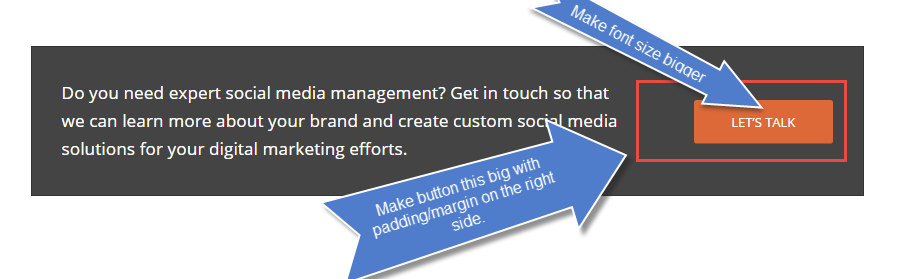
Thank you so much!
Hi,
I would like to have a button that opens a lightbox with some images (a gallery). I read a lot of support posts and came to the conclusion that it’s best to use Magnific Popup functions for that. So I came up with the following.
in my functions.php of my enfold-child theme I added:
wp_enqueue_script('fs-custom-js', get_stylesheet_directory_uri().'/js/custom.js', array('jquery'), null, true);
add_theme_support('avia_template_builder_custom_css');
to add my custom javascript file and have custom css feature in the ui builder. That works fine.
In my script file I did:
jQuery(document).ready(function( $ ) {
  $('.fs-gallery-button').magnificPopup({
    items: {
      src: 'link/to/my/image.jpg'
    },
    type: 'image' // this is default type
  });
});
I added the fs-gallery-button class to the button and now if I click it it opens the lightbox image for about 1ms and then some css sets the opacity to 0.
This is just a one image test, but I want to add multiple images (hence a complete gallery) later.I hope you can give me some hints what I’m doing wrong.
PS: I checked the generated html of your lightbox (if used via a masonry gallery) here is the comparison for completeness. First is “my” code second is yours.
<body id="top" class="home page-template-default page page-id-812 logged-in admin-bar stretched roboto open_sans  customize-support mfp-zoom-out-cur" itemscope="itemscope" itemtype="https://schema.org/WebPage" style="">
  <div class="mfp-bg mfp-ready"></div>
  <div class="mfp-wrap mfp-close-btn-in mfp-auto-cursor mfp-ready" tabindex="-1" style="overflow-x: hidden; overflow-y: auto;">
    <div class="mfp-container mfp-s-ready mfp-image-holder">
      <div class="mfp-content">
        <div class="mfp-figure"><button title="Close (Esc)" type="button" class="mfp-close">×</button>
          <figure><img class="mfp-img" src="url/to/image.jpg" style="max-height: 471px;">
            <figcaption>
              <div class="mfp-bottom-bar">
                <div class="mfp-title"></div>
                <div class="mfp-counter"></div>
              </div>
            </figcaption>
          </figure>
        </div>
      </div>
      <div class="mfp-preloader">Loading...</div>
    </div>
  </div>
</body>

<body id="top" class="home page-template-default page page-id-812 logged-in admin-bar stretched roboto open_sans  customize-support mfp-zoom-out-cur" itemscope="itemscope" itemtype="https://schema.org/WebPage" style="">
  <div class="mfp-bg avia-popup mfp-zoom-in mfp-ready" style="height: 17269px; position: absolute;"></div>
  <div class="mfp-wrap mfp-gallery mfp-close-btn-in mfp-auto-cursor avia-popup mfp-zoom-in mfp-ready mfp-image-loaded" tabindex="-1" style="top: 11658px; position: absolute; height: 471px;">
    <div class="mfp-container mfp-image-holder mfp-s-ready">
      <div class="mfp-content">
        <div class="mfp-figure"><button title="" type="button" class="mfp-close">×</button>
          <figure><img class="mfp-img" src="url/to/image.jpg" style="max-height: 471px;">
            <figcaption>
              <div class="mfp-bottom-bar">
                <div class="mfp-title">Some Title</div>
                <div class="mfp-counter">2 / 3</div>
              </div>
            </figcaption>
          </figure>
        </div>
      </div>
      <div class="mfp-preloader"></div><button title="" type="button" class="mfp-arrow mfp-arrow-left mfp-prevent-close"></button><button title="" type="button" class="mfp-arrow mfp-arrow-right mfp-prevent-close"></button></div>
  </div>
</body>


