-
Search Results
-
Hi Kriesi,
Just wanted to add some universal styles to all buttons in our site (sliderbuttons, general content buttons etc.)
I wish to have two looks. A light and a dark.I’m trying to follow: https://kriesi.at/documentation/enfold/button/#toggle-id-12
But can’t find the “custom CSS class name support” under “layout builder”, and can’t find a topic in here that enlightens me…Can you help?
Right now i’m designing each botton style like this, which seems not be be a good idea:
.avia-button {
font-size: 0.8em !important;
text-transform: uppercase;
color: #ffffff !important;
padding-left: 1.4em !important;
padding-right: 1.4em !important;
padding-top: 1em !important;
padding-bottom: 1em !important;
font-weight: 400 !important;
letter-spacing: 0.3em;
background-color: #232323 !important;
border: 1px solid #232323 !important;
border-radius: 0px !important;
}
.avia-slideshow-button {
font-size: 0.8em !important;
color: #232323 !important;
padding-left: 1.4em !important;
padding-right: 1.4em !important;
padding-top: 1em !important;
padding-bottom: 1em !important;
font-weight: 400 !important;
letter-spacing: 0.3em;
background-color: #fff !important;
border: 1px solid #fff !important;
border-radius: 0px !important;
}
.avia-slideshow-button:hover {
padding-left: 1.4em !important;
padding-right: 1.4em !important;
padding-top: 1em !important;
padding-bottom: 1em !important;
opacity: 1 !important;
font-size: 0.8em !important;
color: #77855a !important;
font-weight: 400 !important;
letter-spacing: 0.3em;
background-color: #fff !important;
border: 1px solid #fff !important;
border-radius: 0px !important;
}Hi there,
We are using the Enfold theme, and Wishlist and Compare from yith.
It’s working perfectly when logged in, but logged out, the do_shortcodes won’t work.
We do not have any caching plugins activated.
We are using the shortcodes in a product grid, and also in a slider, but as I said, they only work logged in. I can’t seem to understand why.
These are my snippets:
Grid:
#child-theme/woocommerce/content-product.php
# (previous code)
global $product;
# ...
?>
						<div class="tag-wrapper">
	                         <?php echo apply_filters( 'the_content',' [yith_compare_button] ');
<?php
# (rest of the code)
Slider: (same link, but (url)/shop-startseite/)
#child-theme/shortcodes/econsor_productslider.php, within the html() function of the custom shortcode
# ...

				$html .= do_shortcode( '[yith_wcwl_add_to_wishlist product_id="' . $product->get_id() . '"]', false );
# ...
They both work perfectly logged in, but not logged out, so I guess it’s not an issue within the code itself.
Can you guys help me out here?
Thanks in advance!Topic: Easy Slider is not smooth
Currently we use EasySlider but it does not work nicely.
– missing dot and pause button
– transition is too simple and not smooth at all
– Admin backend: transition control is simple and does not work. I choose “fade” but frontend does not create fade effectPlease check https://waferusa.com/ (use ENFOLD LAW demo)
I check some other demo in Enfold and see some nice sample
https://kriesi.at/themes/enfold-shop/ ==>slider very nice here (but without pause button)
https://kriesi.at/themes/enfold/ ==>slider very nice here (with pause button, nice transition)Please help us to sovle this issue
Dear Kriesi,
since I updated the Enfold theme the portfolio setting column in the advanced layout editor doesn’t work anymore. Pressing the settings toggle button found at the top right of the portfolio page doesn’t do anything. I appreciate that the support linked to my licence has expired however this is an issue introduced by your theme update so I’d like to ask your support anyway. I also appreciate this is your pre-sale email however I can’t raise a ticket in the forum as I get a message saying that my support licence has expired.
Please help.
Regards,
PatrizioHi Enfold team,
a few days ago after the WordPress core update to 6.3.2 an issue started on the backend, when editing Woocommerce products using the classic editor. I have done several tests on my staging site and it is clear, the issue comes from the Avia framework (Enfold 5.6.6). If I switch to another theme like twentytwenty, the issue is gone. Having that said, here are the specifics:On Woo product pages the classic editor (visual editor) is not accessible. The editor field is stuck on the “code editor” but at the same time the html code is displayed WHITE, so that at first it seems there is nothing. Only when highlighting text, one can see it. At the same time the Layout-Architect button does not work anymore.
Here is what I have tested so far:
* Theme: switching to another theme resolves the issue
* Theme: switching between Enfold child and Enfold does NOT resolve the issue -> no child-theme issue …
* Plugins involved: I have deactivated all plugins aside from Woo and then activated them sequentially. The test revealed that the conflict between core 6.3.2 and Avia occurs, when Gridbuilder plus WP Mail SMTP or Yaost Duplicate Post are active. I have rolled back those plugins, to test recent changes, but that’s not doing anything. Also, the problem dissapears with all those plugins active, when standard themes are use. Thus, all points to the Avia framework.I have gotten support from Gridbuilder. They tested all from their side and also did not find any issue in other themes. They suggested to look nto conflicts between Enfold and the latest WP Core update …
Strange fact: While it is impossible to work with the editor for WordPress products, the editor behaves normally for posts, pages, etc. It is a very specific issue for WordPress products only.
Here are some screenshots:
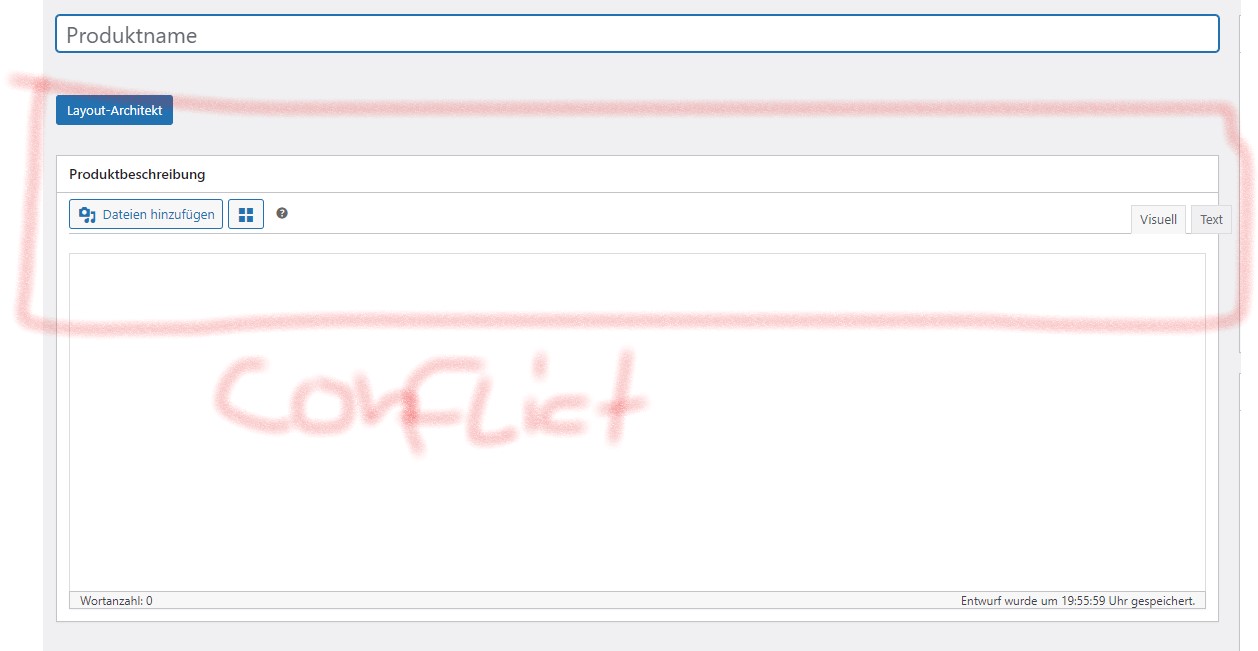
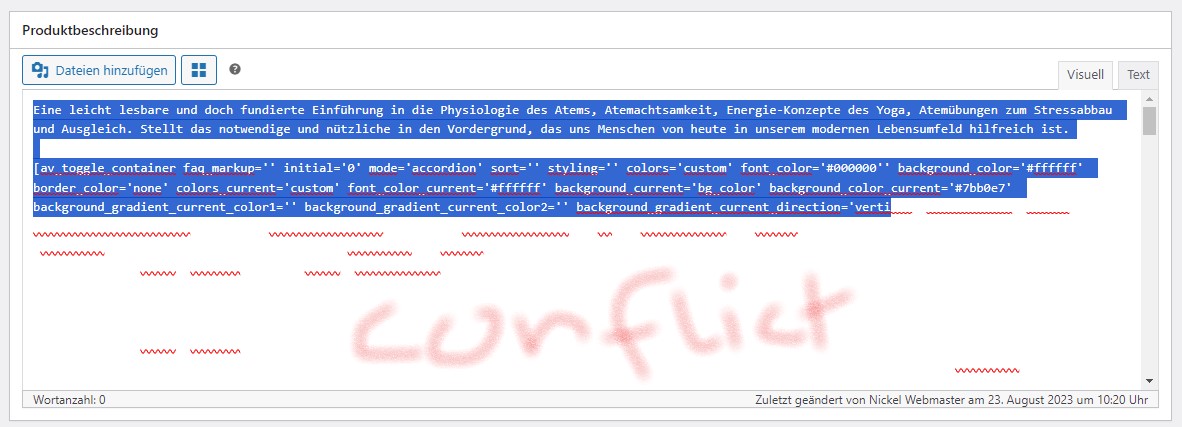
Additional info: I ran error display while testing and got no error massages. There is no issue on the frontend …
Could you please look into that issue? For now, I can work around it when I need to edit products. However, it needs to be fixed. What I fear is that the issue spreads to other classic editor input fields like for pages and posts when wp core further evolves.
Thank you and kind regards
MichaelHi
In WordPress there is a function to prevent SPAM on Email addresses:But when we use for example a button in Enfold with a link to an email adress, this is not possible.
Does Enfold protect emails in buttons or how we can protect them?
Thanks very much.
Best regards
Mike