How can i change the transparent button (request information) to a solid color? Please could you provide CSS.
Hi there,
I’ve just installed the latest version of Enfold on a new WordPress installation. There are no plugins enabled. When I try to use the text editor button on a Page editing or Post editing screen, it doesn’t work. Also, content seems to disappear. What is going on? I’ve tried to look for a solution in the forum but there are too many posts to sort through.
thanks
John
Hi,
I’m creating a website for a holiday home. I want to add airbnb badges and got html codes from airbnb. They say that I can simply insert the code into the website – but if I, for instance, embed the code to a widget (footer, header), directly into a page (Layout Builder: elements text or html code) or into a sidebar, it does not appear in the frontend. Or better: It appears for a split second, and then it disappears. I tried 4 different codes (4 different badges – and in the end I’d like to add them all to the page).
Here’s one example – the code looks like this (I replaced the ID with “*****”):
<div class=”airbnb-embed-frame” data-user-id=”*****” data-review-count=”12″ data-view=”review_button” data-eb=”*****_VULAEhHWUk7vEXdU” data-eu=”RX0sizw7i2AvAD8k206bZ2eHgbuSqtV96E7G75Qjz5zgvY5R0KZm1kmS5w+w eLkoMEPi9zK9kZIthrWPrk3NLCoia3TP6X3gdLYL7o2r3quGdc1fabDOlgVr X1O3KMr+3Vuh9qVhoHpJY03BbbvtCBxFMqz6qI5pK0gsZPx16JGAh7S6r8ke W+5sFYBKo5QLghxP4uCtosiHWExtllQYwvgTN8Ih1iqrNMf6FThvuXkOTQSq iWnEZD8EXAhxhxUB7GLQPiDIgmZ4xDtUehiH/932/xunNK83VELyTvnnOYfO l2um19VCX2u0RPiSFoWRd1ajEJBgQzT4qxQwThhSjg== ” data-trigger-source-type=”badge_center” data-embed-source-type=”badge_center” style=”height:80px;margin:auto”><span>Bewertungen</span><script async=”” src=”https://www.airbnb.de/embeddable/airbnb_jssdk”></script></div>
Can you tell me how I can embed html code in a way that it works?
Or can you alternatively recommend any plugins to embed airbnb functions/badges?
Thx for your support!
Hey DROR,
Try adding this css code in Quick CSS (located in Enfold > General Styling):
#top .form-row label {
    float: right;
}

#top .woocommerce .login .button {
    margin: 0 0 0 20px;
}
Hope it helps :)
Best regards,
Nikko
Hey there guys,
In the past, I have followed the steps provided in the thread https://kriesi.at/support/topic/history-back-button-at-main-menu/ , to create the back button.
That used to work until the version 4.2 of the theme. After upgrading the theme to 4.3.2, this does not work anymore. We had to revert to the previous version. We are using a child theme, and the functions.php file is still there, with the code found in the thread still written in there!
Is there any modification in the code needed, in order to make this work in the latest version of the theme?
Thanks in advance!
-
This topic was modified 7 years, 10 months ago by
 wtechgr.
Hey Chiuhn,
Thank you for using Enfold.
Yes, that’s possible. Please try this css code.
#top .inner_product_header, #top .inner_product .avia_cart_buttons {
  opacity: 0;
}

#top .inner_product:hover .inner_product_header, #top .inner_product:hover .avia_cart_buttons {
  opacity: 1;
}
Best regards,
Ismael
Hi.
I’m migrating an old site built with Jooma (www.italnoleggio.it) into a new site with WP and Enfold theme (www.ilredelweb.it/italnoleggio).
I migrated pages and posts now I have to change the code for two shortcodes: [button] and [tab].
Can you take a loook into the old: http://www.italnoleggio.it/xc40/volvo/noleggio-lungo-termine-volvo-xc40-d3
and the new: https://ilredelweb.it/italnoleggio/volvo/noleggio-lungo-termine-volvo-xc40/
and suggest me how to modify the code?
Thanks in advance Gianluca from Italy
Hi,
I’ve would like to change the default order to the Social Media Buttons element.
I’ve tried to change the /enfold/includes/helper-social-media.php like suggested in this post – without any luck.
I basically just need to set the Linkedin-share-button after the Twitter-share-button.
Thanks in advance!
Dear Enfold-People.
What i tried so far:
Instaling the Restaurant-one-page Demo via the regular way (DemoImport). But it failed. Maybe because my providers (Strato) Timeout is after 120seconds.
Than with the description of post June 21, 2015 at 11:53 am #462319
I converted the File restaurant-one-page.xml into a gzip and than tried to upload it via the Enfold Theme option Import/Export (second Button) but it tells me :Please upload a valid config file.
You can create the file by clicking on the “Export Theme Settings” button
What can i do?
I just want to instal the Demo version of Restaurant one page.
Would be great to hear from you.
Thanks and kind regards.
Filipp
Hi,
There is a huge blue button on the top of each sub forum: https://kriesi.at/support/forum/enfold/#new-post
Best regards,
Rikard
Hi,
I believe I recognize this issue, please try replacing the “asset-manager.class.php” with the one linked in the Private Content area.
via ftp at: \wp-content\themes\enfold\config-templatebuilder\avia-template-builder\php\asset-manager.class.php
then re-save your Enfold settings, to do this go to Enfold Theme Options > General Styling > Quick CSS field and enter a space to make the “Save all changes” button clickable.
Then clear your browser cache.
Best regards,
Mike
Hi Rikard,
We’re seeing the first issue on Chrome and Edge on the computer after clearing browser caching, and also on Firefox and Chrome on the phone. It’s appearing on all blog posts and many pages although not the home page. Our friend just checked on his iPhone after also clearing caching and he’s seeing exactly the same as us: lots of code appearing in place of headers, images, social share buttons and more. On the latest blog post ‘Jeju Olle Video’ for example, all the code is appearing, then the proper version, then more code.
As for the second issue, the video slider on the home page is appearing as the black screen on Chrome and as a still of the video on Edge:
https://postimg.cc/image/61s895kjf/
On the phone where a photo should appear, it’s also just showing a black screen.
We were running the two caching plugins because it was our understanding that they work well together as long as they are set up correctly. We weren’t experiencing any problems before updating Enfold. When we saw the problem, we put the site on Under Construction because we didn’t want people to see it like that. We didn’t then think to deactivate the caching plugins but have deactivated them now.
Understandably, we are very concerned about this. Our site has been down for two days now and we really need this resolved urgently.
Thanks for your help,
Kim
Hi,
*Update, the devs have provided a fix that will be in the next update, I linked to the file in the Private Content area.
replace the file at: \wp-content\themes\enfold\config-templatebuilder\avia-template-builder\php\asset-manager.class.php
you will then need to rebuild the merged css, this can be done by adding a blank space in your Quick CSS to enable the “Save all changes” button and save, then clear your browser cache.
Best regards,
Mike
Hey Andre,
To align the comment gravator in responsive mode please add the below CSS
@media only screen and (max-width: 360px) {
#top .comment_content {
    margin: 0;
    padding: 0;
}

#top .gravatar {
    float: none;
    margin-bottom: 20px;
}}
The result will be as shown below

You may not see the changes until the cached files are cleared in your browser.
Please try disabling the CSS merging in Enfold > performance options and hard refresh by pressing Ctrl + Shift + F5 on your browser or press the F12 key to open chrome dev tools and right click on the refresh button and select “Empty Cache and Hard Reload” and review the site again.

Also, if a caching plugin is installed please check the plugin settings and empty the cache.
Best regards,
Vinay
Hi!
The html is laid out in such a way that the headers are going to be a separate block on top, not in every cell line you want

This is why they are hidden in mobile.
Here is the code you can put in Enfold > General Styling > Quick Css, if it does not work, put into themes/enfold/css/custom.css
@media only screen and (max-width: 767px) {
    .responsive .avia_responsive_table .avia-data-table .avia-button-row,
    .responsive .avia_responsive_table .avia-data-table tr:first-child th {
        display: block;
    }
}
If you need further assistance please let us know.
Regards,
Victoria
Hello,
I am using Enfold 4.1.2
I encouter issues adding links to fullwidth button in a 1/2 lay-out section on the homepage.
I have, on the homepage, a black, 1/2 lay-out section. In it a mailchimp form and two blue colored fullwitdth buttons beneeth it.
It is impossible for me to get those buttons to link to any kind of link!!
If I add links to the buttons, in the front end they do not work / are activated?
Please your help on this bizar issue.
No other issues with the website… I am confused ;(
Hey jeroenvandessel,
To display your social icons in a row, first copy your current social icons in your header by inspecting your page and right clicking to choose “Edit as HTML”
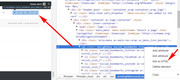
then copy and paste in a code block, here’s an example:
<ul class="noLightbox social_bookmarks icon_count_6"><li class="social_bookmarks_twitter av-social-link-twitter social_icon_1"><a target="_blank" href="http://twitter.com" aria-hidden="true" data-av_icon="" data-av_iconfont="entypo-fontello" title="Twitter"><span class="avia_hidden_link_text">Twitter</span></a></li><li class="social_bookmarks_facebook av-social-link-facebook social_icon_2"><a target="_blank" href="http://facebook.com" aria-hidden="true" data-av_icon="" data-av_iconfont="entypo-fontello" title="Facebook"><span class="avia_hidden_link_text">Facebook</span></a></li><li class="social_bookmarks_youtube av-social-link-youtube social_icon_3"><a href="#" aria-hidden="true" data-av_icon="" data-av_iconfont="entypo-fontello" title="Youtube"><span class="avia_hidden_link_text">Youtube</span></a></li><li class="social_bookmarks_instagram av-social-link-instagram social_icon_4"><a href="#" aria-hidden="true" data-av_icon="" data-av_iconfont="entypo-fontello" title="Instagram"><span class="avia_hidden_link_text">Instagram</span></a></li><li class="social_bookmarks_pinterest av-social-link-pinterest social_icon_5"><a href="#" aria-hidden="true" data-av_icon="" data-av_iconfont="entypo-fontello" title="Pinterest"><span class="avia_hidden_link_text">Pinterest</span></a></li><li class="social_bookmarks_reddit av-social-link-reddit social_icon_6"><a href="#" aria-hidden="true" data-av_icon="" data-av_iconfont="entypo-fontello" title="Reddit"><span class="avia_hidden_link_text">Reddit</span></a></li></ul>
then add this code in the General Styling > Quick CSS field:
.social_bookmarks li a {
    border-radius: 100px;
}
.social_bookmarks li {
border: none !important;
}
Expected results:
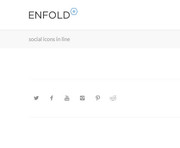
If you would like to use the larger icons elements use the wand tool in the default editor to get the shortcodes for the icons, and paste into a code block element adding a div with a custom class, here’s an example:
<div class="sbox">
<ul class="avia-icon-list av-iconlist-big">
<li class="avia_start_animation"><a href="https://www.facebook.com/" title="" target="_blank" style="background-color:#719430; color:#ffffff; " class="iconlist_icon avia-font-entypo-fontello"><span class="iconlist-char " aria-hidden="true" data-av_icon="" data-av_iconfont="entypo-fontello"></span></a></li>
<li class="avia_start_animation"><a href="https://twitter.com/" title="" target="_blank" style="background-color:#719430; color:#ffffff; " class="iconlist_icon avia-font-entypo-fontello"><span class="iconlist-char " aria-hidden="true" data-av_icon="" data-av_iconfont="entypo-fontello"></span></a></li>
<li class="avia_start_animation"><a href="https://plus.google.com/" title="" target="_blank" style="background-color:#719430; color:#ffffff; " class="iconlist_icon avia-font-entypo-fontello"><span class="iconlist-char " aria-hidden="true" data-av_icon="" data-av_iconfont="entypo-fontello"></span></a></li>
<li class="avia_start_animation"><a href="https://www.youtube.com/" title="" target="_blank" style="background-color:#719430; color:#ffffff; " class="iconlist_icon avia-font-entypo-fontello"><span class="iconlist-char " aria-hidden="true" data-av_icon="" data-av_iconfont="entypo-fontello"></span></a></li>
<li class="avia_start_animation"><a href="https://instagram.com/" title="" target="_blank" style="background-color:#719430; color:#ffffff; " class="iconlist_icon avia-font-entypo-fontello"><span class="iconlist-char " aria-hidden="true" data-av_icon="" data-av_iconfont="entypo-fontello"></span></a></li>
<li class="avia_start_animation"><a href="http://tumblr.com/" title="" target="_blank" style="background-color:#719430; color:#ffffff; " class="iconlist_icon avia-font-entypo-fontello"><span class="iconlist-char " aria-hidden="true" data-av_icon="" data-av_iconfont="entypo-fontello"></span></a></li>
<li class="avia_start_animation"><a href="https://www.linkedin.com/" title="" target="_blank" style="background-color:#719430; color:#ffffff; " class="iconlist_icon avia-font-entypo-fontello"><span class="iconlist-char " aria-hidden="true" data-av_icon="" data-av_iconfont="entypo-fontello"></span></a></li>
<li class="avia_start_animation"><a href="http://www.pinterest.com/" title="" target="_blank" style="background-color:#719430; color:#ffffff; " class="iconlist_icon avia-font-entypo-fontello"><span class="iconlist-char " aria-hidden="true" data-av_icon="" data-av_iconfont="entypo-fontello"></span></a></li>
</ul></div>
then add this code in the General Styling > Quick CSS field, take note of the custom class for the opening div above:
.sbox ul.avia-icon-list li {
    float: left;
    clear: none;
}
Expected results:
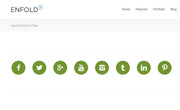
Here is some more info
Best regards,
Mike
Hey ckerr44,
Here is the code you can put in Enfold > General Styling > Quick Css, if it does not work, put into themes/enfold/css/custom.css
.flex_column.av_one_half.flex_column_div.avia-builder-el-32 .avia-button-wrap.avia-button-center ,
.flex_column.av_one_half.flex_column_div.avia-builder-el-34 .avia-button-wrap.avia-button-center,
.avia-button-wrap.avia-button-center.avia-builder-el-12  {
  z-index: 1005;
}
If you need further assistance please let us know.
Best regards,
Victoria
Hi,
i’d like to know the list of all cookies used by Enfold Theme.
The theme only sets cookies when the cookie consent is enabled and the ALB’s notification elements with a Close Button is added to the page.
Best regards,
Ismael
I have the same problem: the buttons in the new button-row element are not a uniform size (round) even after implementation of the custom css as suggested above.
I would like them to look exactly as the demo referred to in the blogpost for Enfold 4.3.
-
This reply was modified 7 years, 10 months ago by
 Hayek.
 Sondre Vego
This reply has been marked as private.
Hi Support,
I’m sure it’s burried somewhere on the support forum, but not sure how to look for this one… so here goes.
How to simply add extra share buttons to blog layout or a page with Social Share Butons pls?
Have seen some old posts from 2015-16… lots of steps… can’t seem to get it to work…
surely this simple functionality been updated for extra buttons anno 2018, almost two years later… I hope ))
Tnx in adv
regards
Hi Ismael. The quantity counter seems to be a standard part of the Enfold Shop Demo. As there’s no image gallery function in the support forum I don’t know how to upload a screenshot.
It’s very simple. On this page https://kriesi.at/themes/enfold-shop/product/red-velvet/ there is a quantity counter which allows a purchaser to buy multiple quantities of a particular item. Please look at the link I keep posting and see what I’m talking about.
Next to the “Add to CART” button is the counter that allows purchasers to order multiple numbers of that item. Simple. How can I add that to a product page that looks like this: http://naturalistegourmet.com/product/thai-pesto/ I want to put the Quantity Counter next to the “Add to Basket”.
Thank you.
Hey,
Thanks for contacting us!
Please login to ThemeForest account you used to purchase Enfold then go to – https://themeforest.net/item/enfold-responsive-multipurpose-theme/4519990?ref=Kriesi and there should be a green “Renew support” button on the right side of the page :)
Best regards,
Yigit
Hey mmf1,
Please try adding this code to the Quick CSS section under Enfold > General Styling or to your child theme’s style.css file:
#top #wrap_all .header_color .av-menu-button-colored > a .avia-menu-text:after {
    background-color: transparent;
}
Best regards,
Yigit
Hi,
Have you imported parent theme options in Enfold theme options > Import & Export tab? If you have, please go to Enfold theme options > General Styling > Quick CSS, enter space to enable “save” button and then save to flush dynamic CSS file.
Regards,
Yigit
Based on the hint by Ismael,
finally I get the solution:
1. at Enfold Child settings > Tab “Layout Builder”: activate the checkbox for Show element options for developers
2. insert Quick CSS: (th-class1 can be renamed to Your needs)
#top .th-class1 .avia-button {
  border-radius: 100px;
}
3. add th-class1 to the userdefined CSS class of the button-row-element
Topic is resolved.
Thanks everyone for participation!!
kind regards
Tobias
Hi there Enfold team!
Playback for the Vimeo video background on my homepage is quite slow, and frequently buffers.
The video is hosted on a Vimeo Plus account so videos should be fast. Here’s how it loads on its own.
Curiously, when you view the video on the regular Vimeo link there are no speed or buffering issue, but when used as a video background on my site, it is slow. I am also using a plugin called Autoptimize to speed up my website.
Is there anything I can do to optimize the video playback on the website? I’ve also contacted Vimeo support and here’s what they said:
Hi there,
When testing the video on your site on my end I am unable to replicate this behavior and the video loads successfully on my end.
I’d like to collect more information so we can better understand what might be happening here. Please provide the following information:
I’ll need for you to log your playback experience using our player “debug” tool.
Instructions:
1) Open any video you’re having trouble with
2) Press play and watch the video (the longer you can watch, the better)
3) Once the issue occurs, press “d” on your keyboard to open the debug panel
4) Click the blue “Copy Debug Key” button to obtain the unique ID associated with your playback session
5) Paste the entire id into your email and send it our way for analysis. (Note: The debug key will be comprised of random characters which will then be used to access playback information in our system)
Additional details I need:
* A detailed description of the problem you’re seeing (e.g the video buffers before starting playback)
* Please try this download speed test and send me the results: http://testmy.net/download
* Please let me know if you’re seeing the same issue in all browsers, or just one browser
Once we have this information, a specialist will be in touch to go over the results. Thanks for your help and patience so far!
Sincerely,
Nicole B.
Any help would be highly appreciated. Thank you!! :)
Greetings Team,
Have just updated Enfold Child to the latest version 4.3.1. Unfortunately, that has disabled some CSS features in my portfolio: the arrows to enable navigating from one image to another using the symbols (<and>) as well as the X to exit. Also, the WP Content Copy Protection plugin stopped working. Please see the private content section to see examples of the old behaviour and the new one.
Update: Have now rolled back and installed Enfold 4.2.3 which restored all broken functionality. Here is some of the CSS code:
/* Lightbox styling */
button.mfp-arrow, .mfp-close{
  background-color: rgba(100,100,100,0.8) !important;
}
.avia-popup{
  background: white;
  opacity:1 !important;
}
button.mfp-arrow{
    width: 50px;
    height: 70px;
}
/* Fixing x button position */
.mfp-zoom-in .mfp-figure, .mfp-zoom-in .mfp-iframe-holder .mfp-iframe-scaler{
  -webkit-transform: none !important;
  transform: none !important;
}
button.mfp-close{
  position:fixed;
  top:30px !important;
  right:30px !important;
}
Please advise how to keep this functionality after updating to 4.3.1.
Thanks,
ofekw
-
This topic was modified 7 years, 10 months ago by
 ofekw.



