
-
Search Results
-
there was a thread here but closed – so i set up a new one.
you can see it here: http://www.wordpress-webdesign.org/grayscale/
because of having some troubles with the common css Solution (filter setting grayscale) i use the code Element to implement a little jquery script.
<script type="text/javascript">

	// jQuery(".graytone img").css({"display":"none");

	// On window load. This waits until images have loaded which is essential
	jQuery(window).load(function(){

		// Fade in images so there isn't a color "pop" document load and then on window load
		jQuery(".graytone img").animate({opacity:1},500);

		// clone image
		jQuery('.graytone img').each(function(){
			var el = jQuery(this);
			el.css({"position":"absolute"}).wrap("<div class='img_wrapper' style='display: inline-block'>").clone().addClass('img_grayscale').css({"position":"absolute","z-index":"998","opacity":"0"}).insertBefore(el).queue(function(){
				var el = jQuery(this);
				el.parent().css({"width":this.width,"height":this.height});
				el.dequeue();
			});
			this.src = grayscale(this.src);
		});

		// Fade image
		jQuery('.graytone img').mouseover(function(){
			jQuery(this).parent().find('img:first').stop().animate({opacity:1}, 1000);
		})
		jQuery('.img_grayscale').mouseout(function(){
			jQuery(this).stop().animate({opacity:0}, 1000);
		});
	});

	// Grayscale w canvas method
	function grayscale(src){
        var canvas = document.createElement('canvas');
		var ctx = canvas.getContext('2d');
        var imgObj = new Image();
		imgObj.src = src;
		canvas.width = imgObj.width;
		canvas.height = imgObj.height;
		ctx.drawImage(imgObj, 0, 0);
		var imgPixels = ctx.getImageData(0, 0, canvas.width, canvas.height);
		for(var y = 0; y < imgPixels.height; y++){
			for(var x = 0; x < imgPixels.width; x++){
				var i = (y * 4) * imgPixels.width + x * 4;
				var avg = (imgPixels.data[i] + imgPixels.data[i + 1] + imgPixels.data[i + 2]) / 3;
				imgPixels.data[i] = avg;
				imgPixels.data[i + 1] = avg;
				imgPixels.data[i + 2] = avg;
			}
		}
		ctx.putImageData(imgPixels, 0, 0, 0, 0, imgPixels.width, imgPixels.height);
		return canvas.toDataURL();
    }

</script>
you can place it e.g before a partnerlogo element:
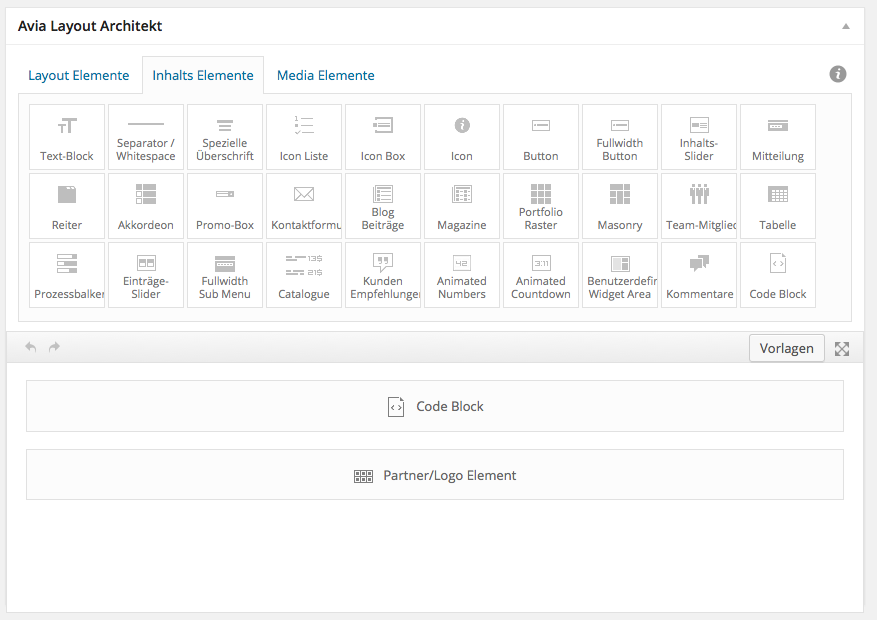
with :

here i gave to the partner logo element a custom css class : graytone
you can find that class in the script above on line (// jQuery(".graytone img").css({"display":"none");)
(how to activate the custom css for every alb element put in funktions.php :add_theme_support('avia_template_builder_custom_css');)there are some adjustements you can make (fade in speed, animation speed)
http://impexvending.com.au/contact-us/
The added CSS is having an affect in all areas, not just the desired ones?
NOTE: This issue only happens when the elements are in the color section, when done out of the color section they are okay. I am using the Custom Css Class inside the element that I would like the change to happen but it is not happening in all elements inside the color section?
How do I fix this?
Thanks!!
Here is what has been done so far:
Added to functions.php:
add_theme_support(‘avia_template_builder_custom_css’);Added to Quick CSS:
#av_section_1 .av-special-heading {
background-color: #3892CE;
border-top-left-radius: 10px;
border-top-right-radius: 10px;
padding-top: 10px;
}#av_section_1 .avia_textblock {
background-color: #3892CE;
padding: 10px;
color: #FFF !important;
border-bottom-left-radius: 10px;
border-bottom-right-radius: 10px;
}#av_section_1 .avia-image-container.avia-align-center {
margin: 0 auto;
}.shaded-box.avia_textblock {
background-color: #3892CE;
padding: 10px;
}Hi, I have a video on my home that I want to track with Google Analytics event tracking. I found this useful post how to add event tracking to the image element:
https://kriesi.at/support/topic/how-to-add-google-analytics-event-tracking-code-to-image-links-and-text-links/My application however is the video player which I don’t believe has the same on_click_event. Either way I tried it and it doesn’t seem to work.
I tried these steps:
1. Add custom CSS class to video selector called ‘ga-track’
2. Added this code the functions.php:// theme support appears to be added by default see script below
// add_theme_support(‘avia_template_builder_custom_css’);function add_custom_script(){
?>
<script>
jQuery(window).load(function(){
jQuery(“.ga-track a”).attr(“onclick”,”_gaq.push([‘_trackEvent’, ‘Videos’, ‘Play’, ‘My Video’]”);
});
</script>
<?php
}
add_action(‘wp_footer’, ‘add_custom_script’);In Analytics I did this:
https://docs.google.com/a/snowball.co.za/file/d/0B10etxh2shi0UWI4X3Vkd1h3eGs/edit?usp=drivesdkand this:
https://docs.google.com/a/snowball.co.za/file/d/0B10etxh2shi0QkNjenlJN1NoOEE/edit?usp=drivesdkBasically nothing happens.
I have tried custom functions.php: mentioned here
sidebar is still under the main pic.
please advice.# # wrap single product image in an extra div # add_action( 'woocommerce_before_single_product_summary', 'avia_add_image_div', 2); add_action( 'woocommerce_before_single_product_summary', 'avia_close_image_div', 20); function avia_add_image_div() { echo "<div class='single-product-main-image alpha'>"; } function avia_close_image_div() { global $avia_config; $avia_config['currently_viewing'] = "shop_single"; echo "</div>"; } # # wrap single product summary in an extra div # add_action( 'woocommerce_before_single_product_summary', 'avia_add_summary_div', 25); add_action( 'woocommerce_after_single_product_summary', 'avia_close_summary_div', 3); function avia_add_summary_div() { echo "<div class='single-product-summary'>"; } function avia_close_summary_div() { echo "</div>"; //close out the summary get_sidebar(); }and CSS
.single-product .product { width: 68%; margin-right: 4%; clear: none; float: left; }Two questions about my (static) front page html:
Question 1. Adding alt tag to fullscreen slider image on front page
On my front page, I am using an image inside the fullscreen slider and would like to have the alt tag included. My image has an alt tag applied in the media library.
The code that is generated is:<div id='fullscreen_slider_0' class='avia-fullscreen-slider main_color avia-builder-el-0 el_before_av_textblock avia-builder-el-first container_wrap sidebar_right' ><a href='#next-section' title='' class='scroll-down-link'aria-hidden='true' data-av_icon='' data-av_iconfont='entypo-fontello'></a><div data-size='no scaling' data-lightbox_size='large' data-animation='slide' data-ids='3733' data-video_counter='0' data-autoplay='false' data-bg_slider='true' data-slide_height='100' data-handle='av_fullscreen' data-interval='5' data-class=' ' data-css_id='fullscreen_slider_0' data-scroll_down='aviaTBscroll_down' data-custom_markup='' data-stretch='' class='avia-slideshow avia-slideshow-1 av-slider-scroll-down-active avia-slideshow-no scaling av_fullscreen avia-slide-slider ' itemscope="itemscope" itemtype="https://schema.org/ImageObject" ><ul class='avia-slideshow-inner' ><li style='background-position:center center;' data-img-url='http://WEBSITENAME.com/blog/wp-content/uploads/2014/09/sarasota-downtown-events.jpg' class=' av-single-slide slide-1 ' ><div data-rel='slideshow-1' class='avia-slide-wrap' ><div class = "caption_fullwidth caption_bottom caption_bottom_framed caption_framed"><div class = "container caption_container"><div class = "slideshow_caption"><div class = "slideshow_inner_caption"><div class = "slideshow_align_caption"><h2 class='avia-caption-title' itemprop="name" >CAPTION TEXT</h2><div class='avia-caption-content' itemprop="description" ><p>MORE TEXT<br /> </p>Lots of code, but no alt tag. Can I add it somehow?
Question 2. Using this theme, I see that I have no h1 on my front page.
I use a logo for my company name, the caption inside of the slider is an h2 and the remaining content on the front is h2 or smaller. Is there a consensus about the need for an h1 tag on the front page? I have a title which includes my business name and tagline, and my logo image has an alt tag with my business name. Is there a need to create an h1 on the front page? If so, how?Thanks for all the help you have been providing as I learn this new theme.
HI!
I have several counter in the footer first four are sitting in one line, the other two yell.ru and yelp.com for some reason are stacked under each other.. Do you know how to make them all in one line?

this is the code for the counters in footer.php
<?php global $avia_config; $blank = isset($avia_config['template']) ? $avia_config['template'] : ""; //reset wordpress query in case we modified it wp_reset_query(); //get footer display settings $the_id = avia_get_the_id(); //use avia get the id instead of default get id. prevents notice on 404 pages $footer = get_post_meta($the_id, 'footer', true); $footer_widget_setting = !empty($footer) ? $footer : avia_get_option('display_widgets_socket'); //check if we should display a footer if(!$blank && $footer_widget_setting != 'nofooterarea' ) { if( $footer_widget_setting != 'nofooterwidgets' ) { //get columns $columns = avia_get_option('footer_columns'); ?> <div class='container_wrap footer_color' id='footer'> <div class='container'> <?php do_action('avia_before_footer_columns'); //create the footer columns by iterating switch($columns) { case 1: $class = ''; break; case 2: $class = 'av_one_half'; break; case 3: $class = 'av_one_third'; break; case 4: $class = 'av_one_fourth'; break; case 5: $class = 'av_one_fifth'; break; case 6: $class = 'av_one_sixth'; break; } $firstCol = "first el_before_{$class}"; //display the footer widget that was defined at appearenace->widgets in the wordpress backend //if no widget is defined display a dummy widget, located at the bottom of includes/register-widget-area.php for ($i = 1; $i <= $columns; $i++) { if($i != 1) $class .= " el_after_{$class} el_before_{$class}"; echo "<div class='flex_column {$class} {$firstCol}'>"; if (function_exists('dynamic_sidebar') && dynamic_sidebar('Footer - column'.$i) ) : else : avia_dummy_widget($i); endif; echo "</div>"; $firstCol = ""; } do_action('avia_after_footer_columns'); ?> </div> <!-- ####### END FOOTER CONTAINER ####### --> </div> <?php } //endif nofooterwidgets ?> <!-- end main --> </div> <?php //copyright $copyright = do_shortcode( avia_get_option('copyright', "© ".__('Copyright','avia_framework')." - <a href='".home_url('/')."'>".get_bloginfo('name')."</a>") ); // you can filter and remove the backlink with an add_filter function // from your themes (or child themes) functions.php file if you dont want to edit this file // you can also just keep that link. I really do appreciate it ;) //you can also remove the kriesi.at backlink by adding [nolink] to your custom copyright field in the admin area if($copyright && strpos($copyright, '[nolink]') !== false) { $kriesi_at_backlink = ""; $copyright = str_replace("[nolink]","",$copyright); } if( $footer_widget_setting != 'nosocket' ) { ?> <footer class='container_wrap socket_color' id='socket' <?php avia_markup_helper(array('context' => 'footer')); ?>> <div class='container'> <span class='copyright'><?php echo $copyright . $kriesi_at_backlink; ?></span> <?php echo "<nav class='sub_menu_socket' ".avia_markup_helper(array('context' => 'nav', 'echo' => false)).">"; $avia_theme_location = 'avia3'; $avia_menu_class = $avia_theme_location . '-menu'; $args = array( 'theme_location'=>$avia_theme_location, 'menu_id' =>$avia_menu_class, 'container_class' =>$avia_menu_class, 'fallback_cb' => '', 'depth'=>1 ); wp_nav_menu($args); echo "</nav>"; ?> </div> <!-- ####### END SOCKET CONTAINER ####### --> </footer> <?php } //end nosocket check } else { echo "<!-- end main --></div>"; } //end blank & nofooterarea check //display link to previeous and next portfolio entry echo avia_post_nav(); echo "<!-- end wrap_all --></div>"; if(isset($avia_config['fullscreen_image'])) { ?> <!--[if lte IE 8]> <style type="text/css"> .bg_container { -ms-filter:"progid:DXImageTransform.Microsoft.AlphaImageLoader(src='<?php echo $avia_config['fullscreen_image']; ?>', sizingMethod='scale')"; filter:progid:DXImageTransform.Microsoft.AlphaImageLoader(src='<?php echo $avia_config['fullscreen_image']; ?>', sizingMethod='scale'); } </style> <![endif]--> <?php echo "<div class='bg_container' style='background-image:url(".$avia_config['fullscreen_image'].");'></div>"; } ?> <?php /* Always have wp_footer() just before the closing </body> * tag of your theme, or you will break many plugins, which * generally use this hook to reference JavaScript files. */ wp_footer(); ?> <a href='#top' title='<?php _e('Scroll to top','avia_framework'); ?>' id='scroll-top-link' <?php echo av_icon_string( 'scrolltop' ); ?>><span class="avia_hidden_link_text"><?php _e('Scroll to top','avia_framework'); ?></span></a> <div id="fb-root"></div> <!-- Yandex.Metrika informer --> <a href="https://metrika.yandex.ru/stat/?id=25691525&from=informer" target="_blank" rel="nofollow"><img src="//bs.yandex.ru/informer/25691525/3_1_FFFFFFFF_EFEFEFFF_0_pageviews" style="width:88px; height:31px; border:0;" alt="Яндекс.Метрика" title="Яндекс.Метрика: данные за сегодня (просмотры, визиты и уникальные посетители)" onclick="try{Ya.Metrika.informer({i:this,id:25691525,lang:'ru'});return false}catch(e){}"/></a> <!-- /Yandex.Metrika informer --> <!-- Yandex.Metrika counter --> <script type="text/javascript"> (function (d, w, c) { (w[c] = w[c] || []).push(function() { try { w.yaCounter25691525 = new Ya.Metrika({id:25691525, webvisor:true, clickmap:true, trackLinks:true, accurateTrackBounce:true}); } catch(e) { } }); var n = d.getElementsByTagName("script")[0], s = d.createElement("script"), f = function () { n.parentNode.insertBefore(s, n); }; s.type = "text/javascript"; s.async = true; s.src = (d.location.protocol == "https:" ? "https:" : "http:") + "//mc.yandex.ru/metrika/watch.js"; if (w.opera == "[object Opera]") { d.addEventListener("DOMContentLoaded", f, false); } else { f(); } })(document, window, "yandex_metrika_callbacks"); </script> <noscript><div><img src="//mc.yandex.ru/watch/25691525" style="position:absolute; left:-9999px;" alt="" /></div></noscript> <!-- /Yandex.Metrika counter --> <!-- begin of Top100 code --> <script id="top100Counter" type="text/javascript" src="http://counter.rambler.ru/top100.jcn?3038058"></script> <noscript> <a href="http://top100.rambler.ru/navi/3038058/"> <img src="http://counter.rambler.ru/top100.cnt?3038058" alt="Rambler's Top100" border="0" /> </a> </noscript> <!-- end of Top100 code --> <!--LiveInternet counter--><script type="text/javascript"><!-- document.write("<a href='//www.liveinternet.ru/click' "+ "target=_blank><img src='//counter.yadro.ru/hit?t52.6;r"+ escape(document.referrer)+((typeof(screen)=="undefined")?"": ";s"+screen.width+"*"+screen.height+"*"+(screen.colorDepth? screen.colorDepth:screen.pixelDepth))+";u"+escape(document.URL)+ ";"+Math.random()+ "' alt='' title='LiveInternet: number of pageviews and visitors"+ " for 24 hours is shown' "+ "border='0' width='88' height='31'><\/a>") //--></script><!--/LiveInternet--> <!--bigmir)net TOP 100--> <script type="text/javascript" language="javascript"><!-- bmN=navigator,bmD=document,bmD.cookie='b=b',i=0,bs=[],bm={v:16935163,s:16935163,t:3,c:bmD.cookie?1:0,n:Math.round((Math.random()* 1000000)),w:0}; for(var f=self;f!=f.parent;f=f.parent)bm.w++; try{if(bmN.plugins&&bmN.mimeTypes.length&&(x=bmN.plugins['Shockwave Flash']))bm.m=parseInt(x.description.replace(/([a-zA-Z]|\s)+/,'')); else for(var f=3;f<20;f++)if(eval('new ActiveXObject("ShockwaveFlash.ShockwaveFlash.'+f+'")'))bm.m=f}catch(e){;} try{bm.y=bmN.javaEnabled()?1:0}catch(e){;} try{bmS=screen;bm.v^=bm.d=bmS.colorDepth||bmS.pixelDepth;bm.v^=bm.r=bmS.width}catch(e){;} r=bmD.referrer.replace(/^w+:\/\//,'');if(r&&r.split('/')[0]!=window.location.host){bm.f=escape(r).slice(0,400);bm.v^=r.length} bm.v^=window.location.href.length;for(var x in bm) if(/^[vstcnwmydrf]$/.test(x)) bs[i++]=x+bm[x]; bmD.write('<a href="http://www.bigmir.net/" target="_blank" onClick="img=new Image();img.src="http://www.bigmir.net/?cl=16935163";"><img src="http://c.bigmir.net/?'+bs.join('&')+'" width="88" height="31" border="0" alt="bigmir)net TOP 100" title="bigmir)net TOP 100"></a>'); //--> </script> <noscript> <a href="http://www.bigmir.net/" target="_blank"><img src="http://c.bigmir.net/?v16935163&s16935163&t3" width="88" height="31" alt="bigmir)net TOP 100" title="bigmir)net TOP 100" border="0" /></a> </noscript> <!--bigmir)net TOP 100--> <div id="yelp-biz-badge-plain-zScAJRejYOlU8GjNG_LrAQ"><a href="http://www.yelp.com/biz/alex-pavlov-real-estate-broker-marina-del-rey-3">Check out Alex Pavlov Real Estate Broker on Yelp</a></div><script type="text/javascript">(function(d, t) {var g = d.createElement(t);var s = d.getElementsByTagName(t)[0];g.id = "yelp-biz-badge-script-plain-zScAJRejYOlU8GjNG_LrAQ";g.src = "//dyn.yelpcdn.com/biz_badge_js/en_US/plain/zScAJRejYOlU8GjNG_LrAQ.js";s.parentNode.insertBefore(g, s);}(document, 'script'));</script> <div id="yellrank"></div> <script src="http://www.yell.ru/yellrank/yellrank.js/?cmp=10980453"></script> </body> </html>Hi,
1. I enabled the custom class field for Advanced Layout Builder adding this line to the functions.php. I see the field now. Do I now need to create a child theme so it doesn’t get overwritten on Enfold updates?
add_theme_support(‘avia_template_builder_custom_css’);2. I would like to be able to change the background color of mainly 3 content elements, the Special Heading, Text Block and Widget block. Can you tell me what I would need to type into the new Custom Css Class and then into the Quick CSS to do this? Shouldn’t all the elements already have a background color selector or image upload function? Love the Advanced editor. Also need a vertical Separator/Whitespace element.
Hi,
1. I enabled the custom class field for Advanced Layout Builder adding this line to the functions.php. I see the field now. Do I now need to create a child theme so it doesn’t get overwritten on Enfold updates?
add_theme_support(‘avia_template_builder_custom_css’);2. I would like to be able to change the background color of mainly 3 content elements, the Special Heading, Text Block and Widget block. Can you tell me what I would need to type into the new Custom Css Class and then into the Quick CSS to do this? Shouldn’t all the elements already have a background color selector or image upload function? Love the Advanced editor. Also need a vertical Separator/Whitespace element.


 “};
“};


