
-
AuthorSearch Results
-
February 2, 2026 at 11:05 pm #1494604
In reply to: WooCommerce Features not working
Hi,
The code running in the WPCode plugin is running too late, please add it to the child theme functions.php file, it should work correctly then. Since the code is meant to run at “init” = “(add_action(‘init’,’ava534345953_init’, 50);”
which is before the theme and plugins, it now running in a plugin after the theme will not work. I see no other solution.
This solution works on my localhost, your site or login is limited and I can not test there, so you will need to test.Best regards,
MikeDecember 1, 2022 at 1:32 am #1374540In reply to: Enfold Sidebar on single product pages
Hi,
I realise this is an old post but for the benefit of anyone who has Googled this topic and are using Ismael’s first solution for a right sidebar (post-1162484), there’s a slight code tweak required if you find that the default sidebar is being loaded instead of your ‘Single Product Pages’ sidebar:
‘global $avia_config;’ must be added to the ‘avia_add_sidebar()’ function. So revised code is as follows:
add_action('init','ava534345953_init', 50);
function ava534345953_init() {
  add_action( 'woocommerce_after_single_product_summary', 'avia_add_sidebar', 25);
}

function avia_close_image_div() {
  global $avia_config;
  echo "</div>
";
}

function avia_add_sidebar() {
  global $avia_config;
  if(is_product()) {
    $avia_config['currently_viewing'] = 'shop_single';
    get_sidebar();
  }
}
Ismael’s CSS code remains unchanged:
.single-product-main-image {
    width: 25%;
}

.single-product-summary {
    overflow: hidden;
    width: 45%;
    float: left;
    margin-right: 5%;
}

.single-product .sidebar {
    width: 25%;
}
August 27, 2021 at 8:55 am #1318595Hi,
There was a minor syntax error in the snippet. Please try it again.
/* zijbalk op productpagina */
function ava534345953_init() {
	add_action( 'woocommerce_after_single_product_summary', 'avia_add_sidebar', 25);
	add_action( 'woocommerce_after_single_product_summary', 'avia_close_image_div_mod', 20);
	add_action( 'woocommerce_before_single_product_summary', 'avia_open_image_div_mod', 1 );
}

function avia_open_image_div_mod() {
	echo "<div class='product-main-container'>";
}

function avia_close_image_div_mod() {
	echo "</div>";
}

function avia_add_sidebar() {
	if(is_product()) {
		$avia_config['currently_viewing'] = "shop_single";
		get_sidebar();
	}
}
add_action('init','ava534345953_init', 50);
Do not forget to add the css code. You may need to toggle or temporarily disable the Enfold > Performance > File Compression settings afterwards.
Best regards,
IsmaelApril 22, 2021 at 12:46 pm #1296033In reply to: Left sidebar on single shoppage Enfold
Hi,
Thank you for following up.
We updated the code in the functions.php file.
/* zijbalk op productpagina */
function ava534345953_init() {
	add_action( 'woocommerce_after_single_product_summary', 'avia_add_sidebar', 25);
	add_action( 'woocommerce_after_single_product_summary', 'avia_close_image_div_mod', 20);
	add_action( 'woocommerce_before_single_product_summary', 'avia_open_image_div_mod', 1 );
}

function avia_open_image_div_mod() {
	echo "<div class='product-main-container'>";
}

function avia_close_image_div_mod() {
	echo "</div>";
}

function avia_add_sidebar() {
	if(is_product()) {
		$avia_config['currently_viewing'] = "shop_single";
		get_sidebar();
	}
}
add_action('init','ava534345953_init', 50);
And use this css code instead.
.product-main-container {
    width: 63%;
    float: right;
    margin-left: 50px;
}

.product-main-container::after {
	content: '';
	display: table;
	clear: both;
}

.product-main-container .single-product-main-image, .product-main-container .single-product-summary  {
	width: 100%;
}

#top #main .sidebar {
    border-left: 0;
    border-right-style: solid;
    border-right-width: 1px;
    margin-left: 0;
    margin-right: 50px;
    padding-right: 50px;
}
The widget area is now located in the sidebar.
Best regards,
IsmaelFebruary 23, 2021 at 12:52 pm #1283062Hi,
Thank you for the update.
Try to replace the snippet in the functions.php with the following code.
function ava534345953_init() {
	add_action( 'woocommerce_after_single_product_summary', 'avia_add_sidebar', 25);
	add_action( 'woocommerce_after_single_product_summary', 'avia_close_image_div_mod', 20);
	add_action( 'woocommerce_before_single_product_summary', 'avia_open_image_div_mod', 1 );
}

function avia_open_image_div_mod() {
	echo "<div class='product-main-container'>";
}

function avia_close_image_div() {
	echo "</div>";
}

function avia_close_image_div_mod() {
	echo "</div>";
}

function avia_add_sidebar() {
	if(is_product()) {
		$avia_config['currently_viewing'] = "shop_single";
		get_sidebar();
	}
}
add_action('init','ava534345953_init', 50);
Then use this css code.
.product-main-container {
	width: 70%;
	float: right;
}

.product-main-container::after {
	content: '';
	display: table;
	clear: both;
}

.product-main-container .single-product-main-image, .product-main-container .single-product-summary  {
	width: 100%;
}

#top #main .sidebar {
        border-left: 0;
	border-right-style: solid;
	border-right-width: 1px;
	margin-left: 0;
}
Or post the FTP and WP details so that we could implement the changes.
Best regards,
IsmaelSeptember 18, 2020 at 8:05 am #1246689In reply to: Change Woocommerce product sidebar to right side
Hi,
That should be possible as well. We could wrap the product image and the description container inside another div and increase the containers’ width.
Please replace the snippet with the following code.
function ava534345953_init() {
	add_action( 'woocommerce_after_single_product_summary', 'avia_add_sidebar', 25);
	add_action( 'woocommerce_after_single_product_summary', 'avia_close_image_div_mod', 20);
	add_action( 'woocommerce_before_single_product_summary', 'avia_open_image_div_mod', 1 );
}

function avia_open_image_div_mod() {
	echo "<div class='product-main-container'>";
}

function avia_close_image_div() {
	echo "</div>";
}

function avia_close_image_div_mod() {
	echo "</div>";
}

function avia_add_sidebar() {
	if(is_product()) {
		$avia_config['currently_viewing'] = "shop_single";
		get_sidebar();
	}
}
add_action('init','ava534345953_init', 50);
And use this css code instead.
.product-main-container {
	width: 70%;
	float: left;
}

.product-main-container::after {
	content: '';
	display: table;
	clear: both;
}

.product-main-container .single-product-main-image, .product-main-container .single-product-summary  {
	width: 100%;
}
keyword: product sidebar full width image description
Best regards,
IsmaelSeptember 14, 2020 at 3:21 am #1245585In reply to: Shop Sidebar to Right Side
Hey PT0060,
Sorry for the late reply, to add a right sidebar to a product page try adding this code to the end of your functions.php file in Appearance > Editor:add_action('init','ava534345953_init', 50); function ava534345953_init() { add_action( 'woocommerce_after_single_product_summary', 'avia_add_sidebar', 25); } function avia_close_image_div() { global $avia_config; echo "</div> "; } function avia_add_sidebar() { if(is_product()) { $avia_config['currently_viewing'] = "shop_single"; get_sidebar(); } }and this css to your Quick CSS:
.single-product-main-image { width: 25%; } .single-product-summary { overflow: hidden; width: 45%; float: left; margin-right: 5%; } .single-product .sidebar { width: 25%; }You may need to adjust the css to suit.
Best regards,
MikeMay 31, 2020 at 11:16 pm #1218292In reply to: Enfold Shop template
Hey Cocoa,
To add a right sidebar to a woocommerce product page, please try this code in the General Styling > Quick CSS field or in the WordPress > Customize > Additional CSS field:.single-product-main-image { width: 25%; } .single-product-summary { overflow: hidden; width: 45%; float: left; margin-right: 5%; } .single-product .sidebar { width: 25%; }Then add this code to the end of your functions.php file in Appearance > Editor:
add_action('init','ava534345953_init', 50); function ava534345953_init() { add_action( 'woocommerce_after_single_product_summary', 'avia_add_sidebar', 25); } function avia_close_image_div() { global $avia_config; echo "</div> "; } function avia_add_sidebar() { if(is_product()) { $avia_config['currently_viewing'] = "shop_single"; get_sidebar(); } }To add additional Avia Builder elements to a product page you will need to build the product page with the builder.
Best regards,
MikeDecember 16, 2019 at 2:17 am #1166214In reply to: My shop sidebar changes when a category is clicked?
Hi,
Sorry for the late reply, we do have some code that will allow you to have a right sidebar on a single product page, but it works best if your page is full width.

If you would like to try it out, Please add this code in the General Styling > Quick CSS field:/*add right sidebar to woo product page*/ .single-product-main-image { width: 25%; } .single-product-summary { overflow: hidden; width: 40%; float: left; margin-right: 5%; } .single-product .sidebar { width: 35%; }Then add this code to the end of your functions.php file in Appearance > Editor:
add_action('init','ava534345953_init', 50); function ava534345953_init() { add_action( 'woocommerce_after_single_product_summary', 'avia_add_sidebar', 25); } function avia_close_image_div() { global $avia_config; echo "</div> "; } function avia_add_sidebar() { if(is_product()) { $avia_config['currently_viewing'] = "shop_single"; get_sidebar(); } }Best regards,
MikeDecember 4, 2019 at 8:19 am #1162484In reply to: Enfold Sidebar on single product pages
Hi,
Thank you for the update.
We added this snippet in the functions.php file to adjust the structure of the product page.
add_action('init','ava534345953_init', 50); function ava534345953_init() { add_action( 'woocommerce_after_single_product_summary', 'avia_add_sidebar', 25); } function avia_close_image_div() { global $avia_config; echo "</div> "; } function avia_add_sidebar() { if(is_product()) { $avia_config['currently_viewing'] = "shop_single"; get_sidebar(); } }And this css code in the style.css file to alter the width of the containers.
.single-product-main-image { width: 25%; } .single-product-summary { overflow: hidden; width: 45%; float: left; margin-right: 5%; } .single-product .sidebar { width: 25%; }Best regards,
IsmaelNovember 9, 2019 at 8:29 pm #1155239Hey HeeHA,
Sorry for the late reply, please try this solution:
Try adding this code to the end of your functions.php file in Appearance > Editor:add_action('init','ava534345953_init', 50); function ava534345953_init() { add_action( 'woocommerce_after_single_product_summary', 'avia_add_sidebar', 25); } function avia_close_image_div() { global $avia_config; echo "</div> "; } function avia_add_sidebar() { if(is_product()) { $avia_config['currently_viewing'] = "shop_single"; get_sidebar(); } }Then add this code in the General Styling > Quick CSS field or in the WordPress > Customize > Additional CSS field:
//add right sidebar to woo product page .single-product-main-image { width: 25%; } .single-product-summary { overflow: hidden; width: 45%; float: left; margin-right: 5%; } .single-product .sidebar { width: 25%; }Before:
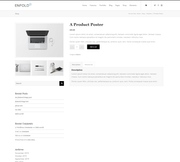
After:
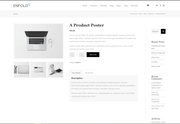
Best regards,
MikeAugust 11, 2019 at 12:28 am #1126549In reply to: Single product page right sidebar
Hi,
Sorry for the late reply, Try adding this code to the end of your functions.php file in Appearance > Editor://add right sidebar to woo product page add_action('init','ava534345953_init', 50); function ava534345953_init() { add_action( 'woocommerce_after_single_product_summary', 'avia_add_sidebar', 25); } function avia_close_image_div() { global $avia_config; echo "</div> "; } function avia_add_sidebar() { if(is_product()) { $avia_config['currently_viewing'] = "shop_single"; get_sidebar(); } }Then add this code in the General Styling > Quick CSS field or in the WordPress > Customize > Additional CSS field:
.single-product-main-image {
    width: 25%;
}

.single-product-summary {
    overflow: hidden;
    width: 45%;
    float: left;
    margin-right: 5%;
}

.single-product .sidebar {
    width: 25%;
}
Best regards,
MikeApril 17, 2018 at 1:50 pm #943099Hi,
I adjusted your css to this:/* single product sidebar left */ .single-product-main-image { width: 25%; } .single-product-summary { overflow: hidden; width: 45%; float: right; margin-right: 5%; } .single-product-main-image { float: right; margin-right: 0px !important; } .single-product .sidebar { width: 25%; float: left; border-left-style: none !important; border-left-width: 0px !important; } .single-product .inner_sidebar { margin-left: 0px !important; margin-right: 50px !important; }Please check.
For future readers, this was the function to create a single product sidebar:// single product sidebar add_action('init','ava534345953_init', 50); function ava534345953_init() { add_action( 'woocommerce_after_single_product_summary', 'avia_add_sidebar', 25); } function avia_close_image_div() { echo "</div>"; } function avia_add_sidebar() { if(is_product()) { $avia_config['currently_viewing'] = "shop_single"; get_sidebar(); } }Best regards,
MikeApril 15, 2018 at 9:53 am #942160Thank you again, but I have another question,
I have see “how to add the sidebat on the single product page” the question
Is very good to work, but how to let the sidebar on the left side, because the solution is on the right side
Thank you very muchAnd this ode in the function.php
// adjust settings on init
add_action(‘init’,’ava534345953_init’, 50);
function ava534345953_init() {
add_action( ‘woocommerce_after_single_product_summary’, ‘avia_add_sidebar’, 25);
}function avia_close_image_div() {
echo “</div>”;
}function avia_add_sidebar() {
if(is_product()) {
$avia_config[‘currently_viewing’] = “shop_single”;
get_sidebar();
}
}.single-product-main-image {
width: 25%;
}And this css code in the Quick CSS field:
.single-product-summary {
overflow: hidden;
width: 45%;
float: left;
margin-right: 5%;
}.single-product .sidebar {
width: 25%;
}July 28, 2017 at 3:36 pm #831080In reply to: single image problem
Hi!
I added following code to Functions.php file in Appearance > Editor
// adjust settings on init add_action('init','ava534345953_init', 50); function ava534345953_init() { add_action( 'woocommerce_after_single_product_summary', 'avia_add_sidebar', 25); } function avia_close_image_div() { global $avia_config; echo "</div> "; } function avia_add_sidebar() { if(is_product()) { $avia_config['currently_viewing'] = "shop_single"; get_sidebar(); } }And added a test widget in single product widget area for testing and confirmed it does show up fine. Please see your product below.
Also, i noticed that you have made CSS changes on image and description widths. You can remove them and refer to this post – https://kriesi.at/support/topic/sidebar-rechts-single-page/#post-580220 and use that custom CSS instead
Best regards,
YigitJuly 26, 2017 at 8:59 am #830001Topic: Moving Sidebar to the right of the image
in forum Enfoldinfo224
ParticipantHi
I’m trying to move the sidebar widget to the right of the image.
I used the following// adjust settings on init
add_action(‘init’,’ava534345953_init’, 50);
function ava534345953_init() {
add_action( ‘woocommerce_after_single_product_summary’, ‘avia_add_sidebar’, 25);
}function avia_close_image_div() {
global $avia_config;
echo “</div>
“;
}function avia_add_sidebar() {
if(is_product()) {
$avia_config[‘currently_viewing’] = “shop_single”;
get_sidebar();
}
}
but gotFatal error: Cannot redeclare avia_close_image_div() (previously declared in /home/dh_w9ptc8/xxx.co.uk/wp-content/themes/enfold/config-woocommerce/config.php:1231) in /home/dh_w9ptc8/xxx.co.uk/wp-content/themes/enfold/functions-enfold.php on line 1908
Thanks
July 10, 2017 at 2:35 pm #818751In reply to: Side bar display on products when using WooCommerce
Hi ColinWalton,
Function with adding the action has to be only one. Sorry, if I wasn’t clear enough.
Remove this one:function ava534345953_init() { add_action( 'woocommerce_after_single_product_summary', 'avia_add_sidebar', 25); }So you should get this:
// fixes the sidebar to add correctly to PRODUCTS PAGES add_action('init','ava534345953_init', 50); function avia_close_image_div() { echo "</div>"; } function avia_add_sidebar() { if(is_product()) { $avia_config['currently_viewing'] = "shop_single"; get_sidebar(); } } function ava534345953_init() { add_action( 'woocommerce_before_single_product', 'avia_add_sidebar', 25); }Best regards,
VictoriaJuly 8, 2017 at 12:07 pm #818139In reply to: Side bar display on products when using WooCommerce
Hiya, as I said, I have already tried that. If I put if after THE PREVIOUS CODE Victoria said to keep in – all I get is a blank screen.
This is the code I have already:
// fixes the sidebar to add correctly to PRODUCTS PAGES add_action('init','ava534345953_init', 50); function ava534345953_init() { add_action( 'woocommerce_after_single_product_summary', 'avia_add_sidebar', 25); } function avia_close_image_div() { echo "</div>"; } function avia_add_sidebar() { if(is_product()) { $avia_config['currently_viewing'] = "shop_single"; get_sidebar(); } }If I add THIS afterwards:…
function ava534345953_init() { add_action( 'woocommerce_before_single_product', 'avia_add_sidebar', 25); }I end up with a blank screen. I think the various functions are fighting against each other somehow?
TO SUM UP – THIS IS THE CODE AS I HAVE IT NOW…
// fixes the sidebar to add correctly to PRODUCTS PAGES add_action('init','ava534345953_init', 50); function ava534345953_init() { add_action( 'woocommerce_after_single_product_summary', 'avia_add_sidebar', 25); } function avia_close_image_div() { echo "</div>"; } function avia_add_sidebar() { if(is_product()) { $avia_config['currently_viewing'] = "shop_single"; get_sidebar(); } } function ava534345953_init() { add_action( 'woocommerce_before_single_product', 'avia_add_sidebar', 25); }July 7, 2017 at 11:15 am #817750In reply to: Side bar display on products when using WooCommerce
Hi ColinWalton,
You could try a different action
function ava534345953_init() { add_action( 'woocommerce_before_single_product', 'avia_add_sidebar', 25); }and adjust float to right, if left does not work for you. (Keep all the code form before)
Best regards,
VictoriaJune 12, 2017 at 6:29 am #806718In reply to: Moving Sidebar on Single Product Pages to the Right
Hi,
The modification above is obsolete Please remove it then add the following code in the functions.php file:
// adjust settings on init add_action('init','ava534345953_init', 50); function ava534345953_init() { add_action( 'woocommerce_after_single_product_summary', 'avia_add_sidebar', 25); } function avia_close_image_div() { global $avia_config; echo "</div> "; } function avia_add_sidebar() { if(is_product()) { $avia_config['currently_viewing'] = "shop_single"; get_sidebar(); } }In the Quick CSS field, add the following css code.
.single-product-main-image { width: 25%; } .single-product-summary { overflow: hidden; width: 45%; float: left; margin-right: 5%; } .single-product .sidebar { width: 25%; }Related thread: https://kriesi.at/support/topic/sidebar-rechts-single-page/#post-580220
Best regards,
IsmaelApril 24, 2017 at 5:48 pm #782466And with that I only appear in the widget sidebar pages not in Single Product Pages widget area and not all that I have if they appear on my home page, in the product only some appear me …
Thank youThe code that I have put is the one you sent in the previous message with a link
functions.php file:// adjust settings on init
add_action(‘init’,’ava534345953_init’, 50);
function ava534345953_init() {
add_action( ‘woocommerce_after_single_product_summary’, ‘avia_add_sidebar’, 25);
}function avia_close_image_div() {
echo “</div>”;
}function avia_add_sidebar() {
if(is_product()) {
$avia_config[‘currently_viewing’] = “shop_single”;
get_sidebar();
}
}CSS:
.single-product-main-image {
width: 25%;
}.single-product-summary {
overflow: hidden;
width: 45%;
float: left;
margin-right: 5%;
}.single-product .sidebar {
width: 25%;
}January 6, 2017 at 7:13 am #730198In reply to: How to edit woocomerce product page layout
Hi,
Thank you for the screenshot.
Please add the following code in the functions.php file.
// adjust settings on init add_action('init','ava534345953_init', 50); function ava534345953_init() { add_action( 'woocommerce_after_single_product_summary', 'avia_add_sidebar', 25); } function avia_close_image_div() { global $avia_config; echo "</div>"; } function avia_add_sidebar() { if(is_product()) { $avia_config['currently_viewing'] = "shop_single"; get_sidebar(); } } add_action('wp_footer', 'ava_custom_script'); function ava_custom_script(){ ?> <script type="text/javascript"> (function($) { function a() { $('.single .product').prepend('<div class="single-product-main-container"></div>'); $('.single-product-main-image, .single-product-summary').prependTo('.single-product-main-container'); } a(); })(jQuery); </script> <?php }And this code in the Quick CSS field.
.single-product-main-container { width: 70%; float: right; margin-left: 5% } .single-product-main-image { width: 45%; float: left; margin-right: 0; } .single-product-summary { overflow: hidden; width: 45%; float: left; margin-left: 5%; } .single-product .sidebar { width: 25%; }Best regards,
IsmaelNovember 16, 2016 at 9:52 am #712811Topic: Problem with sidebar Woocommerce
in forum EnfoldErik Van Schoondrager
ParticipantI have a sidebar on the right on the product page (Woocommerce). The problem is that it is showing the sidebar page widgets instead of the single product page widgets.
I added to functions.php the following
// adjust settings on init
add_action(‘init’,’ava534345953_init’, 50);
function ava534345953_init() {
add_action( ‘woocommerce_after_single_product_summary’, ‘avia_add_sidebar’, 25);
}function avia_close_image_div() {
echo “</div>”;
}function avia_add_sidebar() {
if(is_product()) {
$avia_config[‘currently_viewing’] = “shop_single”;
get_sidebar();
}
}And I added to Quick CSS
.single-product-main-image {
width: 25%;
}.single-product-summary {
overflow: hidden;
width: 45%;
float: left;
margin-right: 5%;
}.single-product .sidebar {
width: 25% ;
}#top div.product .woocommerce-tabs {
width: 75%;
float: left;
}October 13, 2016 at 8:59 am #698621In reply to: WooCommerce Single Product Page Description below
Hi!
Please remove the sidebar modifications in the functions.php and Quick CSS field. Add this code in the functions.php.
// adjust settings on init add_action('init','ava534345953_init', 50); function ava534345953_init() { add_action( 'woocommerce_after_single_product_summary', 'avia_add_sidebar', 25); remove_action( 'woocommerce_after_single_product_summary', 'woocommerce_output_product_data_tabs', 10 ); remove_action( 'woocommerce_after_single_product_summary', 'woocommerce_output_product_data_tabs', 1 ); add_action( 'woocommerce_after_single_product_summary', 'woocommerce_output_product_data_tabs', 20 ); } function avia_close_image_div() { echo "</div>"; } function avia_add_sidebar() { if(is_product()) { $avia_config['currently_viewing'] = "shop_single"; get_sidebar(); } }And this code in the Quick CSS field:
.single-product-main-image { width: 25%; } .single-product-summary { overflow: hidden; width: 45%; float: left; margin-right: 5%; } .single-product .sidebar { width: 25%; } #top div.product .woocommerce-tabs { width: 75%; float: left; }Best regards,
IsmaelSeptember 20, 2016 at 12:47 pm #689125In reply to: A few woocommerce issues
Hi Andy,
since moving the sidebar to the right is done via function.php, this issue cannot happen in another theme.
Andy, ich schreibe immer auf Englisch, damit ander etwas von unserer Konversation haben, aber nur ganz kurz, zur bessere Klärung: Das oben gezeigte Snippet stammt von Ismael und wurde schon öfter im Forum empfohlen https://kriesi.at/support/search/ava534345953/?avia_filter_search=yes&avia_search_forums=all&avia_search_dates=all&avia_search_include=no
Aber die definition der Sidebarfunction avia_add_sidebar() { if(is_product()) { $avia_config['currently_viewing'] = "shop_single"; get_sidebar(); }scheint dabei nicht zu klappen, denn es werden eben nicht die Widgets aus schop_single genommen. Ich meine schon mal etwas diesbezüglich hier im Form gelesen zu haben, finde es aber nicht mehr und damit auch nicht die evtl. gefundene Lösung. Herzlichen Gruß, Michael
September 14, 2016 at 11:14 am #686271In reply to: A few woocommerce issues
Oh, before you ask regarding issue 1. – I have moved the sidebar to the right, but I did it according to the available instructions and it should be correct and should work.
//BEGIN PRODUCT WIDGET AREA IN THE RIGHT SIDEBAR
// adjust settings on init
add_action('init','ava534345953_init', 50);
function ava534345953_init() {
	add_action( 'woocommerce_after_single_product_summary', 'avia_add_sidebar', 25);
}

function avia_close_image_div() {
	echo "</div>";
}

function avia_add_sidebar() {
	if(is_product()) {
	$avia_config['currently_viewing'] = "shop_single";
	get_sidebar();
	}
}
//END PRODUCT WIDGET AREA IN THE RIGHT SIDEBAR
April 6, 2016 at 5:14 am #608654In reply to: Sidebar Product Single Page Right + GO BACK Button
Hi!
Please create a child theme: http://kriesi.at/documentation/enfold/using-a-child-theme/
Create a functions.php file inside the child theme then enter the suggested codes:
function avia_add_sidebar() {
	global $avia_config;
	if(is_product()) {
		$back = $_SERVER['HTTP_REFERER'];
		if(isset($back) && $back != "") echo '<a href="'.$back.'" rel="nofollow">Go back</a>';
		$avia_config['currently_viewing'] = "shop_single";
		get_sidebar();
	}
}

// adjust settings on init
add_action('init','ava534345953_init', 50);
function ava534345953_init() {
	add_action( 'woocommerce_after_single_product_summary', 'avia_add_sidebar', 25);
}

function avia_close_image_div() {
	echo "</div>";
}
Regards,
IsmaelFebruary 21, 2016 at 10:26 am #586630In reply to: Custom Category Function?
Hey!
Please use this in the functions.php file:
// adjust settings on init
add_action('init','ava534345953_init', 50);
function ava534345953_init() {
	if(is_category(5405)) {
		remove_filter('pre_get_posts','ksuce_exclude_categories');
	}
}
Regards,
IsmaelFebruary 14, 2016 at 1:39 pm #582932Topic: Button Single Product Page
in forum EnfoldMATTIA
ParticipantHallo Josue
Hallo Ismael,I just need a please help.
Ismael has integrated me following code in the “funktion.php”, works great!
// adjust settings on init
add_action(‘init’,’ava534345953_init’, 50);
function ava534345953_init() {
add_action( ‘woocommerce_after_single_product_summary’, ‘avia_add_sidebar’, 25);
}function avia_close_image_div() {
global $avia_config;
echo “</div>”;
}function avia_add_sidebar() {
if(is_product()) {
$avia_config[‘currently_viewing’] = “shop_single”;
get_sidebar();
}
}and in the CSS this code:
.single-product-main-image {
width: 25%;
}.single-product-summary {
overflow: hidden;
width: 45%;
float: left;
margin-right: 5%;
}If I insets code of Josue, a 500 server error appears:
function avia_close_image_div()
{
global $avia_config;
if(is_product()) {
$back =$_SERVER[‘HTTP_REFERER’];
if((isset($back) && $back !=”)) echo ‘Go back‘;
$avia_config[‘currently_viewing’] = “shop_single”;
get_sidebar();
}
echo “</div>”;
}Could you adjust the final code, thank you.
The button must not be placed strictly under the single product image.
The main thing customers have the option of having to go to the previous page.Many thanks.
greeting
Jessica -
AuthorSearch Results
-
Search Results
-
Hi
I’m trying to move the sidebar widget to the right of the image.
I used the following// adjust settings on init
add_action(‘init’,’ava534345953_init’, 50);
function ava534345953_init() {
add_action( ‘woocommerce_after_single_product_summary’, ‘avia_add_sidebar’, 25);
}function avia_close_image_div() {
global $avia_config;
echo “</div>
“;
}function avia_add_sidebar() {
if(is_product()) {
$avia_config[‘currently_viewing’] = “shop_single”;
get_sidebar();
}
}
but gotFatal error: Cannot redeclare avia_close_image_div() (previously declared in /home/dh_w9ptc8/xxx.co.uk/wp-content/themes/enfold/config-woocommerce/config.php:1231) in /home/dh_w9ptc8/xxx.co.uk/wp-content/themes/enfold/functions-enfold.php on line 1908
Thanks
I have a sidebar on the right on the product page (Woocommerce). The problem is that it is showing the sidebar page widgets instead of the single product page widgets.
I added to functions.php the following
// adjust settings on init
add_action(‘init’,’ava534345953_init’, 50);
function ava534345953_init() {
add_action( ‘woocommerce_after_single_product_summary’, ‘avia_add_sidebar’, 25);
}function avia_close_image_div() {
echo “</div>”;
}function avia_add_sidebar() {
if(is_product()) {
$avia_config[‘currently_viewing’] = “shop_single”;
get_sidebar();
}
}And I added to Quick CSS
.single-product-main-image {
width: 25%;
}.single-product-summary {
overflow: hidden;
width: 45%;
float: left;
margin-right: 5%;
}.single-product .sidebar {
width: 25% ;
}#top div.product .woocommerce-tabs {
width: 75%;
float: left;
}Topic: Button Single Product Page
Hallo Josue
Hallo Ismael,I just need a please help.
Ismael has integrated me following code in the “funktion.php”, works great!
// adjust settings on init
add_action(‘init’,’ava534345953_init’, 50);
function ava534345953_init() {
add_action( ‘woocommerce_after_single_product_summary’, ‘avia_add_sidebar’, 25);
}function avia_close_image_div() {
global $avia_config;
echo “</div>”;
}function avia_add_sidebar() {
if(is_product()) {
$avia_config[‘currently_viewing’] = “shop_single”;
get_sidebar();
}
}and in the CSS this code:
.single-product-main-image {
width: 25%;
}.single-product-summary {
overflow: hidden;
width: 45%;
float: left;
margin-right: 5%;
}If I insets code of Josue, a 500 server error appears:
function avia_close_image_div()
{
global $avia_config;
if(is_product()) {
$back =$_SERVER[‘HTTP_REFERER’];
if((isset($back) && $back !=”)) echo ‘Go back‘;
$avia_config[‘currently_viewing’] = “shop_single”;
get_sidebar();
}
echo “</div>”;
}Could you adjust the final code, thank you.
The button must not be placed strictly under the single product image.
The main thing customers have the option of having to go to the previous page.Many thanks.
greeting
Jessica


