Hi,
To have the avia-tooltip show at the bottom you will need to edit the file at:
\enfold\js\avia.js
on line 1243 you will find:
position: 'top', //top or bottom
change the position to bottom, Then clear your browser cache and any cache plugin.
Then add this css to your Quick CSS:
.avia-tooltip .avia-arrow-wrap {
    bottom: 45px !important;
}
.avia-tooltip .avia-arrow {
    top: 15px !important;
}
Now to change the text color and the background color adjust this css to suit:
.avia-tooltip {
    background: red;
    color: #000;
}
.avia-tooltip .avia-arrow {
	background-color: red;
}
this makes the font black and the background red

Best regards,
Mike
hi there,
i got a website with woocommerce and the themesetting for the product-gallery is set to “Woocommerce 3.0 Product galley”.
unfortunally theres is no alt text showing on hover. website below.
is it possible to add the avia.tooltip via functions.php to the product galley?
greetz
-
This topic was modified 4 years, 3 months ago by
 volmering.
Hey tinohannes,
Thank you for the inquiry.
You can use this css code to adjust the style of the image tooltip.
.avia-tooltip {
    position: absolute;
    z-index: 9999999;
    padding: 12px;
    margin-top: -18px;
    margin-left: -4px;
    background: #000;
    background: rgba(0, 0, 0, 0.8);
    color: #fff;
    width: 140px;
    border-radius: 2px;
    text-align: center;
}
Default background color is set to rgba(0, 0, 0, 0.8).
Best regards,
Ismael
Hi MIke
thanks – I tried disabling the tooltips and now I see the pop-up captions, but before I had some code to put the captions underneath the images, visible at all times, instead of in a popup. I guess it got lost. Can you help me with that? I have some code to do that with the masonry gallery so I guess I can use that instead?
I still am being redirected to youtube when I try to play the videos on the page.
Firefox, chrome, all the same. Is there some other setting I should be looking at?
thanks
Nancy
-
This reply was modified 4 years, 3 months ago by
 Munford.
Hi,
For number two you are hiding the tooltips in your child theme with this css:
/* Hide tooltip */
#top .avia-tooltip {
	display: none !important;
}
removing this will solve.
For number three the video on both pages are working for me in-page, I tested on Chrome, Firefox, & Edge on Windows 10
Best regards,
Mike
Hi Jul,
There’s no option for that however you can use this workaround:
1. Add a Code Block
2. Add this code in the Code Block:
<span class="av-icon-char" aria-hidden="true" data-avia-icon-tooltip="The Tooltip"> </span>
3. Replace The Tooltip to the Tooltip Text of your choice
4. Replace the URL http://enfold.test/wp-content/uploads/2021/08/portfolio-large-1-300×150.jpg with the URL of your image
5. Change the value of width and height, then save.
Hope this helps.
Best regards,
Nikko
Hi! Is it possible to add a tooltip to an image? I want it to behave like the icon tooltip but with an image instead of an icon. I tried the hotspot tooltip but that is not what I’m looking for, unless there is a way to remove the pulsating dot.
Thanks!
Jul
Hi,
Thanks for the update. Please try this CSS as well to change the font family:
#about.alternate_color h1 .tooltipsall {
  font-family: monospace;
}
Best regards,
Rikard
Hey hitrev,
Thank you for the link to your site and the video, I didn’t find the orange “.tooltipsall” color in your css, it was black, but I did find the green hover:

but you will notice that your links are inside a H1 tag:

so a css rule of just “.tooltipsall” is pretty weak, heading tags typically have a higher specificity than this.
So to correct try forming your rule like this and add manually:
#about.alternate_color h1 .tooltipsall {
	color: red;
}
#about.alternate_color h1 .tooltipsall:hover {
	color: yellow;
}
Your plugin options may work in a plain text element, but I believe even then the paragraph tag “p” is effected by a second class for the “.main_color” or the “.alternate_color” classes, so in the end a single class “.tooltipsall” doesn’t have the specificity needed. I hope this makes sense.
Best regards,
Mike
Ahoy,
I’m having issues with the style settings for my plugin. The styles are being overwritten to show enfolds style settings instead of the ones I have selected for in my plugin settings. The plugin i’m having issues with is called “Tooltips Style”. As a test I have set the colors to text color to orange and the font family to a different font family but they are staying the default of enfold. I would also like the hove color to be blue of the text and the underline to be a tad thicker if possible. I have reached out the the plugin developer and the issue seems to be with the enfold theme only, when I change the theme the styles load.
I have included a video of the issue as well as the website in the private content.
Hey Patrick,
Thank you for the notification.
We will post the changes as soon as possible. For now, you can check them below.
feature: ALB columns reverse or individual resort order when switching to fullwidth on mobile devices
feature: ALB gridrow reverse or individual resort orderof cells when switching to fullwidth on mobile devices
feature: theme option “Transparency Menu Color On Hover”
feature: ALB video element option to show fullscreen button for HTML5 videos
fixed: missing comma in CSS for mobile and svg makes svg huge
fixed: button CSS top border issue on :active – removed !important in button.css
fixed: Option Remove query string from static resources breaks invalidation of post css files – option willl be ignored for these files
fixed: ALB Textblock custom element lockable custom CSS class missing
fixed: fullwidth submenu alignment ignored for mobile button
fixed: undefined constant THEMENAME in Mailchimp Newsletter Signup widget
fixed: typography font size not applied in block editor in frontend
fixed: ALB masonry gallery lightbox title not corresponding to options settings for flexible masonry
fixed: ALB magazine category sort buttons break frontend when no entries are found
fixed: svg logo broken when svg tag in multiple lines
fixed: svg logo not displayed for non logged in users
fixed: italien translation breaking selectbox in ALB Image Hotspot tooltip location
tweak: add missing schema.org markup to section background videos and slideshow videos
tweak: accessibility support:
added: Accessibility Tab to Theme Extensions Page
added: tab key access support to main menu with submenus and megamenu
added: visual appearance with keyboard access to menus (focus now equivalent to mouse hover effects)
added: attributes role=”menuitem” tabindex=”0″ to menu items
added: started support for plugin “One Click Accessibility” ( https://wordpress.org/plugins/pojo-accessibility/ )
added: started support for plugin “WP Accessibility” ( https://wordpress.org/plugins/wp-accessibility/ )
tweak: remove “:” when empty label text from contact form emails
tweak: extended date filter to “last xxx days/weeks/month/years” for ALB elements:
Blog
Magazine
Masonry
Portfolio
Post Slider
Accordion Slider
Featured Image Slider
added: filter ‘avf_social_media_icon_display_name’ – change tooltip display name of icon
added: filter ‘avf_form_mail_label’ – allows to change label text on E-Mail of a contact form
added: filter ‘avf_wp_accessibility_outline_width’ – change hardcoded plugin value for focus caret
added: filter ‘avf_wp_accessibility_outline_style’ – change hardcoded plugin value for focus caret
Following elements have been updated to support post-css file:
Dropcap 1 (Big Letter)
Dropcap 2 (Colored Background)
Fullwidth Sub Menu
Grid Row + Grid Cells
OSM – Leaflet Map
Post Metadata
Search
Social Buttons
Tabs
Team
Textblock
Timeline
Video
Updated: LayerSlider Version 6.11.9
updated: French language files fr_FR (version 4.8.6.4, provided by comkapi – (Email address hidden if logged out) )
updated: Dutch language files nl_NL (version 4.8.7 provided by EZWebdesign – Roger Hoen )
updated: Italian language files it_IT (version 4.8.7, provided by BigBatT – (Email address hidden if logged out) )
updated: sync all language files version 4.8.7
Best regards,
Ismael
( Click the images to enlarge them )
You are in the edit mode of the corresponding page. And you see this or a similar image. There are in a Onepage mostly Color-Sections as parent container to include other elements like columns or headlines etc.pp ( via drag & drop ).
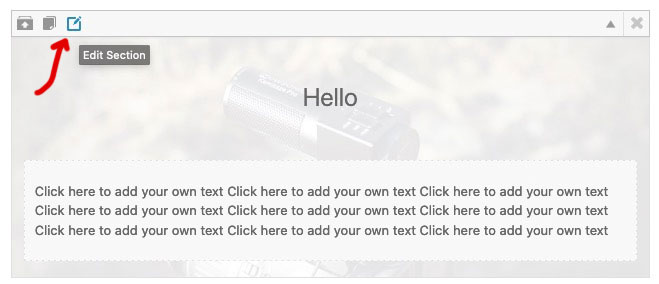
If you move the mouse over the small icons in the upper left corner (see first picture) you will see small tooltips that show you what can be done with the element. The right one of these icons opens an editmode to the color-section ( second picture ).
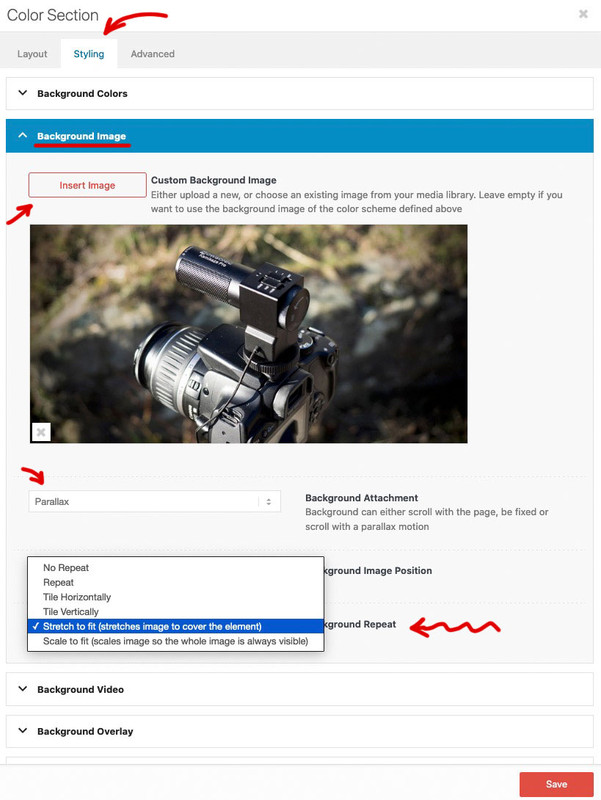
At the top of the popup window are tabs – click the styling tab.
In the default case you will see several toggles – one of them is : Background-Image. If you are working with demo files, then there might be images already available. In this case click on the image to insert another one. If not, click the “Insert Image” button. Now you can choose one from the Media Library – or even upload one here.
The settings below show you the possibilities for the background image.
You wanted Parallax – then select that in the Background-Attachment. Also you should choose for Background-Repeat : stretch to fit.
Now don’t forget to save your settings: Save
And update the page afterwards: Update on the left are the metaboxes.
Hey WebDevDept,
Thank you for the inquiry.
The tooltip text are covering the hotspots, which might be due to the html tags that were added in the hotspot title field. To fix it, try to use this css code.
.av-hotspot-blank .av-hotspot-container .av-image-hotspot_inner {
    z-index: 99999999;
}
Best regards,
Ismael
I have 5 hotspots on the homepage with tooltips that each have a link to another section on the same page.
The text links work for all 5 tooltip buttons, however, only 1 of the yellow hotspots links work. Even when you mouseover the other hotspots, it’s as if the links aren’t in the code at all.
Due to this project being password-protected, I’ll provide a link and screenshot in the private section below.
Thanks in advance for your help, this one’s dot me dumbfounded!
Hi,
Thank for the gif, the reason the page turned gray was because the search field was being moved 1322px from the left which is off your page, I didn’t find what was moving it but you site acts strangely in the background. You also had an issue with the menu and search links overlapping. I adding this css to your Quick CSS and it works for desktop but you may need to fine-tune it for mobile.
.html_burger_menu_active #top #wrap_all #header #avia-menu .av-burger-menu-main.menu-item-avia-special > a{
	width: 58px;
	position: fixed;
	right: 20px;
	top:40px;
}

.html_burger_menu_active #top #wrap_all #menu-item-search > a {
	height: 56px;
	top: 100px;
	position: fixed;
	right: 20px;
	display: inline;
}
#menu-item-search .avia-search-tooltip.avia-tt {
	left: -136px!important;
	top: 120px!important;
}
Please clear your browser cache and check.
I see that you are using Elementor so I wonder if that is the issue with your site acting strangely in the background, typically other page builders conflict with Enfold.
Best regards,
Mike
Hi hitrev,
Thanks for providing the link.
The links shows a hand cursor on links when I checked your site, are you referring on the Click Here text?
Can you try to add this CSS code in Enfold > General Styling > Quick CSS:
#top a,
#top span.tooltipsall {
    cursor: pointer;
}
Hope it helps.
Best regards,
Nikko
Hi,
Thank you for the update.
Please remove the old Enfold 4.8.3 from the themes folder to rule out any conflict, then replace the content of the themes/enfold/config-templatebuilder/avia-shortcodes/image_hotspots/image_hotspots.php with the following code.
// https://pastebin.com/nJhGCKqf
It is not working correctly because the value in the Posizione Tooltip dropdown option is incorrect.
<optgroup label="Below">
<option value="av-tt-pos-left av-tt-align-bottom">In basso a sinistra</option>
<option selected="selected" value="av-tt-pos-right av-tt-align-bottom">In basso a destra</option>
<option value="av-tt-pos-below av-tt-align-centered">In basso  al centro</option></optgroup>
Best regards,
Ismael
Hey guys,
In the Theme Settings > Social Profiles section, can that be expanded to include other social sites such as Tik Tok please, so that these can easily be displayed in the header/footer areas?
Another idea for this would also be to allow a custom field where you can select your own icon from the Enfold icon font (or another uploaded one) and link to a custom URL. This could be really useful for making these areas useable to link to account management, help or other areas. Might also be useful if we can edit the tooltip for these custom icons, so for instance if you insert a gear icon when it’s hovered we can alter the tooltip to say “Settings” or similar.
Thanks a lot for considering it.
Tim
-
This topic was modified 4 years, 6 months ago by
 THP Studio.
Hi,
Thank you for the clarification.
Adding the following css code should adjust the background of the tooltip container from black to transparent, which should remove the black bar.
.ui-wordpress-tooltip-pro {
    background-color: transparent !important;
}
Best regards,
Ismael
Hi,
Thank you for the update.
It seems to work correctly when the tooltip link (GIF TEST) is in the same line. Please check the screenshot below.
Screenshot: https://postimg.cc/SXsCRMDz
We inserted a few letters before the link to completely push it in the second line.
Best regards,
Ismael
Hi,
Thank you for the update.
Have you tried enabling the Advanced > Responsive Settings > Hotspot on mobile devices option? This should set the tooltip content to always display below the hotspot image, and so users will not have to tap or click the hotspot to see the tooltip content. It could also act as a support in case users are having difficulty accessing the hotspot tooltip.
You can also adjust the size of the hotspot if necessary.
@media only screen and (max-width: 990px) {
.responsive .av-image-hotspot {
    height: 50px;
    width: 50px;
    line-height: 50px;
    font-size: 22px;
}
}
Best regards,
Ismael
Hi,
Thank you for the update.
It seems to be working correctly on our end. The tooltip gets the correct class names, both av-tt-pos-left/right and av-tt-pos-below. Please post the site URL in the private field so that we could check the issue.
Screenshot: https://imgur.com/KMwxw3F
Best regards,
Ismael
Ahoy,
I’m having an issue with the enfold theme and the Tooltips Pro plugin. After working with the Tooltips Pro developer it seems that the issue is the enfold theme. When I hover over my tooltip the enfold theme seems to create additional white space under the rollover gif. If I change the theme the plugin works fine. Attached is a video of the issue using a test gif.
Any help would be greatly appreciated :)
-
This topic was modified 4 years, 6 months ago by
 hitrev.
Hi Yigit,
The “on mouse hover” setting does behave better than the “show on mouse hover – Hide on click” setting in that the tooltip doesn’t quickly vanish, so I’ve set both hotspot elements to “on mouse hover”. However, both elements are still problematic on my iPhones. They won’t activate unless I very precisely hit the center of the hotspot, which I can only do about 10% of the time. When I zoom in so that the hotspot is very large I can activate it every time. My guess is that the touch target (I’m not sure what that characteristic is really called) is somehow being set to very small pixel dimensions. It works fine on my Android phone though.
Thanks,
-Eric
Hey,
Thanks for contacting us!
Could you please edit your Image with Hotspots element and choose to show tooltips on mouse hover in Advanced > Show Tooltips and check if that helps? Your first element seems to be working fine :)
Best regards,
Yigit
Hi,
Glad to hear, I had not tested on mobile because I was not sure if you would like this, please try this css instead for all sizes:
@media only screen and (max-width: 767px) {
	#top.postid-3431 .avia-tooltip.avia-tt {
	top: 370px !important;
    left: 30% !important;
    background-color: transparent !important;
}
}
@media only screen and (min-width: 768px) and (max-width: 1023px) {
	#top.postid-3431 .avia-tooltip.avia-tt {
	top: 370px !important;
    left: 26% !important;
    background-color: transparent !important;
}
}
@media only screen and (min-width: 1024px) and (max-width: 1439px) {
	#top.postid-3431 .avia-tooltip.avia-tt {
	top: 475px !important;
    left: 29% !important;
    background-color: transparent !important;
}
}
@media only screen and (min-width: 1440px) {
	#top.postid-3431 .avia-tooltip.avia-tt {
	top: 675px !important;
    left: 31% !important;
    background-color: transparent !important;
}
}
feel free to fine-tune for certain sizes if you wish and after applying the css, please clear your browser cache and check.
Best regards,
Mike
Hi,
Thank you for your patience, currently there is a caption for the lead gallery image that is hidden, #top .avia-gallery .avia-gallery-caption
but when you hover over the thumbnails the lead image container is not replaced it is overlayed with a larger thumbnail and the caption is not used. So I’m not seeing a good way to change this, I did come up with this css that sets all of the tooltips to the same location so they look like captions on hover, please try this code in the General Styling ▸ Quick CSS field or in the WordPress ▸ Customize ▸ Additional CSS field:
#top.postid-3431 .avia-tooltip.avia-tt {
	top: 675px !important;
    left: 31% !important;
    background-color: transparent !important;
}
you could also add font size and color rules if you wanted, please see the screenshots in the Private Content area.
Best regards,
Mike
Hello, I have image hotspots running on a page and they behave as expected on desktop and an android phone, but on iphones the hotspot is very difficult to press, and when it does active the tooltip often disappear very quickly. It’s like the touch target is only a few pixels wide. Any suggestions.
Is it possible to create a caption under a big gallery item (#top div .avia-gallery .avia-gallery-big)? I’m using the Gallery with Preview.
So instead of the tooltips, when I hover over the thumbs, I would like a caption appearing underneath the big gallery item.
Merhabalar,
1- Please add following code to Quick CSS field in Enfold theme options > General Styling tab
.page-id-1679 .avia-tooltip.avia-tt {
    background-color: #4274a4;
    border-bottom-left-radius: 0 !important;
    border-bottom-right-radius: 0 !important;
}
.page-id-1679 .avia-tooltip.avia-tt .avia-arrow-wrap {
    display: none;
}
2- Lutfen o gorselin oldugu column elementini duzenleyip Advanced > Developer Settings sekmesinden ozel bir ID verin (assagidaki ornekte “alt-margin”) sonra assagidaki kodu Quick CSS alanina ekleyin
#alt-margin { margin-bottom: -90px; }
Best regards,
Yigit



