Hey burdeMedia,
Thank you for the inquiry.
The images are set to have a maximum height of 321px but you can adjust it manually by editing the entry_with_sidebar thumbnail size in the functions.php file,
$avia_config['imgSize']['entry_with_sidebar'] = array('width'=>845, 'height'=>321);
Or install the following plugin, then go to the Settings > Media panel and adjust the size of the entry_with_sidebar thumbnail there. And yes, you have to regenerate the thumbnails after the size adjustment. This is the plugin.
// https://wordpress.org/plugins/simple-image-sizes/
Best regards,
Ismael
Hi,
Thank you for the update.
After the thumbnail size adjustment, did you regenerate the thumbnails or upload the images again? You can use the plugin that we suggested above to regenerate the images or thumbnails in bulk.
// https://wordpress.org/plugins/regenerate-thumbnails/
Best regards,
Ismael
Hi,
Thanks for the login, I checked your pages on Windows with Chrome & Firefox & a 22′ screen, at first I don’t notice any blurriness in the preview thumbnails, but when I compare the thumbnails in a new tab with the gallery there seems to be a difference, I believe it’s because your thumbnails are 300px square and are showing at 351px square, I recommend changing the thumbnail size to 400px square and then Regenerate Thumbnails and clear your caches.
Perhaps on your 13′ Mac the thumbnails are showing at 300px so you don’t see the difference?
I linked to the thumbnails in the Private Content area to show what I mean.
The easiest way to change the thumbnail sizes is to install the Simple Image Sizes plugin, then go to Settings > Media, and change the thumbnail image size (increase its width / height).
Then Regenerate Thumbnails with this plugin, it seems the Simple Image Sizes plugin has an issue with it’s “regenerate thumbnails” option.
The other option is to find the image sizes in the functions.php file around line 174 and then Regenerate Thumbnails and clear your caches.
Best regards,
Mike
Hey Nicolas,
Thank you for the inquiry.
We can set the big preview image to change on click or tap but you will lose the gallery’s lightbox functionality. If you want to proceed, edit the wp-content\themes\enfold\config-templatebuilder\avia-shortcodes\gallery\gallery.js file, and replace everything with this code:
// https://pastebin.com/A1NdePZ7
After that, edit the wp-content\themes\enfold\config-templatebuilder\avia-shortcodes\gallery\gallery.php which is located in the same folder, and look for this code around line 430:
$class = $counter++ % $columns ? "class='$imagelink $custom_link_class'" : "class='first_thumb $imagelink $custom_link_class'";
.. replace it with:
$class = $counter++ % $columns ? "class='$imagelink $custom_link_class noLightbox'" : "class='first_thumb noLightbox $imagelink $custom_link_class'";
This will disable the lightbox, so when you click on the gallery thumbnails the preview image will change and not open the lightbox container.
We can probably come up with a better solution in the future but this is beyond the scope of support.
Best regards,
Ismael
Hi,
or resolution? Is this assumption correct?
1.) Yes, that is correct. The theme will only load the predefined thumbnail because the srcset attribute is not present in the template, so you have to upload images that are big enough on any type of device. If you want, you can install a third party plugin that adds srcset attribute to images.
// https://wordpress.org/plugins/wp-retina-2x/
2.) Also correct. Uploading larger images is not necessarily bad because you can still compress them and given proper optimization on other areas of the site, it should still load fast on any device. But having the srcset attribute in the template or the image tag is still the better solution. Please try the plugin above.
Best regards,
Ismael
This reply has been marked as private.
Hi,
In the Masonry Gallery (Perfect Grid) page it shows the thumbnails, the images that when clicked open in a lightbox. When the page is checked for accessibility compliance, there is an error notice saying “Empty link: a link contains no text” on each image.
Since those images are scaled automatically by the masonry script from the original, no alt text can be used on them (as the image is a background image in the lightbox).
But the gallery styling gives the possibility to display:
– Display Title and Excerpt (<<<< Excerpt is actually the Caption, you may want to change that in the code for clarity)
– Display Title
– Display Excerpt (<<<< Excerpt is actually the Caption, you may want to change that in the code for clarity)
– Display neither
Next under “Element Title and Excerpt display settings” you can choose when to display Title and/or Excerpt:
it gives you the option when to show it or hide it:
– Always display
– Display on mouse hover
– Hide on mouse hover
Note: the explanation description is not correct, should be something like “You can choose whether to always display, only on hover or hide on hover”
Now for my real question:
Since showing the image Title or entering the image Caption (your “Excerpt”) gets rid of the accessibility warning about the Empty Link, I was wondering if it would be possible to have a fourth option in “When to Display” that offers the same as “show on mouse hover” or “display as centered overlay” but without actually showing it on mouse hover or as overlay? Something like “Use invisibly”?
That way the title would be there as the link text for accessibility reasons but doesn’t actually display.
“Display neither” is obviously not an option, then it just disappears from the code, resulting in the Empty Link error.
Is this something that would be doable using the .av-masonry-entry-content which shows on hover or in centered overlay, or would that create problems elsewhere?
Added remark 2020-06-17:
Or even simpler, would it be possible to always have the image title set as the link text regardless of the other options chosen?
Thanks in advance,
Rob
-
This topic was modified 5 years, 9 months ago by
 rob2701. Reason: Added remark for possible simpler solution
Great, it works! Note that the code you mentioned should be a bit longer, and include the POST_THUMBNAIL_DESCRIPTION as well ;-)
Thanks anyway ;-)
global $woocommerce;
if( version_compare( $woocommerce->version, ‘3.0.0’, “>=” ) ) {
function avia_woocommerce_gallery_thumbnail_description($img, $attachment_id, $post_id, $image_class ) {
return $img;
}
function avia_woocommerce_post_thumbnail_description($img, $post_id){
return $img;
}
}
Hi thijsvanhalewijn,
You can remove this code and see if the issue persists:
/* Woocommerce 3.0.0 Compatibility Fix – Remove Enfold’s custom functions that conflict with the new image display in WooCommerce 3.0.0 */
global $woocommerce;
if( version_compare( $woocommerce->version, ‘3.0.0’, “>=” ) ) {
function avia_woocommerce_gallery_thumbnail_description($img, $attachment_id, $post_id, $image_class ) {
return $img;
}
Best regards,
Victoria
Hey Victoria, this is all the code from enfold-child/functions.php (starting with line 1)
<?php
/* Woocommerce 3.0.0 Compatibility Fix – Remove Enfold’s custom functions that conflict with the new image display in WooCommerce 3.0.0 */
global $woocommerce;
if( version_compare( $woocommerce->version, ‘3.0.0’, “>=” ) ) {
function avia_woocommerce_gallery_thumbnail_description($img, $attachment_id, $post_id, $image_class ) {
return $img;
}
function avia_woocommerce_post_thumbnail_description($img, $post_id){
return $img;
}
}
add_theme_support(‘avia_template_builder_custom_css’);
/*
* Add your own functions here. You can also copy some of the theme functions into this file.
* WordPress will use those functions instead of the original functions then.
*/
function sv_remove_product_page_skus( $enabled ) {
if ( ! is_admin() && is_product() ) {
return false;
}
return $enabled;
}
add_filter( ‘wc_product_sku_enabled’, ‘sv_remove_product_page_skus’ );
?>
Hi,
Did you try adjustinng the size of the Large thumbnail in the Settings > Media panel as suggested above?
Best regards,
Ismael
I inserted gallery (big images with thumbnails below) in layout builder, but I don’t like the white border on the site. I removed it, but now the alignment isn’t good. How can I fix it? I also don’t like on hover animation, it flashes too much when you move from one image to another. I would like to keep it, just turn it down a little.
I added the link to the site in private content so you can imagine better how it looks and what I want to change.
Hi Guys,
I have a problem with the display on the category pages. The pictures are cropped for height and I don’t know why. I have already tried to edit the pictures with “regenerate thumbnails plugin”. But that didn’t work either.
Perhaps you can help me…
Hey wrightella1,
Sorry for the late reply, you can modify the image sizes in the /enfold/functions.php file, starting at line 166.
After making your changes you will have to Regenerate Thumbnails.
For your burger menu font sizes, Please try this code in the General Styling > Quick CSS field or in the WordPress > Customize > Additional CSS field:
@media only screen and (max-width: 990px) {
	#top #wrap_all #av-burger-menu-ul span.avia-menu-text,#top #wrap_all #av-burger-menu-ul li {
		font-size: 16.5px !important;
	}
}
After applying the css, Please clear your browser cache and check.
Best regards,
Mike
Hi!
A few days ago I updated the theme and then this evening I wanted to upload a new logo. However for some reason the logo is getting automatically cropped to a thumbnail. I tried to revert to the old logo and that is now getting cropped to the size of a thumbnail as well.
So at the moment half of the logo is missing and I cannot revert to the old logo. Grateful for any help!
Hi there,
The products in my Woocommerce webshop have a big display issue when upgrading the server php version to higher than 7.0.
The menu of Enfold is also squeezed completely.
It seems due to a bug in Avia (READ THE LOGFILE UNDERNEATH):
[Fri May 29 00:36:00.016651 2020] [lsapi:notice] [pid 1879473:tid 140005691205376] [client 207.46.13.223:12545] [host http://www.thijsvanhalewijn.nl] Backend log: PHP Warning: Missing argument 3 for avia_woocommerce_gallery_thumbnail_description(), called in /home/deb69798/domains/thijsvanhalewijn.nl/public_html/wp-includes/class-wp-hook.php on line 287 and defined in /home/deb69798/domains/thijsvanhalewijn.nl/public_html/wp-content/themes/enfold-child/functions.php on line 5\n
[Fri May 29 00:36:00.016713 2020] [lsapi:notice] [pid 1879473:tid 140005691205376] [client 207.46.13.223:12545] [host http://www.thijsvanhalewijn.nl] Backend log: PHP Warning: Missing argument 4 for avia_woocommerce_gallery_thumbnail_description(), called in /home/deb69798/domains/thijsvanhalewijn.nl/public_html/wp-includes/class-wp-hook.php on line 287 and defined in /home/deb69798/domains/thijsvanhalewijn.nl/public_html/wp-content/themes/enfold-child/functions.php on line 5\n
I would love too upgrade my PHP version but this holds me back. What can be done?
PS: I use the latest versions of WP 5.4.2 both as Woocommerce and Enfold 4.7.5.
Hi,
Thank you for the update.
Can you give us a link to the site so that we can inspect the images? Please post the site URL in the private field. For the meantime, try to check if the window actually contains the original version of the image instead of the thumbnail.
UPDATE: If you mean the lightbox container, try to adjust the Large thumbnail size from the Settings > Media panel, then regenerate the thumbnails or upload the images again.
// https://wordpress.org/plugins/regenerate-thumbnails/
Best regards,
Ismael
Hi Rikard
Of course, I understand. In the meantime, I found that there is no issue with Yoast or anything else on the website etc. Apparently, WhatsApp just sometimes does not share thumbnails with links. When I share those same links on Facebook Messenger or another messaging service, the thumbnails do appear.
Thank you for your quick responses!
The image in the media library is 940×640.
I have reuploaded the image 940x640px like all the other images different times, changing format, png, jpg, same profile. I even uploaded in the new portfolio element an already existing image in the media library, same result. I generated different time the portfolio element, I regenersted the thumbnail in the uploading window, same result.
that problem started when I have started few days ago updating the portfolio. with the older images doesn’t.
thanks
Hi
I would like that the :hover action for “avia gallery -> Big image with small thumbnails below -> Use Lighbox Do you want to activate the lightbox -> Yes” for thumbnails is triggered via tap on mobile devices.
Thus, on mobile taping on a thumbnail would NOT trigger the lightbox but trigger display of the respective picture as “big image”.
tapping on the “big image” should still trigger the lightbox.
for me, this would improve the the galleries’ usefulness on mobile.
Thanks a lot!
Nico
Could you please also add something to override these in config-woocommerce/config.php
#
# removes the default post image from shop overview pages and replaces it with this image
#
add_action( 'woocommerce_before_shop_loop_item_title', 'avia_woocommerce_thumbnail', 10);
remove_action( 'woocommerce_before_shop_loop_item_title', 'woocommerce_template_loop_product_thumbnail', 10);
if you look into : functions.php file of parent enfold you see on line 174ff:
Click to enlarge
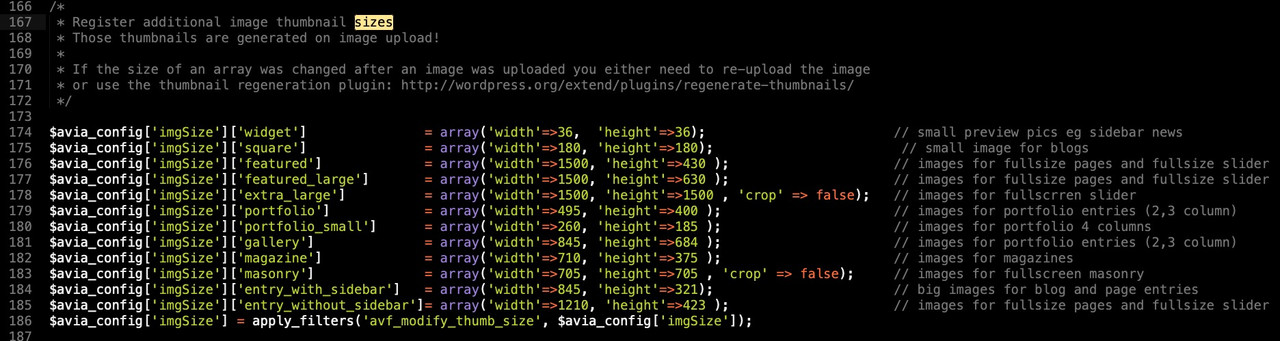
you see there is a filter: avf_modify_thumb_size which we can use to add or modify the thumbnails.
you see that there are on some crop rules on the otheres not
you can redefine such an existing size via that filter f.e:
/***** redefine existing size  ****/
function modified_thumb_for_blog_pages( $size ){
  $size['entry_with_sidebar'] = array('width'=>900, 'height'=>450 );
  return $size;
}
add_filter('avf_modify_thumb_size', 'modified_thumb_for_blog_pages', 10, 1 );
i think for single blog posts the “entry_with_sidebar” is taken.
If you have no sidebar on the blog – clear – the entry_without_sidebar is taken.
BUT: you will not see directly an effect. You had to regenerate the tumbnails ( see comment on functions.php )
Hi,
Please try adding following code to bottom of functions.php file
function av_get_thumb_excerpt( $atts ) {
	$a = shortcode_atts( array(
		'id' => '',
	), $atts );

	$output = get_the_excerpt($a['id']);
	$output .= get_the_post_thumbnail($a['id']);

	return $output;
}
add_shortcode( 'my_shortcode', 'av_get_thumb_excerpt' );
Then you can use the shortcode as following
[my_shortcode id="10"]
and replace ID (10) depending on which post you would like to display. I attached the result in private content field :)
Regards,
Yigit
Thme Enfold version 4.5.7
WordPress 5.3.3
The site starts to go slow and then the entire server is down due to the database overuse , I have checked that he WP table wp_postmeta has grown exponentially in the last month from 200 MB to 900 MB and the grown is in the wp_postmeta table, that appears to repeat information with a lot of rows apparently redundant :
meta_id post_id meta_key meta_value
3896043 16407 _av_el_mgr_version 1.0
3896042 16407 _avia_sc_parser_state check_only
3896039 16405 _edit_last 2
3896037 16406 _wp_attachment_metadata a:5:{s:5:”width”;i:321;s:6:”height”;i:204;s:4:”file”;s:21:”2020/06/05.06-e-1.png”;s:5:”sizes”;a:5:{s:9:”thumbnail”;a:4:{s:4:”file”;s:19:”05.06-e-1-80×51.png”;s:5:”width”;i:80;s:6:”height”;i:51;s:9:”mime-type”;s:9:”image/png”;}s:6:”widget”;a:4:{s:4:”file”;s:19:”05.06-e-1-36×36.png”;s:5:”width”;i:36;s:6:”height”;i:36;s:9:”mime-type”;s:9:”image/png”;}s:6:”square”;a:4:{s:4:”file”;s:21:”05.06-e-1-180×180.png”;s:5:”width”;i:180;s:6:”height”;i:180;s:9:”mime-type”;s:9:”image/png”;}s:15:”portfolio_small”;a:4:{s:4:”file”;s:21:”05.06-e-1-260×185.png”;s:5:”width”;i:260;s:6:”height”;i:185;s:9:”mime-type”;s:9:”image/png”;}s:14:”shop_thumbnail”;a:4:{s:4:”file”;s:21:”05.06-e-1-120×120.png”;s:5:”width”;i:120;s:6:”height”;i:120;s:9:”mime-type”;s:9:”image/png”;}}s:10:”image_meta”;a:12:{s:8:”aperture”;s:1:”0″;s:6:”credit”;s:0:””;s:6:”camera”;s:0:””;s:7:”caption”;s:0:””;s:17:”created_timestamp”;s:1:”0″;s:9:”copyright”;s:0:””;s:12:”focal_length”;s:1:”0″;s:3:”iso”;s:1:”0″;s:13:”shutter_speed”;s:1:”0″;s:5:”title”;s:0:””;s:11:”orientation”;s:1:”0″;s:8:”keywords”;a:0:{}}}
3896036 16406 _wp_attached_file 2020/06/05.06-e-1.png
3896035 16405 _dp_original 16395
3896032 16405 _thumbnail_id 16406
3896031 16405 _wp_old_date 2020-05-15
3896030 16405 _wp_old_date 2020-05-15
3896029 16405 _wp_old_date 2020-05-15
3896028 16405 _wp_old_date 2020-05-15
3896027 16405 _wp_old_date 2020-05-15
3896026 16405 _wp_old_date 2020-05-15
3896025 16405 _wp_old_date 2020-05-15
3896024 16405 _wp_old_date 2020-05-15
3896023 16405 _wp_old_date 2020-05-15
3896022 16405 _wp_old_date 2020-05-15
3896021 16405 _wp_old_date 2020-05-15
3896020 16405 _wp_old_date 2020-05-15
3896019 16405 _wp_old_date 2020-05-15
3896018 16405 _wp_old_date 2020-05-15
3896017 16405 _wp_old_date 2020-05-15
3896016 16405 _wp_old_date 2020-05-15
3896015 16405 _wp_old_date 2020-05-15
3896014 16405 _wp_old_date 2020-05-15
3896013 16405 _wp_old_date 2020-05-15
3896012 16405 _wp_old_date 2020-05-15
3896011 16405 _wp_old_date 2020-05-15
3896010 16405 _wp_old_date 2020-05-15
3896009 16405 _wp_old_date 2020-05-15
3896008 16405 _wp_old_date 2020-05-15
3896007 16405 _wp_old_date 2020-05-15
3896006 16405 _wp_old_date 2020-05-15
3896005 16405 _wp_old_date 2020-05-15
3896004 16405 _wp_old_date 2020-05-15
3896003 16405 _wp_old_date 2020-05-15
3896002 16405 _wp_old_date 2020-05-15
3896001 16405 _wp_old_date 2020-05-15
3896000 16405 _wp_old_date 2020-05-15
3895999 16405 _wp_old_date 2020-05-15
3895998 16405 _wp_old_date 2020-05-15
3895997 16405 _wp_old_date 2020-05-15
3895996 16405 _wp_old_date 2020-05-15
3895995 16405 _wp_old_date 2020-05-15
3895994 16405 _wp_old_date 2020-05-15
3895993 16405 _wp_old_date 2020-05-15
3895992 16405 _wp_old_date 2020-05-15
3895991 16405 _wp_old_date 2020-05-15
….
I cand send you the hole table if you want
Any fix ?
And any suggestion to decrease the wp_postmeta removing unnecesary rows?
Thanks!
Hi,
You can copy the whole avia_woocommerce_product_elements function in the child theme, rename the function and do your own modifications.
remove_filter( 'avf_builder_elements', 'avia_woocommerce_product_elements', 500, 1 );
add_filter( 'avf_builder_elements', 'avia_woocommerce_product_elements_mod', 500, 1 );

function avia_woocommerce_product_elements_mod( $elements )
{
	$posttype = avia_backend_get_post_type();

    if( ! empty( $posttype ) && $posttype == 'product' )
    {
        $elements[] = array("slug"	=> "avia_product_hover",
            "name" 	=> "Hover effect on <strong>Overview Pages</strong>",
            "desc" 	=> "Do you want to display a hover effect on overview pages and replace the default thumbnail with the first image of the gallery?",
            "id" 	=> "_product_hover",
            "type" 	=> "select",
            "std" 	=> "",
            "class" => "avia-style",
            "subtype" => array("Yes - show first gallery image on hover" => 'hover_active', "No hover effect" => ''));

        $counter = 0;
        foreach( $elements as $element )
        {
            if( $element['id'] == 'sidebar' )
			{
				$elements[ $counter ]['required'] = '';
			}
            else if( $element['id'] == 'layout' )
            {
	            $elements[ $counter ]['builder_active'] = true;
	           // unset($elements[$counter]);
            }
            $counter++;
        }
    }

	return $elements;
}
Best regards,
Ismaele
Hey Victoria
We add this code in the function shortcode_handler, line 276. Here the whole foreach in there:
				foreach( $entries as $index => $entry )
				{
					$class  = 'av-upcoming-event-entry';
					$image  = get_the_post_thumbnail( $entry->ID, 'square', array( 'class' => 'av-upcoming-event-image' ) );
					$class .= ! empty( $image ) ? ' av-upcoming-event-with-image' : ' av-upcoming-event-without-image';
					$title  = get_the_title( $entry->ID );
					$link	= get_permalink( $entry->ID );

					$post->ID = $entry->ID; //temp set of the post id so that tribe fetches the correct price symbol
					$price  = tribe_get_cost( $entry->ID, true );
					$venue  = tribe_get_venue( $entry->ID );
					/* ADDED FOR INFOS - START */
					$additional_fields = tribe_get_custom_fields();
					if ($additional_fields['Infos']) {
						$infos = $additional_fields['Infos'];
					} else {
						$infos = " ";
					}
					/* ADDED FOR INFOS - END */
					$post->ID = $default_id;

					$event = '';

					$event .=	"<a href='{$link}' class='{$class}'>";

					if( $image )
					{
						$event .=	$image;
					}

					$event .=		"<span class='av-upcoming-event-data'>";
					$event .=			"<h4 class='av-upcoming-event-title'>{$title}</h4>";
					$event .=			"<span class='av-upcoming-event-meta'>";
					/* ADDED FOR INFOS - START */
					if ($infos)	$event .= "<span class='av-upcoming-event-infos'><strong>{$infos}</strong></span>";
					/* ADDE FOR INFOS - END */
					$event .=				"<span class='av-upcoming-event-schedule'>" . tribe_events_event_schedule_details($entry) . "</span>";

					if( $price )
					{
						$event .=			"<span class='av-upcoming-event-cost'>{$price}</span>";
					}
					if( $price && $venue )
					{
						$event .=				' - ';
					}
					if( $venue )
					{
						$event .=			"<span class='av-upcoming-event-venue'>{$venue}</span>";
					}

					$event .=				apply_filters( 'avf_upcoming_event_extra_data', '', $entry );
					$event .=			'</span>';
					$event .=		'</span>';
					$event .=	'</a>';

					/**
					 * Allows to change the output
					 *
					 * @since 4.5.6.1
					 * @param string $event
					 * @param array $entries		WP_Post
					 * @param int $index
					 * @return string
					 */
					$output .= apply_filters( 'avf_single_event_upcoming_html', $event, $entries, $index );
				}
The added code is between the two “ADDED FOR INFOS – START” and “ADDED FOR INFOS – END”
Best regards
Mike
Hi,
Thank you for the info. You can use the Media Elements > Gallery element for that. Make sure that the Styling > Gallery Style is set to the second option (Big image with thumbnails below). The big image will be replaced with whichever thumbnails you hover.
Best regards,
Ismael
Hey Severin03,
Please have a look at the following thread:
https://kriesi.at/support/topic/hide-titles-and-descriptions-when-you-hover-on-images-or-thumbnails-of-galleries/#post-981078
If you need further assistance please let us know.
Best regards,
Victoria
This reply has been marked as private.
I have noticed that the ‘You might also like” section is not displaying on new blog posts despite having common tags set and the Related Entries option set to “show thumbnail and post title by default”.
As a test i set the same tags as an old post (which is displaying the section) and it is still not display it. From what i can see all settings are identical between posts.
In addition i was having the same issue with the “Share this entry” section not showing which i have had to manually add to the end of a post with the Share element. Is this possibly related to the above as i would like for this to be visible by default as it use to be on older posts without having to manually add it.
many thanks for your help.



