The images for the WooCommerce catalog pages are showing cropped. Although the product images are setup to show uncropped. See this screenshot: https://www.screencast.com/t/r15ukNZu
You can see the cropped images here: https://staging.srf-books.org/product-category/books/paramahansa-yogananda-books/page/5/
I already tried regenerating the thumbnails.
Note that it works fine when I change to the default theme.
Thanks,
Hi,
Thanks for the screenshot and the link to your site, your image is cropped, I recommend using the plugin Simple Image Sizes, it will let you change the image crop to false.
After you make the changes you will need to use the plugin Regenerate Thumbnails to change all of the thumbnails.
Best regards,
Mike
Hey Dameon,
Thank you for the inquiry.
You may need to add this filter in the functions.php file to disable the theme’s default size for the catalogue images.
add_filter( 'avf_wc_before_shop_loop_item_title_img_size', 'avf_wc_before_shop_loop_item_title_img_size_mod', 10, 1 );
function avf_wc_before_shop_loop_item_title_img_size_mod( $thumbnail_size ) {
    return 'woocommerce_thumbnail';
}
If the issue persists, here are a few things you can try to troubleshoot the problem:
1.) Check the WooCommerce settings for the product images to make sure that the correct image sizes are being used for the product categories. You can access these settings by going to “Customize > WooCommerce > Product Images” in the WordPress dashboard.
2.) Check the WordPress media settings to make sure that the correct image sizes are being used for the product images. You can access these settings by going to “Settings > Media” in the WordPress dashboard.
3.) Check the WordPress theme and plugin files to see if there are any custom image size functions being used that might be affecting the way the product images are displayed.
Hope these suggestions help! Let us know if you have any other questions or if you need further assistance.
Best regards,
Ismael
Hi,
Thank you for the update.
To make the default thumbnails and copy larger in the magazine element, please try the following css code.
.av-magazine-thumbnail {
    width: 180px;
    min-height: 180px;
}

.av-magazine-thumbnail img {
    height: 180px;
    width: 180px;
}

.av-magazine .av-magazine-content-wrap .av-magazine-title {
    font-size: 2rem;
    line-height: 1.4em;
}

.av-magazine .av-magazine-content {
    font-size: 1rem;
    line-height: 1.3em;
}
This code will increase the font size of the copy and set the width and height of the thumbnails to 180px. You can adjust these values as needed to achieve the desired size for the thumbnails and content.
I hope this helps! Let me know if you have any other questions or if you need further assistance.
Best regards,
Ismael
If you look here:
https://asiamluxe.com/portfolio-item/skin-laundry-founder-yen-reis-believes-beautiful-skin-is-everything/
The gallery in the middle of the page words fine. The first image is a horizontal of a woman with a hole in the knee of her jeans.
The settings are:
Gallery style>Big image with thumbnails below
Big Preview> no scaling org width and height
Face same size> No
Whereas if you look here:
https://asiamluxe.com/portfolio-item/skin-laundry-founder-yen-reis-believes-beautiful-skin-is-everything-2/
The gallery starts with a vertical image and while it works properly when you click into the slideshow, where the images are 1000 pixels deep or wide (whichever dimensions is bigger is 1000, the other is less. For instance hire images are 1000 wide and vertical images are 1000 tall but the other dimensions is always less). That first image on the page appears much larger, about 1250 or so.
It seems to stretch the image to the width when it’s a vertical for the first image. Is the s the normal behavior? If so is it at all possible to have the image on the page itself, that first image not fit to width but rather display at its actual depth like it does inside the slideshow? If this is just how it works I will see if the client will let me crop those first vertical images differently or always use a horizontal.
Thanks so much.
Int a nutshell the default thumbnails and copy that we are pulling is very small (in the magazine element), we would like to make it larger. I added the page and login information in the private area.
Hi,
Thank you for your patience but I’m not sure what you mean. Do you mean the cropping of the slider image or the placement of the slider image in the slide?
To adjust the Crop Position please see this article: Adjust WordPress Image Crop Position
For the fullsize slider image try adding this to your child theme functions.php:
add_image_size( 'featured_large', 1500, 630, array( 'center', 'center' ) );
and then regenerate your thumbnails using the regenerate thumbnails plugin.
Best regards,
Mike
Dear Support Members, I found this code in a forum thread:
function remove_title_attr(){
?>
<script>
jQuery(window).load(function(){
  jQuery('#wrap_all img.avia_image, #wrap_all .avia-gallery-thumb img, #wrap_all .avia-gallery-thumb a').removeAttr('title');
});
</script>
<?php
}
add_action('wp_footer', 'remove_title_attr');
It works as expected. Thanks! I am wondering how I could achive the same effect for a masonry element. With the above code in place the titles of the images are still displayed on hover. Any chance to add that to the code above?
All the best, Daniel
Hi, I added this code (that you guys gave me) to pull the description which worked great (see image)
$excerpt = ! empty( $entry->post_excerpt ) ? $entry->post_excerpt : avia_backend_truncate( $entry->post_content, apply_filters( ‘avf_magazine_excerpt_length’, 60 ), apply_filters( ‘avf_magazine_excerpt_delimiter’, ‘ ‘ ), ‘…’, true, ” );
I would like to make the whole element larger. Bigger thumbnail and text. Is there a way to do this?
Thanks
may i give you a hint on images and enfold formats. – regardless of your question above?
The compression level of the recalculated image formats is 100% – that is a problem for the performance.
See at your start page the slider – the original image is 287kb ( Worship-5.jpg ) the recalculated image ( Worship-5-1500×630.jpg ) is about : 569kb
my tip: reduce the compression level on recalculated images:
add_filter("avf_jpeg_quality", "avf_set_quality_mod", 9999, 1);
add_filter("avf_wp_editor_set_quality", "avf_set_quality_mod", 9999, 1);
function avf_set_quality_mod($quality) { $quality = 65; return $quality;}
here to 65%
sadly – this influences only the upload – existing images are not influenced on that.
For that – there are some good plugins to recalculate the thumbnails.
For Example: https://de.wordpress.org/plugins/resmushit-image-optimizer/ or from shortpixel: https://de.wordpress.org/plugins/regenerate-thumbnails-advanced/
my recommendation now is : reSmush.it
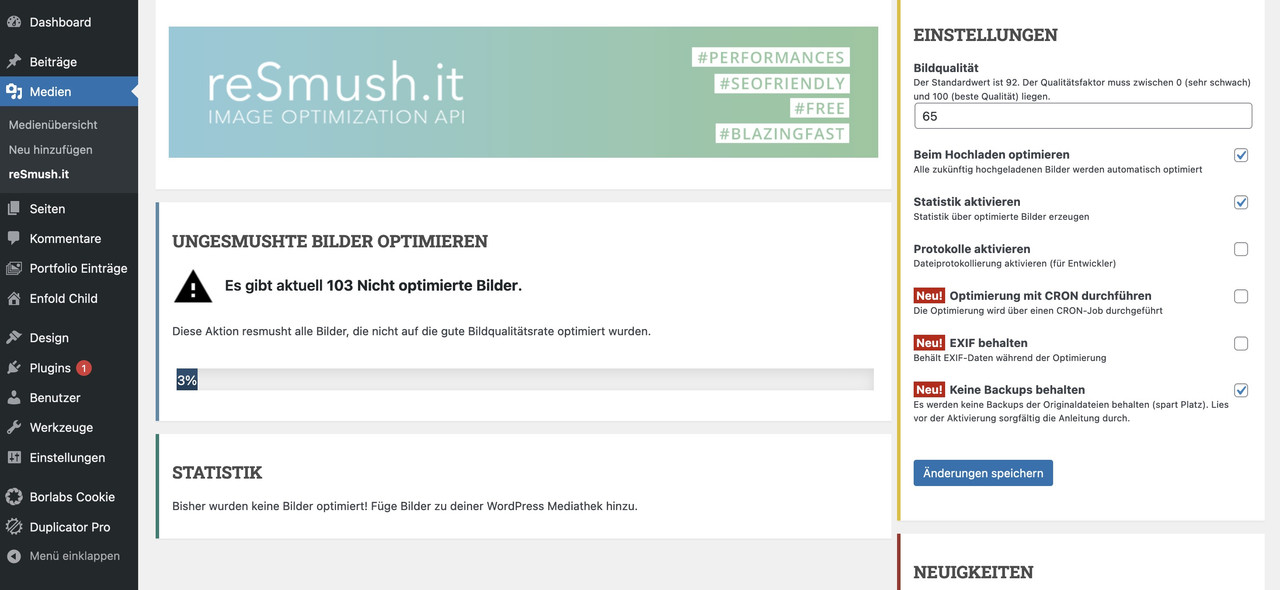
on starting with the plugin – you can choose to have backups of all images – but checking the box ( reight side – to not preserve backups ) you can delete them afterwards.
The plugin will observe the upload of images and optimize them on upload.
i do have compression level 55 on most of my websites – and see if your image on 1500x630px has a significant difference ( espacially for a background-image ) – this image got 56kb !!
https://webers-testseite.de/eleina/
Hey emilconsor,
Thank you for the inquiry.
It sounds like there may be an issue with the gallery script. Did you modify the enfold\config-templatebuilder\avia-shortcodes\gallery\gallery.js file? Here are a few things you can try to troubleshoot the problem:
1.) Check the modifications made to the gallery.js. This is the script that is responsible for displaying the full-size images when the thumbnails are hovered over. There may be an issue with the way this code is handling the image URLs or with the way it is updating the DOM to display the images.
2.) If you are using any custom CSS to style the gallery element, make sure that the CSS is being applied correctly and is not causing any issues. You can try temporarily disabling the custom CSS to see if the issue persists without it.
If the issue persists after trying these steps, you may want to try creating a new gallery using a different plugin or tool to see if the issue is specific to the plugin or tool you are currently using.
I hope these suggestions help! Let me know if you have any other questions or if you need further assistance.
Best regards,
Ismael
We have a problem with the gallery module on our website. Whenever you hover over one of the thumbnails it always shows the first image.
I already tried making a new gallery but that didn’t fix the problem.
I also tried disabling all plugin and using the parent theme but the problem still persist.
Hopefully, you can help me with this.
Regards,
Gerry
hey ismael,
thanks for the code, it’s working.
So this means now that the thumbnails are shown in their original aspect ratio, right?
Thank you very much!
best,
george
Hi Rikard,
Thank you for the opacity code, works perfectly. About borders: I would like not to have the double border in-between the gallery thumbnails. What I managed myself is the following code:
#top div .avia-gallery img { border-right: none; }
But I do not know how to exclude the last image from this. Please see the private link, the first gallery is without the right border, the lower gallery is a default one.
Best regards,
Marina
Hey hgschaffler,
Thank you for the inquiry.
The theme sets its own default image size for the catalogue page to create a more uniform grid, but it can be disabled by adding this code in the functions.php file.
add_filter( 'avf_wc_before_shop_loop_item_title_img_size', 'avf_wc_before_shop_loop_item_title_img_size_mod', 10, 1 );
function avf_wc_before_shop_loop_item_title_img_size_mod( $thumbnail_size ) {
    return 'woocommerce_thumbnail';
}
Best regards,
Ismael
Hello,
I would like to remove the right border for all gallery thumbnails except for the last one, and change the hover color to a lighter one. To see the gallery in question please open the link in the private content. Is it possible to made these changes?
Thank you,
Marina
I modified loop-search.php as such, and seems to work on staging and live site as I had hoped. Is this correct?
$searchthumb = get_the_post_thumbnail( $the_id, ‘large’ );
echo “<span class=’search-result-counter {$counterclass}’>{$searchthumb}</span>“;
Also, these have a child theme, so simpler. How might I implement this in our other Enfold site that does NOT use a child theme? Thanks!
Hi,
Thanks for your screenshots, it looks like you are looking at the correct images, Shop Catalog 450×450
So I would change this one to no crop and then regenerate the thumbnails again, you should be able the regenerate this one size if you wish in the plugin.
Best regards,
Mike
Hi Mike,
thank you very much again for your detailed answer. I really appreciate you trying to help here. Even if the topic doesn’t directly concern the Enfold Theme itself :)
Unfortunately, I’m not that good with the technical settings. But I think I understand the problem and you are right :)
I opened the images cropped in the shop in the catalog in a new tab and the images concerned are really all cropped.
I have now installed the Simple Image Size Plugin and in the plugin the size 450×450 is also displayed with the Shop Catalog images AND the images are all cropped. This is how the plugin shows me that all images are cropped.


So I just have to change the setting for the Shop Catalog images so that these images are no longer cropped and then regenerate all the thumbnails again?
Or do I also have to adjust the sizes in the WordPress settings. Also from 800 to 600 and from 600 to 300?
Best regards
Christian
-
This reply was modified 3 years, 3 months ago by
 Chrisxx1982.
Hi,
If you use the Simple Image Sizes plugin you can change the size of the shop catalog images, there is no option to change this in the theme.
Your first screenshot is from WordPress ▸ Dashboard ▸ Settings ▸ Media ▸ Media Settings ▸ Image sizes, it is not a WooCommerce setting, you probably meant WordPress instead of WooCommerce, I just wanted to make sure we are talking about the same setting, and yes that is correct.
The default shop catalog image size is 450×450, when I check my Shop Demo with the latest Enfold and WooCommerce none of my images changed after the last update and the only difference I see in sizes are
woocommerce_thumbnail 300×300
woocommerce_single 600×0
and yours are:
woocommerce_thumbnail 600×0
woocommerce_single 800×0
So your woocommerce_thumbnail are twice the size as the default, try right-clicking on your shop images that look cropped and open the image in a new tab and see if the whole image shows or if the image is actually cropped.
I would think that even if the image is twice the size the image would scale down to show the whole image as the thumbnail, so I believe that your image is actually cropped and if so the only way to fixed it would be to regenerate the thumbnails again without cropping. Cropping is the default setting for woocommerce_thumbnail image.
Best regards,
Mike
Hi Mike,
Thank you very much for your detailed answer.
Yes, the problem only arose after I recreated all the images with the plugin mentioned “Force regenerate thumbnail”.
I ran the plugin you suggested again and saw that the image size for the “shop catalog” preview images was set to 450×450 pixels.
Look at the attachments ->


Where can I adjust this size in the theme? Unfortunately I can’t find any settings in the theme options there.
By the way, in the Woocommerce settings -> media I have the check mark
“crop the thumbnail to the exact size ( thumbnails are usually proportional )”. Shouldn’t that be correct?
Thank you again for your help.
Best regards
Christian
Hi Antonella,
I am sorry for the late reply!
Your product images are not showing up on my end but I have added following code to bottom of functions.php file of your child theme
add_filter( 'avf_wc_before_shop_loop_item_title_img_size', 'avf_wc_before_shop_loop_item_title_img_size_mod', 10, 1 );
function avf_wc_before_shop_loop_item_title_img_size_mod( $thumbnail_size ) {
    return 'woocommerce_thumbnail';
}
Could you please clear cache and review your website?
Best regards,
Yigit
Also, can I make the thumbnails square at all?
So I did the below, and like this look best, but is there any way to make the image linked to the same as the title next to it? Thanks!
Replace it with:
$searchthumb = get_the_post_thumbnail( $the_id, ‘large’ );
echo “<span class=’search-result-counter {$counterclass}’>{$searchthumb}</span>”;
Add this on Quick CSS or custom.css:
.search-result-counter {
padding: 0;
width: 75px;
height: 75px;
}
.search-result-counter img {
width: 100%;
height: 100%;
border-radius: 100px;
}
#top.search-results .entry-content,
#top.search-results .post-title {
margin-left: 45px;
}
-
This reply was modified 3 years, 3 months ago by
 Illingco.
-
This reply was modified 3 years, 3 months ago by Illingco.
-
This reply was modified 3 years, 3 months ago by Illingco.
Hi,
It sounds like regenerating your thumbnails is the root cause. I recommend testing on your staging site to correct this.
Best regards,
Mike
Hi Mike,
first of all, thank you for your detailed answer.
Yes, only after I regenerated the images with the “Force regenerate thumbnail” plugin does it look like on the screenshot that some images are too big and no longer fit in the frame. Everything was great before and each product was fully visible and not cut off anywhere. With some pictures it still fits, but many have also grown very strangely.
I didn’t change anything in the Woocommerce settings for the image sizes. The settings are as shown in the screenshot.
I have a staging site.
Of course, I can now start simply changing the image sizes. It’s just very strange that everything was ok before and only after the thumbnails were created again did the view change. So the error should be somewhere else.
Best regards
Christian
Hi,
Chrisxx1982 thanks your your patience and your screenshot: https://imgbb.com/47sQ41L
I see that you said: The problem first appeared when I regenerated the thumbnails. is this because you changed the size of some of your images?
I recommend following audreyweddingsalon advice and first create a staging site to test on, most cPanel webhosts have a staging site option, some in the dashboard:

Others add the option in the Softaculous WordPress Management

There may be other staging site options in different cPanel servers, these are the two that I have seen.
Then for your issue I recommend installing the plugin Simple Image Sizes as it will give you an easy way to set certain images to no crop:

afterward you will want to use a regenerate thumbnails plugin.
The built-in thumbnail regeneration in the Simple Image Sizes plugin often fails for me, this is why I recommend a different plugin to regenerate thumbnails.
Please note there are several woocommerce & shop image sizes so try to change the ones you want to.
Best regards,
Mike
Thanks for the tip. I don’t dare to try it yet :)
The Woocommerce 3.0 product gallery is currently set in the Enfold Theme settings. ( So under shop options -> product gallery -> Woocommerce 3.0 gallery).
Woocommerce 3.0 product gallery has been active for a long time. The problem first appeared when I regenerated the thumbnails.
I’m now also afraid to switch to the standard Enfold product gallery. I remember that the images in the products were blurred and I never had any other problems with the Woocommerce 3.0 product gallery.
Unfortunately, I’m not very familiar with the subject.
I mean the product page where all the products are listed as shown in the picture. Directly in the products, the images are normal. But some of the thumbnails are too big and don’t fit into the frame.
How can I customize this?
Hey j0schi,
Thank you for your patience, please try this css:
@media only screen and (max-width: 767px) {
.responsive #top #wrap_all .container {
    width: 95%;
    max-width: 95%;
}
.responsive table.shop_table .product-subtotal,
.responsive .shop_table .product-quantity,
.responsive table.shop_table.cart .product-thumbnail {
	display: table-cell;
	padding: 0;
}
.responsive table.shop_table.cart .product-thumbnail,
.responsive table.shop_table.cart .product-thumbnail img {
	width: 50px;
    min-width: 50px;
}
}
The expected results:

Best regards,
Mike



