-
Search Results
-
Looking for a snippet to show a deafult image in blog views – but NOT Single view (there only images should be shwon, which are uplaoded with the post).
I tried it like this:function enfold_fallback_thumb_url( $size = ‘enfold-blog-thumb’ ) {
// Deine Fallback-ID (anpassen!)
$fallback_id = 4283;
return wp_get_attachment_image_url( $fallback_id, $size );
}// Enfold-kompatibler Filter: Nur Übersicht, kein Single
function enfold_fallback_thumbnail_html( $html, $post_id, $post_thumbnail_id ) {
global $post;// Admin/Single/hat Bild: überspringen
if ( is_admin() || is_singular() || $post_thumbnail_id ) {
return $html;
}// Nur Posts in Übersichten
if ( ! is_home() && ! is_archive() || $post->post_type !== ‘post’ ) {
return $html;
}// Fallback-Bild rendern (Enfold-Size)
$fallback_html = ‘<img src=”‘ . enfold_fallback_thumb_url( ‘enfold-blog-thumb’ ) . ‘”
alt=”‘ . esc_attr( get_the_title( $post_id ) ) . ‘”
class=”attachment-enfold-blog-thumb wp-post-image fallback-thumb” />’;return $fallback_html;
}
// Filter aktivieren
add_filter( ‘post_thumbnail_html’, ‘enfold_fallback_thumbnail_html’, 10, 3 );But it doesn’t work. Any advices? Thakns
TimHi
We are updating a site for our client and he wants enlarged images to display at full size (1500px) wide in lightbox when a smaller image element is clicked upon.
We were advised to add the following into the functions.php file. However, I think this only works in an image gallery?
function avia_change_gallery_thumbnail_link($link, $attachment, $atts, $meta){
$link = wp_get_attachment_image_src($attachment->ID, “full”);
return $link;
}
add_filter(‘avf_avia_builder_gallery_image_link’, ‘avia_change_gallery_thumbnail_link’, 10, 4);Is there a way of forcing enlarged images to display full size when clicking smaller or thumbnail elements?
Thanks in advance
Steve
Topic: Responsive Issue
Dera Sirs,
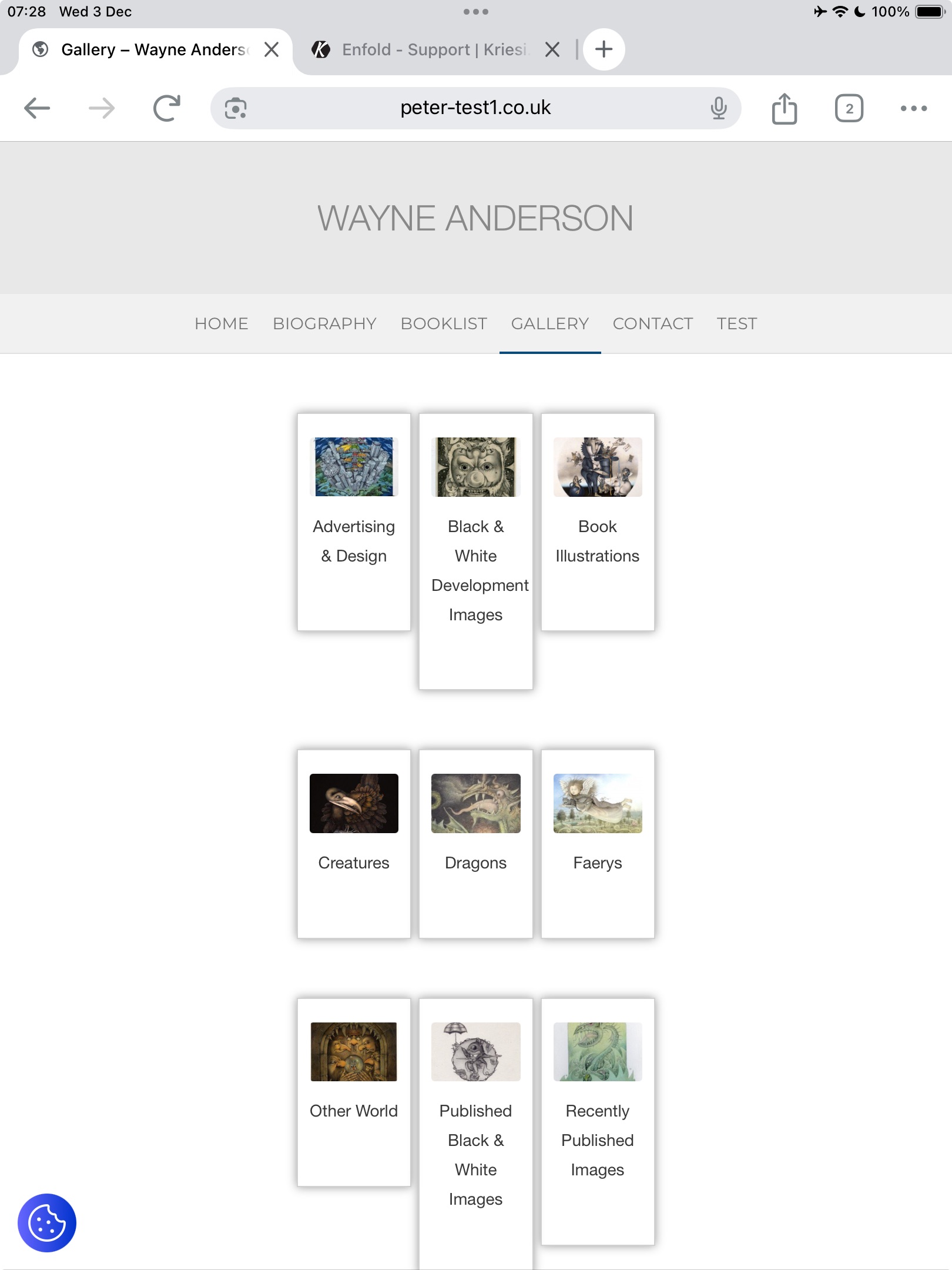
I have an issue with this page https://peter-test1.co.uk/gallery/ on ipad both landscape and portrait the thumbnails seem to have different heights . It is possible to have these heights consistent so all are the same height. See screen shotMany thanks. Pete
UPDATE
I found this code and that fixed it:add_filter( 'avf_wc_before_shop_loop_item_title_img_size', 'avf_wc_before_shop_loop_item_title_img_size_mod', 10, 1 ); function avf_wc_before_shop_loop_item_title_img_size_mod( $thumbnail_size ) { return 'woocommerce_thumbnail'; }I am building a shop with woocommerce and I have selected in the customizer to have the product thumbnails be uncropped, but they are defaulting to 1:1. Have tried all combinations. I have setup another page to be the shop page, using the Shop Single 450×999 image size, which works OK, but all the related products are still 1:1 ratio. Can you see what’s blocking the upcropped setting?
thanks
Nancyhi
I am building a shop with woocommerce but when I look at it without being logged in, the individual products are not opening from the shop grid. I see an ?avia_forced_reroute=1 in the url. Tested without plugins but no change. Can you see what the problem is?Also I have selected in the customizer to have the product thumbnails be uncropped, but they are defaulting to 1:1. Have tried all combinations.
thanks
NancyHello,
Looking to install an image view like this one.Has multiple thumbnail sliders on the right with conditional color options. The color slider changes depending on which door is chosen. And the door image thumbnail is different from the door image that displays, so lots of options. Can you suugest something that may work within enfold or a plugin?
https://www.chiohd.com/homeowners/garage-doors/accents
Thank you
I need some help please to tweak a function you supplied to me in this thread last year.
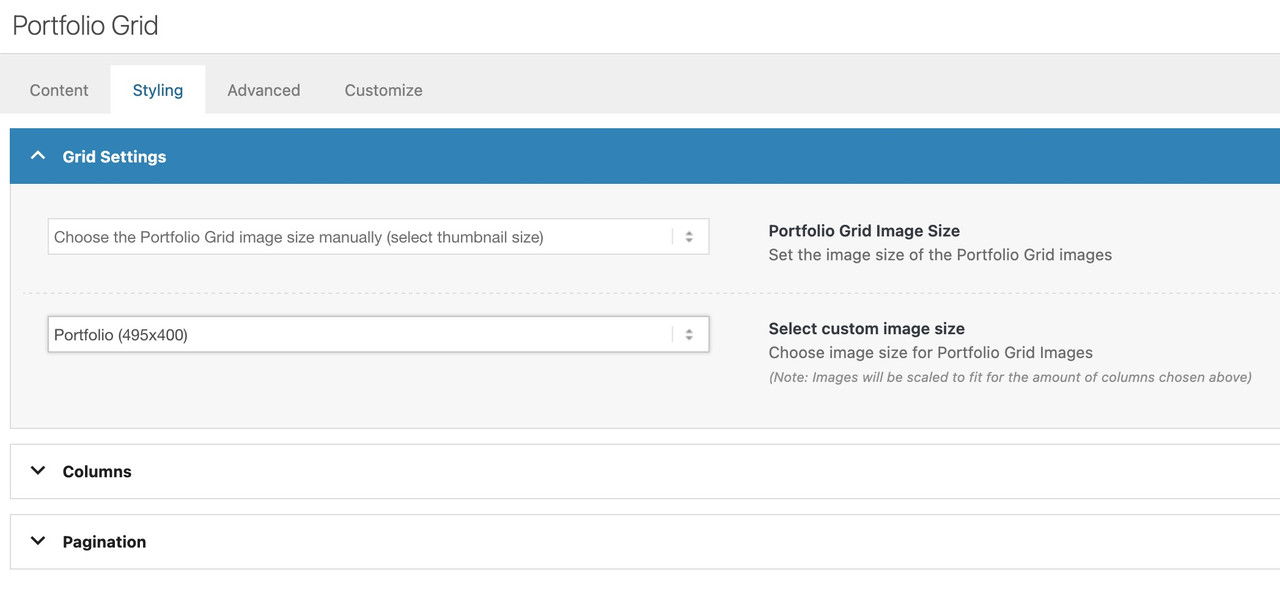
The function removes 495px wide images from srcset: these images were originally created on upload but then deleted as they were no longer used anywhere but unfortunately were still included in srcset definitions and didn’t display.
function avf_remove_specific_image_size_from_srcset( $sources, $size_array, $image_src, $image_meta, $attachment_id ) {
    if ( isset( $sources[495] ) ) {
        unset( $sources[495] );}
    return $sources;
}
add_filter( 'wp_calculate_image_srcset', 'avf_remove_specific_image_size_from_srcset', 10, 5 );
The image URL in srcset was …image-name-495×279.jpg, …image-name-495×335.jpg etc i.e. landscape images.
I have now discovered a problem that portrait images that were uploaded as 400px tall but then also deleted are referenced in srcset and not being displayed, e.g. …image-name-170×400.gif and …image-name-268×400.gif as two examples.
The above filter appears to work just on the first part of the image size URL specified in srcset, i.e. if I change 495 to 170 then the deleted 170×400.gif reference gets removed from srcset. I’ve tried $sources[x400] but that just crashes the site… :-)
Is there a function/filter, or modification to the above, that can remove all the 400px tall portrait references as well as 495px wide?
Topic: Monster Thumbnails
I exported pages using WP-All Import and then reimported them as portfolio entries. I must have made a mistake with the image settings.
In any case, the thumbnails in the post and portfolio listing lists don’t appear at 60 x 60 px, but at full size. The image also displays a strange class with spaces.. WP-Allimport support told me I needed to contact you.
You’ll find screenshots and admin access in the private section. Could you please help me get everything back to normal.
Regards
GünterMy problem is that the full width easy slider is not seen as accessible by our Accessibility vendor, as it presents as a list item.
https://www.integralrecoveries.com/leadership-copy/
Per the team:
Lists: Remove List HTML
Content that does not function as a list should not be coded as such.
The header thumbnail image is coded as being a part of a list when it should not be.Remediation Recommendation
Ensure this content is not coded as a list. Generally, this will mean removing <ol>, <ul>, <dl>, <dt>, <dd>, or <li> elements that are holding this content.Here is a snippet of the code displaying the Full width easy slider:
Here is the code snippet I'm referring to '''<li class="avia-slideshow-slide av-juo9jzkl-8700c68c0f38de355eb6ad66836a0d85__0 av-single-slide slide-1 slide-odd next-active-slide active-slide" style="visibility: visible; opacity: 1; transition: none; transform: translateZ(0px);"><div data-rel="slideshow-1" class="avia-slide-wrap "><img decoding="async" fetchpriority="high" class="wp-image-621 avia-img-lazy-loading-not-621" src="https://www.integralrecoveries.com/wp-content/uploads/2019/06/Header_About2000x300.jpg" width="2000" height="300" title="Header_About2000x300" alt="" itemprop="thumbnailUrl" srcset="https://www.integralrecoveries.com/wp-content/uploads/2019/06/Header_About2000x300.jpg 2000w, https://www.integralrecoveries.com/wp-content/uploads/2019/06/Header_About2000x300-300x45.jpg 300w, https://www.integralrecoveries.com/wp-content/uploads/2019/06/Header_About2000x300-768x115.jpg 768w, https://www.integralrecoveries.com/wp-content/uploads/2019/06/Header_About2000x300-1030x155.jpg 1030w, https://www.integralrecoveries.com/wp-content/uploads/2019/06/Header_About2000x300-1500x225.jpg 1500w, https://www.integralrecoveries.com/wp-content/uploads/2019/06/Header_About2000x300-705x106.jpg 705w, https://www.integralrecoveries.com/wp-content/uploads/2019/06/Header_About2000x300-450x68.jpg 450w" sizes="(max-width: 2000px) 100vw, 2000px" style="left: 0px;"></div></li>'''I’ve tried several options:
The image is set as 2000px x 300px btw.
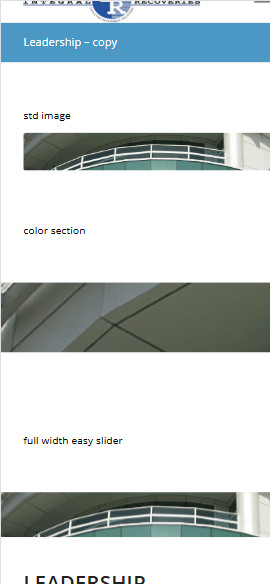
1) Displaying as an image (no scaling, original width & height) – why doesn’t this work, it would solve many problems.
2) Color section – I’ve tried all options under Section Height including – Minimum Custom height in % based on browser windows width (responsive). However, it is not responsive (using 15% custom height for example). When you minimize for phone, it just blows up the left portion of the image height and does not adjust horizontally.
3) full width easy slider – This is what I’ve been using on all pages, which is responsive and is being rejected by the accessibility team as it uses a list element to display.
I’ve setup the following test page to show the differences of the three approaches with text headers
https://www.integralrecoveries.com/leadership-copy/
Inspect the page and display as an iphone 14 Max and you will see what happens. See attachment below
How can I fix this? I’m just trying to display a page header that is not coded as a list.
Thank you very much in advance!