Could you please advise me on where I can change the code so that the big preview image is not cropped but displays the full height? I don’t want to have to use the simple image plugin to adjust the image size since it is not being maintained. (but I can use one to regenerate the thumbnails. ) Thanks!
-
This reply was modified 2 years, 6 months ago by
 williamslyd.
For a client I needed to restyle their website. So I started to create a manual backup. In the backup folder I noticed that the daily backups (created automatically) had sizes larger than 2GB. I was in kind of shock, since it’s only a small website.
Doing some research I found out that Enfold created huge amounts of images (thumbnails) for each image that has been uploaded. And even more strange: a lot of image files are way larger than the originals.
I don’t need all these images and their sizes. I create my own images in Photoshop, crop them in the right aspect ratio and save them compressed. These are the only images I want to use.
Searching at this forum I see a lot of people are struggling with this issue. It’s hard to find out the best solution.
What is the best and easiest way anno 2023 to get rid of all the images/thumbnails I don’t need? Preferably I don’t want to code, don’t want to delete them manually through FTP and don’t want to install several external plugins…
Hi,
but it shrunk my Menu type size significantly and did not fix the two square images..
The filter should not affect the menu but it will reactivate the options in the Appearance > Customize > Woocommerce > Product Images panel and override the default theme settings. Did you adjust the Thumbnail cropping settings to 1:1? Please try to set the cropping to Uncropped or Custom, then specify the desired aspect ratio. The images are probably displaying as square because the aspect ratio is set to 1:1.
Best regards,
Ismael
Hi,
They differ significantly because I am trying to change them to make them go in the 4:3 dimensions.
The images should have the same size to maintain a consistent grid. Also, please note that there might be some minor adjustments in the frontend because product images inherit the size of the columns by default. If they don’t display as configured after resizing them to a specific dimension, please add this filter to the functions.php file.
add_filter( 'avf_wc_before_shop_loop_item_title_img_size', 'avf_wc_before_shop_loop_item_title_img_size_mod', 10, 1 );
function avf_wc_before_shop_loop_item_title_img_size_mod( $thumbnail_size ) {
    return 'woocommerce_thumbnail';
}
Best regards,
Ismael
I have read the threads. Set the size in the customize woo commerce settings. I have added the regenerate thumbnails plug-in… and two images that are the exact same size as the others will NOT cooperate. I have spent hours on this. Can you help??
I have changed the sizes, re-edited, reuploaded and everything under the sun but these few images will not play nice and fit in their box. I changed one and it would not work then using the same image multiple times it finally worked so something weird is going on
Costa Rica Sunrise and Ricketts Glenn will not comply no matter what I do.
https://pamelagoodyer.com/fine-art-limited-editions/ You can see them here.
Thank you in advance for your help.
This reply has been marked as private.
Hi Yigit,
Ismael’s solution doesn’t work.
Do you have a tip for me please…
How can I apply the overlay also on the thumbnails of the mansory gallery?
Thanks in advance
Lion
Hi Yigit,
I know that as Ismael says the images can be downloaded in one way or another, but the watermark solution weighs down the site too much and in any case on my images there is already a watermark.
I would just like to apply the change you suggested also to the thumbnail page of the mansory gallery.
How can I do? Can you tell me which file I can edit o what to do please…
Thanks in advance…Lion
Yigit,
with this change on iOS now with the lightbox open it is not possible to save the file. Perfect.
Is it possible to do the same thing in the thumbnail grid of the mansory gallery, i.e. remove the menu that appears by holding down a thumbnail and prevent the “Download linked file” option?
By the way : not your Question – i know but
this is something i miss on default too:
the image sizes generated by enfold are all ( some are squared) in landscape format.
At least one image format should be created in portrait mode, e.g. for team members. Of course, the aspect ratios required for landscape shots are not suitable for such portrait shots. Here, 3:4 or 4:5 would probably be common formats.
you can do that by a snippet inside child-theme functions.php:
add_image_size( 'news_size', 175, 260, false );
add_image_size( 'portrait', 900, 1200, false );
add_image_size( 'portrait_small', 450, 600, array( 'center', 'top' ) );  // this is with crop : true and crop properties

function my_custom_sizes( $sizes ) {
    return array_merge( $sizes, array(
        'news_size' => __( 'News Size' ),
		'portrait' => __( 'Portrait' ),
		'portrait_small' => __( 'Portrait small' ),
    ));
}
add_filter( 'image_size_names_choose', 'my_custom_sizes' );
but: this only works on uploadiing images. If you like to recalculate the existing images – use a recalculation plugin ( force regenerate Thumbnails etc.)
Hi,
Thank you for the update.
It is on category pages shown in the link below that the thumbnail sizes aren´t right and they don´t seem to be targeted by $size[‘portfolio‘]. Can you tell me which description I need to use? Thanks!
To adjust the thumbnail in the category or archive pages, try to add this filter in the functions.php file. This modification will set the “portfolio” size as the default thumbnail.
add_filter("avf_post_slider_args", function($atts, $context) {
	if( $context == "archive" ) {
		$atts['preview_mode'] = 'custom';
		$atts['image_size'] = 'portfolio';
	}
	return $atts;
}, 10, 2);
Best regards,
Ismael
Hi Ismael,
that basically works, thanks. I just need your help with one small thing:
It is on category pages shown in the link below that the thumbnail sizes aren´t right and they don´t seem to be targeted by $size[‘portfolio‘]. Can you tell me which description I need to use? Thanks!
Best regards,
Sara
Hello,
since the latest update, the following function no longer works and creates empty single product pages.
function bt_woocommerce_overview_banner_image()
{
global $avia_config;
if(avia_is_dynamic_template() || is_paged() || is_search() ) return false;
$image_size = “entry_with_sidebar”;
$layout = avia_layout_class( ‘main’ , false );
if($layout == ‘fullsize’) $image_size = ‘entry_without_sidebar’;
if(is_shop())
{
$shop_id = function_exists( ‘wc_get_page_id’ ) ? wc_get_page_id( ‘shop’ ) : woocommerce_get_page_id( ‘shop’ );
if($shop_id != -1)
{
$image = get_the_post_thumbnail($shop_id, $image_size);
if($image) echo “<div class=’page-thumb’>{$image}</div>”;
}
}
if(is_product_category())
{
global $wp_query;
$image = “”;
if(isset($wp_query->query_vars[‘taxonomy’]))
{
$term = get_term_by( ‘slug’, get_query_var($wp_query->query_vars[‘taxonomy’]), $wp_query->query_vars[‘taxonomy’]);
if(!empty($term->term_id))
{
$attachment_id = get_woocommerce_term_meta($term->term_id, ‘thumbnail_id’);
$style = get_woocommerce_term_meta($term->term_id, ‘av_cat_styling’);
if(!empty($attachment_id) && empty($style))
{
$image = wp_get_attachment_image( $attachment_id, ‘full’, false, array(‘class’=>’category_thumb’));
if($image) echo “{$image}”;
}
}
}
}
}
What can we use instead of this function?
Many greetings
Hey jaimemerz,
Thank you for the inquiry.
The easiest solution would be to upload images with the same size and aspect ratio. The featured images in the posts above vary widely in size, one is 1210px in width while the other is only 400px. Other options are to edit the enfold/includes/loop-index.php template file and assign a different thumbnail to display in the posts, or use the avf_post_featured_image_link filter.
function avf_post_featured_image_link_mod($image) {
    if (is_single()) {
        $image = get_the_post_thumbnail( $current_post['the_id'], 'medium' );
    }

    return $image;
}
add_filter('avf_post_featured_image_link','avf_post_featured_image_link_mod', 10, 1);
Best regards,
Ismael
Hello!
We’re running into some confusion for the best practices with sizing blog featured images. On most of our sites, the featured image keeps a consistent ratio. However, on the site in private content, we’re seeing different image sizes between blog posts. Can you please advise on how we can standardize this more—whether it’s in the file creation, or regenerating thumbnails?
Thanks!
Hi,
Thank you for the update.
We edited the css code and added a few css media queries to adjust the height of the images on tablet view or smaller screens and prevent distortion.
This is the modified css code.
@media only screen and (min-width: 990px) {
  #top.archive .thumbnail_container img {
    height: 324px;
  }
}

@media only screen and (min-width: 768px) and (max-width: 989px) {
  #top.archive .thumbnail_container img {
    height: 224px;
  }
}

@media only screen and (max-width:767px) {
  .responsive #top #main .sidebar {
    display: block !important;
    width: 100% !important;
    border: 0 !important;
  }

  .responsive #top #main .sidebar .inner_sidebar {
    margin-left: 0 !important;
  }

  #top.archive .thumbnail_container img {
    height: 178px;
  }
}
Please make sure to purge the cache before checking the page.
Best regards,
Ismael
Hey sarawh,
Thank you for the inquiry.
You can use the avf_modify_thumb_size filter to adjust the dimension of the existing thumbnails instead of directly editing the functions.php file. Usage examples can be found in the following threads.
// https://kriesi.at/support/topic/alter-featured-image-on-blog-does-not-work/#post-1342432
// https://kriesi.at/support/topic/title-and-image/#post-1304670
// https://kriesi.at/support/topic/source-for-masonry-image-size/
Best regards,
Ismael
Hi,
a while ago I asked how we can change the size of the thumbnails on our blog archive pages. We need to do this because we have text on our images which is cut off with the predefined images size. You gave me a reply which I have understood (see below) – but can I implement this change in the child theme? I´ve tried adding this code but it isn´t making any difference, which suggests that I am doing something wrong ;) I have to add that I don´t know much about php. I re-uploaded one of the thumbnails after adding the code but that also made no difference.
/* Resize portfolio thumbnails on archive/category pages in the blog */
$avia_config[‘imgSize’][‘portfolio’] = array( ‘width’ => 710, ‘height’ => 375 ); // images for portfolio entries (2,3 column)
You replied:
Hi,
Thank you for your patience and the links to your site, the portfolio size images on the archive pages is set by line 190 in the enfold/functions.php file
I didn’t find an easy way to adjust the image size on the archive page so I would recommend changing the portfolio size from array(‘width’=>495, ‘height’=>400 ); to mmatch the magazine size array(‘width’=>710, ‘height’=>375 ); and then you will need to regenerate your thumbnails and then check.
This would also change any other use of the portfolio thumbnails on your site, but it doesn’t look like this would be an issue for you.
Best regards,
Mike
Post Link: https://kriesi.at/support/topic/change-layout-number-of-columns-on-blog-category-pages/#post-1310490
I’m so sorry… it still does not work.
I placed in in the Appearance Editor. But still this “Not found field”.
There was already some info in the editor. Could that be the reason? Or could it be this text: “Don’t display products in the clothing category on the shop page.”
This is al the info there is in there:
@media only screen and (max-width: 768px) {
/* Add your Desktop Styles here */
.responsive #top .products .product:nth-child(odd) {
clear: none !important;
}
}
post-type-archive .woocommerce-no-products-found {
display: none;
}
function custom_pre_get_posts_query( $q ) {
$tax_query = (array) $q->get( ‘tax_query’ );
$tax_query[] = array(
‘taxonomy’ => ‘product_cat’,
‘field’ => ‘slug’,
‘terms’ => array( ‘cursus’ ), // Don’t display products in the clothing category on the shop page.
‘operator’ => ‘NOT IN’
);
$q->set( ‘tax_query’, $tax_query );
}
add_action( ‘woocommerce_product_query’, ‘custom_pre_get_posts_query’ );
For your information: This is in the Enfold Quick CSS. Could that be interfering?
.single-product-main-image {width: 66% !important;}
#top .product div.images img {
width: auto;
margin: 0 auto;
}
#top.archive .thumbnail_container img {
height: 324px;
}
@media only screen and (max-width:767px) {
.responsive #top #main .sidebar {
display: block !important;
width: 100% !important;
border: 0 !important;
}
.responsive #top #main .sidebar .inner_sidebar {
margin-left: 0 !important;
}
}
.avia-button {
background-color:gold!important;
}
.product_cat-cursus .single-product-main-image{
width: 30%!important;
}
add_action( ‘woocommerce_product_query’, ‘custom_pre_get_posts_query’ );
Hi,
For your other issue your images are in a portrait size and the element is showing a landscape size, so you could change the image size of the image used.
The category page is using the “portfolio” image size, so try using the Simple Image Sizes plugin and change the image size in the WordPress ▸ Dashboard ▸ Settings ▸ Media ▸ Media Settings options, look for portfolio size and change the size and disable cropping:

and click the Save Changes button at the bottom of the page, then use the Regenerate Thumbnails plugin, to regenerate all of your images (thumbnails), this plugin works better than the built-in option of the other plugin, as it sometimes stalls if you have a lot of images.
Best regards,
Mike
Hi,
Thank you for the info.
We’ve checked the site but we are not yet sure what is causing the issue. Have you tried regenerating the thumbnails? You can use the following plugin to regenerate the images, but please make sure to create a site backup before doing so.
// https://wordpress.org/plugins/regenerate-thumbnails/
Best regards,
Ismael
i don’t know how your plugin react on this. My solution above is only for working with snippets inside your child-theme functions.php.
i do not know how those regenerate Plugins do their job. – F.e. if they remove allready existing recalculated images.
There is one Plugin from : Shortpixel Group: https://wordpress.org/plugins/regenerate-thumbnails-advanced/
if this plugin recalculates the images – you can have under advanced options to erase non recalculated images from the uploaded folder.
(click to enlarge:)
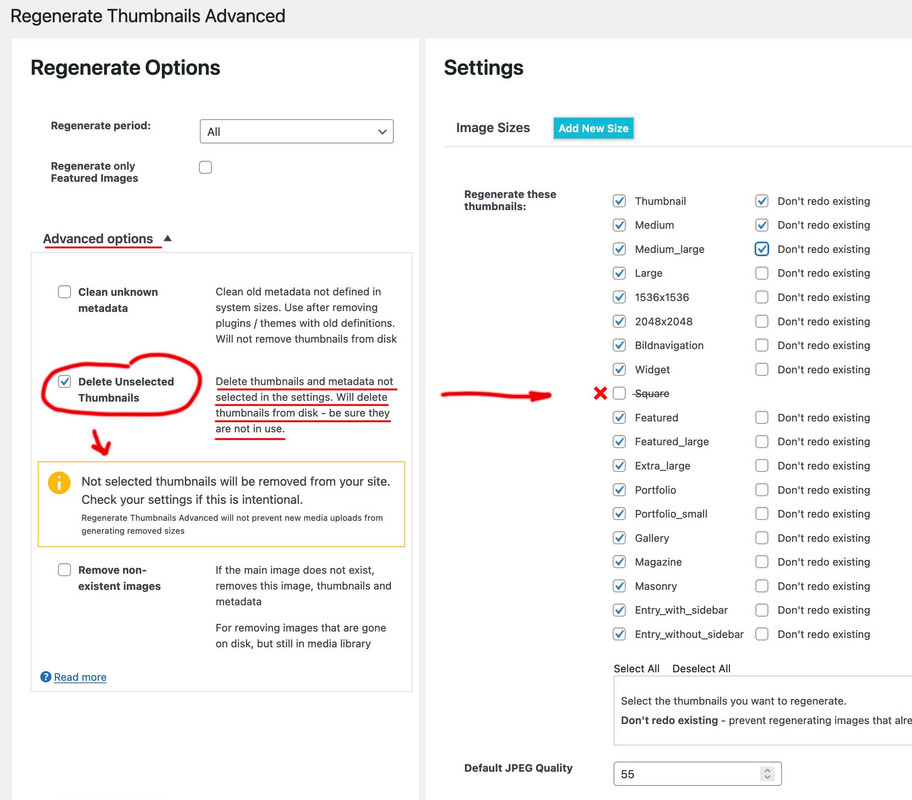
btw.: this plugin also can create new image sizes.The only thing I notice is that the compression level does not work for Enfold formats.
But you can set that beforehand by f.e:
add_filter("avf_jpeg_quality", "avf_set_quality_mod", 9999, 1);
add_filter("avf_wp_editor_set_quality", "avf_set_quality_mod", 9999, 1);
function avf_set_quality_mod($quality) { $quality = 55; return $quality;}
Guenni,
So, I am trying to do this step-by-step, removing the default Enfold-based image sizes first. I kept the bulk of your framework, but made a few little changes. I applied the code below to my child themes functions file, and then did a full regeneration of the images, and removed any images that did not have sizes anymore.
// Start Removing Image Sizes - Rev 20230907-3 //

// Remove or unregister unused WordPress Image Sizes (via Enfold)

// Disable loads of Enfold & WP image sizes upon upload
// do image sizes manually, double-size with high compression for retina screens
// use Photoshop to set exact double size and quality between Q30 and Q40
add_action('init', 'remove_enfold_image_sizes');
function remove_enfold_image_sizes() {
  remove_image_size('square');
  remove_image_size('featured');
  remove_image_size('featured_large');
  remove_image_size('portfolio');
  remove_image_size('portfolio_small');
  remove_image_size('gallery');
  remove_image_size('magazine');
  remove_image_size('masonry');
  remove_image_size('entry_without_sidebar');
  remove_image_size('entry_with_sidebar');
  remove_image_size('shop_thumbnail');
  remove_image_size('shop_catalog');
  remove_image_size('shop_single');
  remove_image_size('shop_gallery_thumbnail');
}
// Remove unneeded WP image sizes
add_filter( 'intermediate_image_sizes_advanced', 'prefix_remove_default_images' );
// Remove default image sizes here.
function prefix_remove_default_images( $sizes ) {
// do NOT remove small and medium sizes, they are used in backend Media Library!
// unset( $sizes['small']); // 150px
// unset( $sizes['medium']); // 300px
 unset( $sizes['large']); // 1024px
 unset( $sizes['medium_large']); // 768px
 unset( $sizes['1536*1536']); // 1536x1536px
 unset( $sizes['2048*2048']); // 2048x2048px
 return $sizes;
}

// Moduly Image Sizes
add_image_size('Moduly-Square', 1080, 1080, false);
add_image_size('Moduly-Horizontal', 1920, 1080, false);
This is the result (on Performance Tab > Responsive Images Overview section), after the above adjustments.
I do see the couple added image sizes, but unless I am a complete idiot, it still looks like the image sizes above are still being injected.
Images aspect ratio: 1 : 1
36*36 – Widget (added by theme)
108*108 – thumbnail (WP default size)
180*180 – Square (added by theme)
540*540 – medium (WP default size)
705*705 – Masonry (added by theme)
1080*1080 – large (WP default size)
1080*1080 – Moduly-Square (added by a plugin)
1500*1500 – Fullscreen Sections/Sliders (added by theme)
1536*1536 – 1536×1536 (WP default size)
2048*2048 – 2048×2048 (WP default size)
Images aspect ratio: 52 : 37
260*185 – Portfolio small (added by theme)
Images aspect ratio: 99 : 80
495*400 – Portfolio (added by theme)
845*684 – Gallery (added by theme)
Images aspect ratio: 142 : 75
710*375 – Magazine (added by theme)
Images keeping original aspect ratio
768*0 – medium_large (WP default size)
Images aspect ratio: 845 : 321
845*321 – Entry with Sidebar (added by theme)
Images aspect ratio: 1210 : 423
1210*423 – Entry without Sidebar (added by theme)
Images aspect ratio: 150 : 43
1500*430 – Featured Thin (added by theme)
Images aspect ratio: 50 : 21
1500*630 – Featured Large (added by theme)
Images aspect ratio: 16 : 9
1920*1080 – Moduly-Horizontal (added by a plugin)
Guenni,
I feel like an idiot on this, because it seems like I am doing it right, but am just not getting it to do what it would appear it should be doing. Any ideas where I have gone wrong?
Try this and for changing the direct next post:
https://kriesi.at/support/topic/enfold-image-sizes-3/#post-1108904
https://kriesi.at/support/topic/enfold-image-sizes-3/#post-1109028
But : after erasing some of those image-sizes – you had to regenerate your thumbnails : there are some good plugins to do so.
f.e.: https://wordpress.org/plugins/force-regenerate-thumbnails/
// Disable loads of Enfold & WP image sizes upon upload
// do image sizes manually, double-size with high compression for retina screens
// use Photoshop to set exact double size and quality between Q30 and Q40
add_action('init', 'remove_enfold_image_sizes');
function remove_enfold_image_sizes() {
// do NOT remove widget size, is used in backend portfolio items!
// remove_image_size('widget');
  remove_image_size('square');
  remove_image_size('featured');
  remove_image_size('featured_large');
  remove_image_size('portfolio');
  remove_image_size('portfolio_small');
  remove_image_size('gallery');
  remove_image_size('magazine');
  remove_image_size('masonry');
  remove_image_size('entry_without_sidebar');
  remove_image_size('entry_with_sidebar');
  remove_image_size('shop_thumbnail');
  remove_image_size('shop_catalog');
  remove_image_size('shop_single');
    remove_image_size('shop_gallery_thumbnail');
}
// Remove unneeded WP image sizes
add_filter( 'intermediate_image_sizes_advanced', 'prefix_remove_default_images' );
// Remove default image sizes here.
function prefix_remove_default_images( $sizes ) {
// do NOT remove small and medium sizes, they are used in backend Media Library!
// unset( $sizes['small']); // 150px
// unset( $sizes['medium']); // 300px
 unset( $sizes['large']); // 1024px
 unset( $sizes['medium_large']); // 768px
 return $sizes;
}
I have tried lots of different techniques, but am still running into issues doing the following tasks:
- Removing unused image sizes set by Enfold
- Changing Enfold-defined sizes
Desired Outcomes:
Biggest picture: Really streamline the image resources to allow for large library without so many image size variations to create massive filesystem bloat.
- Determine where Enfold-based Widget image size is used.
- Remove (or redefine them to other sizes, if possible) the following Enfold-created image sizes: Masonry, Magazine, Fullscreen Sections/Sliders, Portfolio small, Entry with Sidebar, Entry without Sidebar
- Change the default size for the following Enfold-based sizes: Featured Large (1920×1080)
- Viability of removing other WP-default sizes: 108×108 (thumbnail), 1536×1536, 2048×2048
Methods Attempted
I have tried a ton of different directions, including Simple Image Options (recommended on the theme Performance tab), Enfold code snippet library (https://github.com/KriesiMedia/enfold-library/blob/master/actions%20and%20filters/Layout/avf_modify_thumb_size.php), WordPress Docs (https://developer.wordpress.org/reference/functions/remove_image_size/).
No matter which tool or how I apply the code, those registered image sizes continue to appear, both in the plugin display, but also in that Image section on the Performance tab. I can manually add image sizes, but without being able to get that snippet code to work, they are not selectable within any Avia panels.
Environment:
WP: 6.3.1
Enfold: 5.6.6 (with child-theme)
Hey!
The Portfolio Raster manual image size setting does not work.
“Wähle für das Portfolio-Raster die Bildgröße manuell (Thumbnail-Größe wählen)”
“Square (180×180)”
I would like square pictures 180×180.
In the source code the 180 x 180 are not rendered
<img width="129" height="180"
So now all images are different in height
In other wordpress/enfold sites it works.
What can it be?
Dear Kriesi Team,
I can’t find a way to add an image to my post. Even posts that I have taken from the demo content that have a thumbnail image do not have an image in the quick edit or in the post itself.
I am looking forward to a quick help.
With kind regards,
Jelka
Dear Support,
I have a little problem using NextGen gallery with Enfold theme.
I have two separate blog posts, both of which have NextGen galleries added to them. There are no issues using the gallery with one of the posts – when clicking on an image, only one lightbox appears and I can comfortably scroll back and forth. However when I added a NextGen gallery to anther blog post and clicked on an image, double lightboxes appear. Both galleries were added with the following code block using the correct id:
[ngg src=”galleries” ids=”…” display=”basic_thumbnail” thumbnail_crop=”0″]
Lightbox Modal Window is disabled in Enfold Theme options.
Thank You in advance!
Hans
ok on a fresh install – it works – so I think there must be something in the child theme functions.php that is preventing it from working correctly.
Edit: ok – this known snippet to set the lightbox size to full from galleries :
function avia_change_gallery_thumbnail_link($link, $attachment, $atts, $meta){
    $link = wp_get_attachment_image_src($attachment->ID, "full");
    return $link;
}
add_filter('avf_avia_builder_gallery_image_link', 'avia_change_gallery_thumbnail_link', 10, 4);
disturbs the correct behavior of custom_link setting.



