Viewing 30 results - 3,091 through 3,120 (of 10,097 total)
  • Author
    Search Results
  • This reply has been marked as private.
    #949385
    nychng
    Participant

    Hi there,
    This is a typical product page that I have (see private content).
    When I click on the main product image, nothing happens. When I click on the thumbnails below, it loads the image. This is not my desired image behaviour.

    This behaviour is different from another site that I have also running enfold.
    My question is, where do I go within Enfold to change the behaviour of the images?

    Thank you.

    dianado
    Participant

    Hello guys.

    I’ve noticed a change to how the Magazine thumbnails are styled (or not) in version 4.3 of Enfold.

    The thumbnail styling for class av-magazine-thumbnail used to be located in stylesheet enfold/css/shortcodes.css. That class is no longer in there, and neither are a whole lot of other Magazine classes. I may have missed it, but I can’t find any mention of a change to the Magazine styles in the changelog.

    So, the thumbnail and title now don’t look quite as nicely styled and positioned as in the previous versions of Enfold. The thumbnail used to be positioned to the left, with a thin border around the thumbnail, and the date and post title positioned to the right of the thumbnail. In the latest version, there is no border and the date and title are positioned beneath the thumbnail image. Were these classes accidentally removed from shortcodes.css? It is a bit worrying when a new version of Enfold alters the style of an element in this way. Hope you can help.

    Links to two client sites are provided in the Private Content section.

    Cheers
    Diana

    #949133

    Hi again
    still can’t find out why my magazine element has changed. I am getting an author line (not there before), out of aligment text, wrong size image border, and the sorting categories at the top are not working anymore. Any ideas?? I also have a [member] / [nonmember] shortcode on the mag elements like this:

    [member][av_magazine link='portfolio_entries,261,317' items='10' offset='0' tabs='aviaTBtabs' thumbnails='aviaTBthumbnails' heading='' heading_link='manually,http://' heading_color='theme-color' heading_custom_color='#ffffff' first_big_pos='top' custom_class='' av_uid='av-3cuuz8'][/member]

    [nonmember][av_magazine link='portfolio_entries,261,262' items='10' offset='0' tabs='aviaTBtabs' thumbnails='aviaTBthumbnails' heading='' heading_link='manually,http://' heading_color='theme-color' heading_custom_color='#ffffff' first_big_pos='top' custom_class='' av_uid='av-vqzewk'][/nonmember]

    which worked fine but now it looks like both elements are showing on the page. see below in private.
    ???
    thanks
    Nancy

    • This reply was modified 7 years, 11 months ago by Munford.
    #949049
    kaproadmin
    Participant

    Hello,

    I have 2 main problems with my website which uses Enfold and I have to say that I never had problems this bad.
    1. The search engine is not working properly, it keeps offering the same answer, no matter what is searched.
    2. The thumbnail pictures, which used to be one size are now in different sizes
    3 Every time that WordPress does an update, it creates problems and changes in the website (they generally end up being temporary) but it is extremely annoying!

    PLEASE HELP!!!

    Or I might have to go to Sola Solew, where they don’t have problems or at least very few.

    #948989

    Hey Ismaël,

    Sorry but I don’t understand you last answer.
    I’ve seen the framework > php > class-framework-widgets.php in my Parent theme. I don’t want to change the date format but ton remove the “-” after the date, cf Print screen, link attached.
    I also would like to increase the size of the thumbnail images.
    Tx a lot !

    #948826

    Hi,

    Thanks for the update.

    You have to re-add the custom link url because the translated page is actually using another thumbnail. Technically, those are different images or least a different entry on the database. We added a custom link to the “swarovski-gift-paper” bag as an example.

    Best regards,
    Ismael

    #948788

    Hi,

    Thank you for the update. The following plugin lets you override default thumbnail sizes. Install it then look for the “shop” thumbnails in the Settings > Media panel.

    // https://wordpress.org/plugins/simple-image-sizes/

    Best regards,
    Ismael

    #948100

    Topic: Captions

    in forum Enfold
    kbarranco
    Participant

    You guys have been great and I hate to ask for more, but …..
    You beautifully managed to attach a lightbox slideshow to the site I am building. Just 2 more things…

    1) (“Menu page”) How can I get the name of the product as a caption (lower left). I have the product names in Alt, Caption, and Description entries in Media Gallery but don’t see the captions.

    2) Can I also get the name of the product on the single product page items when the user hovers over the thumbnails?

    #948029

    Thanks I think that worked but it seems I also lost some styling on the magazine element – or maybe with an update – as now it has the /by admin tag on everything and the layout is messed up. How do I get rid of that?

    at one point I edited the mag element like this (as per your suggestion):

    Edit config-templatebuilder > avia-shortcodes > magazine.php, find this code on line 558:
    
    if(empty($this->atts['thumbnails']))
    {
    $image = "";
    $extraClass = "av-magazine-no-thumb";
    }
    
    Below, add this:
    
    $excerpt = !empty($entry->post_excerpt) ? $entry->post_excerpt : avia_backend_truncate($entry->post_content, apply_filters( 'avf_magazine_excerpt_length' , 10) , apply_filters( 'avf_magazine_excerpt_delimiter' , " "), "…", true, '');

    and had everything lining up with a sqare photo, title, and excerpt underneath, but now it’s showing the /by admin tag and the photos are not filling the frame, and the titles and excerpts are moved too far down. Can you see what’s causing this suddenly? I have not changed any settings or css.

    thanks
    Nancy

    • This reply was modified 7 years, 11 months ago by Munford.
    #947614
    paulohenrique
    Participant

    Hi,
    I would like to resize thumbnails from recent posts on widget, on the blog page and single-page, could someone help me?
    *Link in private.

    #947571

    Hi,

    Thank you for the update. Those are the gallery thumbnails. Please edit the gallery then look for the “Gallery Preview Image Size” settings. Select a smaller version of the thumbnail.

    Best regards,
    Ismael

    #947558

    Hey Munford,

    Please try adding this code to the Quick CSS section under Enfold > General Styling or to your child theme’s style.css file:

    .av-magazine-thumbnail { clear: both; } 
    

    Best regards,
    Yigit

    #947521

    This: WooCommerce > Settings > Products > Display panel does not exist anymore, and like everyone, the Appearance > Customizer (which I have always hated) only changes the Shop gallery thumbnail image. So my single product page is trying to show a 100px thumbnail in a 450px space. I also hate trying to override Woocommerce templates because they are notorious for arbitrarily nuking hooks and filters and leaving sites to crash and burn upon update (it’s happened to me plenty). Apparently Woo has left it up to the woo-enabled themes to add this feature into their Theme Options, which would be nice with Enfold.
    But if you know where I can override the image size being pulled for the single product page image, I would be grateful. This all seems like a time-consuming fix for something so simple.

    #946942

    Topic: finding a shortcode ?

    in forum Enfold
    smarta-brett
    Participant

    on this page http://gccre.com.au/ (access pw = ” twist ” )

    I have a full width slider – I want to add this slider image and link to a template page for a plug-in
    this is a page using the tempolate
    http://gccre.com.au/commercial/professional-offices-2/

    for the moment I have just used the code generated on the page (shown below) and the image sits there ok – but I know it is not correct and will not update if the slider is updated in the admin

    I’ve manage to discover the shortcode (hook or whatever its called) for the widget panel

    but can you tell me what the shortcode/hook is or where/how I can find it?

    here is the code I have used for the moment

    <div id="full_slider_2" class="avia-fullwidth-slider main_color avia-shadow   avia-builder-el-5  el_after_av_one_third  avia-builder-el-last  slider-not-first container_wrap fullsize"><div data-size="no scaling" data-lightbox_size="large" data-animation="slide" data-ids="16703" data-video_counter="0" data-autoplay="false" data-bg_slider="false" data-slide_height="" data-handle="av_slideshow_full" data-interval="5" data-class=" " data-css_id="" data-scroll_down="" data-control_layout="av-control-default" data-custom_markup="" data-perma_caption="" data-autoplay_stopper="" data-image_attachment="" data-min_height="0px" data-src="" data-position="top left" data-repeat="no-repeat" data-attach="scroll" data-stretch="" class="avia-slideshow avia-slideshow-2  av-control-default avia-slideshow-no scaling av_slideshow_full   avia-slide-slider" itemprop="ImageObject" itemscope="itemscope" itemtype="https://schema.org/ImageObject"><ul class="avia-slideshow-inner" style="padding: 0px;"><li class="av-single-slide slide-1  active-slide" style="visibility: visible; opacity: 1; transition: none; transform: translateZ(0px);"><div data-rel="slideshow-2" class="avia-slide-wrap"><div class="caption_fullwidth av-slideshow-caption caption_bottom"><div class="container caption_container"><div class="slideshow_caption"><div class="slideshow_inner_caption"><div class="slideshow_align_caption"><a href="http://gccre.com.au/contact/" class="avia-slideshow-button avia-button avia-color-black " data-duration="800" data-easing="easeInOutQuad">contact us</a></div></div></div></div></div><img src="http://gccre.com.au/wp-content/uploads/2018/04/bottom-final.jpg" width="2000" height="377" title="bottom-final" alt="" itemprop="thumbnailUrl" style="left: 0px;"></div></li></ul></div></div>
    

    Hi,

    Unfortunately that does not work.
    I mean the title tag of the pictures.

    <a href="https://kriesi.at/themes/enfold-minimal-photography/portfolio-item/vanessa-vincent/" id="av-masonry-1-item-2063" data-av-masonry-item="2063" class="av-masonry-entry isotope-item post-2063 portfolio type-portfolio status-publish has-post-thumbnail hentry portfolio_entries-wedding av-masonry-item-with-image av-grid-img av-masonry-item-loaded" title="Vanessa & Vincent" itemscope="itemscope" itemtype="https://schema.org/CreativeWork" style="position: absolute; left: 49.758298420883015%; top: 0px;"><div class="av-inner-masonry-sizer"></div><figure class="av-inner-masonry main_color"><div class="av-masonry-outerimage-container"><div class="av-masonry-image-container" style="background-image: url(https://kriesi.at/themes/enfold-minimal-photography/wp-content/uploads/sites/70/2017/03/PeopleImages.com-ID360807-705x470.jpg);"></div></div><figcaption class="av-inner-masonry-content site-background"><div class="av-inner-masonry-content-pos"><div class="av-inner-masonry-content-pos-content"><div class="avia-arrow"></div><h3 class="av-masonry-entry-title entry-title" itemprop="headline">Vanessa & Vincent</h3></div></div></figcaption></figure></a>

    <a href="https://kriesi.at/themes/enfold-minimal-photography/wp-content/uploads/sites/70/2017/03/PeopleImages.com-ID366299-1030x687.jpg" id="av-masonry-1-item-2022" data-av-masonry-item="2022" class="av-masonry-entry isotope-item post-2022 attachment type-attachment status-inherit hentry av-masonry-item-with-image lightbox-added av-masonry-item-loaded" title="" itemprop="thumbnailUrl" style="position: absolute; left: 0%; top: 0px;"><div class="av-inner-masonry-sizer"></div><figure class="av-inner-masonry main_color"><div class="av-masonry-outerimage-container"><div class="av-masonry-image-container"><img src="https://kriesi.at/themes/enfold-minimal-photography/wp-content/uploads/sites/70/2017/03/PeopleImages.com-ID366299-705x470.jpg" title="" alt=""></div></div></figure></a>

    • This reply was modified 7 years, 11 months ago by Aaanalog.
    #946516
    newki75
    Participant

    Hello,
    I have 3 questions regarding my sidebar customisation, I hope you’ll be able to help me. Please find below the credentials cause my site is development mode.

    Enfold latest news widget:
    – I don’ want to display the time near the date. In the css, there’s only 1 class for date and time so I can’t apply a display: none; I went to WordPress settings / General and remove the text in custom time field. It works but I still have a “-” after the date, how can I remove it?
    – how can I increase the size of the image thumbnail? it’s currently 36*36, I’d like 64*64.

    Archives widget : I’d like to remove the months to keep only the years, how can I do this?

    Tx guys for your help and Enfold is still my favorite theme :-)
    Nice day
    Marine

    #946374

    Hi,

    Thank you for using Enfold.

    You should reselect the images in the translated pages because it’s still using the thumbnail ids from the previous language. Let us know if that helps.

    Best regards,
    Ismael

    #946291

    further to posting I have been able get rid of the php errors

    now it’s just a layout issue with this page
    http://gccre.com.au/commercial/large-office-training-facility/
    as explained above I want to add the footer image and the widget area to the right on this page
    I’ve dropped the footer in using

    <div id="full_slider_2" class="avia-fullwidth-slider main_color avia-shadow avia-builder-el-5 el_after_av_one_third avia-builder-el-last slider-not-first container_wrap fullsize"><div data-size="no scaling" data-lightbox_size="large" data-animation="slide" data-ids="16703" data-video_counter="0" data-autoplay="false" data-bg_slider="false" data-slide_height="" data-handle="av_slideshow_full" data-interval="5" data-class=" " data-css_id="" data-scroll_down="" data-control_layout="av-control-default" data-custom_markup="" data-perma_caption="" data-autoplay_stopper="" data-image_attachment="" data-min_height="0px" data-src="" data-position="top left" data-repeat="no-repeat" data-attach="scroll" data-stretch="" class="avia-slideshow avia-slideshow-2 av-control-default avia-slideshow-no scaling av_slideshow_full avia-slide-slider" itemprop="ImageObject" itemscope="itemscope" itemtype="https://schema.org/ImageObject"><ul class="avia-slideshow-inner" style="padding: 0px;"><li class="av-single-slide slide-1 active-slide" style="visibility: visible; opacity: 1; transition: none; transform: translateZ(0px);"><div data-rel="slideshow-2" class="avia-slide-wrap"><div class="caption_fullwidth av-slideshow-caption caption_bottom"><div class="container caption_container"><div class="slideshow_caption"><div class="slideshow_inner_caption"><div class="slideshow_align_caption"><a href="http://gccre.com.au/contact/" class="avia-slideshow-button avia-button avia-color-black " data-duration="800" data-easing="easeInOutQuad">contact us</a></div></div></div></div></div><img src="http://gccre.com.au/wp-content/uploads/2018/04/bottom-final.jpg" width="2000" height="377" title="bottom-final" alt="" itemprop="thumbnailUrl" style="left: 0px;"></div></li></ul></div></div>

    which I got off “inspect ” code in Chrome and it has the result I want but I’m pretty sure its not the correct way to do it – BUT at least i know how & where to drop the correct code

    so I was hoping you could tell me what is or where I could find the correct code to drop into the template file

    #945970

    I changed the image sizes twice and also regenerated the thumbnails twice. I’ve created the following screenshots to hopefully help you understand what i’m trying to accomplish.

    This is the current view when you view the product mentioned above – https://www.royalpillow.com/wp-content/uploads/2018/04/current-state.jpg
    This is the desired end result – https://www.royalpillow.com/wp-content/uploads/2018/04/desired-result.jpg
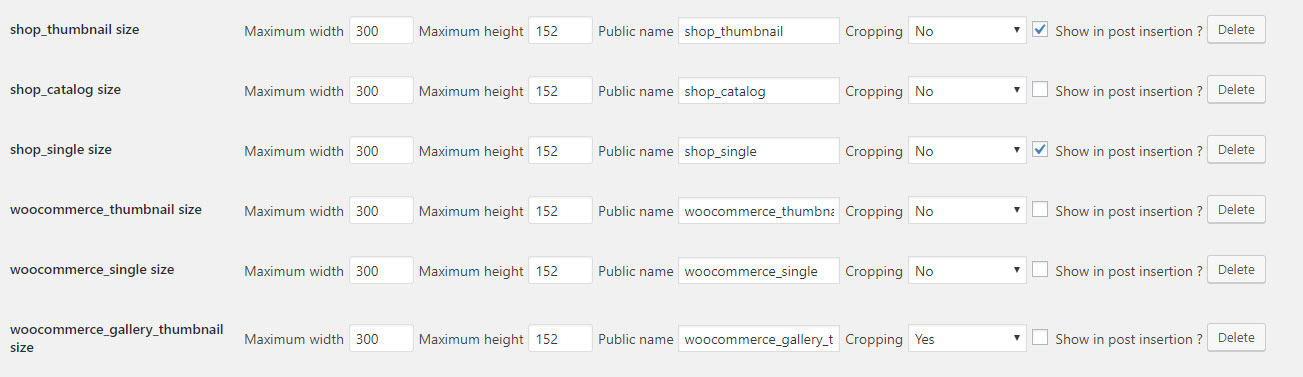
    These are my settings for the plugin you recommended above – https://www.royalpillow.com/wp-content/uploads/2018/04/plugin-settings.jpg (notice how i tried for grins to force each image option to the desired result dimensions)
    Here is proof I regenerated plugins – https://www.royalpillow.com/wp-content/uploads/2018/04/regenerate-thumbnail.jpg

    Yet notice how the product image changed in no way shape or form. Please help… Thanks.

    #945842

    It became like https://imgur.com/a/RrnbxFj

    I want align with thumbnail picture on the left.

    #945709
    smarta-brett
    Participant

    Hi

    Ive been using Enfold with great success to date however I’m having problems implementing the Easy Property Listings (EPL) plugin.

    It is the layout of the listing pages that is giving me problems – EPL is marketed as an easy solution but I find it very difficult due to my low skill level at hard coding – I have a support ticket in with them as Priority Support but it often takes days to get an answer

    I was wondering if you could have a look – there are a few issues

    (front end site access pw is ” twist ” )
    http://gccre.com.au/commercial/large-office-training-facility/

    1. the featured image is not displaying properly
    2. the content spreads to the very edge of the page
    3. I downloaded and installed their customised file for Enfold but it seem to be giving me PHP errors
    4. I am wanting to have the page layout similar to this (which I did a while ago using “Builder” theme)

    with a widget panel at the side and a footer image (not widgets) at the bottom

    if you could give me any clues to go any way to resolving any of these issues I would be very grateful!

    The content of the customised for Enfold single -listing.php file is shown below

    <?php
    	global $avia_config;
    
    	/*
    	 * get_header is a basic wordpress function, used to retrieve the header.php file in your theme directory.
    	 */
    	 get_header();
    
    	$title  = __('Blog - Latest News', 'avia_framework'); //default blog title
    	$t_link = home_url('/');
    	$t_sub = "";
    
    	if(avia_get_option('frontpage') && $new = avia_get_option('blogpage'))
    	{
    		$title 	= get_the_title($new); //if the blog is attached to a page use this title
    		$t_link = get_permalink($new);
    		$t_sub =  avia_post_meta($new, 'subtitle');
    	}
    
    	if( get_post_meta(get_the_ID(), 'header', true) != 'no') echo avia_title(array('heading'=>'strong', 'title' => $title, 'link' => $t_link, 'subtitle' => $t_sub));
    	
    	do_action( 'ava_after_main_title' );
    
    ?>
    
    		<div class='container_wrap container_wrap_first main_color <?php avia_layout_class( 'main' ); ?>'>
    
    			<div class='container template-blog template-single-blog '>
    
    				<main class='content units <?php avia_layout_class( 'content' ); ?> <?php echo avia_blog_class_string(); ?>' <?php avia_markup_helper(array('context' => 'content','post_type'=>'post'));?>>
    
                        <?php
                        /* Run the loop to output the posts.
                        * If you want to overload this in a child theme then include a file
                        * called loop-index.php and that will be used instead.
                        *
                        */
    
                           /**************************************************/
    			?>
    			<?php
    				global $avia_config, $post_loop_count;
    
    				if(empty($post_loop_count)) $post_loop_count = 1;
    				$blog_style = !empty($avia_config['blog_style']) ? $avia_config['blog_style'] : avia_get_option('blog_style','multi-big');
    				if(is_single()) $blog_style = avia_get_option('single_post_style','single-big');
    
    				$initial_id = avia_get_the_ID();
    
    				// check if we got posts to display:
    				if (have_posts()) :
    
    					while (have_posts()) : the_post();
    
    					/*
    				     * get the current post id, the current post class and current post format
    					 */
    					$url = "";
    					$current_post = array();
    					$current_post['post_loop_count']= $post_loop_count;
    					$current_post['the_id']	   	= get_the_ID();
    					$current_post['parity']	   	= $post_loop_count % 2 ? 'odd' : 'even';
    					$current_post['last']      	= count($wp_query->posts) == $post_loop_count ? " post-entry-last " : "";
    					$current_post['post_type']	= get_post_type($current_post['the_id']);
    					$current_post['post_class'] 	= "post-entry-".$current_post['the_id']." post-loop-".$post_loop_count." post-parity-".$current_post['parity'].$current_post['last']." ".$blog_style;
    					$current_post['post_class']	.= ($current_post['post_type'] == "post") ? '' : ' post';
    					$current_post['post_format'] 	= get_post_format() ? get_post_format() : 'standard';
    					$current_post['post_layout']	= avia_layout_class('main', false);
    					$blog_content = !empty($avia_config['blog_content']) ? $avia_config['blog_content'] : "content";
    					
    					/*If post uses builder change content to exerpt on overview pages*/
    				    if(AviaHelper::builder_status($current_post['the_id']) && !is_singular($current_post['the_id']) && $current_post['post_type'] == 'post')
    				    {
    					   $current_post['post_format'] = 'standard';
    					   $blog_content = "excerpt_read_more";
    				    }
    					
    					
    					/*
    				     * retrieve slider, title and content for this post,...
    				     */
    				    $size = strpos($blog_style, 'big') ? (strpos($current_post['post_layout'], 'sidebar') !== false) ? 'entry_with_sidebar' : 'entry_without_sidebar' : 'square';
    				    
    				    if(!empty($avia_config['preview_mode']) && !empty($avia_config['image_size']) && $avia_config['preview_mode'] == 'custom') $size = $avia_config['image_size'];
    					$current_post['slider']  	= get_the_post_thumbnail($current_post['the_id'], $size);
    					
    					if(is_single($initial_id) && get_post_meta( $current_post['the_id'], '_avia_hide_featured_image', true ) ) $current_post['slider'] = "";
    					
    					
    					$current_post['title']   	= get_the_title();
    					$current_post['content'] 	= $blog_content == "content" ? get_the_content(__('Read more','avia_framework').'<span class="more-link-arrow">  &rarr;</span>') : get_the_excerpt();
    					$current_post['content'] 	= $blog_content == "excerpt_read_more" ? $current_post['content'].'<div class="read-more-link"><a href="'.get_permalink().'" class="more-link">'.__('Read more','avia_framework').'<span class="more-link-arrow">  &rarr;</span></a></div>' : $current_post['content'];
    					$current_post['before_content'] = "";
    
    					/*
    				     * ...now apply a filter, based on the post type... (filter function is located in includes/helper-post-format.php)
    				     */
    					$current_post	= apply_filters( 'post-format-'.$current_post['post_format'], $current_post );
    					$with_slider    = empty($current_post['slider']) ? "" : "with-slider";
    					/*
    				     * ... last apply the default wordpress filters to the content
    				     */


    					echo "<article class='".implode(" ", get_post_class('post-entry post-entry-type-'.$post_format . " " . $post_class . " ".$with_slider))."' ".avia_markup_helper(array('context' => 'entry','echo'=>false)).">";
    					
    					echo '<div class="entry-content-wrapper clearfix">';
    					do_action( 'epl_property_single' );
    					echo '</div>';
    					
    					echo "</article>";
    
    					$post_loop_count++;
    					endwhile;
    					else:
    
    				?>
    
    				    <article class="entry">
    					<header class="entry-content-header">
    					    <h1 class='post-title entry-title'><?php _e('Nothing Found', 'avia_framework'); ?></h1>
    					</header>
    
    					<p class="entry-content" <?php avia_markup_helper(array('context' => 'entry_content')); ?>><?php _e('Sorry, no posts matched your criteria', 'avia_framework'); ?></p>
    
    					<footer class="entry-footer"></footer>
    				    </article>
    
    				<?php
    
    					endif;
    
    					if(empty($avia_config['remove_pagination'] ))
    					{
    						echo "<div class='{$blog_style}'>".avia_pagination('', 'nav')."</div>";
    					}
    				?>
    
    				<?php			
    			/**************************************************/
    						
                            //show related posts based on tags if there are any
                            get_template_part( 'includes/related-posts');
    
                            //wordpress function that loads the comments template "comments.php"
                            comments_template();
    
                        ?>
    
    				<!--end content-->
    				</main>
    
    				<?php
    				$avia_config['currently_viewing'] = "blog";
    				//get the sidebar
    				get_sidebar();
    
    				?>
    
    			</div><!--end container-->
    
    		</div><!-- close default .container_wrap element -->
    
    <?php get_footer(); ?>

    Hey Laura,

    Thank you for using Enfold.

    1-23.) Set the “Preview Image Size” of the Blog Posts element to “manual” and then select a larger version of the thumbnail. Add the following css codes afterwards.

    @media only screen and (min-width: 768px) {
    #top .fullsize .template-blog .post .entry-content-wrapper {
        max-width: 1200px;
    }
    
    #top .fullsize .template-blog .post .entry-content-wrapper > * {
        max-width: 80em;
        margin-left: auto;
        margin-right: auto;
    }
    
    #top .fullsize .template-blog .post .big-preview {
        width: 30% !important;
        float: left;
        margin-right: 2%;
        margin-top: 0;
    }
    
    #top .fullsize .template-blog .post .entry-content-wrapper > .entry-content-header {
        width: 67%;
    }
    }

    And then use this script to move the preview image above the header container.

    
    add_action('wp_footer', 'ava_custom_script_blog_mod');
    function ava_custom_script_blog_mod(){
    ?>
    <script type="text/javascript">
    (function($) {
        $('.html_elegant-blog .av-alb-blogposts .post').each( function() {
            var image, heading;
    
            image = $(this).find('.big-preview');
            header = $(this).find('.entry-content-header');
    
            image.insertBefore(header);
        });
    })(jQuery);
    </script>
    <?php
    }

    3.) Use these css codes to adjust the bottom margin of the magazine top bar and the space between the magazine items.

    .av-magazine {
        margin-bottom: 50px;
    }
    
    .av-magazine-top-bar {
        margin-bottom: 20px;
    }

    Best regards,
    Ismael

    #945497

    Hi,

    When you change the images sizes, you also need to Regenerate Thumbnails / Images.
    Please do that and it should be fine after.

    Best regards,
    Basilis

    #945344
    David_Peters
    Participant

    Hi,
    I love Enfold theme but I get conflicts with Photo Gallery Plugin which I want to use for displaying masonry image galleries and lightbox. On masonry picture gallery Enfold adds some hover-effect that conflict with Picture Gallery. On hover the thumbnail increases in size and shows a white border – but only on the bottom of the thumbnail. On mouse-out the image stays a bit larger than original. How can I disable image gallery in Enfold theme altogether or at least disable the mouse-over and mouse-out effect? Many thanks in advance, David

    #945225

    Hi,

    Thank you for the update.

    The tab section uses the “square” *(180x180px) thumbnail by default. Use this plugin to adjust the default size of the “square” thumbnail then regenerate the images.

    // https://wordpress.org/plugins/simple-image-sizes/

    Or edit the config-templatebuilder > tab_sub_section.php file. Look for this code around line 410:

    $src = wp_get_attachment_image_src($atts['tab_image'], 'square');
    

    Replace “square” with a custom thumbnail size.

    Best regards,
    Ismael

    #945008

    Hey!

    We used this filter in the functions.php file to change the thumbnail size from ‘square (180x180px)’ to ‘shop_single (550x550px). ( see private field )

    add_filter('woocommerce_loop_add_to_cart_link', 'avf_woocommerce_loop_add_to_cart_link_mod', 10, 1);
    function avf_woocommerce_loop_add_to_cart_link_mod($product) {
    	global $product;
    
    	$product_id = method_exists( $product , 'get_id' ) ? $product->get_id() : $product->id;
    					
    	$link 	= 	$product->add_to_cart_url();
    	$ajax_class = 'add_to_cart_button product_type_simple';
    	$text	= "";
    	$title 	= 	get_the_title($product_id);
    	$content = 	get_the_excerpt($product_id);
    	$price = 	$product->get_price_html();
    	$rel   = "";
    
    	if(empty($link_behavior))
    	{
    		$cart_url = get_the_permalink($product_id);
    		$ajax_class = "";
    	}
    	else
    	{
    		$cart_url = $product->add_to_cart_url();
    		$ajax_class = $product->is_purchasable() ? "add_to_cart_button ajax_add_to_cart" : "";
    		$rel = $product->is_purchasable() ? "rel='nofollow'" : "";
    	}
    
    	$product_type = method_exists( $product , 'get_type' ) ? $product->get_type() : $product->product_type;
    
    	$image = get_the_post_thumbnail( $product_id, 'shop_single', array('class'=>"av-catalogue-image av-cart-update-image av-catalogue-image-{$show_images}"));
    
    	$text .= $image;
    	$text .= "<div class='av-catalogue-item-inner'>";
    	$text .= "<div class='av-catalogue-title-container'><div class='av-catalogue-title av-cart-update-title'>{$title}</div><div class='av-catalogue-price av-cart-update-price'>{$price}</div></div>";
    	$text .= "<div class='av-catalogue-content'>{$content}</div>";
    	$text .= "</div>";
    
    	echo "<li>";
    
    	//coppied from templates/loop/add-to-cart.php - class and rel attr changed, as well as text
    
    	return sprintf( '<a %s href="%s" data-product_id="%s" data-product_sku="%s" class="av-catalogue-item %s product_type_%s">%s</a>',
    		$rel,
    		esc_url( $cart_url ),
    		esc_attr( $product_id ),
    		esc_attr( $product->get_sku() ),
    		$ajax_class,
    		esc_attr( $product_type ),
    		$text
    	);
    }
    

    Regards,
    Ismael

    #945001

    So it is just isolating the image in a slide show? It’s not letting the user see it closer/bigger.
    I have the thumbnails at 550- and that didn’t help. I’m at a loss.
    and my images are blurry.
    Don’t want to bug you guys anymore with this. I’ll figure something out

    #944999

    Hi,

    Thank you for the update. Note that we applied the same image url to the catalogue item so it will open the same image inside a lightbox. Use larger images in the catalogue items’ “Thumbnail Image” option.

    Best regards,
    Ismael

    #944931

    Hey kellyCraftMedia,
    To open the thumbnail of the post slider in a lightbox please try this solution
    To remove the margin from the slides please try this css:

    #top.home .avia-content-slider-inner .slide-entry-wrap .slide-entry.flex_column {
        margin-left: 0%!important; 
    }

    Please remove the permissions for viewing your mockup.

    Best regards,
    Mike

Viewing 30 results - 3,091 through 3,120 (of 10,097 total)