Hi,
Change this css:
#av-burger-menu-ul li.av-show-submenu > .sub-menu > li > a > .avia-menu-text {
	color: yellow;
}
to this:
#av-burger-menu-ul li.av-show-submenu > .sub-menu > li > a > .avia-menu-text {
	color: yellow;
	font-size: 20px;
	line-height: 20px;
}
then add this css:
.html_av-overlay-full #top #wrap_all #av-burger-menu-ul li.av-show-submenu li {
    line-height: 20px;
}

adjust to suit.
Please ensure to copy the code from the forum and not an email notification so the symbols are not converted.
Best regards,
Mike
hail brave new AI world
New snippet
see in Action here: https://webers-testseite.de/impressum/
it is a draggable Window:
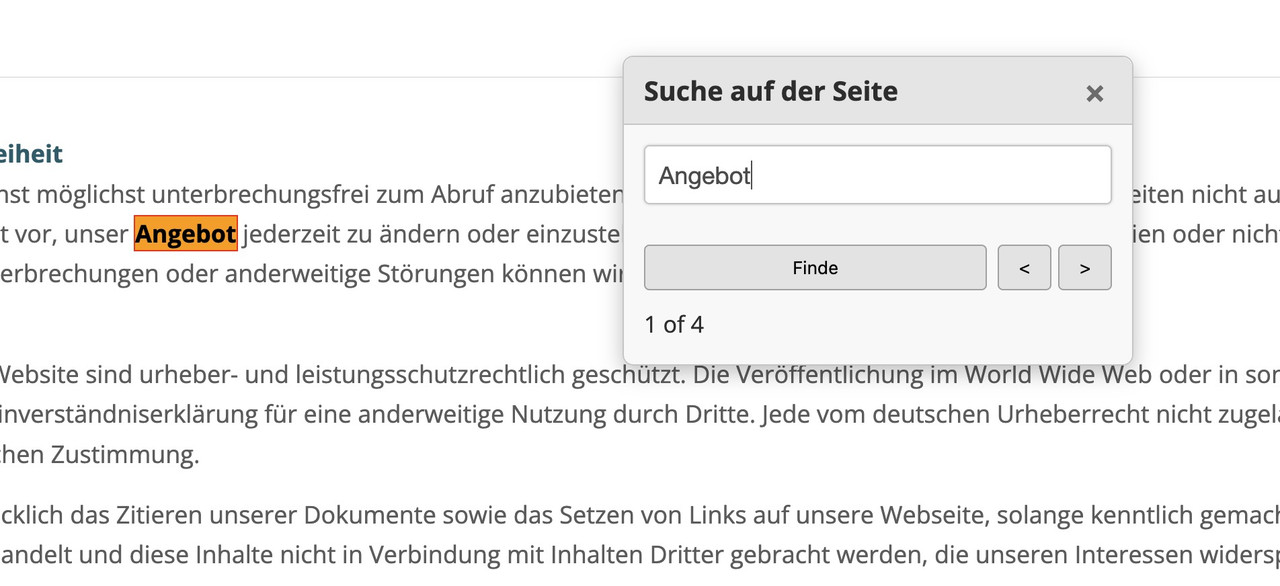
this is for child-theme functions.php:
see code here on paste bin: https://pastebin.com/zc4fvX1w
because of a innerHtml (lines 158-176) it is not possible to post it here – (maybe mod knows how)

and here is the style for quick css
/* --- Draggable Search Window --- */
#gcmSearchUIContainer { /* Changed ID for clarity */
  position: fixed;
  top: 100px; /* Initial position from the top */
  left: 50%;  /* Start horizontally centered */
  transform: translateX(-50%); /* Adjust for true centering */
  width: 380px; /* A suitable width for a small window */
  background-color: #f9f9f9;
  border: 1px solid #ccc;
  border-radius: 8px;
  box-shadow: 0 5px 15px rgba(0,0,0,0.25);
  z-index: 100001; /* Ensure it's on top, slightly higher than before if needed */
  overflow: hidden; /* To contain rounded corners with header */
}

#gcmSearchUIContainer.hidden {
  display: none;
}

#gcmSearchUIHeader {
  padding: 10px 15px;
  background-color: #e8e8e8;
  border-bottom: 1px solid #ccc;
  cursor: move; /* Indicates this area is draggable */
  border-top-left-radius: 8px; /* Match container's radius */
  border-top-right-radius: 8px; /* Match container's radius */
  display: flex;
  justify-content: space-between;
  align-items: center;
}

#gcmSearchUIHeader .gcm-title {
  font-weight: bold;
  font-size: 1.1em;
  color: #333;
}

#gcmSearchUIHeader #gcmCloseSearchBtnDraggable { /* Specific ID for close button in this context */
  background: none;
  border: none;
  font-size: 1.3em;
  font-weight: bold;
  color: #777;
  cursor: pointer;
  padding: 0 5px;
}
#gcmSearchUIHeader #gcmCloseSearchBtnDraggable:hover {
  color: #000;
}

#gcmSearchUIBody {
  padding: 15px;
  display: flex;
  flex-direction: column; /* Stack elements vertically */
  gap: 10px; /* Space between elements in the body */
}

#gcmSearchUIBody #gcmSearchInputDraggable { /* Specific ID for input */
  width: 100%;
  padding: 10px;
  border: 1px solid #ccc;
  border-radius: 4px;
  box-sizing: border-box;
}

#gcmSearchUIBody .gcm-controls-row {
  display: flex;
  justify-content: space-between; /* Space out controls */
  align-items: center;
  gap: 8px; /* Space between buttons in a row */
}

#gcmSearchUIBody .gcm-navigation {
    display: flex;
    gap: 5px;
}

#gcmSearchUIBody button {
  padding: 8px 12px;
  border: 1px solid #aaa;
  border-radius: 4px;
  background-color: #e7e7e7;
  cursor: pointer;
  min-width: 40px; /* For Next/Prev buttons */
  text-align: center;
}

#gcmSearchUIBody button:hover {
  background-color: #d7d7d7;
}

#gcmSearchUIBody #gcmSearchBtnDraggable { /* Specific ID */
    flex-grow: 1; /* Allow Find button to take more space if needed */
}

#gcmSearchUIBody .gcm-results-count-draggable { /* Specific ID */
  font-size: 0.95em;
  color: #333;
  white-space: nowrap; /* Prevent wrapping */
}

/* --- Highlighting Styles (remain the same) --- */
.custom-highlight {
  background-color: yellow;
  color: black;
  font-weight: bold;
}

.custom-highlight.current-custom-highlight {
  background-color: orange;
  outline: 1px solid red;
}
Do not forget to remove the leading php on that downloaded snippet before you insert it to your child-theme functions.php
Download: https://pastebin.com/dl/zc4fvX1w
Ok great, but can you get me CSS for smaller Font size for all the “sub menu” items? (So the Main menu fonts size is larger and the Sub Menu is smaller.)
Hi,
To adjust the size and position of the slider arrows, try to add this css code:
#top .avia-smallarrow-slider .avia-slideshow-arrows a {
  opacity: 0;
  margin: 0;
  width: 50px !important;
  height: 50px !important;
  line-height: 50px !important;
  font-size: 20px !important;
  top: 0;
}

#top .avia-smallarrow-slider .avia-slideshow-arrows a.avia-svg-icon svg:first-child, #top .avia-smallarrow-slider .avia-slideshow-arrows a.avia-svg-icon img[is-svg-img="true"] {
  height: 20px;
  width: auto;
  margin-top: 15px;
}

#top .avia-smallarrow-slider .avia-slideshow-arrows {
  position: relative;
  width: 120px;
  top: 20px;
  left: auto;
  height: 24px;
  right: 10px;
}
If you’re trying to disable the image overlay, add this code:
.image-overlay, .image-overlay .image-overlay-inside {
    display: none !important;
}
Best regards,
Ismael
Hi,
Try to use this css code to adjust the font size of the menu items inside the nav widget:
#top .widget_nav_menu li {
    font-size: 16px;
}
Best regards,
Ismael
I’ve tried the solutions for this from previous questions, but so far I’ve had no luck. I’m trying to use a different font from what is set for default headings (Open Sans) in Enfold for just one easy slider caption. When I change the default font in the theme settings, I can see the font I want (Tangerine). When set the default back to Open Sans and use the CSS override in Quick CSS, I see the font switch to serif, but it will not resolve Tangerine. What am I doing wrong?
I inspected the caption in Chrome and copied the selector, so the CSS is
#faithtop > div > ul > li > div > div > div > div > div > div > h2.avia-caption-title {
font-family: “Tangerine”, serif !important; font-size: 4em !important; color: #2d5c88 !important;
}
Hi,
.main-title looks like a different font or font weight
Looks like the title is set to use a lighter font weight instead of the default 400. Did you configure the Heading elements in the Enfold > Advanced Styling tab? You can also adjust it with this css:
#top #wrap_all .main_color h1, #top #wrap_all .alternate_color h1, #top #wrap_all .socket_color h1 {
    font-weight: 400;
}
Regarding the burger/mobile menu, try to edit the Main Menu (Icon) elements in the Advanced Styling panel, or use this css code:
#top #wrap_all .av-burger-overlay .av-burger-overlay-scroll #av-burger-menu-ul li a {
    color: #ffffff;
    font-size: 18px;
    line-height: 1.8em;
}

.html_av-overlay-side #top #wrap_all div .av-burger-overlay-scroll #av-burger-menu-ul li:hover a, #top #wrap_all .av-burger-overlay .av-burger-overlay-scroll #av-burger-menu-ul li a:hover {
    background-color: #333366;
    color: #ffffff !important;
}
If you have any additional questions at this time we kindly ask that you open them up in a separate thread. The longer threads get in the forum, they become more difficult to support as they tend to drift off topic and they also make it troublesome for users trying to search for solutions. Keeping threads relevant to their original inquiry ensures that we can keep better track of what has been resolved and that users can more effectively find answers to similar issues they might be experiencing.
Thanks!
Best regards,
Ismael
This reply has been marked as private.
The blue box marks the container, which you set to 1500px in the Enfold settings – see my comment above : link
Since the font is set to centered, it will be placed in the middle of the container. If the size is smaller, there will be a gap to the outer edges of the blue box.
Originally, you can see in the first screenshot that there is a manually placed line break (<br>) at the point marked in red.
(click to enlarge the images)

In the second screenshot, I have removed this manual line break in my browser’s dev tools to show you that when there are no line breaks, these lines have the said 1500px width.

Where you are now reporting the lack of smaller widths, you have simply not set manual breaks as above inside the text-block elements.
Hi,
You can adjust the value for all breakpoints, including the first one, which applies to desktops or large screens. To adjust the style of the slider buttons on smaller screens, you can add the following css code:
/*
Mobile Styles
================================================== */
/* Note: Add new css to the media query below that you want to only effect the Mobile and Tablet Portrait view */

@media only screen and (max-width: 768px) {

  /* Add your Mobile Styles here */
  #top .container .slideshow_inner_caption .avia-slideshow-button {
    margin-top: 10px;
    padding: 6px 8px;
    font-size: 13px;
  }
}
Best regards,
Ismael
As i mentioned above – and Mike pointed out again – there are a lot of manual set linebreaks (<br>)
but if you like you can force a max width of the p-tags by font length units one of the modern one is ch (The width of the 0 character of the font in use) so – 110ch means nearly 110 characters. A more common font unit is em (The font size of the element, or its nearest parent container)
I would not recommend this procedure; I would probably rather limit the container itself there, but so that you can see that it also works via css:
#top .avia_textblock p {
  max-width: 110ch;
  word-wrap: break-word;
  margin: 0.85em auto 0;
}
Hi,
Try this CSS in your Enfold Theme Options ▸ General Styling ▸ Quick CSS field:
#av-burger-menu-ul li.av-show-submenu > a > .avia-menu-text {
	color: blue;
}
#av-burger-menu-ul li.av-show-submenu > .sub-menu > li > a > .avia-menu-text {
	color: yellow;
}
.html_av-submenu-hidden #av-burger-menu-ul .av-submenu-indicator:before {
	color: yellow;
	font-size: 20px;
}
#top #wrap_all #av-burger-menu-ul .menu-item-2846 {
	font-size: 12px !important;
}
Please ensure to copy the code from the forum and not an email notification so the symbols are not converted.
After applying the css, please clear your browser cache and check.
Best regards,
Mike
Hi,
Try this CSS in your Enfold Theme Options ▸ General Styling ▸ Quick CSS field:
@media only screen and (max-width: 767px) {
.responsive #top.home #wrap_all #av_section_3 .flex_column.av_one_third {
	width: 31%;
  margin-left: 6px;
}
}
 @media only screen and (max-width: 500px) {
 	#top.home #wrap_all #av_section_3.main_color .flex_column.av_one_third h3 {
    font-size: 0.6em;
 	}
 }
 @media only screen and (min-width: 501px) and (max-width: 767px) {
 	#top.home #wrap_all #av_section_3.main_color .flex_column.av_one_third h3 {
    font-size: 0.9em;
 	}
 }
After applying the css, please clear your browser cache and check.
Best regards,
Mike
This reply has been marked as private.
Hey bemodesign,
Please try the following in Quick CSS under Enfold->General Styling:
@media only screen and (max-width: 767px) {
  #top .isotope-item.special_av_fullwidth .av_table_col .entry-title {
    font-size: 24px;
  }
}
Best regards,
Rikard
Hey connect4consulting,
Thank you for the inquiry.
You can add this css code code to adjust the font size of the elements in the header and footer.
@media only screen and (max-width: 767px) {

  /* Add your Mobile Styles here */
  .phone-info a {
    font-size: 12px !important;
  }

  #socket .sub_menu_socket li {
    line-height: 1.4em;
  }
}
Regarding the slider caption, try to edit the slides’ Styling > Font Sizes settings. You can define font size values for different breakpoints or screen sizes.
View post on imgur.com
Best regards,
Ismael
Hi,
Yes, the default content font size and typography settings are recent additions to the theme options. Regarding the line spacing, you can try this css code:
@media only screen and (max-width: 767px) {

  /* Add your Mobile Styles here */
  .av-image-caption-overlay-center {
    line-height: 1em;
  }
}
View post on imgur.com
Best regards,
Ismael
Hi,
Glad you found the feature useful. You can use the following css code to adjust the size of the social icons and disable the animation.
.av-share-box ul li a {
    font-size: 30px;
    transition: none;
    opacity: 1;
    visibility: visible;
}
View post on imgur.com
Best regards,
Ismael
Hello, I need CSS for Font size and Color options for “Full page overlay menu” sub menu.
They have a lot of SubMenus and I am trying to differentiate from main nav.
Thanks
https://championschoolssouthmountain.armourcloud.io/
On the main Portfolio page, the Header font size is too small on “Mobile view” only, and the text below the header might need to be adjusted on Mobile also. Can you get me some CSS code?
thanks
screenshot: https://img.savvyify.com/image/Screen-Shot-2025-05-01-at-9.49.17-AM.9tvxO
page: https://sonoranwaters.armourcloud.io/projects/
Hi,
Thank you for the update.
You may need to remove the body and p tag configs in the Enfold > Advanced Styling panel because they override the custom styling of the image caption. You can adjust the Default Content Font Size in the Enfold > General Styling > Typography panel instead.
Here is what it looks like after we removed the advanced styling of the p and body tags.
View post on imgur.com
`
Best regards,
Ismael
Hey William,
Thank you for the inquiry.
You can adjust the image caption’s font size in the Styling > Image Caption panel. Please check the screenshot below.
View post on imgur.com
Best regards,
Ismael
Hi,
Looks like this is only set when you adjust the Enfold > General Styling > Typography > Default Content Font Size settings. This overrides the default body font size.
Best regards,
Ismael
Zur Umsetzung der Barrierefreiheit ab Juni 2025 habe ich Fragen, in wie fern hier bei Enfold mit Updates Möglichkeiten geplant sind.
Was mir beim umsetzen als Probleme, die nicht einfach selbst lösbar aufgefallen ist:
1.) Buttons des Cookiebanners lassen sich nicht via Tab auf der Tastatur ansteuern – wird das noch geändert?
2.) Wird es eine Option geben, die man einblenden kann, wo der Nutzer einfach die Schriftgröße selbst verändern kann? Also einfach mit + und – (Buttons via Tastatur auswählbar)?
3.) Ist das Einbinden von ARIA Attributen bei Elementen wie Buttons geplant? Habe da bei Enfold nur diesen Thread gefunden: https://kriesi.at/support/topic/aria-label/
Punkte 1 & 2 wären tatsächlich nur eingeschränkt selbst lösbar bzw. nur mit größeren Aufwand oder ggf. anderen Plugins.
Regarding the implementation of accessibility from June 2025, I have questions about how far Enfold is planning to go with updates.
What I noticed during implementation as problems that cannot be easily solved by myself:
1.) Buttons of the cookie banner cannot be controlled via tab on the keyboard – will this still be changed?
2) Will there be an option that can be shown where the user can simply change the font size themselves? So simply with + and – (buttons selectable via keyboard)?
3) Are there plans to include ARIA attributes for elements such as buttons? I only found this thread on Enfold: https://kriesi.at/support/topic/aria-label/
Points 1 & 2 would actually only be solvable to a limited extent or only with greater effort or possibly other plugins.
Translated with DeepL.com (free version)
Hi,
This is what we see on a clean installation of version 7.1.
View post on imgur.com
And only –enfold-font-size-theme-content is declared in the themes/enfold/css/dynamic-css.php file, line 108.
Best regards,
Ismael
Hi,
Have you tried hiding the testimonial section on mobile view? You can toggle the Element Visibility settings in the Advanced > Responsive panel.
View post on imgur.com
You can also use this css code to adjust the size of the testimonial section on mobile view:
@media only screen and (max-width: 767px) {

  /* Add your Mobile Styles here */
  .responsive #top .av-large-testimonial-slider.avia-testimonial-wrapper .avia-testimonial {
    padding: 0;
    font-size: 0.85em;
  }

  #top .av-large-testimonial-slider .avia-slideshow-arrows {
    position: absolute;
    width: 100%;
    bottom: 50px;
  }

  #top .avia-slideshow-arrows a.next-slide {
    right: -30px;
  }

  #top .avia-slideshow-arrows a.prev-slide {
    right: auto;
    left: -30px;
  }
}
View post on imgur.com
Best regards,
Ismael
Hey MomentumMarketingSupport,
Thank you for the inquiry.
You may need to avoid using the ID “comment” for the color section because this css rule gets applied to it.
#comment {
    width: 602px;
    height: 150px;
    padding: 10px 7px;
    font-size: 12px;
    margin: 0;
}
This is how it looks when the height property is disabled.
View post on imgur.com
Best regards,
Ismael
Yes, that CSS is there but whatever is changed on it affects both the navigation bar search box and the content custom search widget. Below is the CSS for the home page content custom search widget. Is anything is this customization affecting the navigation search box? It was working correctly for several years up until the latest version of Enfold. I don’t know what changed, but rolling back to previous versions of Enfold in a staging area corrects it.
#chsearchbox {
position: relative;
background-color: transparent!important;
margin-top: -15px;
z-index: 55;
border: none!important;
}
#search-3 #s {
left: 35px;
content: url(‘https://riseandshine.childrensnational.org/wp-content/uploads/2017/07/ch-search-icon.png’);
width: 85%;
margin: -32px auto !important;
padding: 41px;
border: none!important;
box-shadow: 0px 5px 15px 0px #cccccc;
}
#search-3 .avia-font-entypo-fontello {
background-image: url(https://riseandshine.childrensnational.org/wp-content/uploads/2017/07/ch-search-icon.png);
background-repeat: no-repeat;
background-position: 50% 50%;
background-size: contain;
background-color: transparent!important;
width: 67px!important;
}
#search-3 #searchform #searchsubmit {
_font-size: 2.5em; /*set the size of the magnifying icon*/
font-size: 1.5em;
color: transparent;
}
#search-3 input[type=”text”] {
font-size: 30px; /*set the size of the search box input font*/
}
#search-3 .button {
left: 95px;
}
#searchsubmit .avia-font-entypo-fontello {
display: none!important;
}
That’s helpful, thank you…I just adjusted the font sizes and the caption title and content are better now, but still running off the bottom of the image…And what about adjusting the slider’s image size for mobile so it runs full height? (I’d like the image to reach to the bottom of the screen.)
-
This reply was modified 11 months, 1 week ago by
 dryo1.
Hey Guenter,
Thank you for the inquiry.
We can’t find the enfold-font-size-content-font variable anywhere in the theme — only enfold-font-size-theme-content. Where did you see the enfold-font-size-content-font variable?
Best regards,
Ismael



