Viewing 30 results - 3,601 through 3,630 (of 18,733 total)
  • Author
    Search Results
  • #1226647

    In reply to: Icons in bullets

    the code above is complete?
    every opening tag – needs a closing one – so every <ul> needs a </ul>
    but why three lists ?
    i guess this will be enough code:

    <ul class="icon-bullets">
     	<li class="icon-location"><a href="https://google-maps-link" rel="nofollow">Address</a></li>
     	<li class="icon-phone"><a href="tel:+000000000" rel="nofollow">(+000) 000 000 000</a></li>
     	<li class="icon-mail"><a href="mailto: (Email address hidden if logged out) " rel="nofollow"> (Email address hidden if logged out) </a></li>
    </ul>

    and:

    ul.icon-bullets li {
    	list-style: none;	
    }
    
    ul.icon-bullets li {
    	padding-left: 8px; 	
    }
    
    ul.icon-bullets li::before {
        font-family: 'entypo-fontello';
        font-size: 23px;
        font-weight: normal;
        position: absolute;
        left: -6px;
        width: 30px;
        text-align: center;
    }
    
    ul.icon-bullets li.icon-location:before { content: '\e842' }
    ul.icon-bullets li.icon-phone:before { content: '\e854' }
    ul.icon-bullets li.icon-mail:before { content: '\e805' }
    

    with text-align you decide where the icons are in the before containers.

    can not test your icon code

    #1226608

    Can the font size be changed in Small bar above Main Menu, in the ENFOLD theme?

    sometimes a relative font-size ( f.e. the given settings for screenwidth relation fit well 4vw means 4% of screen width )

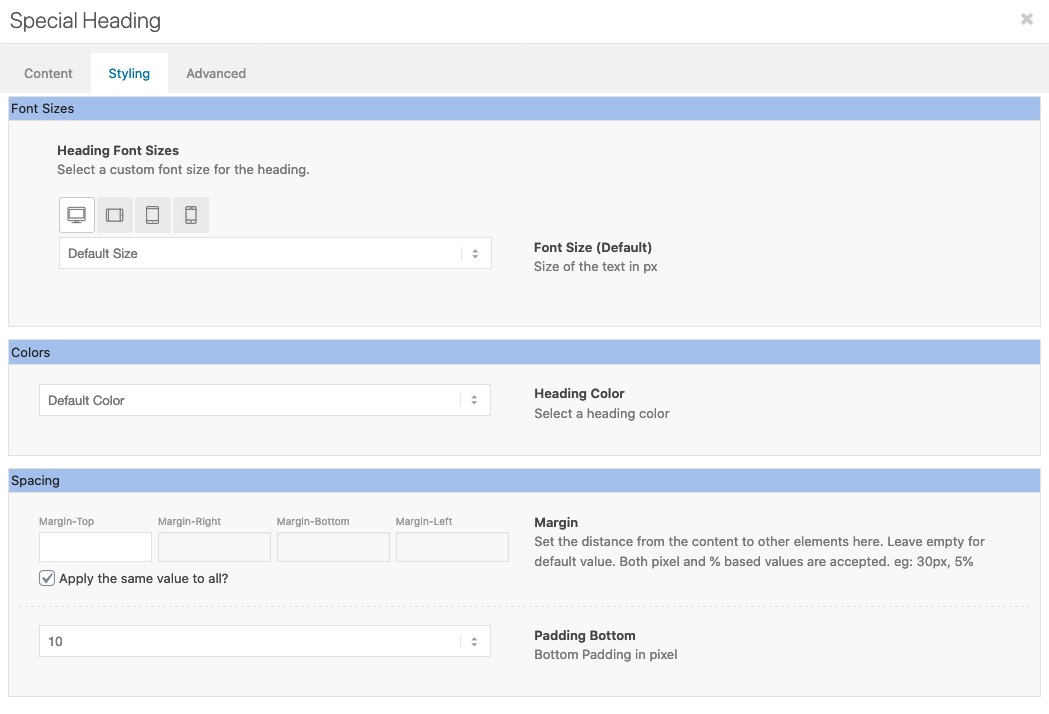
    if it is only for a few headings – open that page and open that heading ( if the page is made with the advanced layout builder)
    Sadly only the other heading styles not the standard style got this option on Style tab to set for 4 different screen width a font-size:

    • This reply was modified 5 years, 9 months ago by Guenni007.
    #1226559

    Hey So Evolve,

    Here is the code you can put in Enfold > General Styling > Quick Css,  if it does not work, put into themes/enfold/css/custom.css

    
    #top #header .mega_menu_title a {
        font-size: 20px;
    }
    

    If you need further assistance please let us know.

    Best regards,
    Victoria

    #1226501

    Topic: Socket Text

    in forum Enfold
    tonyaleigh
    Participant

    Hello! I’m having problems with the socket text. In the theme settings I have….

    Copyright © 2020 HiveDesk.com. All rights reserved.<span class=”socketline”>|</span>Privacy Policy<span class=”socketline”>|</span>Terms of Service<span class=”socketline”>|</span>Made with ♥ in Louisville, KY, USA and Mangalore, India. [nolink]

    In the Quick CSS I have:
    .socketline {
    padding-right: 15px!important;
    padding-left: 15px!important;
    }
    #socket .copyright {
    font-size: 14px!important;
    text-align: center!important;
    width: 100%!important;
    font-weight: 300!important;
    }
    .socket_color a {
    font-weight: 300!important;
    }
    .socket_color a:hover {
    font-weight: 300!important;
    color: #98b9e6!important;
    }

    For some reason, the text will not update now. I’ve cleared the cache and it still will not update. Is there a better way to do this?
    I want my text to look like this in the footer:
    Copyright © 2020 HiveDesk.com. All rights reserved. | Privacy Policy | Terms of Service | Made with ♥ in Louisville, KY, USA and Mangalore, India.

    #1226492
    So Evolve
    Participant

    We have tried every option in the forums and none will allow us to adjust the size of our fonts in the mega menu.

    Please help!

    Avery

    #1226483

    Hi fanlokbun,

    Here is the code you can put in Enfold > General Styling > Quick Css,  if it does not work, put into themes/enfold/css/custom.css

    
    #menu-projects .avia-menu-text {
      font-size: 17px;
    }
    #menu-projects .current-menu-item {
      border-bottom: 2px #ccc solid;
    }
    

    If you need further assistance please let us know.

    Best regards,
    Victoria

    #1226257

    Hi demicoli00,

    Thanks for giving us admin access.
    I have duplicated your homepage (link in private content), then removed the h2 with inline attributes in the slide title and I could see font sizes working properly even in the mobile version.
    I’m not really sure if I understood the issue but I could see it working properly, can you tell us maybe what you’re trying to achieve?

    Best regards,
    Nikko

    #1226207

    Topic: Icons in bullets

    in forum Enfold
    demicoli00
    Participant

    Hi I have looked the forum and followed this post ( https://kriesi.at/support/topic/replace-bullets-with-icon-font/?login_error ) and added the following code:
    HTML

    <ul class=”icon-location”>
     	<li><a href="https://google maps link" rel="nofollow">Address</a></li>
    <ul class=”icon-phone”>
     	<li><a href="tel:+000-000-000" rel="nofollow">(+000) 000 000 000</a></li>
    <ul class=”icon-mail”>
     	<li><a href="mailto:<a href="mailto:hello@abc.com" rel="nofollow">hello@abc.com</a>“><a href="mailto:hello@abc.com" rel="nofollow">hello@abc.com</a></li>
    CSS (in quick CSS)
    ul.icon-location li {
    list-style: none;
    }
    ul.icon-phone li {
    list-style: none;
    }
    ul.icon-mail li {
    list-style: none;
    }
    ul.icon-location li {
    padding-left: 8px;
    }
    ul.icon-phone li {
    padding-left: 8px;
    }
    ul.icon-mail li {
    padding-left: 8px;
    }
    
    ul.icon-location li:before {
    content: ‘\E724’;
    font-family: ‘entypo-fontello’;
    font-size: 23px;
    font-weight: normal;
    position: absolute;
    left: 6px;
    }
    ul.icon-phone li:before {
    content: ‘\1F4DE’;
    font-family: ‘entypo-fontello’;
    font-size: 23px;
    font-weight: normal;
    position: absolute;
    left: 6px;
    }
    ul.icon-mail li:before {
    content: ‘\2709’;
    font-family: ‘entypo-fontello’;
    font-size: 23px;
    font-weight: normal;
    position: absolute;
    left: 6px;
    }
    
    .avia-icon-list .iconlist_content li {
    list-style: none;
    }

    However it did not work. Basically I want to achieve three icons in bullet format for phone, address and email.

    Thanks,

    • This topic was modified 5 years, 9 months ago by Yigit.
    #1226206
    danowen777
    Participant

    Hi,
    I couldn’t find out how to style the Image with Hotspots Media Elements. Finally, I found the relevant CSS. I offer my CSS to anyone who wants an easy starting point for making their own styles. I include a media query for the narrow width browser windows. Mine can be seen at:

    The styles are:

    /* TOOLTIPS */

    .av-tt-default-width {
    width: 300px;
    height: auto;
    border-radius: 20px;
    border: solid 1px #444;
    box-shadow: 5px 5px 10px #444;
    padding: 0 11px;
    background-color: #eee;
    color: #000;
    font-size: 125%;
    }
    .av-tt-default-width img {
    border-radius: 15px;
    border: solid 1px #aaa;
    box-shadow: 0px 3px 6px #bbb;
    padding: 0;
    }
    @media only screen and (max-width: 767px) {
    .responsive .av-hotspot-fallback-tooltip { display: inline-block; }
    .av-hotspot-fallback-tooltip-inner { margin-left: 0; }
    }

    #1226057

    In reply to: Logo left, menu below

    Hi ejo14,

    Here is the code you can put in Enfold > General Styling > Quick Css,  if it does not work, put into themes/enfold/css/custom.css

    
    #top #header .av-main-nav > li > a {
      font-size: 13px;
      padding: 0 11px;
    }
    

    This code will help you have the menu in one line on screens 1440px+ but you need to have burger menu till then probably. The menu is too long and there is space for it on smaller screens.

    If you need further assistance please let us know.

    Best regards,
    Victoria

    #1226004

    In reply to: Font Sizes & Options

    Hey h6carr,

    You can change it by editing the Text Block and go to Styling (tab), and change font size there.
    Here’s a screenshot https://imgur.com/F9oT75w

    Best regards,
    Nikko

    #1225988

    Topic: Font Sizes & Options

    in forum Enfold
    h6carr
    Participant

    Hello,
    How do I change the font size or actual font in a text box on an About Me Page? I know how to change it for the whole theme, but what if I just want to adjust it for a certain section?
    Thanks,
    Carrie

    #1225803

    did you check if a different shortcode works on that f.e.:
    [av_button label='Click me' icon_select='yes' icon='ue800' font='entypo-fontello' link='manually,#' size='small' position='left' color='theme-color' custom_bg='#444444' custom_font='#ffffff']
    a little button

    #1225773

    Many thanks Victoria that works perfectly.
    I have another problem I can’t fix on the site. The full width sub menu font size is too small. I need it to be about 17px.
    Also the sub menu does not highlight the page you are on like the main menu. Is this possible to fix?
    Thanks
    Rob

    no the whole code – try yourself – this is one of my pages:
    https://webers-testseite.de/3columns/

    [av_section min_height='' min_height_pc='25' min_height_px='500px' padding='default' margin='' custom_margin='0px' color='main_color' background='bg_color' custom_bg='' background_gradient_color1='' background_gradient_color2='' background_gradient_direction='vertical' src='' attach='scroll' position='top left' repeat='no-repeat' video='' video_ratio='16:9' video_mobile_disabled='' overlay_enable='' overlay_opacity='0.5' overlay_color='' overlay_pattern='' overlay_custom_pattern='' shadow='no-border-styling' bottom_border='no-border-styling' bottom_border_diagonal_color='#333333' bottom_border_diagonal_direction='scroll' bottom_border_style='scroll' scroll_down='' custom_arrow_bg='' av-desktop-hide='' av-medium-hide='' av-small-hide='' av-mini-hide='' id='' custom_class='' aria_label='' av_element_hidden_in_editor='0' av_uid='av-39o199']
    [av_heading heading='Flex Box Model with 1/3 Columns' tag='h2' style='blockquote modern-quote' subheading_active='subheading_below' size='36' av-medium-font-size-title='' av-small-font-size-title='' av-mini-font-size-title='' subheading_size='24' av-medium-font-size='' av-small-font-size='' av-mini-font-size='' color='' custom_font='' margin='' margin_sync='true' padding='10' link='' link_target='' id='' custom_class='' av_uid='av-kbi07d5u' admin_preview_bg='']
    one color-section with custom-class:   <strong>custom-css</strong> - or what ever you like.
    
    only your 3 columns in this color-section no other elements in it!
    
    columns on individual height !
    [/av_heading]
    [/av_section]
    
    [av_section min_height='' min_height_pc='25' min_height_px='500px' padding='default' custom_margin='0px' custom_margin_sync='true' color='main_color' background='bg_color' custom_bg='#e8e8e8' background_gradient_color1='' background_gradient_color2='' background_gradient_direction='vertical' src='' attachment='' attachment_size='' attach='scroll' position='top left' repeat='no-repeat' video='' video_ratio='16:9' overlay_opacity='0.5' overlay_color='' overlay_pattern='' overlay_custom_pattern='' shadow='no-border-styling' bottom_border='no-border-styling' bottom_border_diagonal_color='#333333' bottom_border_diagonal_direction='' bottom_border_style='' custom_arrow_bg='' id='' custom_class='custom-css' aria_label='' av_element_hidden_in_editor='0' av_uid='av-b33mwt']
    [av_one_third first min_height='' vertical_alignment='av-align-top' space='' row_boxshadow_color='' row_boxshadow_width='10' margin='0px' margin_sync='true' mobile_breaking='' border='' border_color='' radius='0px' radius_sync='true' padding='30px' padding_sync='true' column_boxshadow_color='' column_boxshadow_width='10' background='bg_color' background_color='rgba(176,43,44,0.3)' background_gradient_color1='' background_gradient_color2='' background_gradient_direction='vertical' src='' attachment='' attachment_size='' background_position='top left' background_repeat='no-repeat' highlight_size='1.1' animation='' link='' linktarget='' link_hover='' title_attr='' alt_attr='' mobile_display='' id='' custom_class='' aria_label='' av_uid='av-k3unnj4d']
    
    [av_heading heading='Column1' tag='h2' link='manually,http://' link_target='' style='blockquote modern-quote modern-centered' size='' subheading_active='' subheading_size='15' margin='' padding='10' color='' custom_font='' custom_class='' id='' admin_preview_bg='' av-desktop-hide='' av-medium-hide='' av-small-hide='' av-mini-hide='' av-medium-font-size-title='' av-small-font-size-title='' av-mini-font-size-title='' av-medium-font-size='' av-small-font-size='' av-mini-font-size='' av_uid='av-1q98xr1'][/av_heading]
    
    [av_textblock size='' font_color='' color='' av-medium-font-size='' av-small-font-size='' av-mini-font-size='' id='' custom_class='' av_uid='av-k3unomjx' admin_preview_bg='']
    <strong>Ich bin der Geist, der stets verneint!
    Und das mit Recht; denn alles, was entsteht,
    </strong>
    [/av_textblock]
    
    [av_button label='Click me' icon_select='yes' icon='ue800' font='entypo-fontello' size='small' position='center' label_display='' title_attr='' color='theme-color' custom_bg='#444444' custom_font='#ffffff' link='manually,http://' link_target='' id='' custom_class='' av_uid='av-ka5b3zfy' admin_preview_bg='']
    
    [/av_one_third][av_one_third min_height='' vertical_alignment='av-align-top' space='' row_boxshadow_color='' row_boxshadow_width='10' margin='0px' margin_sync='true' mobile_breaking='' border='' border_color='' radius='0px' radius_sync='true' padding='30px' padding_sync='true' column_boxshadow_color='' column_boxshadow_width='10' background='bg_color' background_color='rgba(237,174,68,0.3)' background_gradient_color1='' background_gradient_color2='' background_gradient_direction='vertical' src='' attachment='' attachment_size='' background_position='top left' background_repeat='no-repeat' highlight_size='1.1' animation='' link='' linktarget='' link_hover='' title_attr='' alt_attr='' mobile_display='' id='' custom_class='' aria_label='' av_uid='av-2i3x1ml']
    
    [av_heading heading='Column2' tag='h2' link='manually,http://' link_target='' style='blockquote modern-quote modern-centered' size='' subheading_active='' subheading_size='15' margin='' padding='10' color='' custom_font='' custom_class='' id='' admin_preview_bg='' av-desktop-hide='' av-medium-hide='' av-small-hide='' av-mini-hide='' av-medium-font-size-title='' av-small-font-size-title='' av-mini-font-size-title='' av-medium-font-size='' av-small-font-size='' av-mini-font-size='' av_uid='av-15b35rx'][/av_heading]
    
    [av_textblock size='' font_color='' color='' av-medium-font-size='' av-small-font-size='' av-mini-font-size='' id='' custom_class='' av_uid='av-k3unomjx' admin_preview_bg='']
    <strong>Ist wert, daß es zugrunde geht;
    Drum besser wär’s, daß nichts entstünde.
    </strong>
    [/av_textblock]
    
    [/av_one_third][av_one_third min_height='' vertical_alignment='av-align-top' space='' row_boxshadow_color='' row_boxshadow_width='10' margin='0px' margin_sync='true' mobile_breaking='' border='' border_color='' radius='0px' radius_sync='true' padding='30px' padding_sync='true' column_boxshadow_color='' column_boxshadow_width='10' background='bg_color' background_color='rgba(238,238,34,0.3)' background_gradient_color1='' background_gradient_color2='' background_gradient_direction='vertical' src='' attachment='' attachment_size='' background_position='top left' background_repeat='no-repeat' highlight_size='1.1' animation='' link='' linktarget='' link_hover='' title_attr='' alt_attr='' mobile_display='' id='' custom_class='' aria_label='' av_uid='av-21n5vr1']
    
    [av_heading heading='Column3' tag='h2' link='manually,http://' link_target='' style='blockquote modern-quote modern-centered' size='' subheading_active='' subheading_size='15' margin='' padding='10' color='' custom_font='' custom_class='' id='' admin_preview_bg='' av-desktop-hide='' av-medium-hide='' av-small-hide='' av-mini-hide='' av-medium-font-size-title='' av-small-font-size-title='' av-mini-font-size-title='' av-medium-font-size='' av-small-font-size='' av-mini-font-size='' av_uid='av-r67z19'][/av_heading]
    
    [av_textblock size='' av-medium-font-size='' av-small-font-size='' av-mini-font-size='' font_color='' color='' id='' custom_class='' av_uid='av-k3unomjx' admin_preview_bg='']
    <strong>So ist denn alles, was ihr Sünde,
    Zerstörung, kurz, das Böse nennt,
    Mein eigentliches Element.
    </strong>
    
    <strong>So ist denn alles, was ihr Sünde,
    Zerstörung, kurz, das Böse nennt,
    Mein eigentliches Element.</strong>
    [/av_textblock]
    
    [av_button label='Click me' icon_select='yes' icon='ue800' font='entypo-fontello' size='small' position='center' label_display='' title_attr='' color='theme-color' custom_bg='#444444' custom_font='#ffffff' link='manually,http://' link_target='' id='' custom_class='' av_uid='av-ka5b3zfy' admin_preview_bg='']
    
    [/av_one_third]
    [/av_section]
    
    [av_section min_height='' min_height_pc='25' min_height_px='500px' padding='default' margin='' custom_margin='0px' color='main_color' background='bg_color' custom_bg='' background_gradient_color1='' background_gradient_color2='' background_gradient_direction='vertical' src='' attach='scroll' position='top left' repeat='no-repeat' video='' video_ratio='16:9' video_mobile_disabled='' overlay_enable='' overlay_opacity='0.5' overlay_color='' overlay_pattern='' overlay_custom_pattern='' shadow='no-border-styling' bottom_border='no-border-styling' bottom_border_diagonal_color='#333333' bottom_border_diagonal_direction='scroll' bottom_border_style='scroll' scroll_down='' custom_arrow_bg='' av-desktop-hide='' av-medium-hide='' av-small-hide='' av-mini-hide='' id='' custom_class='' aria_label='' av_element_hidden_in_editor='0' av_uid='av-2jwmt9j']
    
    [av_one_full first min_height='' vertical_alignment='' space='' row_boxshadow='' row_boxshadow_color='' row_boxshadow_width='10' custom_margin='' margin='0px' mobile_breaking='' border='' border_color='' radius='0px' padding='0px' column_boxshadow='' column_boxshadow_color='' column_boxshadow_width='10' background='bg_color' background_color='' background_gradient_color1='' background_gradient_color2='' background_gradient_direction='vertical' src='' background_position='top left' background_repeat='no-repeat' highlight='' highlight_size='' animation='' link='' linktarget='' link_hover='' title_attr='' alt_attr='' mobile_display='' id='' custom_class='' aria_label='' av_uid='av-1fft953']
    
    [av_codeblock wrapper_element='' wrapper_element_attributes='' codeblock_type='snippet' alb_description='' id='' custom_class='line-numbers language-css' av_uid='av-ka8ikqjt']
    .custom-css .entry-content-wrapper:before,
    .custom-css .entry-content-wrapper::after{
      display: none;
    }
    
    .custom-css .entry-content-wrapper {
      display: flex;
      flex-flow: row wrap;
      justify-content:  space-evenly;
      align-items: stretch
    }
    
    .custom-css .entry-content-wrapper .flex_column {
      flex: 0 1 30%;
      margin:0;
      padding: 0;
      margin-bottom: 3%;
      width: unset !important
    }
    
    @media only screen and (min-width: 990px) {
      .custom-css .entry-content-wrapper .flex_column {
        flex: 0 1 30%;
      }
    }
    
    @media only screen and (min-width: 600px) and (max-width: 989px) {
      .custom-css .entry-content-wrapper .flex_column {
        flex: 0 1 47%;
      }
    }
    
    @media only screen and (max-width: 599px) {
      .custom-css .entry-content-wrapper .flex_column {
        flex: 0 1 100%;
      }
    }
    [/av_codeblock]
    
    [av_hr class='short' icon_select='yes' icon='ue808' font='entypo-fontello' position='center' shadow='no-shadow' height='50' custom_border='av-border-thin' custom_width='50px' custom_margin_top='30px' custom_margin_bottom='30px' custom_border_color='' custom_icon_color='' id='' custom_class='' av_uid='av-kbhzyilt' admin_preview_bg='']
    
    [av_codeblock wrapper_element='' wrapper_element_attributes='' codeblock_type='snippet' alb_description='' id='' custom_class='line-numbers language-css' av_uid='av-ka8ikqjt']
    // if you like the 3rd column to be expanded on bottom then change the one media query to:
    
    @media only screen and (min-width: 600px) and (max-width: 989px) {
      .custom-css .entry-content-wrapper .flex_column {
        flex: 0 1 47%;
      }
      .custom-css .entry-content-wrapper .flex_column:nth-of-type(3) {
        flex: 0 1 96%;
        text-align: center
      }
    }
    [/av_codeblock]
    
    [/av_one_full][/av_section]

    if you insert this in the debug field the whole page will be there after saving.

    #1225729

    In reply to: Suchfunktion im Header

    ich sehe du hast es auch ohne script geschaft – muss ich mir anschauen, gestern im schnellen drüber schauen sah ich keine Möglichkeit.
    Schau dir aber auch bitte an, wo dein Ajax Suchergebnis Feld landet. Das liegt dann an der flex einstellung das beim Erscheinen der ergebnisse das alles nicht mehr stimmt.

    Hier mal meine Lösung :

    um ein child-theme shrinking script zu haben – platziere dieses hier in deiner Child-theme functions.php:

    function wp_change_sticky_header_script() {
       wp_deregister_script( 'avia-sticky-header' );
       wp_enqueue_script( 'avia-sticky-header-child', get_stylesheet_directory_uri().'/js/avia-snippet-sticky-header.js', array('avia-default'), $vn, true);
    }
    add_action( 'wp_enqueue_scripts', 'wp_change_sticky_header_script', 100 );

    das hier ins quick css:
    entferne die obigen Einträge dann wieder zuerst.

    #top #searchform  {
      position: relative;
      height: 100%;
      width: 220px;
    }
    
    #top #avia-menu #searchform > div:first-child {
      opacity: 1 !important;
      display: block !important;
      max-width: 220px;
      border: 1px dotted #2d5c88;
      top: 22px
    }
    
    #top #searchform .ajax_search_response {
      background-color: rgba(255,255,255,0.8);
      position: relative;
      top: 22px;
      border: 1px dotted #2d5c88;
    }
    
    #top .menu-item-search-dropdown > a, 
    #searchform #searchsubmit, .av_ajax_search_image, .iconfont {
      font-size: 16px;
    }
    
    #top .av_minimal_header #s {
      padding: 8px 47px 8px 5px;
    }

    _______________________
    nur zur Info – darf ignoriert werden
    wenn du dir deinen Header anschaust, geht der von 88px auf 44px höhe zurück beim shrinken. Das ist normales Shrinkverhalten bei Enfold ( Hälfte )
    ich habe mir jetzt die Position des Searchform divs angeschaut und rein empirisch ermittelt: für den Anfang wären ca. 22px top abstand ok – nachher sollten es nur noch 1px sein.
    Diese Abnahme des Topabstandes muss ich mit der Variable koppeln, welch die header höhe repräsentiert ( in dem Script ist das newH ).
    Mir war klar, dass ich es nur durch Faktoren nicht hinbringen würde – eine konstante musste noch dabei sein.

    88x - y = 22
    44x - y = 1

    zwei Gleichungen zwei Unbekannte
    Lösung: x ≈ 0.477 und y= 20

    daher die neue Kalkulation innerhalb des scriptes:
    search_form.css({'top': (0.477*newH) - 20 + 'px'});

    ich hatte noch vor die search results unterhalb mit einzubinden, da die aber noch garnicht im DOM sind wenn die Seite lädt – kann eine ähnliche Berechnung nicht greifen.
    – leider –

    Hi,

    Please try this instead:

    @media only screen and (min-width: 991px) {
    .home h1, .home h1 em {
      font-size: 80px !important;
      font-weight: 900 !important;
    }
    
    .home h2 {
      font-weight: 300 !important;
      letter-spacing: 20px !important;
    }
    }

    Also make sure that you have activated the option to delete the old CSS and JS files under Enfold->Performance before you check the results.

    Best regards,
    Rikard

    #1225692
    demicoli00
    Participant

    Hi the title in the easy slider is not working with CSS. I have tried the solution of a number of posts including this one

    I have resorted to inline styling. However, I would like to set the font-size variation for mobiles and the “Caption Title Font Size” is not responsive.

    The caption is styled without any issue.

    Tried clearing cache and browser data and purged. other changes are being pushed effectively.

    Thanks

    #1225475
    chriskazoo
    Participant

    Hi
    I want to disable the end-user being able to resize text on my webpages via Dynamic Type. EG When a user sets text-size to really large in their iPhone settings, the larger text breaks my layout on the webpage. Yuk. OR When a user on a desktop uses the keyboard to increase text size (Command+).

    Is there a way of disabling this function via css or something?

    I tried:
    body {font-size-adjust: none;}

    But that didn’t work
    I’m pulling my hair out here!

    Thanks!

    Hey forgottensky,

    Thank you for the inquiry.

    We are not really sure how the borlabs content block works but you can add an overlay above the portfolio item using a filter. Maybe you can create a script that removes the overlay when the user opt in to play the video or click the button in the overlay.

    You can add this in the functions.php file:

    add_filter('avf_portfolio_custom_overlay', function($overlay, $entry) {
    	$id = $entry->ID;
    	$custom_link = get_post_meta( $id, '_portfolio_custom_link', true ) != '' ? get_post_meta( $id, '_portfolio_custom_link_url', true ) : false;
    	if($custom_link) {
    		$overlay .= "<div class='grid-entry-privacy-overlay'><span>You shall not pass!<span></div>";
    	}
    	return $overlay;
    }, 10, 2);


    .. then use this css code to style the overlay a bit:

    
    .grid-entry-privacy-overlay {
        display: table;
    	position: absolute;
    	text-align: center;
    	width: 100%;
    	height: 100%;
    	background: rgba(0,0,0,0.3);
    }
    
    .grid-entry-privacy-overlay span {
    	display: table-cell;
    	vertical-align: middle;
    	color: #ffffff;
    	font-size: 2em;
    }
    

    You can also try and add the borlabs shortcode as the output of the overlay filter.

    Best regards,
    Ismael

    #1225447

    Sorry for the late reply, didn’t realise you’ve answered. No, i just want to move it up a little bit. The logo hides underneath the top bar, so it seems to be cut off, you only see half of the logo. At the moment i removed the code i wrote in my first post because the site is life and can’t leave it with a bug….

    I face this problem very often, that – when i want to move the logo up or down, or change the size of it on certain devices – its cut off. Event if it works fine on tablet portrait mode it changes on mobile or the other way round. I don’t really understand, why the style of the header section changes (also for instance the font colors change) on the different devices.

    thank you
    katharina

    #1225318

    Hey,

    Please add following code to Quick CSS in Enfold theme options > General Styling and adjust the value as needed

    #top #wrap_all #header.header_color .av-menu-button-colored > a .avia-menu-text {
        font-size: 20px;
    }

    Regards,
    Yigit

    #1225312

    Actually, figured that out, too. Is there any way to increase the font size of only one specific menu item, i.e. the font inside the menu item button?

    #1225141

    i got it with:

    .sub_menu a {
    font-size: 14px;
    padding: 0px 20px 0px 20px !important;
    font-weight: 700 !important;}

    Thank you still for your quick reply

    Hey ESWEENEY113,

    Add this to quick css;

    #header_meta .phone-info,
    #header_meta .container{
    font-size:25px!important;
    }

    Best regards,
    Jordan Shannon

    #1225030

    Hi,

    Add this to quick css:

    .avia-cookie-consent .avia-cookie-consent-button {
    font-size:8px!important;
    }

    Best regards,
    Jordan Shannon

    #1224608

    Solved:
    If anyone have the same problem.
    Put these in quick CSS:

    #top .price span, #top del, #top ins {
    float: inherit;
    font-size: 24px !important;
    }

    .unit, .units {
    margin-left:10px;
    }

    #1224428

    Hi,

    Sorry for the delay. You can use this filter in the functions.php file to adjust the av-mini-font-size media query.

    add_filter('avf_mobile_font_size_queries' function($queries) {
        $queries['av-mini-font-size'] = 'only screen and (max-width: 375px)';
        return $queries;
    }, 10, 1);
    

    Unfortunately, we can’t override the values in the popup-templates.class.php file, so you can either do the modification directly in the parent theme or use css code to override the media queries.

    Best regards,
    Ismael

Viewing 30 results - 3,601 through 3,630 (of 18,733 total)