Hey!
Please add following code to Quick CSS as well
input[type='submit'] {
border-radius: 3px;
background-image: url("../images/layout/bg-button.png");
background-repeat: repeat-x;
background-position: 0 0;
padding:10px;
font-size: 12px;
text-decoration: none;
display:inline-block;
border-style: solid;
border-width: 1px;
margin:3px 0;
line-height: 1.2em;
position: relative;
font-weight: 600;
text-align: center;
max-width: 100%;
}
If that does not work, please post the link to your website
Regards,
Yigit
Hey!
Yes, you need to add these fonts to the website html code first. You can use a plugin like: http://wordpress.org/plugins/easy-google-fonts/ to load the fonts or use the “load google fonts” option field on the layerslider settings page: http://www.clipular.com/c/6588611222831104.png?k=7FbTJ5eutZTGYcfEPbPHwsA8HBc
Just a side note/warning: Each additional font will increase the size of your website and this may cause longer loading times. I wouldn’t add more than one or two fonts…
Cheers!
Peter
Hi!
Thank you for using the theme.
Please check the table then remove the link entirely. There’s a br tag. Maybe, there’s a space before the actual url.
<a href="<br />
http://www.spokenorigins.com/?page_id=3644" style="color: #000000; font-size: 12px; font-weight:bold; ">Details Here…</a>
Best regards,
Ismael
Hey Richard!
Yes, you can use this code:
p{
font-size: 14px;
}
Cheers!
Josue
Hi papernapkinmarketing!
Please add following code to Quick CSS in Enfold theme options under General Styling tab and adjust as needed
.main_color a, .alternate_color a, .main_color strong, .alternate_color strong {
color: inherit!important;
}
.avia-section div.avia_textblock {
font-size: 16px;
}
Regards,
Yigit
hi i am trying to figure out why it keeps on changing some of the text to red (see http://hghdreambody.com/retreat-f/ under HGH and http://hghdreambody.com/hgh-f/ under WHATS NEXT). The words arent linked yet they are red.
Also, on this page http://hghdreambody.com/retreat-f/ under each of the headings, such as LUXURY ACCOMMODATIONS, I am trying to figure how how to make the size of the font a tad larger.
Hi, is there a way to change the standard <p> font size. I can’t see it as an option in the Advanced Styling, like there is for h1, h2, h3 etc.
Should I just override this in the Quick CSS box?
Hi Yigit, Already removed the code, thank you. Yes, I copied and pasted directly in child theme php and nothing happened (no change). So then I copied and pasted the entire php file into child theme php with the added code and it crashed.
I am hoping this theme will work for me and that I can customize it easily and still have a fast loading site. But, I find this forum to be very difficult to search easily and I find it difficult to get simple information like to how customize your combo widget – change font size color link color tab text etc.
If I may make a small suggestion, for your own widgets it would be extremely helpful to have all of this information in one file that a user can easily access through this forum.
Just to update, I deleted the PHP code manually and site is working again. But now I am searching for an outside widget to perform the combo box function as I find it very difficult to customize the font size, link hover, links between links, etc and many simple other features that should be easy to change in this theme (maybe it’s just me but I searched this forum meticulously and tried many things with no avail!). Thank you, hope to see better functionality of in-house widgets with a future update.
Hey onegirlrtw!
– Please add following code to Quick CSS in Enfold theme options under General Styling tab
.news-headline { font-size: 16px; font-family: arial; }
– Can you elaborate? A screenshot would help
–
strong.news-headline:hover { color: red; }
–
#top .news-wrap li { border-bottom: 1px solid #e2e2e2; }
– I have answered your question on your other topic here – https://kriesi.at/support/topic/how-can-i-delete-the-time-in-the-combo-widget-but-keep-the-date-stamp/#post-284048
Regards,
Yigit
Hi!
2- Please add following code to Quick CSS in Enfold theme options under General Styling tab and adjust as needed
.iconbox .iconbox_content .iconbox_content_title { font-size: 18px; color: red; }
– You can use custom CSS as following
.ls-l {
font-family: arial;
}
Regards,
Yigit
Hi depietrijojo3!
Please add following code to Quick CSS in Enfold theme options under General Styling tab and adjust as needed
div .slideshow_caption h2 { font-size: 20px; }
div.avia-caption-content { font-size: 16px; }
#top .avia-slideshow-button { font-size: 18px; }
Regards,
Yigit
Hi – I have a website here: http://www.littlefoxwebdesign.co.uk/treeport – could you help me with a couple of things?
1) I seem to have a light blue background behind the main content of the page – I can’t see a coloured background applied and my main background is set to white – how can I turn this off?
2) Could you tell me what element the headings in the Icon Boxes is and how I can edit the font size/colour via custom CSS?
Many thanks!
Hello!
Can you please tell me how to change:
Text Size and Font
Remove hover tab/box
Change hover color
Add a small line in between post entries
remove time (keep date)
in the RECENT POSTS widget in the footer?
-
This topic was modified 11 years, 9 months ago by
 onegirlrtw.
Hello there!
First of, awesome work with the team guys! Hats off!
Just wanted to ask if there is a way (and how) to edit both the Caption Title, Caption Text and Button Font Sizes on the FullScreen Slider.
Thanks for your assistance on this matter!
Regards,
Johann
When adding html link to my service table, the code itself works however when arriving at the intended url and clicking from the intended url to any other page I get an error:
“Forbidden
You don’t have permission to access / on this server.
Additionally, a 500 Internal Server Error error was encountered while trying to use an ErrorDocument to handle the request.”
So when clicking on this link:
http://www.spokenorigins.com/?page_id=1176
then scrolling down to the service table and then clicking “Details Here” in the first service option, the link takes you to the correct page. BUT if you click from that page to any other page, you get the above error.
My goal is to add “Details Here” to the table and when clicking on details here, it takes you to a page with an explanation or containing more details.
Any help greatly appreciated! :)
Thanks in advance,
Lin
This is the code I added to the table:
<a href=”
http://www.spokenorigins.com/?page_id=3644″ style=”color: #000000; font-size: 12px; font-weight:bold; “>Details Here…
Hey djshortkut!
Thank you for visiting the support forum!
Please open one thread per topic. This will keep the threads re-usable if another user is experiencing the same issue.
1.) Add this on Quick CSS or custom.css:
.avia-image-container.avia-align-center .avia-image-container-inner, .avia-image-container.avia-align-center .avia-image-container-inner img {
margin: 0 auto;
display: inline-block;
vertical-align: bottom;
width: 100%;
}
2.) What is the screen resolution of your monitor? Add this on Quick CSS or custom.css:
@media only screen and (min-width: 1800px)
.responsive.html_stretched .av-masonry-entry {
width: 17.8%;
}
3.) Add this on functions.php to force the testimonial image to get a larger version of the thumbnail:
add_filter('avf_testimonials_avatar_size', 'avf_adjust_testimonials_avatar_size' );

function avf_adjust_testimonials_avatar_size($avatar_size) {
	$avatar_size  = 'square';
	return $avatar_size;
}
4.) Use this on Quick CSS:
.avia-no-number {
opacity: 1;
font-size: 0.8em;
font-weight: normal;
}
Cheers!
Ismael
Hi
Only when i completely remove my custom CSS can i change my menu font size and colour, could you tell me what is causing this and give me a fix
Thank you
Mike
Now fixed this ;-)
-
This topic was modified 11 years, 9 months ago by
 nsr500rossi.
Hi WeAreDGTL!
Thank you for using the theme!
You can change the font size of the blog with this on Quick CSS or custom.css:
.template-blog p {
font-size: 16px;
}
Use this for the text block:
.av_textblock_section p {
font-size: 18px;
}
Regards,
Ismael
Hey!
Thank you for the update.
I checked the page and the button does have a rel=”nofollow” attribute applied to it. This is the button code:
<div class="avia-button-wrap avia-button-left avia-builder-el-2 el_after_av_one_third el_before_av_hr rel-nofollow">
<a href="http://www.viagogo.fr/psg/Billets-de-sport/Football/Ligue-1/Paris-Saint-Germain-Billets/E-667348?AffiliateID=1277&PCID=AFFFRIAFF1277REFART0F4EDEAE1E-10" class="avia-button avia-icon_select-yes avia-color-theme-color avia-size-small avia-position-left" target="_blank" rel="nofollow"><span class="avia_button_icon" aria-hidden="true" data-av_icon="" data-av_iconfont="entypo-fontello"></span><span class="avia_iconbox_title">Acheter billet PSG Bastia</span></a>
</div>
Regards,
Ismael
Hi,
Absolutely brilliant theme – congrats all!
I am having a bit of an issue with font size, and can’t find anything else similar already listed in the forum nor can I work out how to change it through the admin panel.
I have created a page and have the following elements on it (all created using the Avia Layout Builder and in the below order):
* Text Block
* Blog Posts
* Text Block
It all works as it should do – however the font size (I believe it is all the same font) differs between the <p> tag in the text block and the <p> tag in the blog posts.
I have tried a number of amends in the custom CSS to no avail – so am hoping that the moderators/community might know the solution.
Thanks!
Andrew
Hi!
Yes, the code Ismael provided will make the changes you have shown in your screenshot. If you would like to apply the code differently on same of your pages, you can add page ID in front of the code as following
.page-id-8128 .caption_framed .slideshow_caption .avia-caption-content {
background: rgba(0,0,0,.8);
font-size: 20px !important;
color: red;
}
You can right click on Chrome or Firefox to inspect elements to find page ID’s http://i.imgur.com/HyPTCRg.jpg
Cheers!
Yigit
George tells me that he did nothing and he has no clue why these things are happening to the LayerSlider. The issue with what you are suggesting about editing is impossible because the dimensions are correct and always have been. The issues of the background image, font and size all only showed up after updating the theme.
Josue is a user on the site. Kriesi has asked for credentials. If you want me to add you please send me an email showing the address I need to use for your password to be sent to you.
This is all delaying my much needed launch of the site. It’s far too late to start over with a new theme, not to mention the hours and hours that have been invested in the Enfold theme so far.
Hey!
Thank you for the update.
Alright. I thought you’re asking for additional options on the slider panel. Anyway, if you want to change the transparency, font size, font color etc. You can use this on Quick CSS or custom.css:
Caption Title:
.caption_framed .slideshow_caption .avia-caption-title {
background: rgba(0,0,0,.8);
font-size: 50px !important;
color: blue;
}
Caption Text:
.caption_framed .slideshow_caption .avia-caption-content {
background: rgba(0,0,0,.8);
font-size: 20px !important;
color: red;
}
You can use imgur, dropbox etc. if you need to post a screenshot. Thank you.
Best regards,
Ismael
Hey lbdesign!
Thank you for visiting the support forum!
You can change the post title with this on Quick CSS or custom.css:
.entry-content-wrapper .post-title {
font-size: 50px;
line-height: 1.3em;
}
Regards,
Ismael
I can’t believe its come to this for what should be a simple adjustment within the theme itself but here it goes…
Where are the options for changing the “caption” style?? Example: You have the option to include a caption with your video slide but the text is small, color white, and it automatically puts a transparent background behind. That’s not a problem IF we can change these options. (i.e. transparency, font color, size etc.). I would like to be able to enlarge (or adjust) the text size and font (without effecting other areas), have the transparency enlarge to fit the adjustment (or not have it at all). There of course many other issues I need help with but I’ll leave it that for now. Can you help with this?
Thanks
Joe
Hi Jette!
Please add following code to Quick CSS in Enfold theme options under General Styling tab and adjust as needed
tr.avia-heading-row th {
text-transform: none;
font-weight: bold;
font-size: 16px;
}
Cheers!
Yigit
Hi Josue
Sorry for the delay. i have been ut of town. Here is a typical example of the table I would like to costumize:
http://international-workshop.com/newWeb/fees-two-years-of-study
As explained, the simple css I need is for changing the text in the heading row from all caps to normal text, make it bold and change the font-size.
Tthanks,
Jette
We aren’t able to debug/re-write code or css for you but in general the css syntax looks like this:
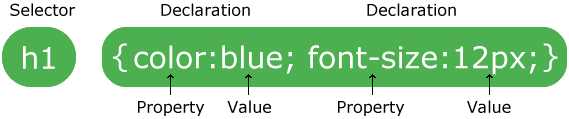
So you have the selector and then the declarations. Each declaration is typically on a new line with the curly brackets enclosing all of them. For media queries, the curly brackets of the media query enclose anything you want to be in that media query.
To add a phone icon you can generate the icon shortcode and then copy out the html for it and add it into the field. Ex:
<span class="av_font_icon avia_animate_when_visible av-icon-style- avia-icon-pos-left avia_start_animation avia_start_delayed_animation" style="color:#ffffff; border-color:#ffffff;"><span class="av-icon-char" style="font-size:20px;line-height:20px;" aria-hidden="true" data-av_icon="" data-av_iconfont="entypo-fontello"></span></span>
Hi!
Thank you for the link.
It is working fine when I checked the website. It’s not being covered by color sections. Try to increase the z-index of the floating box:
#floatbox {
max-width: 300px;
height: 150px;
background: #fcfda8;
position: fixed;
padding: 15px;
right: 10px;
top: 200px;
bottom: 250px;
font-family: arial;
font-size: 18px;
z-index: 9999;
}
Just add the z-index property.
Regards,
Ismael



