Viewing 30 results - 6,511 through 6,540 (of 18,742 total)
  • Author
    Search Results
  • #994391

    Notice how, in the footer, pages and Product categories widgets don’t look the same, even though basically they have the same type of content – unordered list? Also, Interesting links widget has smaller font.

    So, I want bigger line spacing on Pages widget, and then to set all other widgets to look the same like that one (with regards to font size, line spacing etc.).

    (Again, I’m a noob so please excuse my stupid questions . And the poor site design :)

    #994325

    In reply to: Sub-menu item spacing

    Thank you very much we found it and it worked. You were very helpful. we found it in the menu options and only had to change our previous css code to: .menu-item * { font-size: 13px !important; }
    Here is a photo where we solved it: https://imgur.com/S5kndlR

    Best regards,
    Florian

    #994147
    chris_cirlot
    Participant

    Our site is using pixel tracking to monitor an ad campaign. We have the pixels firing correctly on the page, but we are having a hard time getting the javascript call to work with av_button code. Currently the code is:

    [av_button label='REGISTER HERE' link='manually,http://events.trustevent.com/index.cfm?eid=' link_target='_blank' size='x-large' position='center' icon_select='no' font='entypo-fontello' color='theme-color-highlight' custom_font='' custom_class='' admin_preview_bg='' onmousedown="fireButtonPub('url','spdzoe1','a2b0ect')"]

    We also have loaded a javascript function on the page for ‘fireButtonPub’. Since this isn’t working, what are we doing wrong?

    Thanks

    #994143
    Moondreamer21
    Participant

    I’ve searched for how to do this, but I’d like to have a custom bullet show up to the left of each recent post listed in the widget I have for them in the sidebar under my Articles + Videos page.
    Is there some CSS I can use to accomplish this?
    I’d also like to change the font size of the Recent Posts listed.
    Thank you!

    #994118

    Hi,

    Please go to Enfold theme options > Layout Builder and check “Show element options for developers” and then edit your element and give it a custom CSS class (“my-custom-class” in example below) and then add following code to Quick CSS field in Enfold theme options > General Styling tab

    .my-custom-class {
       font-size: 20px;
    }
    

    Best regards,
    Yigit

    #994115

    There are a couple pages on my site that I’d like to change the font size for.

    tarynwrites.com/about
    tarynwrites.com/contact
    tarynwrites.com/free-resources

    I can disable the under construction plugin if the pages aren’t visible.

    The .page class works but it also changes the font size of the sidebar widgets, icon boxes, etc. Is there any way to just change the size of the text on my static pages (like About page, Contact page, etc)?

    This reply has been marked as private.
    better_in_violet
    Participant

    Hi there,

    I was able to figure out how to change the spacing and size of blog posts but I’d like my pages to have the same formatting. I know how to style the font size and spacing; I’m just not sure what class or selector, etc to use for pages.

    Thanks.

    #993964

    Topic: Sub-menu item spacing

    in forum Enfold
    FlorianMeise
    Participant

    We have a Problem with our sub-menu item spacing. We want to decrease the hight between the different menu items, for example under the menu “Maschinen”. We think a css code would work. Before we changed the font size throught the css with: .avia_mega_div * { font-size: 12px !important; }, but in the enfold backend we can’t change the seperator to none (we can but it doesn’t change anything). We hope somone can help.

    #993944
    Phillip
    Participant

    Hi Team,

    I added 10px to the header_meta via padding-bottom but now the beginning of the page / slider is under the menu. Is there a way to fix this? Thank you.

    My Quick CSS:

    #header_meta { text-transform: uppercase; padding-bottom: 10px; }
    #header_meta .container { top: 10px; }
    .header_color .container_wrap_meta { background: white; }
    
    #header_meta #avia2-menu a { font-size: 12px !important; }
    #avia-menu .avia-menu-text { font-size: 16px !important; }
    .sidebar a { font-size: 14px!important; }
    #socket a { font-size: 14px; }
    
    @media only screen and (max-width: 767px) { #header_meta { display: none; }
    }
    
    @media only screen and (max-width: 990px) {
    #top #menu-item-search { 
    display: none; }
    .av-burger-overlay-active #top #menu-item-search { 
    display: block; }}
    
    #top .widget_nav_menu li { text-align: left; }
    .widget { padding: 15px 0px !important; }
    
    @media only screen and (max-width: 380px) {
    .only-dt { display: none !important; }}
    
    .post-meta-infos { display: none; }
    .slide-meta { display: none; }
    .responsive #socket .sub_menu_socket { display: block!important; }
    .slide-content .blog-categories { display: none; }
    • This topic was modified 7 years, 8 months ago by Phillip.
    #993819

    In reply to: Images with links

    Hi,

    Looks like you manage to fixed the issue with the footer columns. If it’s not fixed yet, try to insert the “template-page” selector right after the “#wrap_all” selector.

    
    .responsive #top.page-id-3650 #wrap_all .template-page .flex_column.av_one_fourth {
       width: 24%;
       margin-left: 1%;
    }

    Decrease the font size of the team member name for smaller devices.

    .team-member-name {
        font-size: 11px;
    }

    There are two version of that section, called “blog-grid” and “blog-grid-hd”. Why is that? The images look fine on both galleries, so I’m not really sure what the issue is.

    Best regards,
    Ismael

    #993680

    Hi,

    ich habe jetzt mal zum Ausprobieren den CSS-Code eingefügt. Jetzt sind aber drei schwarze kleine Striche jeweils zwischen den Links “Startseite”, “Impressum” und “Datenschutzerklärung”. Die möchte ich nicht haben. Da sollen überhaupt keine Elemente zwischen den ausgerichteten drei Links sein.

    Ich konnte keine schwarze Striche sehen – wurde das Problem gelöst? Falls nicht, probiere bitte einmal den Browser Cache zu leeren.

    Die Schriftgröße kann mit folgenden Code verändert werden:

    
    #top #socket a, #top #socket div{
        font-size: 13px;
    }
    

    Natürlich kann der Wert 13px auch abgeändert werden :)

    Die Farbe des Socket kann mit folgenden Code angepasst werden:

    
    #top.page-id-22 .socket_color {
        background-color: #59e778;
    }
    

    Wichtig ist, dass der Page ID Wert (im Beispiel 22) je nach Seite angepasst wird, zB hier https://meyerhuber-wondratschek-archiv.de/impressum/ wäre der Wert 83 (#top.page-id-83). Der Farbwert #59e778 kann natürlich auch unterschiedlich gesetzt werden. Der Code für zwei Seiten würde daher so aussehen:

    
    #top.page-id-22 .socket_color {
        background-color: #59e778;
    }
    
    #top.page-id-83 .socket_color {
        background-color: #ff0000;
    }
    

    Wenn Ihr Hilfe beim Auffinden der Page ID braucht empfehle ich dieses Plugin: https://wordpress.org/plugins/wpsite-show-ids/

    LG,
    Dude

    #993677

    Hi,
    [slap-forehead] don’t know why I didn’t think of that :)
    anyways I changed the css a little, please try this code:

      <style type="text/css">
    .socialbody {
        display: flex;
        flex-wrap: wrap;
        justify-content: center;
        align-items: flex-end;
        align-content: center;
    	padding:0 0 20px 0;
        height: 100px;
        font: 16px Roboto, sans-serif;
    }
    
    a {
        text-decoration: none;
    }
    
    .socialBB-icon {
        width:  36px;
        height: 36px;
        fill: currentColor;
        transition: .2s;
    }
    
    a.socialBB-link--instagram:hover { color: #e67300 }
    a.socialBB-link--500px:hover  { color: #6699ff }
    a.socialBB-link--instagram:hover::after { background: #e67300 }
    a.socialBB-link--500px:hover::after  { background: #6699ff }
    
    .socialBB-link {
        position: relative;
        color: #bbb;
    }
    
    .socialBB-link:not(:last-of-type) {
        margin-right: 15px;
    }
    
    .socialBB-tooltip::before,
    .socialBB-tooltip::after {
        display: block;
        position: absolute;
        left: 50%;
        transform: translate(-50%, -10px);
        opacity: 0;
        transition: .2s;
    }
    
    .socialBB-tooltip::before {
        content: '';
        bottom: calc(100% + 2px);
        border: solid 5px transparent;
        border-top-color: currentColor;
    }
    
    .socialBB-tooltip::after {
        content: attr(aria-label);
        bottom: calc(100% + 12px);
        padding: .61em .93em;
        font-size: .875rem;
        color: white;
        border-radius: 3px;
    }
    
    .socialBB-tooltip:hover::before,
    .socialBB-tooltip:hover::after {
        opacity: 1;
        transform: translate(-50%);
    }
    
        </style>
    <div class="socialbody">
    	
    		<svg class="socialBB-icon"><use xlink:href="#icon--instagram"></use></svg>


    		<svg class="socialBB-icon"><use xlink:href="#icon--500px"></use></svg>
    	
    
    	<svg style="display: none">
    		<symbol id="icon--instagram" viewbox="0 0 24 24">
    			<path d="M7.8,2H16.2C19.4,2 22,4.6 22,7.8V16.2A5.8,5.8 0 0,1 16.2,22H7.8C4.6,22 2,19.4 2,16.2V7.8A5.8,5.8 0 0,1 7.8,2M7.6,4A3.6,3.6 0 0,0 4,7.6V16.4C4,18.39 5.61,20 7.6,20H16.4A3.6,3.6 0 0,0 20,16.4V7.6C20,5.61 18.39,4 16.4,4H7.6M17.25,5.5A1.25,1.25 0 0,1 18.5,6.75A1.25,1.25 0 0,1 17.25,8A1.25,1.25 0 0,1 16,6.75A1.25,1.25 0 0,1 17.25,5.5M12,7A5,5 0 0,1 17,12A5,5 0 0,1 12,17A5,5 0 0,1 7,12A5,5 0 0,1 12,7M12,9A3,3 0 0,0 9,12A3,3 0 0,0 12,15A3,3 0 0,0 15,12A3,3 0 0,0 12,9Z" />
    		</symbol>
    		<symbol id="icon--500px" viewbox="0 0 97.8 97.8">
    			<path d="M72.3,47.9c-1.6,0.2-2.9,1-4.1,1.9c-1.4,1.1-2.5,2.3-3.7,3.6c-0.2,0.2-0.1,0.3,0,0.4c0.8,0.9,1.7,1.8,2.7,2.6c1.6,1.3,3.4,2.3,5.5,2.5c2.4,0.2,4.4-0.9,5.2-3.1c0.3-0.8,0.4-1.5,0.4-2.5c0-0.2,0-0.6-0.1-0.9C77.9,49.5,75.4,47.5,72.3,47.9z"/><path d="M52.2,49.8c-1-0.7-2.1-1.4-3.4-1.7c-1.9-0.5-3.6-0.2-5,1.3c-1,1.2-1.5,2.6-1.5,4.3c0,0.2,0,0.4,0,0.7c0.2,2.3,1.8,4.1,4,4.5c1.2,0.2,2.5,0.1,3.6-0.4c2.5-1,4.4-2.7,6.2-4.7c0.1-0.1,0.1-0.2,0-0.3C55,52.1,53.7,50.8,52.2,49.8z"/><path d="M48.9,0C21.9,0,0,21.9,0,48.9s21.9,48.9,48.9,48.9s48.9-21.9,48.9-48.9S75.9,0,48.9,0z M73,65.7c-3.1,0-5.7-1.2-8.1-3.1c-1.6-1.2-2.9-2.6-4.2-4.1c-0.2-0.2-0.3-0.3-0.6,0c-1.3,1.4-2.6,2.8-4.1,4c-1.9,1.5-4,2.7-6.4,3c-4.3,0.6-8-0.5-10.9-3.9c-0.7-0.8-1.1-1.6-1.6-2.6c-0.1-0.1-0.1-0.3-0.2-0.4c-0.6,1.2-1.3,2.3-2.2,3.3c-2.3,2.5-5.2,3.7-8.5,3.9c-2.4,0.1-4.8-0.2-7-1.3c-3.7-1.8-5.8-4.7-6-8.9c0-0.3,0.1-0.4,0.4-0.4c2,0,4,0,6,0c0.3,0,0.4,0.1,0.4,0.4c0.4,2.3,1.6,3.9,3.9,4.5c3.2,0.8,6.2-1,7-4.3c0.6-2.2,0.3-4.4-1.2-6.2c-1-1.2-2.3-1.8-3.9-1.9c-2.2-0.2-4.1,0.6-5.4,2.5c-0.1,0.2-0.3,0.2-0.5,0.2c-1.8,0-3.6,0-5.4,0c-0.3,0-0.4-0.1-0.3-0.4c0.9-5.2,1.9-10.4,2.8-15.6c0.1-0.7,0.3-1.4,0.4-2.1c0-0.2,0.1-0.3,0.4-0.3c6,0,12,0,18,0c0.3,0,0.3,0.1,0.3,0.4c0,1.6,0,3.2,0,4.8c0,0.3-0.1,0.4-0.4,0.4c-4.3,0-8.6,0-12.9,0c-0.4,0-0.5,0.1-0.6,0.5c-0.4,2.3-0.8,4.6-1.2,6.8c0,0.1-0.1,0.2,0,0.3c0.1,0.1,0.2-0.1,0.3-0.1c2-1.9,4.4-2.5,7-2.3c2.5,0.1,4.7,1.1,6.5,2.9c0.7,0.8,1.3,1.6,1.8,2.6c0.1,0.1,0.1,0.2,0.2,0.4c0.5-1.3,1.1-2.5,2-3.5c1.9-2.2,4.4-3.4,7.3-3.7c4.1-0.4,7.5,1.2,10.5,3.9c1.2,1.1,2.3,2.4,3.4,3.6c0.2,0.3,0.3,0.3,0.6,0c1.4-1.6,2.7-3.3,4.4-4.6c2-1.5,4.1-2.6,6.6-2.9c6.2-0.7,11.3,2.6,12.6,9c0.6,2.7,0.4,5.3-0.5,7.9C82,63,78.1,65.7,73,65.7z" />
    		</symbol>
    	</svg>
    </div>

    Best regards,
    Mike

    #993586

    Hey Thomas,
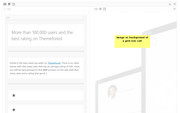
    The image is set as the background of a grid row cell, when the image is picked it is set as “full-size” attachment, which is 1200px square.
    2018-08-04_165103
    To see the settings, Enable Avia Layout Builder Debuger and add this shortcode into the debug window on a new page:

    [av_layout_row border='' min_height_percent='' min_height='' color='main_color' mobile='av-flex-cells' id='Best Rated' av_element_hidden_in_editor='0' av_uid='av-web4fa']
    [av_cell_one_half vertical_align='middle' padding='150px,0px,150px,150px' background_color='#f8f8f8' src='' attachment='' attachment_size='' background_attachment='scroll' background_position='top left' background_repeat='no-repeat' mobile_display='' av_uid='av-w7grli']
    
    [av_one_full first min_height='' vertical_alignment='av-align-top' space='no_margin' custom_margin='aviaTBcustom_margin' margin='0px' margin_sync='true' padding='0px' padding_sync='true' border='' border_color='' radius='0px' radius_sync='true' background_color='' src='' attachment='' attachment_size='' background_position='top left' background_repeat='no-repeat' animation='left-to-right' mobile_display='' av_uid='av-w2cptq']
    
    [av_heading tag='h1' padding='20' heading='More than 100.000 users and the best rating on Themeforest' color='custom-color-heading' style='blockquote modern-quote' custom_font='#000000' size='40' subheading_active='' subheading_size='15' custom_class='' admin_preview_bg='' av-desktop-hide='' av-medium-hide='' av-small-hide='' av-mini-hide='' av-medium-font-size-title='' av-small-font-size-title='' av-mini-font-size-title='' av-medium-font-size='' av-small-font-size='' av-mini-font-size='' margin='' av_uid='av-a1lwm'][/av_heading]
    
    [av_hr class='custom' height='50' shadow='no-shadow' position='left' custom_border='av-border-fat' custom_width='50px' custom_border_color='#000000' custom_margin_top='30px' custom_margin_bottom='30px' icon_select='no' custom_icon_color='' icon='ue808' font='entypo-fontello' av_uid='av-vq7lpq']
    
    [av_textblock size='' font_color='' color='' admin_preview_bg='rgb(255, 255, 255)' av_uid='av-vimjgu']
    Enfold is the best rated top seller on <a href="https://themeforest.net/?ref=Kriesi" target="_blank">Themeforest</a>. There is no other theme with that many sales that has an average rating of 4.85. Heck, you will be hard pressed to find <strong>ANY</strong> product on the web with that many sales and a rating that good ;)
    [/av_textblock]
    
    [av_hr class='invisible' height='20' shadow='no-shadow' position='left' custom_border='av-border-fat' custom_width='50px' custom_border_color='#000000' custom_margin_top='30px' custom_margin_bottom='30px' icon_select='no' custom_icon_color='' icon='ue808' font='entypo-fontello' av_uid='av-vcpmce']
    
    [av_font_icon icon='ue808' font='entypo-fontello' style='' caption='' link='' linktarget='' size='40px' position='left' color='#e2bc12' av_uid='av-v8q3oe'][/av_font_icon]
    
    [av_font_icon icon='ue808' font='entypo-fontello' style='' caption='' link='' linktarget='' size='40px' position='left' color='#e2bc12' av_uid='av-v0ckqm'][/av_font_icon]
    
    [av_font_icon icon='ue808' font='entypo-fontello' style='' caption='' link='' linktarget='' size='40px' position='left' color='#e2bc12' av_uid='av-uses5q'][/av_font_icon]
    
    [av_font_icon icon='ue808' font='entypo-fontello' style='' caption='' link='' linktarget='' size='40px' position='left' color='#e2bc12' av_uid='av-uqms5a'][/av_font_icon]
    
    [av_font_icon icon='ue808' font='entypo-fontello' style='' caption='' link='' linktarget='' size='40px' position='left' color='#e2bc12' av_uid='av-ugrfpi'][/av_font_icon]
    
    [av_hr class='invisible' height='42' shadow='no-shadow' position='left' custom_border='av-border-fat' custom_width='50px' custom_border_color='#000000' custom_margin_top='30px' custom_margin_bottom='30px' icon_select='no' custom_icon_color='' icon='ue808' font='entypo-fontello' av_uid='av-uf3una']
    
    [av_button label='Get it now' link='manually,http://themeforest.net/item/enfold-responsive-multipurpose-theme/4519990?license=regular&open_purchase_for_item_id=4519990&purchasable=source&ref=Kriesi' link_target='' size='large' position='left' icon_select='yes' icon_hover='aviaTBicon_hover' icon='ue859' font='entypo-fontello' color='dark' custom_bg='#444444' custom_font='#ffffff' admin_preview_bg='rgb(255, 255, 255)' av_uid='av-u6k5hi']
    
    [/av_one_full][/av_cell_one_half][av_cell_one_half vertical_align='middle' padding='500px,0px,500px,0px' background='bg_color' background_color='#f8f8f8' background_gradient_color1='' background_gradient_color2='' background_gradient_direction='vertical' src='https://127.0.0.1/2017demo1/wp-content/uploads/2017/01/mockup-3.png' attachment='298' attachment_size='full' background_attachment='scroll' background_position='bottom left' background_repeat='no-repeat' link='' linktarget='' link_hover='' mobile_display='av-hide-on-mobile' av_uid='av-u1r53a' custom_class='linkcell']
    
    [/av_cell_one_half]
    [/av_layout_row]


    You won’t get the images too, but you can download them from the live demo you linked to.

    Best regards,
    Mike

    #993528

    In reply to: Iconos Personalizados

    Hi,
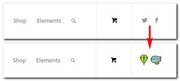
    Si entiendo correctamente, los íconos sociales que desea agregar al lado del menú son imágenes y no se encuentran en fontello.com, en este caso recomiendo agregar iconos sociales desde la opción Opciones de Enfold Theme> Perfiles sociales> Sus perfiles sociales, que usted no se utilizará, por lo que puede reemplazarlos con imágenes. Utilice este CSS en el campo Estilo general> CSS rápido:

    #top .social_bookmarks li:hover a {
        background: transparent !important;
    }
    #top .social_bookmarks li a:before{
        content: "";
        display: block;
        width: 30px;
        height: 30px;
    
    }
    #top .social_bookmarks li.social_bookmarks_facebook a:before {
        background: url(https://png.icons8.com/doodle/50/ffffff/dirigible.png) center center no-repeat;
        background-size: contain;
    }
    
    #top .social_bookmarks li.social_bookmarks_twitter a:before {
        background: url(https://png.icons8.com/color/50/ffffff/hot-air-balloon.png) center center no-repeat;
        background-size: contain;
    }
    

    y reemplace la url con sus imágenes, y reemplace las clases de twitter y facebook con los perfiles sociales que elija usar para el reemplazo.
    2018-08-04_104811
    Si lo desea, podría configurar uno para usted en su sitio para que pueda ver cómo funciona y hacer el resto usted mismo.

    ———-
    If I understand correctly, the social icons you want to add next to the menu are images and not found on fontello.com, in this case I recommend adding social icons from the Enfold Theme Options > Social Profiles > Your social profiles option, that you will not be using, so you can replace them with images. Please use this css in the General Styling > Quick CSS field:

    #top .social_bookmarks li:hover a {
        background: transparent !important;
    }
    #top .social_bookmarks li a:before{
        content: "";
        display: block;
        width: 30px;
        height: 30px;
    
    }
    #top .social_bookmarks li.social_bookmarks_facebook a:before {
        background: url(https://png.icons8.com/doodle/50/ffffff/dirigible.png) center center no-repeat;
        background-size: contain;
    }
    
    #top .social_bookmarks li.social_bookmarks_twitter a:before {
        background: url(https://png.icons8.com/color/50/ffffff/hot-air-balloon.png) center center no-repeat;
        background-size: contain;
    }
    

    and replace the url with your images, and replace the twitter & facebook classes with the social profiles you choose to use for replacement.
    2018-08-04_104811
    If you wish, I could set one up for you on your site so you can see how it works and do the rest yourself.

    Best regards,
    Mike

    #993396

    In reply to: Issues on mobile

    Hi,
    I took a look at the coaching page and found that your column padding was 50px on all four sides of the text blocks, which was pushing the last two items off center, adjusting the padding to 50px-0px-50px-0px centers the text. But at 768px the text goes to the right & left edges of the pink box. I would recommend adding a media queries so at that size the text font is a little smaller so it looks like there is a little padding, while keeping the text centered.

    I also checked your Quick CSS, and found that you were missing a curly bracket, which I replaced. Perhaps this occurred when I was adding the last code, if so sorry about that.
    Please clear your browser cache and check.

    Best regards,
    Mike

    805ITS
    Participant

    Hello,

    I have an issue with my website. On bigger screen, the caption text on the slider does not stay in the same position as on smaller screeen. It goes to the bottom instead of being at the center : https://prnt.sc/kefnv7

    Also I would like the font to be bigger and bigger screen. The resolution I am using on this screen is 2560×1440.

    The CSS code I am using to center the text is the following :

    /* Center Text Full Screen Slider Front Page*/
    .home .caption_bottom .slideshow_caption .slideshow_inner_caption {
        bottom: 180px !important;
        text-align: center !important;
    }

    Thank you in advance for your help!

    #993361
    OhYa1337
    Participant

    I have been trying to change the hover color & background on the links in the secondary menu, but I can get it.
    I can change the font size, but nothing else is working for me.

    The size change works fine the font is 12px
    The background color is also working, which is White
    The font color remains white when it should be red, I used the code ff0000 & also the word red
    Here’s my code

    .sub_menu>ul>li>a, .sub_menu>div>ul>li>
    a {
    font-size: 12px;
    }
    .header_color .sub_menu > ul > li > a:hover, a:active {
        background-color: white;
        color: red;
    }
    #993342
    darioferbor
    Participant

    Hi,

    i’m trying to add some HTML/CSS animated social icons in the socket.
    The problem is, when i add hem, they don’t work as expected (hover colors doesn’t work).

    I’m using the plug-in HTML snippets for generating a schortcode to put in the socked (enfold settings).
    I’ve also tried to use the code in a code block (new page), but it works exactly the same.

    This is the code i’m using:

    <html>
        <style type="text/css">
    .socialbody {
        display: flex;
        flex-wrap: wrap;
        justify-content: center;
        align-items: flex-end;
        align-content: center;
    	padding:0 0 20px 0;
        height: 100px;
        font: 16px Roboto, sans-serif;
        background: #f9f9f9;
    }
    
    a {
        text-decoration: none;
        color: inherit;
    }
    
    .socialBB-icon {
        width:  36px;
        height: 36px;
        fill: currentColor;
        transition: .2s;
    }
    
    .socialBB-link--instagram:hover { color: #e67300 }
    .socialBB-link--500px:hover  { color: #6699ff }
    .socialBB-link--instagram:hover::after { background: #e67300 }
    .socialBB-link--500px:hover::after  { background: #6699ff }
    
    .socialBB-link {
        position: relative;
        color: #bbb;
    }
    
    .socialBB-link:not(:last-of-type) {
        margin-right: 15px;
    }
    
    .socialBB-tooltip::before,
    .socialBB-tooltip::after {
        display: block;
        position: absolute;
        left: 50%;
        transform: translate(-50%, -10px);
        opacity: 0;
        transition: .2s;
    }
    
    .socialBB-tooltip::before {
        content: '';
        bottom: calc(100% + 2px);
        border: solid 5px transparent;
        border-top-color: currentColor;
    }
    
    .socialBB-tooltip::after {
        content: attr(aria-label);
        bottom: calc(100% + 12px);
        padding: .61em .93em;
        font-size: .875rem;
        color: white;
        border-radius: 3px;
    }
    
    .socialBB-tooltip:hover::before,
    .socialBB-tooltip:hover::after {
        opacity: 1;
        transform: translate(-50%);
    }
    
        </style>
    <div class="socialbody">
    	<a href="https://www.instagram.com/dario.borla/" target="_blank" class="socialBB-link socialBB-link--instagram socialBB-tooltip" aria-label="Instagram">
    		<svg class="socialBB-icon"><use xlink:href="#icon--instagram"></use></svg>
    	</a>
    
    	<a href="https://500px.com/darborla" target="_blank" class="socialBB-link socialBB-link--500px socialBB-tooltip" aria-label="500px">
    		<svg class="socialBB-icon"><use xlink:href="#icon--500px"></use></svg>
    	</a>
    
    	<svg style="display: none">
    		<symbol id="icon--instagram" viewbox="0 0 24 24">
    			<path d="M7.8,2H16.2C19.4,2 22,4.6 22,7.8V16.2A5.8,5.8 0 0,1 16.2,22H7.8C4.6,22 2,19.4 2,16.2V7.8A5.8,5.8 0 0,1 7.8,2M7.6,4A3.6,3.6 0 0,0 4,7.6V16.4C4,18.39 5.61,20 7.6,20H16.4A3.6,3.6 0 0,0 20,16.4V7.6C20,5.61 18.39,4 16.4,4H7.6M17.25,5.5A1.25,1.25 0 0,1 18.5,6.75A1.25,1.25 0 0,1 17.25,8A1.25,1.25 0 0,1 16,6.75A1.25,1.25 0 0,1 17.25,5.5M12,7A5,5 0 0,1 17,12A5,5 0 0,1 12,17A5,5 0 0,1 7,12A5,5 0 0,1 12,7M12,9A3,3 0 0,0 9,12A3,3 0 0,0 12,15A3,3 0 0,0 15,12A3,3 0 0,0 12,9Z" />
    		</symbol>
    		<symbol id="icon--500px" viewbox="0 0 97.8 97.8">
    			<path d="M72.3,47.9c-1.6,0.2-2.9,1-4.1,1.9c-1.4,1.1-2.5,2.3-3.7,3.6c-0.2,0.2-0.1,0.3,0,0.4c0.8,0.9,1.7,1.8,2.7,2.6c1.6,1.3,3.4,2.3,5.5,2.5c2.4,0.2,4.4-0.9,5.2-3.1c0.3-0.8,0.4-1.5,0.4-2.5c0-0.2,0-0.6-0.1-0.9C77.9,49.5,75.4,47.5,72.3,47.9z"/><path d="M52.2,49.8c-1-0.7-2.1-1.4-3.4-1.7c-1.9-0.5-3.6-0.2-5,1.3c-1,1.2-1.5,2.6-1.5,4.3c0,0.2,0,0.4,0,0.7c0.2,2.3,1.8,4.1,4,4.5c1.2,0.2,2.5,0.1,3.6-0.4c2.5-1,4.4-2.7,6.2-4.7c0.1-0.1,0.1-0.2,0-0.3C55,52.1,53.7,50.8,52.2,49.8z"/><path d="M48.9,0C21.9,0,0,21.9,0,48.9s21.9,48.9,48.9,48.9s48.9-21.9,48.9-48.9S75.9,0,48.9,0z M73,65.7c-3.1,0-5.7-1.2-8.1-3.1c-1.6-1.2-2.9-2.6-4.2-4.1c-0.2-0.2-0.3-0.3-0.6,0c-1.3,1.4-2.6,2.8-4.1,4c-1.9,1.5-4,2.7-6.4,3c-4.3,0.6-8-0.5-10.9-3.9c-0.7-0.8-1.1-1.6-1.6-2.6c-0.1-0.1-0.1-0.3-0.2-0.4c-0.6,1.2-1.3,2.3-2.2,3.3c-2.3,2.5-5.2,3.7-8.5,3.9c-2.4,0.1-4.8-0.2-7-1.3c-3.7-1.8-5.8-4.7-6-8.9c0-0.3,0.1-0.4,0.4-0.4c2,0,4,0,6,0c0.3,0,0.4,0.1,0.4,0.4c0.4,2.3,1.6,3.9,3.9,4.5c3.2,0.8,6.2-1,7-4.3c0.6-2.2,0.3-4.4-1.2-6.2c-1-1.2-2.3-1.8-3.9-1.9c-2.2-0.2-4.1,0.6-5.4,2.5c-0.1,0.2-0.3,0.2-0.5,0.2c-1.8,0-3.6,0-5.4,0c-0.3,0-0.4-0.1-0.3-0.4c0.9-5.2,1.9-10.4,2.8-15.6c0.1-0.7,0.3-1.4,0.4-2.1c0-0.2,0.1-0.3,0.4-0.3c6,0,12,0,18,0c0.3,0,0.3,0.1,0.3,0.4c0,1.6,0,3.2,0,4.8c0,0.3-0.1,0.4-0.4,0.4c-4.3,0-8.6,0-12.9,0c-0.4,0-0.5,0.1-0.6,0.5c-0.4,2.3-0.8,4.6-1.2,6.8c0,0.1-0.1,0.2,0,0.3c0.1,0.1,0.2-0.1,0.3-0.1c2-1.9,4.4-2.5,7-2.3c2.5,0.1,4.7,1.1,6.5,2.9c0.7,0.8,1.3,1.6,1.8,2.6c0.1,0.1,0.1,0.2,0.2,0.4c0.5-1.3,1.1-2.5,2-3.5c1.9-2.2,4.4-3.4,7.3-3.7c4.1-0.4,7.5,1.2,10.5,3.9c1.2,1.1,2.3,2.4,3.4,3.6c0.2,0.3,0.3,0.3,0.6,0c1.4-1.6,2.7-3.3,4.4-4.6c2-1.5,4.1-2.6,6.6-2.9c6.2-0.7,11.3,2.6,12.6,9c0.6,2.7,0.4,5.3-0.5,7.9C82,63,78.1,65.7,73,65.7z" />
    		</symbol>
    	</svg>
    </div>
    </html>

    Saved to an html file works great.

    Thanks for the support.

    #993077

    Hi,
    It is possible that this only happens on Apples, but I only have a PC, so I would have to ask someone else from the team to take a look at the page.
    But we can easily hide the sub-title on mobile devices, which maybe a better solution.
    Try adding this css to your Quick CSS to do so, I also added some css to make the title a little bigger and center the title vertically:

    @media only screen and (max-width: 767px) { 
    #top .logo .subtext {
    display: none !important;
    }
    #top .inner-container .logo h1 {
        font-size: 20px !important;
        padding-top: 30px !important;
    }
    }

    Best regards,
    Mike

    #993060
    Cravat
    Participant

    Hi,

    I’m having problems changing the font in main menu. I used this code for menu font size and it works:

    .avia-menu-text {
    font-size: 22px;
    }

    But when I tried this for changing the font type, it didn’t work. I used this:

    .main_menu {
    font-family: “Flamenco”;
    font-weight: bold;
    }

    It just defaults to Times New Roman. If I remove that code, than the menu appears kinda weird – it displays in the font that’s selected as “Heading font” in theme settings, but every time you click on a menu item, it appears as Arial for a split second, and then switches to selected Google font. And you can literally see how the font changes.

    #992914

    Thank you Rikard for the code. That helps show the title, but my calendar still doesn’t look like the Church Demo calendar. See below for the things that I noticed:

    1. The page title appears above the calendar filter bar, but I would like the page title to appear just like the Church Demo, same location and same font size. How can the page title move to just above the actual calendar with the dates?
    Title Bar

    2. Please click ” << July “. The page is messed up as seen in the image. How can this monthly page, and any other monthly pages that may look like this, be fixed?
    July

    3. In addition, ” << July ” is located a little higher above the actual calendar. In the Church Demo example, ” << July ” and “September >> ” are located in line with the page title. How can I achieve this?
    Calendar Months

    4. ” September >> ” link is missing from “August”, so how can someone view events in September?
    September

    Thank you again!

    saschapi
    Participant

    Hi guys,
    following scenario: I want to show content of a page in a template file.
    So I build a page with the advanced layout builder and would like to display it’s content above the footer Problem is:
    If I use the do_shortcode function inside my functions.php like this:

    echo do_shortcode('[av_postcontent link="page,145" av_uid=""]');
    the result is unparsed shortcodes from the layout builder:
    [av_heading heading='Provisionsvertrag abschließen und Testgeräte bestellen' tag='h2' style='blockquote modern-quote' size='' subheading_active='' subheading_size='15' margin='' margin_sync='true' padding='10' color='' custom_font='' av-medium-font-size-title='' av-small-font-size-title='' av-mini-font-size-title='' av-medium-font-size='' av-small-font-size='' av-mini-font-size='' av_uid='av-jkcdbpny' admin_preview_bg=''][/av_heading] [av_textblock size='' font_color='' color='' av-medium-font-size='' av-small-font-size='' av-mini-font-size='' av_uid='av-jkcdca70' admin_preview_bg=''] Lorem ipsum dolor sit amet, consetetur sadipscing elitr, sed diam nonumy eirmod tempor invidunt ut labore et dolore magna aliquyam erat, sed diam voluptua. At vero eos et accusam et justo duo dolores et ea rebum. Stet clita kasd gubergren, no sea takimata sanctus est Lorem ipsum dolor sit amet. Lorem ipsum dolor sit amet, consetetur sadipscing elitr, sed diam nonumy eirmod tempor invidunt ut labore et dolore magna aliquyam erat, sed diam voluptua. At vero eos et accusam et justo duo dolores et ea rebum. Stet clita kasd gubergren, no sea takimata sanctus est Lorem ipsum dolor sit amet. [/av_textblock] [av_textblock size='' font_color='' color='' av-medium-font-size='' av-small-font-size='' av-mini-font-size='' av_uid='av-jkcdc08d' admin_preview_bg=''] [gravityform id="1" title="true" description="true"] [/av_textblock]

    Is thhere an option to filter this code or parse it with the alb functions?

    thanks for any advice Sascha

    #992708

    Hi,

    Glad that you found a plugin. :)

    1.a) Use this css code to move the form downwards.

    #top #wpppass form {
        margin: 50px auto;
    }
    

    1.b – 1.c) Use this one to center align the form fields and adjust the font of the label.

    #wpppass form label {
        text-align: center;
        font-size: 14px;
        font-weight: 400;
    }
    
    #wpppass form input[type="password"], #wpppass form input[type="submit"] {
        margin: 10px auto;
    }

    2.) This one should change the menu font color for that specific page.

    .page-id-483 .main_menu ul:first-child > li > a {
        color: green !important;
    }

    Adjust the color value as needed.

    Best regards,
    Ismael

    #992631

    I appreciate the response. I’m having my web guy make these changes. To clarify, should this also address the issue of not being able to change layout settings? Basically anytime I tried to change font size/color, layout settings I got an error within enfold.

    Tony
    Participant

    I would like help on adding a font resize to the header of the Enfold theme I am using at http://neighborsnetworkfl.org

    I have seen lots of sites with a very simple one-click button that cycles through different text sizes so users can adjust the text size for their disability. I have found plugins and widgets that let you add this function to the page in the widget or sidebar areas, like I have done on the right footer of this website. But I would much prefer it be a permanent option maybe to the right of the magnifying glass search function on the navigation menu or even on the top bar. Whatever is easiest.

    Would someone be able to help me? I even have one of the plugin’s codes that could be used, if needed. I just don’t know where to insert it to implement it properly.

    Thank in advance!

    #992582

    It didn’t work but I was able to fix it with this code :

    /*Fix Progress Bar on "About" page on mobile*/
      .avia-progress-bar .progressbar-title-wrap {
        font-size: 10px;
      }
    }
    #992520
    This reply has been marked as private.
    #992349
    jonrouse
    Participant

    Hi,

    I am currently trying to build my first shop with Enfold and Woocommerce.

    I am running into a slight issue, which could be down to my lack of experience.

    I am trying to change the size of the info which sits above the header – the phone number and shop menu/cart etc.
    I’m using the following CSS, which is causing the images, and tabbed info on product to not display. The info is too small by default, so I’d like it to be bigger. I copied some CSS, whilst it works, it’s giving me problems.

    #top #header_meta a, #top #header_meta li, #top #header_meta .phone-info { font-weight: 400!important; text-transform: uppercase!important; font-size: 14px;}
    
    @media only screen and (max-width: 767px) {
     #top #header_meta a, #top #header_meta li, #top #header_meta .phone-info { font-weight: 400!important; text-transform: uppercase!important; font-size: 10px;}
    }

    I think it’s this, because when I delete it and refresh the page, the info comes back.

    Can someone please help?
    Thanks!

    • This topic was modified 7 years, 8 months ago by jonrouse.
Viewing 30 results - 6,511 through 6,540 (of 18,742 total)