Viewing 30 results - 5,581 through 5,610 (of 18,736 total)
  • Author
    Search Results
  • #1065026

    In reply to: change megamenue

    Hi Bregi,

    Here is the code you can put in Enfold > General Styling > Quick Css,  if it does not work, put into themes/enfold/css/custom.css

    
    #top #header .mega_menu_title a {
      font-size: 14px;
    }
    #header .avia_mega_div .units {
        padding: 0 8px 0 8px;
    }
    

    If you need further assistance please let us know.

    Best regards,
    Victoria

    #1064961
    Anj27
    Participant

    Hello, I have some posts at the end of my homepage, added with article slider. The problem is that the title of the post is difficult to read. Haw can I change the font size or put a line-height for this title?
    Thank you

    #1064908
    dorikoren
    Participant

    On each product page, I have a button for “register” and one at the bottom for “Add to Cart”. The register button just results in scrolling down to the add to cart button. How do I remove the registration button?

    Also, below the “add to cart” button, is there a way to remove the “category: categorized” information?

    Finally, is there a way to change the font size for the product title only? I would like to make it larger.

    Page link provided below.

    #1064873

    Hey Eric,

    You would have to decrease the font size a bit, would that be ok for you?

    Best regards,
    Rikard

    #1064854

    In reply to: different body text

    Hi,
    Sorry for the late reply, if I understand correctly you would like this text to be 30px ‘Montserrat’, Please try this code in the General Styling > Quick CSS field

    .av-subheading p,h3.av-special-heading-tag  {
    font-family: 'Montserrat' !important; 
    font-size: 30px !important;
    }

    and download the font from Google fonts and upload to your Enfold Theme Options > Import/Export > Custom Font Manager
    If your want to replace the special heading of the text and use a Text Block element then be sure to add a custom class, as explained above and use this css:

    .custom_class p {
    font-family: 'Montserrat' !important; 
    font-size: 30px !important;
    }

    just change the “custom_class” with your custom class.

    Best regards,
    Mike

    byallmeans
    Participant

    Replying to issue #1055504 (which was closed):

    I have unwanted space between portfolio items. The first items are connected, but as soon as an item hits the browser edge extra space is added between the items.

    The unwanted space between the items is back, despite the CSS you provided:
    @media only screen and (max-width: 989px) {
    #top .isotope-item.special_av_fullwidth .av_table_col .entry-title {
    font-size: 13px;
    margin: 0 0 10px;
    }
    }

    Hi ngavy,

    I see, there’s no option to do that but it can be done by going to Enfold > General Styling > Quick CSS, and add this css code:

    @media only screen and (max-width:767px) {
      #top #wrap_all #main h3.av-magazine-title.entry-title {
        font-size: 18px;
      }
    }

    this only affects mobile devices.

    Best regards,
    Nikko

    #1064633

    In reply to: Font and font size

    Hi Audrey2019,

    Go to Enfold > Advanced Styling > (Select an item to customize) choose Widget Links then click on Edit Element button then modify the Font Size and save.
    As for moving the icons, can you give us some mockup or screenshot on how you want them to look like?

    Best regards,
    Nikko

    #1064624

    Hi tammiviestinta,

    Here is the code you can put in Enfold > General Styling > Quick Css,  if it does not work, put into themes/enfold/css/custom.css

    
    @media only screen and (max-width: 767px) and (min-width: 480px) {
      .responsive #top .slideshow_caption h2 {
          font-size: 26px !important;
      }
    }
    

    If you need further assistance please let us know.

    Best regards,
    Victoria

    #1064539
    Martin
    Participant

    Hello,

    can I centrally set a percentage reduction in font size for mobile devices? So do not go into every text and make the adjustment there, but in the central Enfold settings? That would be a huge relief!

    many Greetings,
    Martin

    #1064442

    ok here we go:
    ( i styled it here only for my page with ID: 2466 – if you want to have it everywhere – remove the if clause – but don’t forget to delete the last but one closing curly bracket then too!)
    it is recomended to use a child-theme
    both comes to child-theme functions.php

    first : the container itself placement

    add_action('ava_main_header', function() {
    if(is_page(2466)){
    echo '<div class="fixed-tel">
            <a id="klick" class="telephone" href="tel:+492289768293">
                <span class="phone-icon">+49 228 9768293</span>   
            </a>
        </div>';
    }
    });

    Second: the function for animation:

    add_action( 'wp_footer', 'fixed_contact_script' );
    function fixed_contact_script() {
    if(is_page(2466)){
    ?>
    <script type="text/javascript">
    (function($){
        $(function(){
            $('.fixed-tel').data('size','big');
        });
        $(window).scroll(function(){
            if($(document).scrollTop() > 10){
                if($('.fixed-tel').data('size') == 'big')
                {
                    $('.fixed-tel').data('size','small');
                    $('.fixed-tel').stop().animate({
                        top:'42px'
                    },700);
                }
            }
            else{
                if($('.fixed-tel').data('size') == 'small')
                {
                    $('.fixed-tel').data('size','big');
                    $('.fixed-tel').stop().animate({
                        top:'50%'
                    },700);
                }  
            }
        });
    })(jQuery);
    </script>
    <?php
    }
    }

    this comes to quick css:

    .fixed-tel {
        top: 50%;
        right: -165px;
        position: fixed;
        z-index: 10;
        background-color: #1ecaed;
        border: 2px solid #fff;
        border-right: none !important;
    }
    
    #klick { padding: 20px; display: block }
    
    .phone-icon::before {
        content: "\e854";
        font-family: entypo-fontello;
        padding-right: 18px;
        font-size: 30px;
        top: 3px;
        position: relative;
    }
    
    .fixed-tel:hover { right: 0 !important }
    .fixed-tel a:hover { text-decoration: none }
    .telephone { color: #fff !important }
    

    if you don’t like the hidden part of that telephone field – just set the right positioning to 0 – and remove css for fixed-tel:hover)
    if you like to link to your contact page just change href in: echo '<a class="telephone" href="tel:+492289768293"> and adapt the content ( maybe the icon to: \e805 )
    if you like to have that phone field over the slided in hamburger menu – set the z-index to 1000
    some positioning depends on your header height ( and if you have f.e. top bar etc.

    Result as mentioned above see here: https://webers-testseite.de/impressum/

    #1064372

    Hey MeghanNathanson,
    Thank you for the link, I took a look and it seems that the font for the blog and the “About” section above are the same, so to match the font size Please try this code in the General Styling > Quick CSS field or in the WordPress > Customize > Additional CSS field:

    article.post-entry p {
    font-size: 13px !important;
    }
    

    For the blog titles do you want them to be the same size and color as the “News and Writings” title?

    Best regards,
    Mike

    #1064260
    MeghanNathanson
    Participant

    Hi, I want to change the size and color of the fonts in a blog element.
    See the bottom of this page where the blog element is. I would like the
    fonts to match the rest of the page. How might I do this? Help?

    #1064153

    In reply to: Font and font size

    Thank you Nikko! – worked well by importing new font :-)
    Where to change size for footer font and how to move icons from socket to footer…
    All the best
    Audrey2019

    #1063998

    Hi robertoKM,

    Please remove this:

    .your-custom-class {font-size: 100px; }

    then in the Text Block change that from Visual (Visuale) to Text (Testo) then wrap your current text/content in a span:

    <span class="mytext">your text</span>

    then save. In Enfold > General Styling > Quick CSS, add this css code:

    #top .mytext {
      font-size: 100px;
    }

    Hope this helps.

    Best regards,
    Nikko

    #1063721

    Topic: Font and font size

    in forum Enfold
    Audrey2019
    Participant

    Hello Support,
    I have some, I hope, simple questions:

    Can I import a font – eg Myriad Pro Light?
    Can I/or where can I change the size of the font – for the moment I would like it larger – in the footer?
    Can I move the icons Instagram and Mail from the socket to the footer?

    THANK YOU :-)
    All the best Audrey 2019

    #1063600
    GMVCONS
    Participant

    Hello!
    I state that I installed enfold on wordpress locally on my computer.
    I found some problems that I can not solve:
    1. at the bottom of the page appear automatically some widgets that I can not remove. The widgets are: Pages, archive, meta data. In the wordpress widget section I have not enabled any widgets as well as in the pages.
    2. I can not change the font size of the page titles (in another site where I installed enfold I had this option in the theme options but in this new version of the theme there isn’t). I also tried to insert the css code that you suggested in the support section of this site, but only increased the font of the menu and not the page titles.
    3. I set the footer but it does not appear

    thank you in advance for the help you give me
    Giulia

    #1063571

    .your-custom-class {font-size: 100px; }

    #1063542

    Hi!
    Thanks, I realised I was imprecise – I mean, specifically, that the fonts included in Enfold, like fontello, are missing a woff2-version, meaning that browsers that support woff2 still have to download the bigger size woff-file.

    #1063458

    Hi I would like to change my button css to the following but not sure how to select it once it’s save to my child theme:
    Is there a way I can have a cool button like this with enfold?
    /****
    * button
    *
    */
    .button, .button–primary, .button–secondary, .wrapped-input button, .wrapper-input button, .wrapped-input–inverse button, .wrapped-input–date button, .beer-list-item__wrapped-input button, .button–secondary-red, .button–alternative, .button–hero {
    font-family: “Neusa-Bold”, sans-serif;
    background: white;
    color: #000;
    cursor: pointer;
    display: inline-block;
    letter-spacing: 0.01em;
    line-height: 1em;
    padding: 0;
    position: relative;
    text-decoration: none;
    text-transform: uppercase;
    transition: color .2s ease-in-out, border-color .2s ease-in-out; }
    .button:before, .button–primary:before, .button–secondary:before, .wrapped-input button:before, .wrapper-input button:before, .wrapped-input–inverse button:before, .wrapped-input–date button:before, .beer-list-item__wrapped-input button:before, .button–secondary-red:before, .button–alternative:before, .button–hero:before, .button:after, .button–primary:after, .button–secondary:after, .wrapped-input button:after, .wrapper-input button:after, .wrapped-input–inverse button:after, .wrapped-input–date button:after, .beer-list-item__wrapped-input button:after, .button–secondary-red:after, .button–alternative:after, .button–hero:after {
    transition: color .2s ease-in-out, border-color .2s ease-in-out; }
    .button:focus, .button–primary:focus, .button–secondary:focus, .wrapped-input button:focus, .wrapper-input button:focus, .wrapped-input–inverse button:focus, .wrapped-input–date button:focus, .beer-list-item__wrapped-input button:focus, .button–secondary-red:focus, .button–alternative:focus, .button–hero:focus {
    outline: none; }
    .button:focus, .button–primary:focus, .button–secondary:focus, .wrapped-input button:focus, .wrapper-input button:focus, .wrapped-input–inverse button:focus, .wrapped-input–date button:focus, .beer-list-item__wrapped-input button:focus, .button–secondary-red:focus, .button–alternative:focus, .button–hero:focus, .button:hover, .button–primary:hover, .button–secondary:hover, .wrapped-input button:hover, .wrapper-input button:hover, .wrapped-input–inverse button:hover, .wrapped-input–date button:hover, .beer-list-item__wrapped-input button:hover, .button–secondary-red:hover, .button–alternative:hover, .button–hero:hover {
    border-color: #1c1c1c;
    color: #1c1c1c; }
    .button:focus:before, .button–primary:focus:before, .button–secondary:focus:before, .wrapped-input button:focus:before, .wrapper-input button:focus:before, .wrapped-input–inverse button:focus:before, .wrapped-input–date button:focus:before, .beer-list-item__wrapped-input button:focus:before, .button–secondary-red:focus:before, .button–alternative:focus:before, .button–hero:focus:before, .button:hover:before, .button–primary:hover:before, .button–secondary:hover:before, .wrapped-input button:hover:before, .wrapper-input button:hover:before, .wrapped-input–inverse button:hover:before, .wrapped-input–date button:hover:before, .beer-list-item__wrapped-input button:hover:before, .button–secondary-red:hover:before, .button–alternative:hover:before, .button–hero:hover:before {
    border-right-color: #1c1c1c; }
    .button:focus:after, .button–primary:focus:after, .button–secondary:focus:after, .wrapped-input button:focus:after, .wrapper-input button:focus:after, .wrapped-input–inverse button:focus:after, .wrapped-input–date button:focus:after, .beer-list-item__wrapped-input button:focus:after, .button–secondary-red:focus:after, .button–alternative:focus:after, .button–hero:focus:after, .button:hover:after, .button–primary:hover:after, .button–secondary:hover:after, .wrapped-input button:hover:after, .wrapper-input button:hover:after, .wrapped-input–inverse button:hover:after, .wrapped-input–date button:hover:after, .beer-list-item__wrapped-input button:hover:after, .button–secondary-red:hover:after, .button–alternative:hover:after, .button–hero:hover:after {
    border-top-color: #1c1c1c; }
    .button–primary {
    border: solid 0.125em #000;
    position: relative;
    box-shadow: 0 0.5625em 0 -0.3125em;
    font-size: 2rem;
    padding: 0.46875em;
    overflow: visible; }
    .button–primary:after, .button–primary:before {
    top: calc(100% + 0.125em);
    position: absolute;
    display: block;
    content: “”;
    border-style: solid; }
    .button–primary:before {
    border-width: 0 0.3125em 0.25em 0;
    border-color: transparent #000 transparent transparent;
    left: -0.125em; }
    .button–primary:after {
    border-width: 0.25em 0.3125em 0 0;
    border-color: #000 transparent transparent transparent;
    right: -0.125em; }
    .button–primary:focus, .button–primary:hover {
    box-shadow: 0 0.5em 0 -0.3125em;
    -webkit-transform: translateY(0.0625em);
    transform: translateY(0.0625em); }
    .button–primary:focus:before, .button–primary:focus:after, .button–primary:hover:before, .button–primary:hover:after {
    bottom: -0.3125em; }
    .button–primary:focus:before, .button–primary:hover:before {
    border-width: 0 0.3125em 0.1875em 0; }
    .button–primary:focus:after, .button–primary:hover:after {
    border-width: 0.1875em 0.3125em 0 0; }
    .button–primary:active {
    box-shadow: 0 0.4375em 0 -0.3125em;
    -webkit-transform: translateY(0.125em);
    transform: translateY(0.125em); }
    .button–primary:active:before {
    border-width: 0 0.3125em 0.125em 0;
    bottom: -0.25em; }
    .button–primary:active:after {
    border-width: 0.125em 0.3125em 0 0;
    bottom: -0.25em; }
    .button–secondary, .wrapped-input button, .wrapper-input button, .wrapped-input–inverse button, .wrapped-input–date button, .beer-list-item__wrapped-input button {
    border: solid 0.1818181818em #000;
    position: relative;
    box-shadow: 0 0.6818181818em 0 -0.4090909091em;
    font-size: 1.375rem;
    padding: 0.4545454545em 0.6818181818em;
    margin-bottom: 0.625em; }
    .button–secondary:after, .wrapped-input button:after, .wrapper-input button:after, .wrapped-input–inverse button:after, .wrapped-input–date button:after, .beer-list-item__wrapped-input button:after, .button–secondary:before, .wrapped-input button:before, .wrapper-input button:before, .wrapped-input–inverse button:before, .wrapped-input–date button:before, .beer-list-item__wrapped-input button:before {
    top: calc(100% + 0.1818181818em);
    position: absolute;
    display: block;
    content: “”;
    border-style: solid; }
    .button–secondary:before, .wrapped-input button:before, .wrapper-input button:before, .wrapped-input–inverse button:before, .wrapped-input–date button:before, .beer-list-item__wrapped-input button:before {
    border-width: 0 0.4545454545em 0.2727272727em 0;
    border-color: transparent #000 transparent transparent;
    left: -0.1818181818em; }
    .button–secondary:after, .wrapped-input button:after, .wrapper-input button:after, .wrapped-input–inverse button:after, .wrapped-input–date button:after, .beer-list-item__wrapped-input button:after {
    border-width: 0.2727272727em 0.4545454545em 0 0;
    border-color: #000 transparent transparent transparent;
    right: -0.1818181818em; }
    .button–secondary:before, .wrapped-input button:before, .wrapper-input button:before, .wrapped-input–inverse button:before, .wrapped-input–date button:before, .beer-list-item__wrapped-input button:before, .button–secondary:after, .wrapped-input button:after, .wrapper-input button:after, .wrapped-input–inverse button:after, .wrapped-input–date button:after, .beer-list-item__wrapped-input button:after {
    bottom: -0.4545454545em; }
    .button–secondary:focus, .wrapped-input button:focus, .wrapper-input button:focus, .wrapped-input–inverse button:focus, .wrapped-input–date button:focus, .beer-list-item__wrapped-input button:focus, .button–secondary:hover, .wrapped-input button:hover, .wrapper-input button:hover, .wrapped-input–inverse button:hover, .wrapped-input–date button:hover, .beer-list-item__wrapped-input button:hover {
    box-shadow: 0 0.6363636364em 0 -0.4545454545em;
    -webkit-transform: translateY(0.0909090909em);
    transform: translateY(0.0909090909em); }
    .button–secondary:focus:before, .wrapped-input button:focus:before, .wrapper-input button:focus:before, .wrapped-input–inverse button:focus:before, .wrapped-input–date button:focus:before, .beer-list-item__wrapped-input button:focus:before, .button–secondary:hover:before, .wrapped-input button:hover:before, .wrapper-input button:hover:before, .wrapped-input–inverse button:hover:before, .wrapped-input–date button:hover:before, .beer-list-item__wrapped-input button:hover:before {
    border-width: 0 0.4545454545em 0.1818181818em 0;
    bottom: -0.3636363636em; }
    .button–secondary:focus:after, .wrapped-input button:focus:after, .wrapper-input button:focus:after, .wrapped-input–inverse button:focus:after, .wrapped-input–date button:focus:after, .beer-list-item__wrapped-input button:focus:after, .button–secondary:hover:after, .wrapped-input button:hover:after, .wrapper-input button:hover:after, .wrapped-input–inverse button:hover:after, .wrapped-input–date button:hover:after, .beer-list-item__wrapped-input button:hover:after {
    border-width: 0.1818181818em 0.4545454545em 0 0;
    bottom: -0.3636363636em; }
    .button–secondary:active, .wrapped-input button:active, .wrapper-input button:active, .wrapped-input–inverse button:active, .wrapped-input–date button:active, .beer-list-item__wrapped-input button:active {
    box-shadow: 0 0.5454545455em 0 -0.4545454545em;
    -webkit-transform: translateY(0.1818181818em);
    transform: translateY(0.1818181818em); }
    .button–secondary:active:before, .wrapped-input button:active:before, .wrapper-input button:active:before, .wrapped-input–inverse button:active:before, .wrapped-input–date button:active:before, .beer-list-item__wrapped-input button:active:before {
    border-width: 0 0.4545454545em 0.0909090909em 0;
    bottom: -0.2727272727em; }
    .button–secondary:active:after, .wrapped-input button:active:after, .wrapper-input button:active:after, .wrapped-input–inverse button:active:after, .wrapped-input–date button:active:after, .beer-list-item__wrapped-input button:active:after {
    border-width: 0.0909090909em 0.4545454545em 0 0;
    bottom: -0.2727272727em; }
    .button–secondary-red {
    border: solid 0.1818181818em #e40421;
    position: relative;
    box-shadow: 0 0.6818181818em 0 -0.4090909091em;
    font-size: 1.375rem;
    padding: 0.4545454545em 0.6818181818em;
    margin-bottom: 0.625em;
    color: #e40421;
    transition: none; }
    .button–secondary-red:after, .button–secondary-red:before {
    top: calc(100% + 0.1818181818em);
    position: absolute;
    display: block;
    content: “”;
    border-style: solid; }
    .button–secondary-red:before {
    border-width: 0 0.4545454545em 0.2727272727em 0;
    border-color: transparent #e40421 transparent transparent;
    left: -0.1818181818em; }
    .button–secondary-red:after {
    border-width: 0.2727272727em 0.4545454545em 0 0;
    border-color: #e40421 transparent transparent transparent;
    right: -0.1818181818em; }
    .button–secondary-red:before, .button–secondary-red:after {
    bottom: -0.4545454545em; }
    .button–secondary-red:focus, .button–secondary-red:hover {
    box-shadow: 0 0.6363636364em 0 -0.4545454545em;
    -webkit-transform: translateY(0.0909090909em);
    transform: translateY(0.0909090909em); }
    .button–secondary-red:focus:before, .button–secondary-red:hover:before {
    border-width: 0 0.4545454545em 0.1818181818em 0;
    bottom: -0.3636363636em; }
    .button–secondary-red:focus:after, .button–secondary-red:hover:after {
    border-width: 0.1818181818em 0.4545454545em 0 0;
    bottom: -0.3636363636em; }
    .button–secondary-red:active {
    box-shadow: 0 0.5454545455em 0 -0.4545454545em;
    -webkit-transform: translateY(0.1818181818em);
    transform: translateY(0.1818181818em); }
    .button–secondary-red:active:before {
    border-width: 0 0.4545454545em 0.0909090909em 0;
    bottom: -0.2727272727em; }
    .button–secondary-red:active:after {
    border-width: 0.0909090909em 0.4545454545em 0 0;
    bottom: -0.2727272727em; }
    .button–secondary-red:before, .button–secondary-red:after {
    transition: none; }
    .button–secondary-red:focus, .button–secondary-red:hover {
    border-color: #fb0726;
    color: #fb0726; }
    .button–secondary-red:focus:before, .button–secondary-red:hover:before {
    border-right-color: #fb0726; }
    .button–secondary-red:focus:after, .button–secondary-red:hover:after {
    border-top-color: #fb0726; }
    .button–alternative {
    border: solid 0.1818181818em #000;
    position: relative;
    background: #e40421;
    box-shadow: #000 0 0.6818181818em 0 -0.4090909091em;
    color: #fff;
    font-size: 1.375rem;
    padding: 0.4545454545em 0.6818181818em; }
    .button–alternative:after, .button–alternative:before {
    top: calc(100% + 0.1818181818em);
    position: absolute;
    display: block;
    content: “”;
    border-style: solid; }
    .button–alternative:before {
    border-width: 0 0.4545454545em 0.2727272727em 0;
    border-color: transparent #000 transparent transparent;
    left: -0.1818181818em; }
    .button–alternative:after {
    border-width: 0.2727272727em 0.4545454545em 0 0;
    border-color: #000 transparent transparent transparent;
    right: -0.1818181818em; }
    .button–alternative:before, .button–alternative:after {
    bottom: -0.4545454545em; }
    .button–alternative:focus, .button–alternative:hover {
    box-shadow: #000 0 0.6363636364em 0 -0.4545454545em;
    color: #fff;
    -webkit-transform: translateY(0.0909090909em);
    transform: translateY(0.0909090909em); }
    .button–alternative:focus:before, .button–alternative:hover:before {
    border-width: 0 0.4545454545em 0.1818181818em 0;
    bottom: -0.3636363636em; }
    .button–alternative:focus:after, .button–alternative:hover:after {
    border-width: 0.1818181818em 0.4545454545em 0 0;
    bottom: -0.3636363636em; }
    .button–alternative:active {
    box-shadow: #000 0 0.5454545455em 0 -0.4545454545em;
    -webkit-transform: translateY(0.1818181818em);
    transform: translateY(0.1818181818em); }
    .button–alternative:active:before {
    border-width: 0 0.4545454545em 0.0909090909em 0;
    bottom: -0.2727272727em; }
    .button–alternative:active:after {
    border-width: 0.0909090909em 0.4545454545em 0 0;
    bottom: -0.2727272727em; }
    .button–hero {
    border: solid 0.1818181818em #000;
    position: relative;
    background: #e40421;
    box-shadow: 0 0.8181818182em 0 -0.4545454545em;
    line-height: 0.7272727273em;
    font-size: 1.375rem; }
    .button–hero:after, .button–hero:before {
    top: calc(100% + 0.1818181818em);
    position: absolute;
    display: block;
    content: “”;
    border-style: solid; }
    .button–hero:before {
    border-width: 0 0.4545454545em 0.3636363636em 0;
    border-color: transparent #000 transparent transparent;
    left: -0.1818181818em; }
    .button–hero:after {
    border-width: 0.3636363636em 0.4545454545em 0 0;
    border-color: #000 transparent transparent transparent;
    right: -0.1818181818em; }
    .button–hero:after {
    display: table;
    clear: both;
    content: “”; }
    .button–hero:before, .button–hero:after {
    bottom: -0.5909090909em; }
    .button–hero:focus, .button–hero:hover {
    box-shadow: #000 0 0.6363636364em 0 -0.4545454545em;
    color: #fff;
    -webkit-transform: translateY(0.0909090909em);
    transform: translateY(0.0909090909em); }
    .button–hero:focus:before, .button–hero:hover:before {
    border-width: 0 0.4545454545em 0.1818181818em 0;
    bottom: -0.3636363636em; }
    .button–hero:focus:after, .button–hero:hover:after {
    border-width: 0.1818181818em 0.4545454545em 0 0;
    bottom: -0.3636363636em; }
    .button–hero:active {
    box-shadow: 0 0.5454545455em 0 -0.4545454545em;
    -webkit-transform: translateY(0.1818181818em);
    transform: translateY(0.1818181818em); }
    .button–hero:active:before {
    border-width: 0 0.4545454545em 0.0909090909em 0;
    bottom: -0.2727272727em; }
    .button–hero:active:after {
    border-width: 0.0909090909em 0.4545454545em 0 0;
    bottom: -0.2727272727em; }
    .button–hero .pre-cta {
    background: #fff;
    border-right: solid 0.1818181818em #000;
    float: left;
    padding: 0.6363636364em 0.9090909091em 0.6363636364em 0.6818181818em; }
    .button–hero .pre-cta-title,
    .button–hero .pre-cta-desc {
    display: block; }
    .button–hero .pre-cta-title {
    margin-bottom: 0.4090909091em; }
    .button–hero .pre-cta-desc {
    font-size: 1rem; }
    .button–hero .cta {
    color: #fff;
    float: right;
    padding: 0.8181818182em 1.3636363636em 0.8181818182em 0.9090909091em; }
    .button–hero .icon {
    float: left;
    margin-right: 0.6818181818em; }
    .button–hero .text {
    float: left;
    line-height: 1.3636363636em; }

    #1063252

    Hi fhcadvance,

    Here is the code you can put in Enfold > General Styling > Quick Css,  if it does not work, put into themes/enfold/css/custom.css


    @media only screen and (max-width:767px){
      #full_slider_1, 
      #full_slider_1 .av_slideshow_full.avia-slideshow,
      #full_slider_1  .avia-slideshow-inner,
      #full_slider_1 .avia-slideshow li,
      #full_slider_1 .avia-slideshow li img {
        min-height: 240px;
    
      }
      #full_slider_1 .avia-slideshow li img {
        width: 140% !important;
        max-width: auto;
      }
       .html_header_transparency #top .avia-builder-el-0 .slideshow_caption {
          padding-top: 0px;
      }
    }
    @media only screen and (max-width: 479px) {
        .responsive #top #wrap_all .av-mini-font-size-28 {
            font-size: 26px !important;
        }
    }
    

    If you need further assistance please let us know.

    Best regards,
    Victoria

    #1063073

    Hey tammiviestinta,

    Please try the following in Quick CSS under Enfold->General Styling:

    @media only screen and (max-width: 767px) {
    .home #full_slider_1 .avia-caption-title {
      font-size:20px;
    }
    }

    Best regards,
    Rikard

    #1063029

    In reply to: change megamenue

    Hi,

    Thanks for that. Please try the following in Quick CSS under Enfold->General Styling:

    #header .mega_menu_title a {
        font-size: 12px;
        line-height: 1.8em;
    }

    Best regards,
    Rikard

    #1062842

    Hi Matt,

    Here is the code you can put in Enfold > General Styling > Quick Css,  if it does not work, put into themes/enfold/css/custom.css

    
    #archives-3 li {
        font-size: 14px !important;
    }
    

    If you need further assistance please let us know.

    Best regards,
    Victoria

    #1062734

    Hi,

    – I cannot reproduce this issue – https://staging-z.lvps46-163-76-211.dedicated.hosteurope.de/ipadmini.png. Please make sure to clear your ipad mini’s browser cache.

    – This issue occurs because words are long – https://staging-z.lvps46-163-76-211.dedicated.hosteurope.de/respo4.png. You could edit your Iconlist element and decrease title font sizes.

    – I cannot reproduce the issue – https://staging-z.lvps46-163-76-211.dedicated.hosteurope.de/respo3.png. Have you fixed it already?

    – This happens – https://staging-z.lvps46-163-76-211.dedicated.hosteurope.de/respo5.png because of the padding you have in your cell.
    I edited your cell and gave it a custom CSS class added following code to style.css file of your child theme

    @media only screen and (max-width: 767px) { 
    	.cell-padding { padding-right: 30px !important; }
    }

    On which page can we reproduce video issue?

    Best regards,
    Yigit

    #1062509
    jeannettevigil02
    Participant

    Hello! I’ve been looking at some posts but I can’t seem to get the solutions you provide to work. I want to change the font and font size of the blog posts. When I use the regular editor, the body copy and headline is too small, and when I use the advanced editor the layout is different (it doesn’t show a photo on the top of the post information, like date and author) and while you can change body size, you can’t change the font style.

    #1062460

    In reply to: Enfold Homepage Edit

    Hi,

    Thank you for sharing the details.

    Please change the width to 400px. Your code should look like:

    .logo .subtext h1 {
        font-size: 25px;
        color: #239ff7;
        width: 400px;
        top: 60%;
        right: 20;
    }

    Best regards,
    Vinay

    #1062456
    clbdcnpafe
    Participant

    Can you help us solve a continuing problem involving accordion elements?

    Put briefly, when we insert an accordion element, whether from a saved template or created new, the elements that follow the accordion element disappear when viewed in “preview” when the page being edited is previewed. After preview, the elements that were missing in Preview are still found in the page being edited. However, if we update the page, the elements that were missing disappear permanently.

    This is not the first time this has happened with our website pages. Four times before over the past three months, once with the home page, and three times (twice before the Gutenberg update) with much simpler pages (one accordion element each), this has also happened. In the instance where parts of the home page disappeared, we had to restore it from a prior backup (we back sites up daily).

    Here are the details.

    You can see the home page as it is supposed to look by going to our home page (links for this and more information are in the private section of this message). However, the font sizes BELOW the accordion elements in the current home page are not correct; they were what we were trying to adjust when this problem began today.

    The CURRENT home page is “Landing Page”. Cloned in November 2018 from an earlier version, it does NOT appear either in the filtered November 2018 or February 2019 listing (we edited it today) and only in the listing for all pages, sorted on “Modified” for most recent edited files first. We have no explanation for why this is happening.

    In the website’s page listing filtered for February 2019 only, you will also see TWO iterations of the current home page, “xxxx 3.1” and “xxxx 3.2” (the complete page names are listed in the private section of this message). Those pages are password protected.

    Those two pages are identical and can be located by filtering for pages edited in February 2019. “xxxx 3.1” and “xxxx 3.2”. They are there for testing. In the form you will find them, they function normally, including the accordions in the last element. However, these two pages DO NOT include the accordion section that is making other elements disappear. Yu can see that section by visiting the current home page: in the middle of that page are three accordions side by side (1/3rd columns) each. Those accordions are template #7 (see below).

    Templates.

    In the private section of this message, we are providing you the website’s address, an administrator level password, passwords for the pages, the actual page names, and information on how to reconstruct our home page from scratch using a series of templates numbered in consecutive order from 1 to 13 (some numbers skipped).

    Each template is a color section element with other elements within each one. Template #7 is the EXISTING color section with the three accordion elements you see on the current home page. Template 7x is a similar color section with only one accordion element, created NEW from scratch today.

    If you insert template # 7 (or 7x) into either “xxxx 3.1” or “xxxx 3.2” and place it where it belongs (below the color section containing the “Here’s how you benefit from NPAFE….” text) and then “Preview” it (don’t update), you will see that other elements disappear. If you then close the page without updating it, you will preserve the page structure prior to adding in 7 (or 7x). If you Update the page, many page elements will be lost forever.

    You can recreate the entire home page in the form of “xxxx 3.1” or “xxxx 3.2” by inserting each template (1 through 13) into a new page. However, do not insert template 7 or 7x; if you do, you will again lose page elements.

    Our being able to use accordion elements is vital; we have been using them on the home page without any problem for several months prior to this problem emerging. Therefore, we would value your assistance as quickly as possible.

    Thank you.

    • This topic was modified 7 years, 2 months ago by clbdcnpafe.
    #1062099

    In reply to: Title in a Page

    Hi,
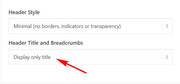
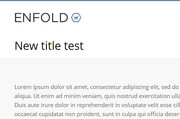
    The theme will add the title automatically without the breadcrumbs in the title bar if you choose the setting “Display only title” in the Header Title and Breadcrumbs option.
    2019-02-02-204254
    It can also be styled with a larger font size and a different color, with css like this:

    h1.entry-title a {
    font-size: 30px !important;
    color: #000 !important;
    }

    2019-02-02-204804
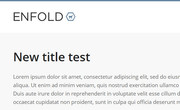
    But I know it’s not quite what you are looking for, so I have another solution for you, first set the “Display only title” in the Header Title and Breadcrumbs option, then we will automatically move the title for you on each page and hide the empty title bar area with this code at the end of your functions.php file in Appearance > Editor:

    function move_page_title(){
      ?>
      <script>
    (function($){
      $(document).ready(function(){
        $( '#top.page h1.main-title.entry-title' ).insertBefore( '.post-entry-type-page' );
        });
    })(jQuery);
    </script>
    <?php
    }
    add_action('wp_footer', 'move_page_title');

    and add this code in the General Styling > Quick CSS field:

    #top.page div.title_container {
    display: none !important;
    }

    You only have to add this code once and it will work on each page automatically
    2019-02-02-211724
    Please let us know if you want further styling like the title center on the page.

    Best regards,
    Mike

    #1061868

    Hi Ismael,

    Thank you for looking into this. I don’t understand either why the button is not visible on mobile devices :(

    Following are the codes I have so far added in Quick CSS. Can you please tell me if there is any that is conflicting? I have never touched anything in the theme files.

    Thank you so much for your help!

    Regards,
    Xandria

    #top .avia-button-fullwidth {
    border-style: solid!important;
    border-width: 1px!important;
    border-color: #fff!important;
    }

    .avia-section.main_color.avia-section-default div.container {
    max-width: 100%!important;
    width: 100%!important;
    padding-right: 0px !important;
    padding-left: 0px !important;
    }

    span.copyright a.xandria { color: #6e6e6e;}

    .logo, .responsive .logo {
    display:none;
    }

    a.avia-button.avia-button-fullwidth .avia_iconbox_title {
    font-size: 14px !important;
    }

    .logo img, .responsive .logo img {
    display:none !important;
    }

    .grid-entry .inner-entry {
    margin-right: 14px;
    }

    .mfp-zoom-in.mfp-ready.mfp-bg, .mfp-zoom-in.mfp-ready .mfp-preloader {
    background-color: #e3e3e3;
    }

    .html_modern-blog .avia-content-slider .slide-entry-title {
    font-size: 1.7em;
    }

    .ls-v6 .ls-circle-timer { display: none; }

    .html_elegant-blog #top .post-entry .post-title, .html_elegant-blog .avia-content-slider .slide-entry-title {
    text-transform: none;
    }

Viewing 30 results - 5,581 through 5,610 (of 18,736 total)