Hey m,
Add this to quick css in place of what you have:
.fontsizeoverride h1{
font-size:32px!important;
}
Best regards,
Jordan Shannon
I need to change the font size in only one instance of H1. I tried this, but the font size didn’t change (when I test with a colour change, it works):
.fontsizeoverride {
font-size: 32px !important;
}
How do I change the code on the shortcode for inserting buttons so the link within the button is nofollow?
I want to insert affiliate links into these buttons – but the links must be nofollow.
This is the current shortcode I have:
[av_button label='LINK TITLE HERE' link='manually,LINK HERE' link_target='_blank' size='x-large' position='left' label_display='' icon_select='no' icon='ue800' font='entypo-fontello' color='custom' custom_bg='#fff000' custom_font='#000000' av_uid='' admin_preview_bg='']
Hi,
when I change the default content font size in /General Styling nothing changes in frontend
than I tried to change the styling for the <body> tag in /Advanced Styling – nothing changes
Best Regard
Thina
Hi, I need to change this items in my Header, but I can’t….
1. Background color to black
2. Font family
3. Font size
My example –>https://www.zykasthenia.com/_trash/header.png
I tried and tried, and the answer surely is very simple :-(
How I can change it?
many thanks
Hi Uros,
Please try the following css:
.avia-builder-el-29 + .av-alb-blogposts a.more-link:before {
    content:'Detaljnije…' !important;
    font-size: 15px;
}
.avia-builder-el-29 + .av-alb-blogposts a.more-link {
    font-size: 0 !important;
}
Best regards,
Victoria
Hey Jennifer,
Thanks for the login, but it doesn’t give us admin access so we can’t assist with this. Please give us admin access, and it would be better if we had FTP access because sometimes the theme editor doesn’t have the right permissions to edit the files.
Another option is to try this css:
li > .iconlist_icon {
font-size: 30px !important;
line-height: 30px !important;
}
Best regards,
Mike
Hello,
Following the recent update, icon lists that are in the right-hand column of a two-column layout changed font size (became smaller font).
Here’s what I mean: https://cl.ly/697e78a6bf7c
I saw this thread https://kriesi.at/support/topic/possible-css-rendering-bug-in-4-5-5/#post-1083761 and thought I could fix it, but after making the changes in the child theme (see: https://cl.ly/c09fdcf8f651) it doesn’t appear to be working.
Can you help?
Hi Victoria,
Thank you for message.
I’ve tried to add this quick css to increase font size in the burger menu.
@media only screen and (max-width:767px) {
#top #wrap_all .av-burger-overlay .av-burger-overlay-scroll #av-burger-menu-ul li a {
font-size: 18px;
color: black !important;
}
And this one to avoid underline link
.main_color a, .alternate_color a {
text-decoration: none !important ;
}
Both are making the width shrink.
Temporary access in private content.
Thanks for your help.
Best
Lex
Hello Victoria,
Thanks for your response. Rikard suggested that I update the Enfold theme via FTP which solved the problem. However when I go to Enfold > Advanced Styling > Main Menu Links to change the font size of the links, and Save all changes, the animations and counters break.
Furthermore, when I go into Enfold > Theme Options > Favicon and try to set the Favicon (which doesn’t seem to be working) and hit Save all changes, the animations, tabs and rollovers break again.
.
Hey Arrastia,
Please try the following in Quick CSS under Enfold->General Styling:
@media only screen and (max-width: 767px) {
.phone-info * {
  font-size:12px !important;
}
}
Best regards,
Rikard
Hi,
I took a look at your menu, but the text already seems to be aligned to the left in your sub-menu. To match the sub-menu font size with the main menu font size, please try this css:
.sub-menu > li > a > .avia-menu-text {
font-size: 16px !important;
}
Best regards,
Mike
Hello,
I am experiencing a mobile issue with the Icon List elements. As you can see when visiting from a mobile device, the Carriers section at the bottom of this page https://troyins.com/personal/
I’ve tried using this code:
@media screen and (max-width: 750px) {article.article-icon-entry.av-iconlist-empty {
font-size: 30px !important;
line-height: 40px !important;}}
But it didn’t work. Can you help?
Thanks,
LF
Hello
I made a custom widget called ‘consultation’, and then added in the following custom HTML –
<div id="ctaBoxWrapper">
	<div class="ctaBox">
		<h2>
			Start with a free consultation.
		</h2>
		<p>
			If you are being investigated by police or if you’ve been charged with a criminal or driving offence, don’t face the problem alone. Being accused of an offence is stressful. The prospects of a criminal record or jail sentence can be daunting. Even if you think there is no defence, we may be able to help. To schedule a free initial consultation with one of our Vancouver lawyers, <a href="/contact/">contact us</a> now.
		</p>
		<p>
[av_button label='Connect' link='page,673' link_target='' size='small' position='left' label_display='' icon_select='no' icon='ue800' font='entypo-fontello' color='theme-color' custom_bg='#444444' custom_font='#ffffff' av_uid='' custom_class='ctaBtn' admin_preview_bg='']
		</p>
	</div>
</div>
I then placed a color section on each page with no padding and gave it an id of ‘ctaBoxWrapper’. I then added the following css –
/* call to action box above footer ******************************/

#ctaBoxWrapper {
    width: 100% !important;
    max-width:100% !important;
    padding:0 !important;
margin: 0px !important;
}

#ctaBoxWrapper .container {
  width: 100% !important;
  max-width:100% !important;
  padding:0 !important;
}

.ctaBox {
	background: #eb001b !important;
	/* background: url(/images/glassDoor.jpg) no-repeat bottom right; */
	margin: 0px !important;
	padding: 50px !important;
}

.ctaBox h2 {
	color: #fff !important;

}

.ctaBox h3 {
	color: #fff !important;

}

.ctaBox p {
	color: #fff !important;

}

.ctaBox a {
	font-weight: bold;
	color: #fff;
}

.ctaBox a:hover {
	color: #000;
}

/* cta button **********************************/

.ctaBtn {
	margin-top: 20px !important;
}

/* same styling as size small - add the class into the shortcode */

.ctaBtn a {
	background: #eb001b !important;
	color: #fff !important;
	opacity: 1 !important;
}

.ctaBtn a:hover {
	background: #000 !important;
	color: #fff !important;
	opacity: 1 !important;
}
I’d like it to be fullwidth, ie, so that the red is flush to the edge as well as flush to the footer, so also no space between this widget and the footer. I’ve looked at lots of posts but can’t make it work. I’ve put a sample page in the private area. Please advise. Thank you in advance.
Hi,
I am using blog post element on my home page. You gave mi code which i can change read more text i insert this css code into style.css(enfold child):
.rm a.more-link:before {
content:’Detaljnije…’ !important;
font-size: 15px;
}
.rm a.more-link {
font-size: 0 !important;
}
i have created rm class and insert it in blog post element in section custom css class and it worked, but i dont know how, we did not touch anything, did not install any plugin it suddenly reverse to read more text again.
Blog post is at the bottom of home page…link in private content
-
This topic was modified 6 years, 12 months ago by
 Uros.
Uros.
Hi,
Thanks for the clarification. Please try the following in Quick CSS under Enfold->General Styling:
@media only screen and (max-width: 1024px) {
.av-catalogue-price {
  font-size:12px;
}
}
Best regards,
Rikard
Hi Nerohm,
I have added it a Custom Class: box, please add this css code just adjust the font size:
#top .box .av-image-caption-overlay-center p {
    font-size: 30px;
}
Best regards,
Nikko
Hi maxgorelkine,
You can change it with CSS
a.cart_dropdown_link:after {
  content: "panier";
	font-size: 10px;
	font-weight:bold
}
.cart_dropdown_link > span:before {
	content:'';
}
BR Pete,
-
This reply was modified 6 years, 12 months ago by
 2funky.
Hey dedmund,
Here is the code you can put in Enfold > General Styling > Quick Css, if it does not work, put into themes/enfold/css/custom.css
.iconbox .iconbox_content p, body {
    font-size: 16px;
}
If you need further assistance please let us know.
Best regards,
Victoria
Hi Mino,
Here is the code you can put in Enfold > General Styling > Quick Css, if it does not work, put into themes/enfold/css/custom.css
a[data-filter="all_sort"], a[data-filter="all_sort"] + span.text-sep.salse_sort_sep.avia_show_sort {
    display: none;
}
.inner_sort_button {
    font-size: 14px;
}
If you need further assistance please let us know.
Best regards,
Victoria
Hello,
I can’t seem to change the font on any of any of my sites. I’m only trying to change it to 16px, instead of the default 13px. When I go to General Styling/Fonts and change the ‘default content font size’ to 16px, the text size doesn’t change, even after I clear my cache.
Good morning.
Finally I have no problem putting the version to edit online. I apologize if I took this ticket to the long but I could not provide the site to be modified as the customer still needed the version to be deleted. The request I made earlier remains, of which I have also attached a screenshot. I communicate the login credentials as an administrator if needed
https://snag.gy/L8padr.jpg
I need:
– Delete the “All” entry
– Increase the font size of the Masonry category index
– Increase the space between one product and another as shown in the arrow shown in the screenshot.
I remain available for any clarification and I thank you in advance for the support
Best regard’s
Mino
Thanks Nikko!
One more thing, I am trying to modify the font size of this image caption https://imgur.com/bdjQSFW but no sucess, i think maybe some custom css is the issue, can you pls take a look?
Best regards,
Nerohm
Hi Rikard thanks !
All that did was make the font green. Not sure if you saw my original message above
I need to make styling changes to the “Full width Sub Menu” from the Layout builder. I will be using it on all pages of the website. I thought this element would be the best solution to a design that will closely resemble the client’s mock up, see below. *If you have a better idea on how to create a footer sub menu that looks like the mock up , let me know.
I need to make the following adjustments to the styling of the “Full Width Sub Menu” if possible.
*Increase font size and change color .
*Add padding/spacing between the sub menu items to spread them across the bottom horizontally as in the mock up.
*Remove vertical lines between sub menu items
* Make the sub menu item white when that page is the active page, exactly how it functions in the main menu at top.
Below is what I am essential looking for as far as spacing for sub menu , however when I try the code snippet , nothing changes
not sure whats going on , look at style 3 with all menu items evenly spread across
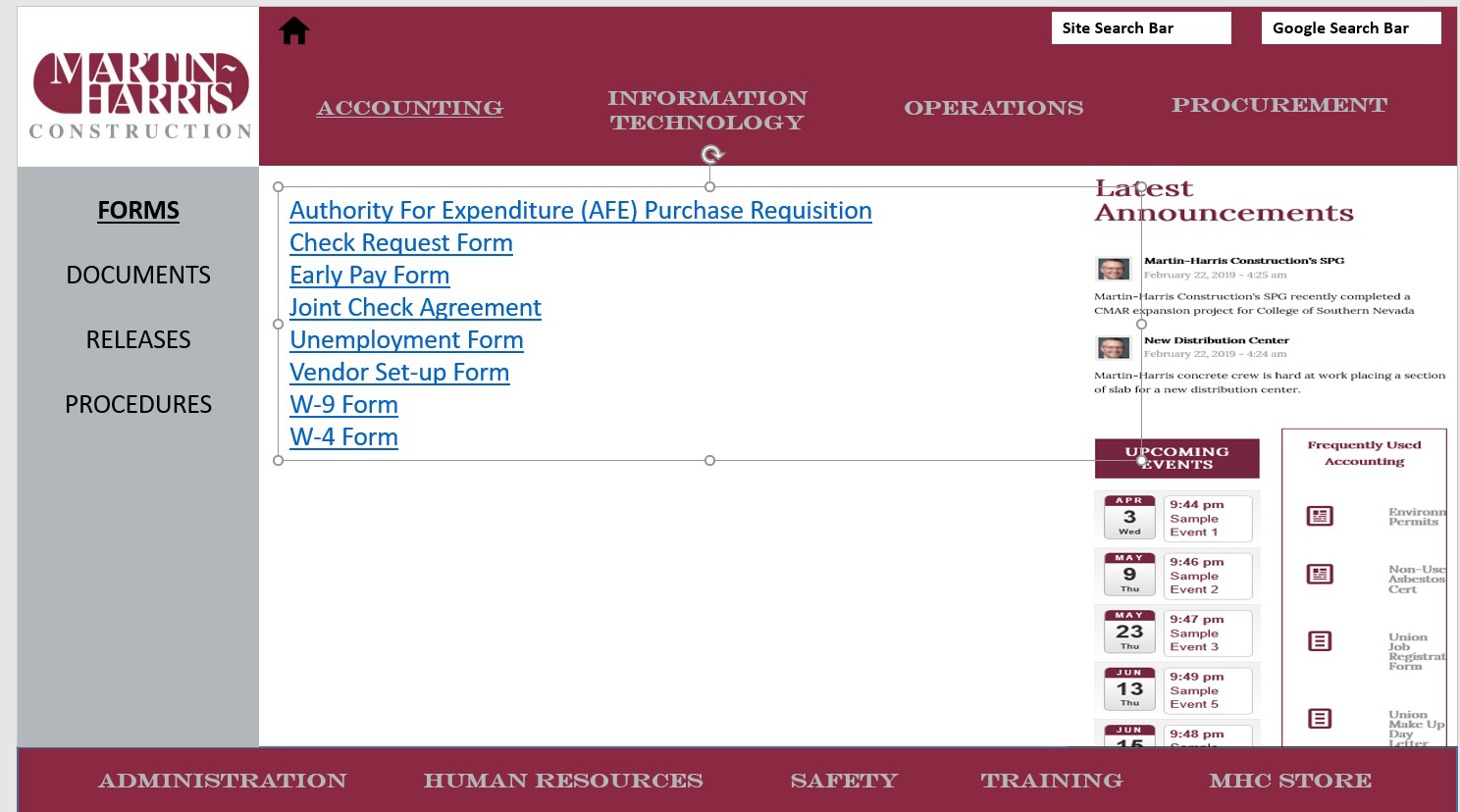
thank you for your assistance !
-
This reply was modified 6 years, 12 months ago by
 webworm72.
– Deactivating the Plugins doesn’t fix the problem
– Enfold is set to latest version, doesn’t fix the problem
– Adjustments made in CSS (Child theme) via customizer
/* H1 */
h1{
	margin-top:10px !important;
}

/* formaat slogan */

/* On screens that are 755px or less, set the background color to blue */
@media screen and (max-width: 755px) {
  h1 {
    font-size:25px;
  }
}

/* On screens that are 590px or less, set the background color to blue */
@media screen and (max-width: 590px) {
  h1 {
    font-size:15px;
  }
}

/* On screens that are 355px or less, set the background color to blue */
@media screen and (max-width: 355px) {
  h1 {
    font-size:12px;
  }
}

/* span geel */
.yellow{
	color:#ffcc33 !important;
	text-decoration: underline;
	text-decoration-color: #000000;
}

/* sectie slogan */
#slogan{
	padding-top:0px !important;
	padding-bottom:90px !important;
}

/* h2 home */
.h2_home > h2{
	font-size:20px !important;
}

/* grootte icons home */
.icon-service{
	max-width:25px;
	max-height:25px;
	margin-bottom:15px;
}

/* formulier */
label{
	font-weight:normal !important;
}
Adjustments made in functions.php (Child theme)
<?php

/*
* Add your own functions here. You can also copy some of the theme functions into this file.
* WordPress will use those functions instead of the original functions then.
*/

add_filter( 'avf_google_heading_font',  'avia_add_heading_font');
function avia_add_heading_font($fonts)
{
$fonts['Montserrat:900'] = 'Montserrat:900';
return $fonts;
}

add_filter( 'avf_google_content_font',  'avia_add_content_font');
function avia_add_content_font($fonts)
{
$fonts['Montserrat:900'] = 'Montserrat:900';
return $fonts;
}
Deleting above code didn’t fix the problem.
I have followed the instructions in other posts on how to use vertical buttons on fullscreen slider. Everything works fine, however I get strange black boxes at the top and bottom of the button list (see the website).
I also attach my Quick CSS, as there are some parts relevant for this:
#header_main_alternate, #avia-menu {
background: #7bc5e0;
}
#top .slideshow_caption .avia-button-wrap.avia-button-left {
margin: 0 10px !important;
}
#top .slideshow_caption .avia-button-wrap a{
padding: 25px 15px;
width: 250px !important;
text-transform: uppercase;
text-decoration: none;
font-weight: bold;
font-size: 20px;
}
#footer td {
border: none!important;
}
#footer .flex_column.first {
width: 15%;
}
#footer .flex_column:nth-child(2) {
width: 25%;
}
#footer .flex_column:nth-child(3) {
width: 20%;
}
#footer .flex_column:nth-child(4) {
width: 22%;
}
Hi Rikard,
Thank you for your advice.
The CSS you provided has helped get the icon to go green but has not helped with the font size or color.
Furthermore, if I activate the “Delete old CSS and JS Files” it reverts back to the initial problem, so if I uncheck this and reload the CSS I get the icon to work correctly.
As I mentioned I imported an xml file and enfold theme settings file from a demo build position.
I can add some url’s if that can help pinpoint the problem…
Many thanks
Nick
Hi Mike thanks !!!
With that last bit of code and some more tweaking of the page’s cell padding I am getting closer to the mock up , see pages below in private section.
My question is how to apply that to the other 8 pages of the website. Accounting, Information Technology, Human Resources etc.
Do I simply add the code below 8 more times with a different page ID , I know that will work as I did it for the “Special Projects ” page to test , see below in private section.
Or… is there is a cleaner way of doing it. perhaps adding all the Page id’s to just the one snippet of code ?
Below is what we have so far to make the desired layout/styling of the tab section for the operations page.
====================================================================================
.sidebar_tab_left .tab_content,.sidebar_tab_left .tab_content,.sidebar_tab_left .tab,.tabcontainer .active_tab_content {
box-shadow: 0px 0px 0px 0px rgba(0, 0, 0, 0.2) !important;
left: 0;
padding: 0px 0 0 10px;
border-color: #b2b7bb
!important;
}
.main_color div .sidebar_active_tab, div .main_color .tabcontainer .active_tab_content, div .main_color .tabcontainer .active_tab {
color: #000000;
background-color: #ffffff
!important;
border-color: #ffffff !important;
}
.tab_titles,.active_tab {
background-color: #b2b7bb
!important;
}
.tab_inner_content p,.tab_inner_content a {
font-size: 14px !important;
}
#top.page-id-2438 .main_color .tabcontainer .tab {
color: #fff !important;
font-size: 16px;
line-height: 20px;
padding-top: 10px;
padding-bottom: 05px;
}
#top.page-id-2438 .main_color .tabcontainer .tab.active_tab {
color: #000 !important;
background-color: #b2b7bb !important;
border-color: #b2b7bb !important;
}
#av-layout-grid-1 > div.flex_cell.no_margin.av_two_third.avia-builder-el-1.el_before_av_cell_one_third.avia-builder-el-first {
padding-bottom: 0px !important;
}
==========================================================================
-
This reply was modified 7 years ago by webworm72.
Hey Willem7904,
Please try the following in Quick CSS under Enfold->General Styling:
@media only screen and (max-width: 767px) {
.av-masonry-entry-content {
    font-size: 14px;
    line-height: 14px;
}
}
Best regards,
Rikard
Hey Niky67,
Please try the following in Quick CSS under Enfold->General Styling:
#av_section_3 .iconlist_icon {
    color: #8cbf66 !important;
    font-size: 18px !important;
}
Also make sure that you delete the old CSS and JS files under Enfold->Performance.
Best regards,
Rikard



