Viewing 30 results - 4,171 through 4,200 (of 18,733 total)
  • Author
    Search Results
  • #1182892
    chriswho1
    Participant

    hi guys

    i have another issue here(my template seems to be full of them) i can’t modify my menu items font style and color despite the fact that i followed every step in the youtube video
    advanced styling–>select an element to customize–>main menu links

    it’s getting to a point where whenever i watch the video for a specific part i just know it won’t work for me before i even try

    #1182850

    Hi Alex,

    You cannot edit it with the Advanced Layout Builder. It can be adjusted via CSS.

    You can play with this css:

    
    .post-password-form p {
        color: #444;
        font-size: 15px;
    }
    

    Best regards,
    Victoria

    Hi m s,

    You can try the code like this:

    
    @media only screen and (min-width:1024px){
        #av_section_1 .avia_textblock.av-small-font-size-32 p,
         #av_section_1 .hr + .av_textblock_section .avia_textblock p  {
            text-align: center;
            font-size: 54px;
        }
    }
     @media only screen and (max-width:479px){
         #av_section_1 .avia_textblock.av-small-font-size-32 p,
          #av_section_1 .hr + .av_textblock_section .avia_textblock p {
            text-align: center;
            font-size: 22px;
        }
     }
    
      @media only screen and (min-width: 480px) and (max-width:1023px){
         #av_section_1 .avia_textblock.av-small-font-size-32 p,
         #av_section_1 .hr + .av_textblock_section .avia_textblock p {
            text-align: center;
            font-size: 28px;
        }
     }
    

    Best regards,
    Victoria

    #1182791

    Hi Trender,

    I tried on my installation, generated the icon and pasted in the text widget in the footer.

    
    [av_font_icon icon='ue921' font='entypo-fontello' style='' caption='' size='40px' position='left' color='' link='manually,http://text.com' linktarget='_blank' animation='' id='' custom_class='' av_uid='av-k6f78x7x' admin_preview_bg=''][/av_font_icon]
    

    This code shows the icon and it opens in the new tab.

    Can you give us temporary admin access to your website in the private content box below, so that we can have a closer look?

    Best regards,
    Victoria

    #1182711

    Hi,
    Please try this code in the General Styling > Quick CSS field or in the WordPress > Customize > Additional CSS field:

    #top.page-id-2479 #kontakt .value_verifier_label {
    	font-size: 16px !important;
    }

    After applying the css, Please clear your browser cache and check.
    2020-02-09-050921

    Best regards,
    Mike

    Hey Johannes,
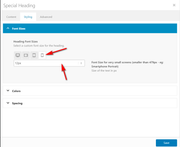
    Für das spezielle Überschriftenelement gehen Sie bitte auf die Registerkarte “Stying”> “Schriftgrößen” und klicken Sie dann auf das Symbol der Gerätegröße, die Sie einstellen möchten, und wählen Sie eine Größe aus der Dropdown-Liste aus
    2020-02-08-143917
    Leider haben Überschriftengrößen wie H1 keine globale Größenpräferenz für Mobilgeräte, aber als ich Ihre Website überprüft habe, waren alle Überschriften spezielle Überschriften. Wenn Sie diesen Schritt befolgen, wird Ihre mobile Schriftgröße für H1, H2 usw. festgelegt .
    Wenn Sie eine globale Schriftgröße für Mobilgeräte wünschen, verwenden Sie in Ihrem Quick CSS bitte das folgende CSS:

    @media only screen and (max-width: 479px) {
    .responsive #top #wrap_all #main h1.av-special-heading-tag {
        font-size: 40px !important;
    }
    }

    Dies funktioniert nur für die H1-Sonderüberschrift, wenn der Bildschirm des Handys kleiner als 479 Pixel ist.

    — Translated with Google —

    For the special heading element please go to the stying tab > font sizes and then click the icon of the device size you wish to set and choose a size from the dropdown
    2020-02-08-143917
    Unfortunately, heading sizes such as H1 do not have a global size preference for mobile devices, but when I checked your site all of your heading were special headings so if you follow this step your mobile font size for H1, H2, etc will be set.
    If you would like to have a global font size for mobile then please use css like this in your Quick CSS:

    @media only screen and (max-width: 479px) {
    .responsive #top #wrap_all #main h1.av-special-heading-tag {
        font-size: 40px !important;
    }
    }

    this will only work for H1 special heading when the mobile screen is smaller than 479px, please feel free to adjust.

    Best regards,
    Mike

    #1182614

    Hi,
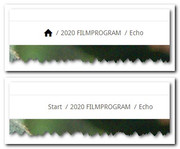
    I didn’t see a breadcrumb on your homepage, but I did find one on another page, Please try this code in the General Styling > Quick CSS field or in the WordPress > Customize > Additional CSS field:

    .breadcrumb-trail a.trail-begin:after {
    	content: "\e821";
    	font-family: entypo-fontello;
    	font-size: 16px;
    	color: #000;
    }
    .breadcrumb-trail a.trail-begin {
    	color:#fff !important; 
    }

    expected results:
    2020-02-08-100443

    Best regards,
    Mike

    #1182549

    Hey Constanze,

    Please try the following in Quick CSS under Enfold->General Styling:

    @media only screen and (max-width: 767px) {
    .avia-icon-list .iconlist_icon {
        height: 34px;
        width: 34px;
        line-height: 34px;
        font-size: 12px;
        margin-right: 20px;
    }
    }

    Best regards,
    Rikard

    #1182429

    As a work around we copied the element and used the “responsiveness” settings creating table elements of 1×8 columns, 2×4 columns and 4×2 columns choosing to hide each table element / column set based on screen width. This somewhat solves the problem but since the break points are fixed we still have layout issues with the columns at 1×8 columns. The overlapping starts at the 1110px browser window width. Ideally having the table element jump to 2×4 columns wouid be best OR allow the font size to shrink..

    Also, we set the 2×4 column table elements for the mobile views in the responsive settings but the theme is forcing a single column where there’s too much space on the sides. How can we override the single column default of the theme to allow for two columns which fit perfectly well (padding and margins) on mobile portrait?

    Thanks!

    #1182344
    ADMan
    Participant

    Hi there,

    As the title says, our small bar has changed colour …. I have entered the correct colour on Enfold Child>Advanced Styling> Small bar above Main Menu

    I have the following in the quick CSS section:
    .logo {
    padding-top: 10px;
    padding-bottom:10px;
    }
    .avia-testimonial {
    background: #ffffff;
    box-shadow: 0 0 2px rgba(0, 0, 0, 0.2);
    border-radius: 4px;
    }
    #header_meta #avia2-menu a {
    font-size: 16px !important;
    font-weight: normal !important;
    }
    #header_meta .phone-info
    {
    font-size: 16px !important;
    font-weight: normal !important;
    }
    .slideshow_caption { width: 100%;

    Thanks,

    D

    #1182339
    venolab
    Participant

    Hi,
    I want to include a seal using the following code provided from jameda.de

    <script src="https://cdn1.jameda-elements.de/widgets/siegel/81338913_1/858486/" type="text/javascript" async></script><div id="jameda-widget-container858486" style="position:relative; width:272px; height:168px; margin:15px; background-image:url(https://cdn1.jameda-elements.de/premium/widgets/_images/top10-top20-bg.png); background-repeat:no-repeat; font-family:Arial, Helvetica, sans-serif; font-size:12px; line-height:15px;"><div style="position:absolute; top:25px; left:108px; width:148px; height:58px; overflow:hidden; white-space:normal;"><a href="https://www.jameda.de/dresden/aerzte/hno-aerzte-hals-nase-ohren/christiane-kirchner/uebersicht/81338913_1/?utm_content=Top10-01%2F2020&utm_source=Kunden-Homepages&utm_medium=Badges&utm_term=81338913&utm_campaign=Badges" style="font-size:15px; line-height:18px; font-weight:bold; color:#01a3d4; text-decoration:none; border:0px;" target="_blank">Christiane Kirchner</a></div><div style="position:absolute; top:98px; left:108px; width:152px; height:53px; overflow:hidden; color:#888; font-size:11px; line-height:13px;"><strong>HNO-&Auml;rzte</strong><br>in Dresden auf&nbsp;<a href="https://www.jameda.de/dresden/aerzte/hno-aerzte-hals-nase-ohren/fachgebiet/?utm_content=Top10-01%2F2020&utm_source=Kunden-Homepages&utm_medium=Badges&utm_term=81338913&utm_campaign=Badges" class="jam_link_check" style="color:#069bd2; font-size:11px; text-decoration:none; border:0px; background-color:transparent !important;" target="_blank">jameda</a></div></div>

    When inserting this code either in a text block or in a code block, the backend looks like as ist should –> Dropbox But at the frontend, it looks terrible, e.g. the background image isn’t loaded. You can see here (please scroll to the bottom of the page): https://hno-dresden.com/unsere-praxis/aerzte/kirchner/

    Does anybody has an idea how to fix?

    Thanks a lot in advance, yours, Thomas

    PS: Cache is cleared.

    • This topic was modified 6 years, 1 month ago by venolab.
    schnelletexte.de
    Participant

    Hallo, ich habe zwei Fragen, die beide die Mobile-Darstellung betreffen:

    Bei “Spezielle Überschrift” gibt es die Einstellung
    “Heading Font Sizes … Select a custom font size for the heading.”
    1) Wo / wo kann ich zentral einstellen, wie groß für die verschiedenen Bildschirmgrößen die “custom font size” für die Speziellen Überschriften voreingestellt ist?
    2) Wo / wie kann ich zentral eingeben, wie groß über den Texteditor definierte H1, H2 usw. in der Mobile-Darstellung ausgegeben werden?

    Die Headlines der Seite https://schnelletexte.de sind in der Mobile-Darstellung viel zu klein, und ich will nicht in jedem Textfeld manuell die Headlinegröße ändern.

    Vielen Dank!

    #1182290

    Ok I have soved part of the problem. The css code presented in the Enfold documentation is not working at all. However I used the following code to give a bcg color to the th row. It doesn’t take the font color though (it still keeps the default main color). I overcome that by choosing a lighter bcg-color. It is funny, since it gets the font-size and vertical-align rules, but not the color rule

    /*----------------------------------------
    // Table headings 
    //--------------------------------------*/
    #top .main_color .avia-data-table.avia_pricing_minimal th {
    	background-color: #c0daed!important;
    }
    .avia-data-table.avia_pricing_minimal th {
    font-size:16px;
    vertical-align: middle;
    color:#ffffff!important!; /*THIS IS NOT WORKING!!*/
    }
    .avia-data-table.avia_pricing_minimal td {
    color:#000000!important;
    font-size:14px;
    }
    #1182184

    no, i’m wrong – didn’t work. it seems there’s a pseudo class which handles the display of the title, & the change of background color.

    .grid-entry a:hover::before {
        content: attr(title);
        position: absolute;
        width: 100%;
        z-index: 1000;
        text-align: center;
        opacity: 1;
        font-size: 18px;
        color: 
        #fff !important;
        transform: translateY(-50%);
        animation: avia-fadein .75s 1 cubic-bezier(0.175,0.885,0.320,1.275) !important;
        top: 50%;
        display: flex !important;
        align-items: center;
        justify-content: center;
        padding: 0 !important;
    }

    this is showing the title on mobile – but not changing the background color. i’ve been trying unsuccessfully to sort this, can I use :active with :before ?
    can’t seem to get this to work no matter what i do – help?

    i’ve even tried this
    #top a .grid-image.avia-hover-fx:active {background:#1d2553!important;}
    while i’m here should the rule go inside, or outside of a media query – given this is only mobile we’re targeting, i’d have thought inside – is that correct?

    • This reply was modified 6 years, 1 month ago by Jason.
    #1182179

    Hi Rikard,
    My apologies. I fixed a typo in my original post and clarified a couple things. I also included the page where the image caption text overlay issue appears (private area). You’ll note in the custom css below that we had to create media queries for each break point so the text would fit well at different screen sizes. Now that I think of it, this may be a feature request for future theme updates. :) But if there’s an easier way to have the overlay text fit well at each screen size, please share. Thanks!
    Eric

    @media only screen and (min-width: 768px) and (max-width: 788px) {
    .av-image-caption-overlay-center p {
    font-size: 12px;
    line-height: 1em;
    }}
    @media only screen and (min-width: 789px) and (max-width: 906px) {
    .av-image-caption-overlay-center p {
    font-size: 13px;
    line-height: 1em;
    }}
    @media only screen and (min-width: 907px) and (max-width: 1023px) {
    .av-image-caption-overlay-center p {
    font-size: 14px;
    line-height: 1.2em;
    }}
    @media only screen and (min-width: 1024px) and (max-width: 1073px) {
    .av-image-caption-overlay-center p {
    font-size: 15px;
    line-height: 1.2em;
    }}
    @media only screen and (min-width: 1074px) and (max-width: 1287px) {
    .av-image-caption-overlay-center p {
    font-size: 16px;
    line-height: 1.2em;
    }}

    #1182176

    Hi again,
    I’m adding to the support request the page where you can see the issue where the table is having responsive problems adjusting to the different screen sizes. Note how the header text starts to overlap other columns instead of the font size shrinking based on screen size and column width. Adding a media query to have the columns stack 8×1, then 4×2 and then 2×4 would allow enfold table elements to view well on any screen size.
    Thanks in advance for any help you can provide.
    Best,
    Eric

    #1182039

    Hi,

    Please try adding !important rule as following

    #top .avia-smallarrow-slider .avia-slideshow-arrows a {
        width: 40px !important;
        height: 40px !important;
        font-size: 20px !important;
    }
    #top .avia-smallarrow-slider .avia-slideshow-arrows a:before {
        line-height: 40px !important;
    }

    If that too does not help, please create temporary admin logins and post them here privately so we can look into it :)

    Best regards,
    Yigit

    #1182013

    Hi Ismael,

    now the animation is in the top background but shrinked into center.

    This code works but only centered in this section on enfold:

    How you can make this section full with on enflod? Did i take the wrong class?

    <style>
                        /* ---- reset ---- */ #top .homedesktoptest{ margin:0; font:normal 75% Arial, Helvetica, sans-serif; }
    					canvas{ display: block; vertical-align: bottom; } /* ---- particles.js container ---- */ 
    					#particles-js{ position:absolute; width: 100%; height: 100%; background-color: #183f60; background-image: url(""); 
    					background-repeat: no-repeat; background-size: cover; background-position: 50% 50%; } /* ---- stats.js ---- */ 
    					.count-particles{ background: #000022; position: absolute; top: 48px; left: 0; width: 80px; color: #13E8E9; font-size: 
    					.8em; text-align: left; text-indent: 4px; line-height: 14px; padding-bottom: 2px; font-family: Helvetica, Arial, sans-serif; font-weight: bold; } 
    					.js-count-particles{ font-size: 1.1em; } #stats, .count-particles{ -webkit-user-select: none; margin-top: 5px; margin-left: 5px; }
    					#stats{ border-radius: 3px 3px 0 0; overflow: hidden; } .count-particles{ border-radius: 0 0 3px 3px; }  
                 </style>


    	                      <div id="particles-js"></div>
                              <script src="https://cdn.jsdelivr.net/particles.js/2.0.0/particles.min.js"></script> 
    	                         <script>
    	                                     particlesJS("particles-js", {"particles":{"number":{"value":47,"density":{"enable":true,"value_area":552.4033491425909}},"color":{"value":"#ffffff"},
    										 "shape":{"type":"circle","stroke":{"width":0,"color":"#000000"},"polygon":{"nb_sides":5},"image":{"src":"img/github.svg","width":100,"height":100}},
    										 "opacity":{"value":0.5,"random":false,"anim":{"enable":false,"speed":1,"opacity_min":0.1,"sync":false}},
    										 "size":{"value":3,"random":true,"anim":{"enable":false,"speed":40,"size_min":0.1,"sync":false}},
    										 "line_linked":{"enable":true,"distance":150,"color":"#ffffff","opacity":0.4,"width":1},
    										 "move":{"enable":true,"speed":6,"direction":"none","random":false,"straight":false,"out_mode":"out",
    										 "bounce":false,"attract":{"enable":false,"rotateX":600,"rotateY":1200}}},"interactivity":{"detect_on":"canvas",
    										 "events":{"onhover":{"enable":true,"mode":"grab"},"onclick":{"enable":true,"mode":"push"},"resize":true},
    										 "modes":{"grab":{"distance":155.84415584415586,"line_linked":{"opacity":1}},"bubble":{"distance":400,"size":40,
    										 "duration":2,"opacity":8,"speed":3},"repulse":{"distance":200,"duration":0.4},"push":{"particles_nb":4},
    										 "remove":{"particles_nb":2}}},"retina_detect":true});var count_particles, stats, update; stats = new Stats;
    										 stats.setMode(0); stats.domElement.style.position = 'absolute'; stats.domElement.style.left = '0px';
    										 stats.domElement.style.top = '0px'; 
    										 document.body.appendChild(stats.domElement); count_particles = document.querySelector('.js-count-particles');
    										 update = function() { stats.begin(); stats.end(); if (window.pJSDom[0].pJS.particles && window.pJSDom[0].pJS.particles.array)
    											 { count_particles.innerText = window.pJSDom[0].pJS.particles.array.length; } requestAnimationFrame(update); }; requestAnimationFrame(update);;
    	                         </script>
    • This reply was modified 6 years, 1 month ago by marketingnr1.
    #1182008

    Hey lifefitnessnz,
    Sorry for the late reply, as I understand your question you would like 3 custom social media icons in a row in your footer widget.
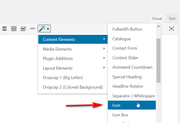
    For this I recommend using the “Custom HTML” widget and add the Icon element shortcode to it, to get the shortcode open a new post using the Classic Editor and choose Icon from the shortcode wand tool:
    2020-02-06-055201
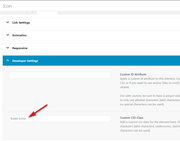
    Then create each of your icons and design to suit adding your links and in the developer section add a custom class such as “footer-icons”
    2020-02-06-060036
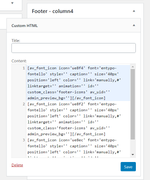
    then add the shortcode to your widget:
    2020-02-06-060316
    This is the shortcode I used in this example:

    [av_font_icon icon='ue8f4' font='entypo-fontello' style='' caption='' size='40px' position='left' color='' link='manually,#' linktarget='' animation='' id='' custom_class='footer-icons' av_uid='' admin_preview_bg=''][/av_font_icon]
    [av_font_icon icon='ue8f2' font='entypo-fontello' style='' caption='' size='40px' position='left' color='' link='manually,#' linktarget='' animation='' id='' custom_class='footer-icons' av_uid='' admin_preview_bg=''][/av_font_icon]
    [av_font_icon icon='ue8ec' font='entypo-fontello' style='' caption='' size='40px' position='left' color='' link='manually,#' linktarget='' animation='' id='' custom_class='footer-icons' av_uid='' admin_preview_bg=''][/av_font_icon]

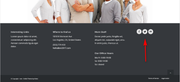
    This is the result:
    2020-02-06-060730
    They should show in a row.
    If you wish to use the image element instead, follow the same steps with the image shortcode and be sure to add the custom class and if your images show as a column like this:
    2020-02-06-062314
    then add this css to your Enfold Theme Options > General Styling > Quick CSS field

    #footer .widget_text .custom-html-widget .footer-icons {
    	display: inline !important; 
    }

    which should correct to a row:
    2020-02-06-062614
    If this doesn’t help then please create an example and link to it so we can help adjust your css.

    Best regards,
    Mike

    #1181939
    smarta-brett
    Participant

    Hi

    on this under development site
    https://aussiehiddentreasures.com/
    front end password = aussie

    When I try to add this css

    @media only screen and (max-width: 600px) {
    .single-product-summary {
    width: 100%;
    }
    

    the menu font changes from bold green letters set in the admin – to thin black lettering

    FYI the css above makes the woocommerce description the full width of the phone page (overriding the css to get the menu to the right on a normal size page)

    here is the full custom css

    .page-thumb { display: none;
    }
    .woocommerce-tabs { display: none !important;
    }
    .related.products {  display: none;
    }
    .template-shop {
        background-image: url(https://aussiehiddentreasures.com/wp-content/uploads/2020/01/bg5-light.jpg);
        background-repeat: repeat;
        background-position: top left;
    }
    .single-product .template-shop {
        background-image: url(https://aussiehiddentreasures.com/wp-content/uploads/2020/01/bg1.jpg);
        background-repeat: repeat;
        background-position: top left;
    }
    .single-product-summary  {
          background-image: url(https://aussiehiddentreasures.com/wp-content/uploads/2020/01/80-white-frost-panel-1.png);
        background-repeat: repeat;
    padding-top: 20px;
      padding-right: 20px;
      padding-bottom: 20px;
      padding-left: 20px;
    }
    .inner_sidebar {
          background-image: url(https://aussiehiddentreasures.com/wp-content/uploads/2020/01/80-white-frost-panel-1.png);
        background-repeat: repeat;
    padding-top: 20px;
      padding-right: 20px;
      padding-bottom: 20px;
      padding-left: 20px;
    }
    .pagination {
          background-image: url(https://aussiehiddentreasures.com/wp-content/uploads/2020/01/80-white-frost-panel-1.png);
        background-repeat: repeat;
    padding-top: 20px;
      padding-right: 20px;
      padding-bottom: 20px;
      padding-left: 20px;
    }
    .single-product-main-image {
        width: 25%;
    }
    .single-product-summary {
        overflow: hidden;
        width: 45%;
        float: left;
        margin-right: 5%;
    }
    .single-product .sidebar {
        width: 30%;
    }
    @media only screen and (max-width: 600px) {
    .single-product-summary {
    width: 100%;
    }
    #1181931

    Hey KK,

    Here are the shortcodes for you, to use them out and build this page:

    [av_section min_height='25' min_height_px='500px' padding='huge' shadow='no-border-styling' bottom_border='no-border-styling' bottom_border_diagonal_color='#333333' bottom_border_diagonal_direction='' bottom_border_style='' id='' color='main_color' custom_bg='' src='https://test.kriesi.at/enfold-2017/wp-content/uploads/sites/24/2015/07/portfolio-large-1.jpg' attachment='965' attachment_size='full' attach='scroll' position='center center' repeat='stretch' video='' video_ratio='16:9' overlay_enable='aviaTBoverlay_enable' overlay_opacity='0.7' overlay_color='#000000' overlay_pattern='' overlay_custom_pattern='' av_element_hidden_in_editor='0' av_uid='av-4nljo6']
    [av_heading heading='This is a single portfolio entry<br/>Style it however you see fit or check our other examples' tag='h1' style='blockquote modern-quote modern-centered' size='40' subheading_active='' subheading_size='12' padding='10' color='custom-color-heading' custom_font='#ffffff' admin_preview_bg='rgb(34, 34, 34)' av_uid='av-4mgbvi'][/av_heading]
    [/av_section]
    
    [av_section min_height='' min_height_px='500px' padding='default' shadow='no-shadow' bottom_border='no-border-styling' id='' color='main_color' custom_bg='' src='' attachment='' attachment_size='' attach='scroll' position='top left' repeat='no-repeat' video='' video_ratio='16:9' overlay_opacity='0.5' overlay_color='' overlay_pattern='' overlay_custom_pattern='' av_uid='av-4dvuxq']
    [av_one_half first min_height='' vertical_alignment='' space='' custom_margin='' margin='0px' padding='0px' border='' border_color='' radius='0px' background_color='' src='' background_position='top left' background_repeat='no-repeat' av_uid='av-46iwcu']
    
    [av_textblock size='' font_color='' color='' av_uid='av-4141p2']
    Lorem ipsum dolor sit amet, consectetuer adipiscing elit. Aenean commodo ligula eget dolor. Aenean massa. Cum sociis natoque penatibus et <strong>magnis</strong> dis parturient montes, nascetur <strong>ridiculus</strong> mus. Donec quam felis, ultricies nec, pellentesque eu, pretium quis, sem. Nulla consequat massa quis enim.
    [/av_textblock]
    
    [/av_one_half][av_one_half min_height='' vertical_alignment='' space='' custom_margin='' margin='0px' padding='0px' border='' border_color='' radius='0px' background_color='' src='' background_position='top left' background_repeat='no-repeat' av_uid='av-dze0u']
    
    [av_textblock size='' font_color='' color='' av_uid='av-3pub7q']
    Donec pede justo, fringilla vel, aliquet nec, vulputate eget, arcu. In enim justo, rhoncus ut, imperdiet a, venenatis vitae, justo. Nullam dictum felis eu pede mollis <strong>pretium</strong>. Integer tincidunt. Cras dapibus. Vivamus elementum semper nisi. Aenean vulputate eleifend tellus. Aeneaellus.
    [/av_textblock]
    
    [/av_one_half][av_one_half first min_height='' vertical_alignment='' space='' custom_margin='' margin='0px' padding='0px' border='' border_color='' radius='0px' background_color='' src='' background_position='top left' background_repeat='no-repeat' av_uid='av-3kvsim']
    
    [av_image src='https://test.kriesi.at/enfold-2017/wp-content/uploads/sites/24/2015/07/portfolio-10.jpg' attachment='871' attachment_size='full' align='center' styling='no-styling' hover='' link='lightbox' target='' caption='' font_size='' appearance='' overlay_opacity='0.4' overlay_color='#000000' overlay_text_color='#ffffff' animation='no-animation' admin_preview_bg='' av_uid='av-3c9zqm'][/av_image]
    
    [/av_one_half][av_one_half min_height='' vertical_alignment='' space='' custom_margin='' margin='0px' padding='0px' border='' border_color='' radius='0px' background_color='' src='' background_position='top left' background_repeat='no-repeat' av_uid='av-38k52e']
    
    [av_image src='https://test.kriesi.at/enfold-2017/wp-content/uploads/sites/24/2015/07/portfolio-8.jpg' attachment='870' attachment_size='full' align='center' styling='no-styling' hover='' link='lightbox' target='' caption='' font_size='' appearance='' overlay_opacity='0.4' overlay_color='#000000' overlay_text_color='#ffffff' animation='no-animation' admin_preview_bg='' av_uid='av-2zv4jq'][/av_image]
    
    [/av_one_half][av_one_full first min_height='' vertical_alignment='av-align-top' space='' custom_margin='aviaTBcustom_margin' margin='6%,0' padding='0px' padding_sync='true' border='' border_color='' radius='0px' radius_sync='true' background_color='' src='' attachment='' attachment_size='' background_position='top left' background_repeat='no-repeat' animation='' mobile_display='' av_uid='av-2xgnw6']
    
    [av_image src='https://test.kriesi.at/enfold-2017/wp-content/uploads/sites/24/2015/07/portfolio-large-1.jpg' attachment='965' attachment_size='full' align='center' styling='no-styling' hover='' link='lightbox' target='' caption='' font_size='' appearance='' overlay_opacity='0.4' overlay_color='#000000' overlay_text_color='#ffffff' animation='no-animation' admin_preview_bg='' av_uid='av-2satb2'][/av_image]
    
    [/av_one_full][av_one_third first min_height='' vertical_alignment='av-align-top' space='' custom_margin='aviaTBcustom_margin' margin='6%' margin_sync='true' padding='0px' padding_sync='true' border='' border_color='' radius='0px' radius_sync='true' background_color='' src='' attachment='' attachment_size='' background_position='top left' background_repeat='no-repeat' animation='' mobile_display='' av_uid='av-2iux72']
    
    [av_image src='https://test.kriesi.at/enfold-2017/wp-content/uploads/sites/24/2015/07/portfolio-4.jpg' attachment='863' attachment_size='full' align='center' styling='no-styling' hover='' link='lightbox' target='' caption='' font_size='' appearance='' overlay_opacity='0.4' overlay_color='#000000' overlay_text_color='#ffffff' animation='no-animation' admin_preview_bg='' av_uid='av-2h4892'][/av_image]
    
    [/av_one_third][av_one_third min_height='' vertical_alignment='' space='' custom_margin='' margin='0px' padding='0px' border='' border_color='' radius='0px' background_color='' src='' background_position='top left' background_repeat='no-repeat' av_uid='av-28zg4m']
    
    [av_image src='https://test.kriesi.at/enfold-2017/wp-content/uploads/sites/24/2015/07/portfolio-7.jpg' attachment='869' attachment_size='full' align='center' styling='no-styling' hover='' link='lightbox' target='' caption='' font_size='' appearance='' overlay_opacity='0.4' overlay_color='#000000' overlay_text_color='#ffffff' animation='no-animation' admin_preview_bg='' av_uid='av-22z0gm'][/av_image]
    
    [/av_one_third][av_one_third min_height='' vertical_alignment='' space='' custom_margin='' margin='0px' padding='0px' border='' border_color='' radius='0px' background_color='' src='' background_position='top left' background_repeat='no-repeat' av_uid='av-1xjlqm']
    
    [av_image src='https://test.kriesi.at/enfold-2017/wp-content/uploads/sites/24/2015/07/portfolio-2.jpg' attachment='862' attachment_size='full' align='center' styling='no-styling' hover='' link='lightbox' target='' caption='' font_size='' appearance='' overlay_opacity='0.4' overlay_color='#000000' overlay_text_color='#ffffff' animation='no-animation' admin_preview_bg='' av_uid='av-66tpq'][/av_image]
    
    [/av_one_third][av_one_half first min_height='' vertical_alignment='av-align-top' space='' custom_margin='aviaTBcustom_margin' margin='0' margin_sync='true' padding='0px' padding_sync='true' border='' border_color='' radius='0px' radius_sync='true' background_color='' src='' attachment='' attachment_size='' background_position='top left' background_repeat='no-repeat' animation='' mobile_display='' av_uid='av-1jo166']
    
    [av_image src='https://test.kriesi.at/enfold-2017/wp-content/uploads/sites/24/2015/07/portfolio-3.jpg' attachment='864' attachment_size='full' align='center' styling='no-styling' hover='' link='lightbox' target='' caption='' font_size='' appearance='' overlay_opacity='0.4' overlay_color='#000000' overlay_text_color='#ffffff' animation='no-animation' admin_preview_bg='' av_uid='av-4uuv2'][/av_image]
    
    [/av_one_half][av_one_half min_height='' vertical_alignment='' space='' custom_margin='' margin='0px' padding='0px' border='' border_color='' radius='0px' background_color='' src='' background_position='top left' background_repeat='no-repeat' av_uid='av-17kfue']
    
    [av_image src='https://test.kriesi.at/enfold-2017/wp-content/uploads/sites/24/2015/07/portfolio-1.jpg' attachment='866' attachment_size='full' align='center' styling='no-styling' hover='' link='lightbox' target='' caption='' font_size='' appearance='' overlay_opacity='0.4' overlay_color='#000000' overlay_text_color='#ffffff' animation='no-animation' admin_preview_bg='' av_uid='av-13v93a'][/av_image]
    
    [/av_one_half][av_one_full first min_height='' vertical_alignment='' space='' custom_margin='' margin='0px' padding='0px' border='' border_color='' radius='0px' background_color='' src='' background_position='top left' background_repeat='no-repeat' av_uid='av-v7mq6']
    
    [av_social_share title='' style='' buttons='' av_uid='av-rhbum']
    
    [/av_one_full]
    [/av_section]
    
    [av_section min_height='' min_height_px='500px' padding='default' shadow='no-border-styling' bottom_border='no-border-styling' bottom_border_diagonal_color='#333333' bottom_border_diagonal_direction='' bottom_border_style='' id='' color='main_color' custom_bg='' src='' attachment='' attachment_size='' attach='scroll' position='top left' repeat='no-repeat' video='' video_ratio='16:9' overlay_opacity='0.5' overlay_color='' overlay_pattern='' overlay_custom_pattern='' av_element_hidden_in_editor='0' av_uid='av-krh26']
    [av_heading heading='Recent Entries' tag='h1' style='blockquote modern-quote modern-centered' size='30' subheading_active='' subheading_size='15' padding='0' color='custom-color-heading' custom_font='#000000' admin_preview_bg='' av_uid='av-dhbk6'][/av_heading]
    [/av_section]
    
    [av_masonry_entries link='portfolio_entries' sort='no' items='4' columns='4' paginate='none' query_orderby='date' query_order='DESC' size='fixed' gap='no' overlay_fx='active' id='' caption_elements='title excerpt' caption_styling='overlay' caption_display='on-hover' color='custom' custom_bg='#ffffff' av_uid='av-uivi']
    

    Best regards,
    Basilis

    #1181864

    Hey,

    Thanks for contacting us and sorry for the late reply!

    Please add following code to Quick CSS in Enfold theme options > General Styling

    #top .avia-smallarrow-slider .avia-slideshow-arrows a {
        width: 40px;
        height: 40px;
        font-size: 20px;
    }
    #top .avia-smallarrow-slider .avia-slideshow-arrows a:before {
        line-height: 40px;
    }
    top .avia-smallarrow-slider .avia-slideshow-arrows {
        width: 90px;
    }
    #top .avia-smallarrow-slider-heading {
        width: 54%;
    }
    

    Best regards,
    Yigit

    #1181842

    In reply to: Footer text

    Hey Charlotte :)

    Please add following code to Quick CSS

    #socket .copyright {
        font-size: 18px;
    }
    #socket .social_bookmarks li a {
        font-size: 20px;
    }

    Best regards,
    Yigit

    #1181830

    Es funktioniert mit diesem Code. Danke

    .js_active .tab {
    font-size: 14px;
    }

    #1181759

    In reply to: Setting problems

    Hi Victoria,

    thanks, i’ve change to 256MB the PHP upload and max size and then re-upload the theme but the problems are still the same.
    I don’t understand what i have to do with the fonts..

    Thanks,
    Mattia

    #1181609

    Hi,

    Thank you for the update.

    The reason the min font size doesn’t work as expected is that the property is applied directly to the paragraph/heading tag while the background color is applied to its parent container. What we can do is apply a class attribute to the layer and use it to adjust the font size of the text on mobile view. You can add the css media query in the Quick CSS field or the style.css file.

    Best regards,
    Ismael

    #1181387

    Hey sftsengineering,

    Here is the code you can put in Enfold > General Styling > Quick Css,  if it does not work, put into themes/enfold/css/custom.css

    
    .html_av-overlay-side #top #wrap_all .av-burger-overlay li a {
        line-height: 2.3em; 
        font-size: 18px;
    }
    

    If you need further assistance please let us know.

    Best regards,
    Victoria

    Eleina_Shinn
    Participant

    Heading Font Sizes and Content Font Sizes in your Icon Box Element only has 3 screen sizes, Medium, Small and Very Small. I had to use css to make the heading larger on default screen size.

    Animated Numbers only has one font size, default, there is no way to change the font size for Medium, Small and Very Small.

    Will this be fixed in upcoming update? Or, can you provide me with CSS in the meantime?.

    Also, will you guys be removing all these tabs in styling elements? It makes it so much more time confusing and unduly complicated to change an element – your old way really was much better.

    Thank you!

    ~e

    #1181292

    Hey,

    Thanks for contacting us!

    You can edit your Text Block element and under Styling tab you can adjust font size on various screen sizes – https://imgur.com/a/y9E8FTP

    I checked your website however your headings are not small on my end. Could you please post a screenshot and show the changes you would like to make? You can upload your screenshots on imgur.com or Dropbox public folder and post the links here :)

    Best regards,
    Yigit

    #1181246
    nine2ten
    Participant

    Hi, after updating the theme to 4.7 the easyslider element for a single image doesn’t show the chosen font sizes on mobile
    – after saving and reopening the font size drop down switches back to default
    – so h2 on mobile shows desktop setting
    – one slider element that has not been saved after updating is still showing intended font size
    Thanks for taking a look!

Viewing 30 results - 4,171 through 4,200 (of 18,733 total)