

Forum Replies Created
-
AuthorPosts
-
August 14, 2014 at 9:40 am in reply to: Rename "Portfolio item" in search results (with german translation) #304247
Hi!
I modified my message, please try it again.
Cheers!
JosueHey!
Go to Enfold > General Styling and select this setting (Boxed Layout):

Regards,
JosueHey!
It would be better to contact Envato supporting regarding this topic, you can create a ticket here:
https://support.market.envato.com/hc/en-us/requests/newRegards,
JosueHey!
No, it doesn’t, you can only set an image or a video to fullscreen elements (color sections, sliders, etc).
P.S. a fullscreen Google Maps element was added in 2.6.
Best regards,
JosueHi,
Can you please create me an administrator account? post it here as a private reply.
Regards,
JosueHello!
It is possible but it would require a heavy customization to the theme, unfortunately that’s beyond the scope of the support we can offer.
But, looking at the site you linked, that “tour” isn’t really controllable, if you want to achieve something like that, you could use a video background.
Cheers!
JosueAugust 14, 2014 at 8:04 am in reply to: Strange recursive div adding a simple text content in footer widget #304223August 14, 2014 at 7:53 am in reply to: Modernizr 1.6ish: miniModernizr for Isotope detected. #304219Hi!
That’s not exactly an error, it’s just a notice. Try the following, open /config-woocommerce/config.php, line 540:
if(!$title) $title = __("Shop",'avia_framework');Replace it by this:
if(isset($title)) if(!$title) $title = __("Shop",'avia_framework');Regards,
JosueHi Tom!
Try with this code instead:
#avia-menu > li > a {
    max-height: 25px;
    line-height: 0px !important;
}
.avia-menu{
    display: table;
    height: 200px;
}
.header-scrolled .avia-menu{
    height: 102px;
}
#avia-menu{
    display: table-cell;
    vertical-align: middle;
}
Regards,
JosueHi!
Can you post a link to an actual Post? the page you posted is empty.
Best regards,
JosueHey!
1, 2, 3. Make use of the “av_header_transparency” class (this gets applied to the #header only when it is transparent), for example, to remove the box-shadow:
.av_header_transparency #header_main, .av_header_transparency#header{
    box-shadow: none !important;
}
Cheers!
JosueHey Nik!
Try adding this to the Quick CSS:
#top .header-scrolled .logo a, #top .header-scrolled .logo a img{
    max-height: 116px !important;
}
.logo, .logo a{
    overflow: visible !important;
}
#top .header-scrolled .logo img{
    background: white;
}
It would be easier if you share us the website.
Best regards,
JosueHey Alex!
If you want the images to appear in the grid you’d have to set them as featured images, i did it for the “3 Easy Ways to Update Your Website” post. Also added a code in Quick CSS to prevent them to appear in the landing blog page.
Best regards,
JosueHey!
If you want to add a subset to the Google Font output use this code instead:
function add_subset_func($fontlist) {
	$fontlist .= "&subset=cyrillic";
	return $fontlist;
}
add_filter('avf_google_fontlist', 'add_subset_func');
Regards,
JosueHi!
Use this code instead:
.main_menu #menu-item-37 a .avia-menu-text {
width: 120px;
background: orange !important;
display: inline-block;
height: 40px;
line-height: 40px;
color: white;
text-align: center;
padding: 0px 0px 0px 0px !important;
}
Best regards,
JosueHi!
Try the following:
.avia-table li {
    background: white !important;
}
Best regards,
JosueHi!
Try with this code:
#header_main, #header {
    -webkit-backface-visibility: hidden;
    -moz-backface-visibility: hidden;
    -webkit-transform: translate3d(0, 0, 0);
    -moz-transform: translate3d(0, 0, 0)
}
Regards,
JosueHi!
Fixed.
Changed the Blog Layout setting and added this code here:
function change_blog_archive_style() {
	global $avia_config;
	if(!is_single()){ $avia_config['blog_content'] = "excerpt_read_more"; }
}
add_action('get_header', 'change_blog_archive_style');
Regards,
JosueHey!
Do you see something like this on the Permalink settings page?
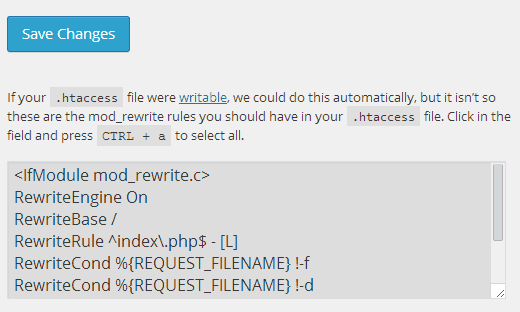
Regards,
JosueHi,
Can you post the link to your website please?
Regards,
JosueHi Erik!
That’s not possible without deeply modifying the theme files (in JS and PHP level). I’d suggest you to optimize all the images present on the page to lessen the charge, for example these images are in PNG format:
http://cdn.bokeheffect.com/wp-content/uploads/2014/01/email_newsletter_v3.png
http://cdn.bokeheffect.com/wp-content/uploads/2014/01/get-a-quote-v3.pngCheers!
JosueThat’s more of a WordPress limitation. as a workaround, you could use the Image Element in shortcode format (just change the src attribute):
[av_image src='https://cdn.airtimetrampoline.com/atdodgeball.JPG' align='center'][/av_image]
Cheers!
JosueAugust 14, 2014 at 4:45 am in reply to: For pages with small content,the footer background increases to filled height #304149Hi!
In that case you’d need to increase the container minimum height, try adding this:
.container_wrap .content{
min-height: 800px;
}
Cheers!
JosueAugust 14, 2014 at 4:41 am in reply to: Portfolio Archive Page Title – Replacing "Archive for: xxx" with just "xxx" #304147You are welcome, always glad to help :)
Regards,
JosueIn that case use this method to insert media elements:

Cheers!
JosueHi,
Can you please create me an administrator account? post it here as a private reply.
Regards,
JosueHey!
Try adding this at the very end of your theme functions.php file:
function avia_add_custom_icon($icons) {
	$icons['cart']	 = array( 'font' =>'entypo-fontello', 'icon' => 'ue859');
	return $icons;
}
add_filter('avf_default_icons','avia_add_custom_icon', 10, 1);

function avia_add_custom_social_icon($icons) {
	$icons['Cart'] = 'cart';
	return $icons;
}
add_filter('avf_social_icons_options','avia_add_custom_social_icon', 10, 1);
Then, you’ll have this option available here:

Cheers!
JosueHi,
Can you post a link to the page where you are trying this please?
Regards,
Josue -
AuthorPosts


