Forum Replies Created
-
AuthorPosts
-
Hi,
You can add the pic links to the private section below. Also, please refer to this post which I believe will help fix this issue: https://kriesi.at/support/topic/tab-section-height-doesnt-allow-for-accordionsexpanding-elements/
Best regards,
Jordan ShannonHi,
You don’t see screen option in the top right hand corner under your account/user name? Please screenshot me the page as you see it.
Best regards,
Jordan ShannonHi,
Add this to quick css:
article .entry-content {
padding-bottom:100px!important;
border-bottom: 1px solid #333!important;
}
As for the second read more link, the first one seems to be within the paragraph itself. Did you try creating your own read more link?
Best regards,
Jordan ShannonHi,
Yes provided that they have unique classes to target separately.
Best regards,
Jordan ShannonHi,
No problem at all. If you need additional help, please let us know here in the forums.
Best regards,
Jordan ShannonHey JPGlobal,
Have you tried disabling all active plugins to see if the issue disappears?
Best regards,
Jordan ShannonHi,
I’m glad you were able to get this corrected and thank you for sharing the solution. If you need additional help, please let us know here in the forums.
Best regards,
Jordan ShannonHi,
I’m glad you were able to get this issue corrected. If you need additional help, please let us know here in the forums.
Best regards,
Jordan ShannonHey aliakbari2,
Please provide a link to the site in question so we can look into this issue further.
Best regards,
Jordan ShannonSeptember 19, 2017 at 11:53 pm in reply to: The Events Calendar — eliminate double breadcrumbs #854085Hi,
I’m glad you were able to get this corrected. If you need additional help, please let us know here in the forums.
Best regards,
Jordan ShannonSeptember 19, 2017 at 11:45 pm in reply to: Social icon: make display in the tablet and mobile view #854083Hi,
I’m glad you got this corrected. If you need additional help, please let us know here in the forums.
Best regards,
Jordan ShannonHi,
I’m glad this worked for you. If you need additional help, please let us know here in the forums.
Best regards,
Jordan ShannonHi,
Please provide an exact link to the page with the blog posts.
Best regards,
Jordan ShannonHey bremerlloyd,
This can be addressed with the following quick css, specifically “background”:
.avia-team-member .team-social {
    border: 7px solid rgba(0, 0, 0, 0.1);
    position: absolute;
    font-size: 19px;
    background: rgba(255, 255, 255, 0.7);
    opacity: 0;
    visibility: hidden;
    top: 0;
    left: 0;
    right: 0;
    bottom: 0;
    text-align: center;
    border-radius: 3px;
}
Best regards,
Jordan ShannonHey KK,
Do you mean in regards to using the Enfold demos?
Best regards,
Jordan ShannonHey WayneSBell,
Add the following to quick css:
h2.woocommerce-loop-product__title{
color:#fff!important;
}
Best regards,
Jordan ShannonSeptember 19, 2017 at 11:15 pm in reply to: Mobile menu doesn't show the strips icon, just a title. #854071Hi,
I see, Please try deleting all active plugins to see if the issue alleviates itself.
Best regards,
Jordan ShannonHi,
Again, go to Appearance > Widgets. From there you will see Footer-Column 1-5. You need to edit those.
Best regards,
Jordan ShannonHi,
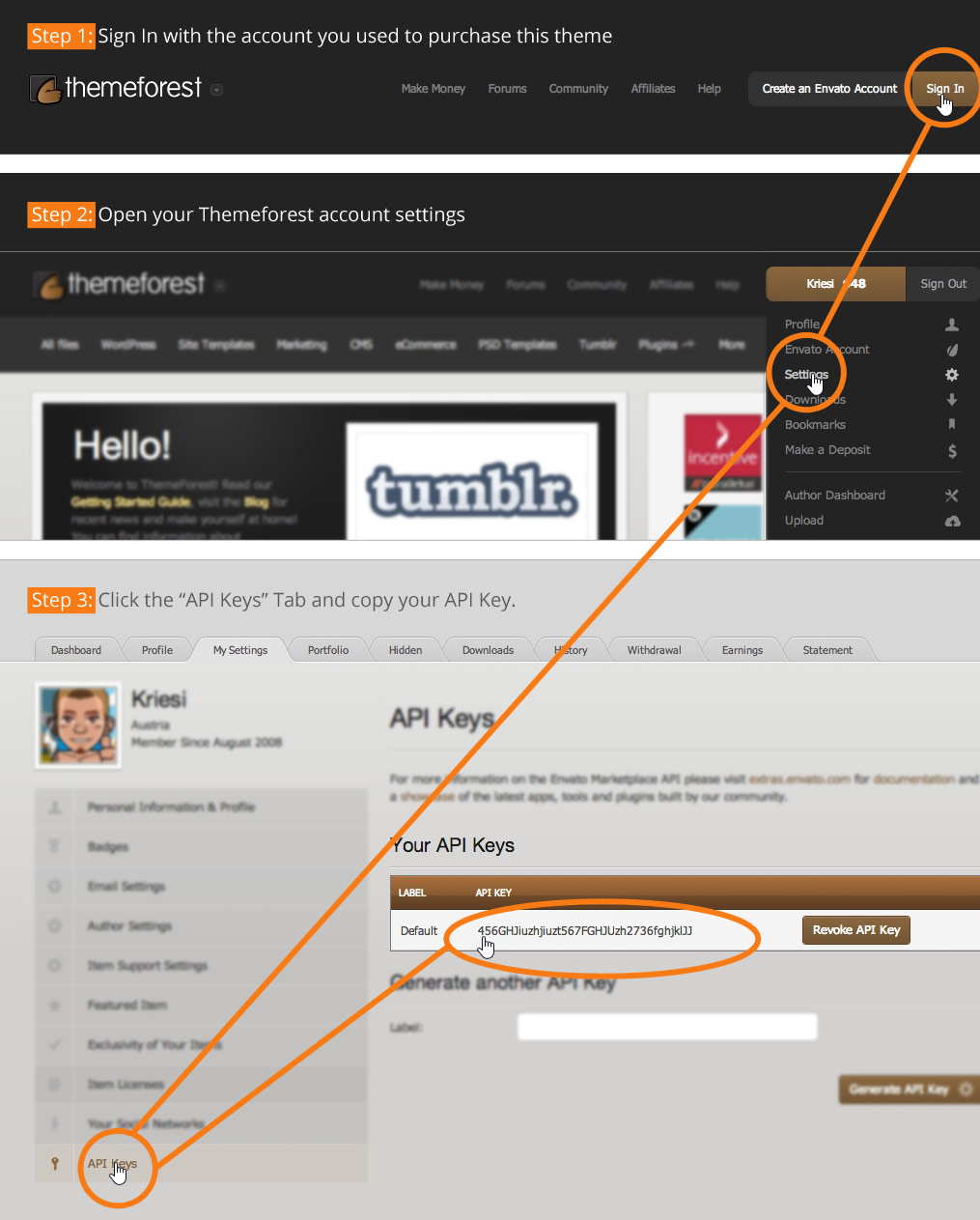
Yes the API key would need to be generated. On the “Theme Option” page (Enfold > Theme Options > Theme Update) there’s a link to an image which explains where you can create/find the api key – see http://kriesi.at/wp-content/themes/enfold/framework/images/layout/FIND_API.jpg
Best regards,
Jordan ShannonHi,
Add the following to quick css:
@media only screen and (max-width: 767px){
.responsive #top #main .products .product {
    margin: 0 5px 20px 0!important;
    width: 45%!important;
}}
Best regards,
Jordan ShannonHi,
No problem, if you need additional help, please let us know here in the forums.
Best regards,
Jordan ShannonHi,
It seems the content is hidden by the footer. Is this what you mean? The content is loading for me but it slides under the footer.
Best regards,
Jordan ShannonHi,
It could be a multitude of reasons. Perhaps it is in fact a bug, in which case the css fix would have to suffice until a full solution is released. Or, it could also be a plugin blocking the script from running properly. If you would like to try, please disable all active plugin to see if the issue resolves.
Best regards,
Jordan ShannonHi,
Add this to quick css:
Are you able to a custom class to that caption. That way it can be targeted directly.
Best regards,
Jordan ShannonHi,
For Sub Menu Items Mega Menu Not Showing On Mobile Version,
many have found that when using the “#” symbol to make no links in the main column of the menu. Removing the “#” symbol and entering “https: //” fixed it.Best regards,
Jordan ShannonHi,
Try adding the following to functions.php
// custom script
add_action( 'wp_footer', 'ava_custom_script' );
function ava_custom_script() {
	?>
	<script type="text/javascript">
	(function($) {
		function a() {
			$(".read-more-link a").empty().text('CHANGE THIS TEXT');
		}

		a();
	})(jQuery);
	</script>
	<?php
}
Best regards,
Jordan ShannonHi,
Please remove all custom css you currently have on the site. If no css is working it is likely you have an error in the custom css preventing it from running. You can even attempt:
body{
display:none;
}
If this does not display a blank page, I’m sure you have a css error somewhere.
Best regards,
Jordan ShannonHi,
I’m glad this worked for you. Unfortunately there is no guide as most css fixes or unique per the situation. If you need additional help, please let us know here in the forums.
Best regards,
Jordan ShannonHi,
If you need additional help, please let us know here in the forums.
Best regards,
Jordan ShannonHi,
Yes Enfold is currently 4.0.7. Please see the following guide to updating:
Best regards,
Jordan Shannon -
AuthorPosts