Forum Replies Created
-
AuthorPosts
-
Hey Deanna,
I’m glad you were able to get this resolved with a simple revert. If you need further help, please let us know here in the forums.
Best regards,
Jordan ShannonFebruary 14, 2018 at 12:29 am in reply to: Social Profiles extending past page edge (boxed layout) #911992Hi,
No problem at all at I’m glad I was able to help. If you need additional help, please let us know here in the forums.
Best regards,
Jordan ShannonFebruary 13, 2018 at 11:24 pm in reply to: Caption Overlay Background Color should stay when hovering over image #911979Hi,
No problem at all my friend I’m glad you were able to find a satisfactory solution. If you need additional help, please let us know here in the forums.
Best regards,
Jordan ShannonFebruary 13, 2018 at 11:23 pm in reply to: Posts Date on pages, Read More/Author font size, Excerpt line-height #911978Hi,
No problem at all my friend. I’m happy my small bit of code was able to help. Did you need further assistance or shall I close this thread?
Best regards,
Jordan ShannonHi,
So this is a code editor? It appears to have to be integrated into the theme files themselves.
Best regards,
Jordan ShannonFebruary 13, 2018 at 10:41 pm in reply to: Caption Overlay Background Color should stay when hovering over image #911950Hey Multispace,
Please provide a link to the page and section in question so we can look into this issue further.
Best regards,
Jordan ShannonHey sjidesign,
Sure, you can add the following to quick css:
#text-9{
border:1px solid #000;
border-radius:15px;
padding:8px
}
Adjust the color to whatever you need
Best regards,
Jordan ShannonFebruary 13, 2018 at 10:37 pm in reply to: Posts Date on pages, Read More/Author font size, Excerpt line-height #911947Hi,
You can target the line-height with the following:
.slide-content{
line-height:15px!important;
}
Best regards,
Jordan ShannonFebruary 13, 2018 at 10:32 pm in reply to: Standard WordPress gallery is aligned far left, shrunk in size #911938Hi,
I’m only seeing this when the screen begins to shrink and the responsiveness comes into play. Normally, I’m viewing the image full-width.
Best regards,
Jordan ShannonHi,
Great! I’m glad this was able to be solved. If you need additional help, please let us know here in the forums.
Best regards,
Jordan ShannonHey PattyLJ,
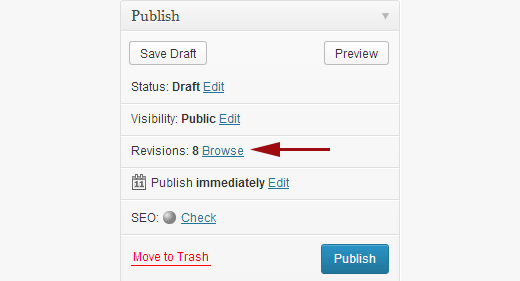
Can you try and go back to the last revision and see if that works in bring the page page back:
http://cdn3.wpbeginner.com/wp-content/uploads/2013/09/revisions-location.png
If so, then re-do your minor update again and see if it works.
Best regards,
Jordan ShannonHi,
No problem at all. If you need further help, please let us know here in the forums.
Best regards,
Jordan ShannonHi,
If you need further help, please let us know here in the forums.
Best regards,
Jordan ShannonFebruary 13, 2018 at 7:25 pm in reply to: Standard WordPress gallery is aligned far left, shrunk in size #911863Hi,
Can you screenshot this for me so I know exactly what you mean?
Best regards,
Jordan ShannonHi,
Apologies, are you looking for the image to be full-width? I’m speaking specifically of the last images you sent in the screenshot.
Best regards,
Jordan ShannonHi,
It looks like Rikard’s code targeted the background of the button, so it may be a good idea to just remove the custom_bg value from the shortcode.
Best regards,
Jordan ShannonHi,
Great! Did you need further help on this topic or shall I close the thread?
Best regards,
Jordan ShannonHey xandria,
Enfold comes bundled with a basic version of LayerSlider, not premium. In order to upgrade and receive all of the full premium features, you must purchase the full version of the LayerSlider.
Best regards,
Jordan ShannonHey zeldalaerke,
Try adding the following to quick css:
#av_section_1{
display:none!important;
}
Best regards,
Jordan ShannonHi,
Please provide admin info in the private section so I can login and look into this issue further.
Best regards,
Jordan ShannonHi,
Those would more or less be for functionality questions. Sales inquiries are generally directed to ThemeForest.
Best regards,
Jordan ShannonHi,
Did you make sure to put my css at the very top of quick css so that it runs before everything else?
Best regards,
Jordan ShannonHey bucksharp,
Great! I’m glad you all were able to track and solve your issue!
Best regards,
Jordan ShannonHey Marco van Nieuwenhoven,
Unfortunately, we don’t handle sales and pricing via the support forum. All inquiries of that type have to be handled via ThemeForest.
Best regards,
Jordan ShannonHey Joepp,
You can try adding the following to quick css to quickly solve the issue:
#mobile-advanced{
display:none!important;
}
Best regards,
Jordan ShannonHey bucksharp,
Have you made sure to double-check any custom css you may have for formatting errors? Sometimes formatting errors within custom css can prevent the theme options from taking.
Best regards,
Jordan ShannonFebruary 13, 2018 at 5:57 pm in reply to: Standard WordPress gallery is aligned far left, shrunk in size #911811Hi,
This could very well be an oversight on the part of the developers. I can report the issue, and hopefully they can look into it and provide a fix in a future update.
Best regards,
Jordan ShannonHi,
Great! I’m glad you were able to get this fixed. The video looks great now. If you need further help, please let us know here in the forums.
Best regards,
Jordan ShannonFebruary 13, 2018 at 5:32 pm in reply to: Social Profiles extending past page edge (boxed layout) #911802Hi,
Please add the following to quick css:
.avia-menu.av_menu_icon_beside{
padding-right:125px!important;
}

.noLightbox.social_bookmarks.icon_count_3{
margin-left:-150px!important;
}
Best regards,
Jordan ShannonHi,
Great! If you need additional help, please let us know here in the forums.
Best regards,
Jordan Shannon -
AuthorPosts