

-
AuthorPosts
-
February 12, 2026 at 2:54 pm #1495029
Dear team,
on my draft page below I need to play a video which is hosted on AWS. I is placed below the hero image, left columnvideo URL: https://2026-02-eins.s3.eu-north-1.amazonaws.com/Ronald-Video.MP4
it starts by clicking on the preview image (below hero image), where I have inserted the AWS file link url.
i want to play it to play on the page in a way that page itself is still visible. Presently the whole page is getting dark and only the video plays. you nedd to go back to the page with arrow left.
–>how to get play within the ½ width column sized frame of the preview pic? So that the page itself ist still visible?
I tried to use the video element instead on the right column, but this seems not to work using the a.m. url.
would be great to know woich setting / element i need to use & configure acc.
Thx a lot and best regards
TilmanFebruary 13, 2026 at 5:05 am #1495038Hey Tilman,
Thank you for the inquiry.
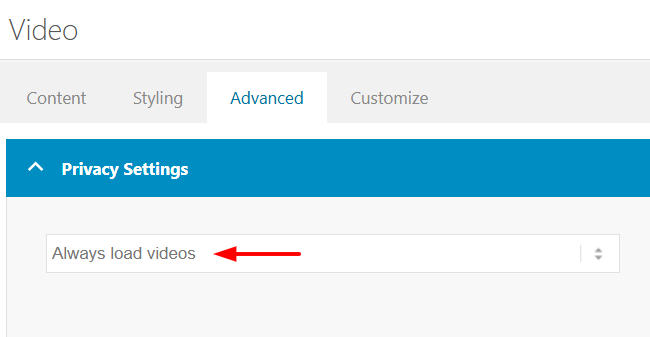
Please try to edit the Video element and set the Advanced > Privacy Settings > Lazy Load Videos option to Always load videos.
You may also need to go to Enfold > Privacy & Cookies > Cookie Handling > Default Cookie Behaviour and set it to the first or second option to allow videos to play or load automatically.
Let us know the result.
Best regards,
IsmaelFebruary 13, 2026 at 7:48 am #1495049Hi Ismael,
thanks – I have added different version s of this coulmn using different settings. It all does not lead to the result I would like to have.Like here: the video plays, and the rest of the site is still visible:
On this page the video is hosted @youtube and linked with the enfold video element.
Also loading the video directly on the web space did not lead to the way I would like to show it, or I still have the wrong settings. But I think I do not know where to change the settings. Cookie settings I had changed it is correct.
Shall I use better the image element with link to the video Or the video element ? on the dev site mentioned I´v tried both
would be great to know how to fis this.
thx a lot & best regards
Tilman-
This reply was modified 2 months, 1 week ago by
oestersund.
February 15, 2026 at 10:51 am #1495090Dear team,
do you have any idea? this would be super helpful.thx and best regards Tilman
February 15, 2026 at 1:46 pm #1495098February 15, 2026 at 6:11 pm #1495106hi Mike, thx – pls find below. best regards Tilman
page …/jobs-karriere
-
This reply was modified 2 months ago by
February 15, 2026 at 7:58 pm #1495108February 15, 2026 at 9:03 pm #1495109thx Mike,
this works, but only if I host the video directly on the webspace – see right column on the page mentionedIf I host the video on AWS (left column) nothing happens.
the direct AWS url in browser starts the video: https://2026-02-eins.s3.eu-north-1.amazonaws.com/Ronald-Video.MP4As mentioned, we want to host the video son AWS, so the questions remains: How to configure it in Enfold, that the AWS hosted video plays, too ?
thx again & best regards Tilman
February 16, 2026 at 8:11 am #1495118Hi,
Thank you for the update.
Please note that videos from AWS are not supported by the Video element by default, so you’ll need to embed them using a Code Block element. Make sure to remove the trailing forward slash at the end to make the video URL valid. Here is the list of supported video URLs for the Video element:
— https://wordpress.org/documentation/article/embeds/#Okay.2C_So_What_Sites_Can_I_Embed_From.3F
We edited the Code Block element with the AWS URL and removed the trailing forward slash. The video is now loading correctly.
Best regards,
IsmaelFebruary 16, 2026 at 8:25 am #1495120Thanks a lot, Ismael. How can we change the code so that the column height is only the same as the video size? At my end, you see black bars above and below the video.
e.g. like 100% instead of 1500px did not work,
Now `ve added a second column with 1000 px height:
<iframe src=”https://2026-02-eins.s3.eu-north-1.amazonaws.com/Ronald-Video.MP4″ width=”100%” height=”1000px” scrolling=”no” allowfullscreen=”allowfullscreen”></iframe>
-> but maybe there is a code to have dynamicly a correct height?
And 2 reamining questions if we do it via a.m. code and not video element:
a) is it possible to add a play button above the video?
b) and how to implement/show a start pic / thumbnail?Thanks again for your continuous support, and best regards, Tilman.
-
This reply was modified 2 months ago by
-
This reply was modified 2 months ago by
February 17, 2026 at 5:53 am #1495152Hi,
Thank you for the inquiry.
We replaced the iframe with the video tag, which should display a thumbnail or video cover by default using the poster attribute and have the video controls enabled automatically.
<video width="100%" height="1000" controls poster="https://www.timm-tiegelkamp.de/wp-content/uploads/2026/02/Danny-Videocover-Foto_Web.jpg">
    <source src="https://2026-02-eins.s3.eu-north-1.amazonaws.com/Ronald-Video.MP4" type="video/mp4">
    Your browser does not support the video tag.
</video>
Best regards,
IsmaelFebruary 17, 2026 at 7:19 am #1495160HI Ismael,
this works perfect :-) Thank you very much and have a great day, TilmanFebruary 17, 2026 at 10:56 pm #1495174Hi,
Glad that Ismael could help, if you have further questions please open a new thread and we will try to help. Thanks for using Enfold.Best regards,
Mike -
This reply was modified 2 months, 1 week ago by
-
AuthorPosts



- The topic ‘Video play w/o opening new window’ is closed to new replies.