

-
AuthorPosts
-
February 8, 2026 at 4:33 pm #1494830
I am working on a new page in a flywheel staging area and cannot get the accordion/toggle to start with all items closed. I have compared all theme options with a working production site and cannot see a difference. I vaguely remember this issue from when setting up this element a long time ago. Can you guide me to what to check?
February 8, 2026 at 6:06 pm #1494849There is no option on having all toggles open at start.
There is an option to have multiple toggles open at once, but the option to have them all open at startup is not included.
This could potentially be a useful addition.you can place a snippet to your child-theme functions.php to give a click to all existing toggles.
if you want to be more selective you can use a custom class to do so.try first without timeout :
function open_all_toggles_at_start(){
?>
<script>
(function($){
    $(function() {
            $(".toggler").trigger('click');
    });
})(jQuery);
</script>
<?php
}
add_action('wp_footer', 'open_all_toggles_at_start');
February 8, 2026 at 6:52 pm #1494850We do not want all toggles open at start; we want them closed but for some reason they are not doing that. I have reviewed all settings and cannot get the page to open with the items closed.
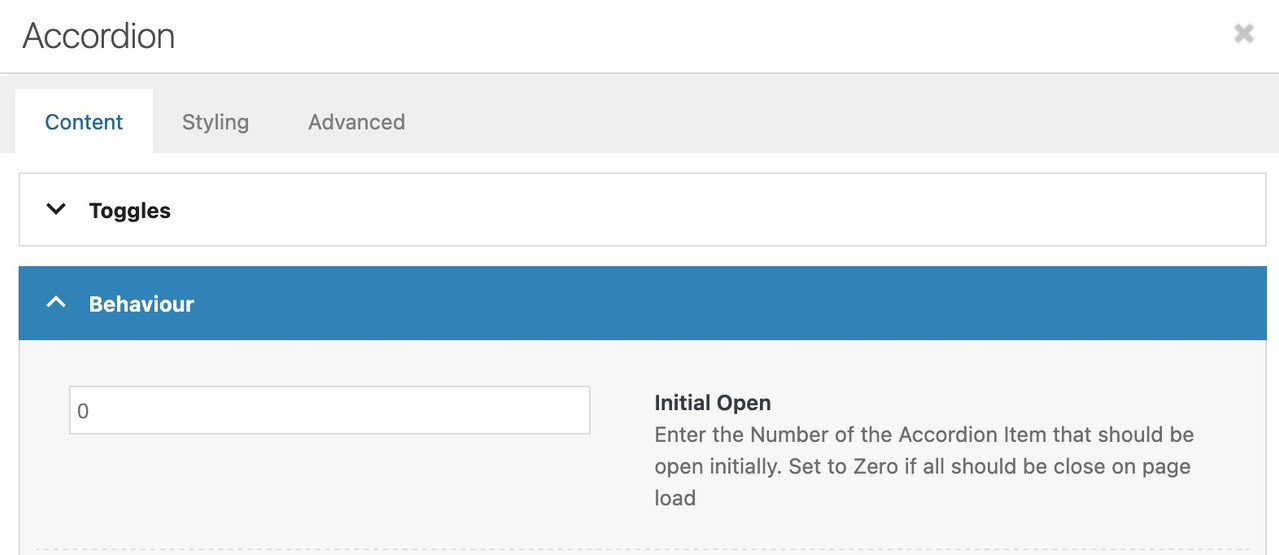
February 8, 2026 at 7:59 pm #1494855Accordion – Content : Behaviour: enter a zero
 February 8, 2026 at 8:55 pm #1494861
Yes, that is what we have it set at. I deleted it and set it to 0 again, it still opens all of the items when I go to view page.
February 9, 2026 at 5:46 am #1494868Hi,
Thank you for the inquiry.
We couldn’t find the page with the Accordion element on your site, so we created a test page and left the Initial Open setting at its default value (zero), as described. On this test page, we can see that the toggle element is not working correctly. Did you add any custom scripts or modifications to the theme? Please also try deactivating all plugins to check if this is a plugin conflict.
Best regards,
IsmaelFebruary 10, 2026 at 6:09 pm #1494933The page is BJM PSC Training – or cmk testing
We do not have any that I’m aware of. We converted to the Enfold theme from YOOtheme and didn’t add any custom items after that. This morning I deactivated all plugins and the problem still exists. I have looked through for CSS buried somewhere from the conversion and cannot find anything.
February 10, 2026 at 10:45 pm #1494939Hi,
I found that you had this jQuery in your Quick CSS field:jQuery(document).ready(function($){ // Close all accordion items on page load $('.av_accordion .accordion_section').removeClass('active'); $('.av_accordion .accordion_content').hide(); });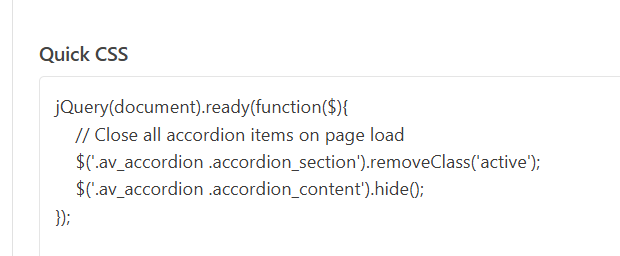
the CSS field is only for CSS and not jQuery.
Your issue is still occuring, so we will keep checking for more code errors, but I’m not able to reproduce on my test site, so I don’t believe that it is an issue with the theme, perhaps some custom code somewhere.Best regards,
MikeFebruary 11, 2026 at 3:04 pm #1494991Thanks, yes – I’ve been troubleshooting using a variety of sources, unfortunately one of them told me to try that… obviously it didn’t work and I forgot to remove it. This issue has me stumped, I hope you can find something….
February 13, 2026 at 5:32 am #1495043 -
AuthorPosts


- You must be logged in to reply to this topic.