Viewing 6 posts - 1 through 6 (of 6 total)
  • Author
    Posts
  • #1494723

    I can’t seem to change teh background on this page. can you please tell me how to change it to a plain white background?

    #1494739

    Hey melanie308,

    If you want to remove the backgrounds on that page, then you can do so in the Slider and Color Section element options.

    Best regards,
    Rikard

    #1494774

    i don’t see that as an option? can you please tell me where to find that?

    #1494782

    Hi,

    Thank you for the inquiry.

    The background option for the Color Section is located under Styling > Background Image. You can remove the background image there or replace it with another one.

    If you need to apply a solid background color, simply go to the Background Colors panel, as shown in the screenshot.
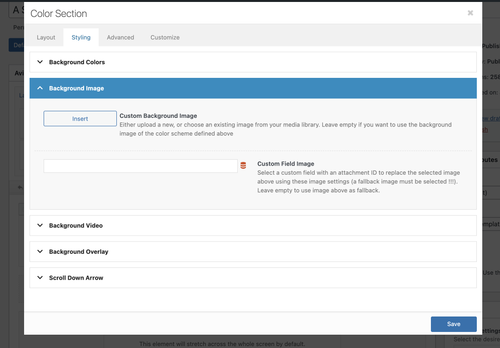
    fbzTkEQ.md.png

    Best regards,
    Ismael

    #1494791

    so it seems i somehow have a color section on this page but i can’t find that element to find those options! can you help guide me how to find the color section on this page pls?

    #1494794

    Hi,

    When hovering over the element, then you will see 3 icons on the left. Click the Pen+paper icon to access the element options.

    Best regards,
    Rikard

Viewing 6 posts - 1 through 6 (of 6 total)
  • You must be logged in to reply to this topic.

