

-
AuthorPosts
-
December 15, 2025 at 9:09 pm #1492541
My client was getting a blank screen when trying to edit some elements — buttons and separators, for example — the editing box pops up, spins and then just leaves a blank box where the options should show (see https://snipboard.io/K9arqs.jpg). So, after making sure everything was up to date (and re-uploading the theme) and the issue persisted, I set up a dev site, deactivated all the plugins and tried a few other things, but the issue persists. So I’m including a temp login in the Private Content, here, and hoping you can help me get to the bottom of it. Thanks and lmk if you have questions!
Here’s the dev site:December 16, 2025 at 8:05 am #1492548Hey sky19er,
Thank you for the inquiry.
We get a critical error when we try to open a Button element — other elements work fine. Please set the installation to debug mode and enable the error logs so we can gather more information about the issue. Please check the link below:
Once the error log is enabled, try opening another Button again, then look for the error logs in the wp-content folder. Let us know what it says or provide a screenshot.
Best regards,
IsmaelDecember 16, 2025 at 9:34 am #1492556Thanks, Ismael! It looks like wpengine has an error log in the user portal — I copy/pasted the JSONs for what looked like the most recent three errors below — does that give you the info you need? Here’s the full log, too, if it helps: https://crcamericadev.wpenginepowered.com/wp-content/uploads/crcamericadev-logs-2025-12-16T08_23_26.csv
{
“installName”: “crcamericadev”,
“environment”: “DEV”,
“type”: “error”,
“date”: “2025-12-16T07:00:46.000Z”,
“severity”: “notice”,
“client”: “49.149.68.94:0”,
“message”: “auditor:event=profile_update {\”user_id\”:8,\”blog_id\”:1,\”event\”:\”profile_update\”,\”current_user_id\”:8,\”remote_addr\”:\”49.149.68.94\”}, referer: https://crcamericadev.wpenginepowered.com/wp-admin/post.php?post=40933&action=edit”,
“uuid”: “363ffd3e-4ddf-4663-99f2-2087ff23cfb1”
}{
“installName”: “crcamericadev”,
“environment”: “DEV”,
“type”: “error”,
“date”: “2025-12-16T07:00:44.000Z”,
“severity”: “notice”,
“client”: “49.149.68.94:0”,
“message”: “auditor:event=profile_update {\”user_id\”:8,\”blog_id\”:1,\”event\”:\”profile_update\”,\”current_user_id\”:8,\”remote_addr\”:\”49.149.68.94\”}, referer: https://crcamericadev.wpenginepowered.com/wp-admin/post.php?post=40933&action=edit”,
“uuid”: “b926ecae-71e8-4fb4-a782-11c298d2ca0d”
}{
“installName”: “crcamericadev”,
“environment”: “DEV”,
“type”: “error”,
“date”: “2025-12-16T07:00:13.000Z”,
“severity”: “notice”,
“client”: “49.149.68.94:0”,
“message”: “auditor:event=wp_login {\”user_id\”:8,\”blog_id\”:1,\”event\”:\”wp_login\”,\”current_user_id\”:8,\”remote_addr\”:\”49.149.68.94\”}, referer: https://kriesi.at/”,
“uuid”: “2748a21e-c9f6-4b3d-a12c-ee78ab39909f”
}December 16, 2025 at 12:11 pm #1492559Hi,
Thanks for that. It looks like your installation is running out of memory. Please try to increase it: https://developer.wordpress.org/advanced-administration/wordpress/wp-config/#Increasing_memory_allocated_to_PHP. Your hosting provider might have that in the interface too.
Best regards,
RikardDecember 16, 2025 at 8:33 pm #1492575Thanks, Rikard, but I increased the memory to wp engine’s max of 512MB, ran another test, and the issue seems to persist. The only things I see in the log since doing that are what look like my two times clearing the wp engine cache (once after increasing the memory to 256 and once after bumping it up to 512 — see below or https://crcamericadev.wpenginepowered.com/wp-content/uploads/crcamericadev-logs-2025-12-16T19_28_03.csv). Any other ideas? I’m including the temp login again in the Private Content field, in case you want to poke around. Thanks again!
{
“installName”: “crcamericadev”,
“environment”: “DEV”,
“type”: “error”,
“date”: “2025-12-16T19:24:37.000Z”,
“severity”: “notice”,
“client”: “24.24.164.87:0”,
“message”: “wpe_cache_plugin:info: event=clear-all-cache, referer: https://crcamericadev.wpenginepowered.com/wp-admin/edit.php?post_type=page”,
“uuid”: “8b6d00fd-38e3-44d3-903b-9166dbc7f21a”
}{
“installName”: “crcamericadev”,
“environment”: “DEV”,
“type”: “error”,
“date”: “2025-12-16T19:17:43.000Z”,
“severity”: “notice”,
“client”: “24.24.164.87:0”,
“message”: “wpe_cache_plugin:info: event=clear-all-cache, referer: https://crcamericadev.wpenginepowered.com/wp-admin/media-new.php”,
“uuid”: “a746b3bf-7e06-48bd-994c-ce6d04e249d2”
}December 17, 2025 at 8:18 am #1492593Hi,
Thank you for the info.
The logs above don’t provide much information about the editor issue. Please set the installation to debug mode and enable the error logs so we can see the actual WP or PHP errors.
Best regards,
IsmaelDecember 18, 2025 at 4:17 am #1492638Ah, ok, here’s the real deal: https://snipboard.io/nyo9vp.jpg
And I had to move the dev site to a new url: https://devcrc.wpenginepowered.com/
And there’s a new temp login in the private content.
Thanks again!December 18, 2025 at 8:12 am #1492639Hi,
Thank you for the info.
According to the logs and as mentioned above, the installation is running out of memory even though the WP_MEMORY_LIMIT is already set to 512M. If you can provide the S/FTP details, we’ll try to investigate the issue further.
Best regards,
IsmaelDecember 18, 2025 at 8:28 am #1492641Thanks, Ismael — sure thing, details in the PC below — and lmk if you need me to reach out to wpengine support.
December 18, 2025 at 8:49 am #1492644Hi,
Thank you for the details.
We reset the WP_MEMORY_LIMIT and WP_MAX_MEMORY_LIMIT to 1024M and it seems to have worked as expected. But when we try to edit an element in the builder, we now receive a “not logged in” error. We are not sure whether the login token has expired or if this is a different issue. Please generate a new login or wtlwp token.
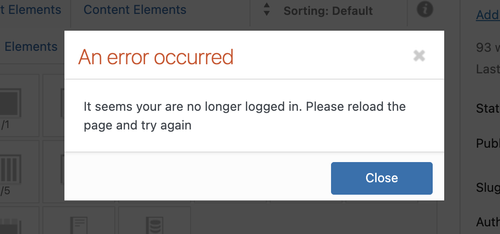
We are still seeing the same error in the logs.
PHP Fatal error: Allowed memory size of 536870912 bytes exhausted
We recommend reaching out to your hosting provider for additional assistance.
Best regards,
IsmaelDecember 19, 2025 at 12:04 am #1492665Thanks again, Ismael! Interesting — the temp login isn’t expired, but here’s another one in the PC, also good for a week. I spoke with wp engine support and they troubleshot for about a half hour but couldn’t solve it. They showed me how to look in the inspector > Network > trigger the error > click on the first admin-ajax.php > Response and note how there’s just a “1” (https://snipboard.io/RJ7US6.jpg) as opposed to the html that should show there — they suggested I pass that info on to you in hopes it might provide a clue. I also added another environment in the same account, to test a clean install of Enfold there, and there doesn’t seem to be an issue with that install; no errors on buttons, etc. / functioning normally, if that offers any clue / potential solution. Lmk if you have any other questions.
December 19, 2025 at 7:18 am #1492666Hi,
Thank you for the update.
The login token link just redirects to the wp login page. Is there an actual account we can use to log in to the site? When we try to edit a button in the builder, we receive an internal server error, which is likely due to exhausted memory mentioned above. Unfortunately, we are not yet sure why this error still occurs even though the memory limit has already been increased.
Best regards,
IsmaelDecember 19, 2025 at 10:00 am #1492673Sorry, I think wpengine support may have deactivated the temp login plugin when they were troubleshooting. It should be working now, but here’s an actual user just in case. They also said the max on the hosting is 512, so even if you up it to 1024 it limits it to 512. But I run a bunch of Enfold sites with them and never had a memory issue like this — we shouldn’t have to up it that high, right? Maybe you’re just trying to do that temporarily to troubleshoot? Regardless, it doesn’t sound like they can do that for us, but I can double-check if you want; lmk. Thanks again for sticking with this!
December 29, 2025 at 6:29 am #1493550Hi,
Thank you for the update.
We have checked the site for a while but haven’t been able to identify the cause of the issue yet. We’ll review it again and let you know as soon as we find anything. In the meantime, please try to move the site to another staging environment so you can continue building it.
Thank you for your patience.
Happy holidays.
Best regards,
IsmaelDecember 29, 2025 at 7:44 am #1493555Thanks, Ismael — the site is actually live with this issue at https://crcamerica.org/ — it’s a site that’s been managed by the client for many years and they just reached out to me with this issue. So, no need to move it to continue building — they just want to be able to edit the affected elements on the live site. Happy Holidays to you and the crew, too — lmk if you have other questions!
December 30, 2025 at 3:34 am #1493579Hi,
We modified config-templatebuilder/avia-template-builder/php/base-classes/class-modal-elements.php and temporarily deactivated the block of code related to the icon fonts, and this seems to have fixed the issue. We’ll keep this modification in place for now so the site remains editable.
We’ll let you know once we figure out the issue.
Best regards,
IsmaelDecember 31, 2025 at 8:48 am #1493606Thanks so much, Ismael — glad you’re on the trail. No need to keep the modification on the dev site — I’ve downloaded that file so I can post it to the live site, if I want to implement that temporary fix for the client. Thanks again and Happy New Year!
January 15, 2026 at 11:34 pm #1493999Hey Ismael, just checking back in to make sure someone’s still working on this.
February 6, 2026 at 4:01 am #1494775Checking back again on this — please advise :)
February 10, 2026 at 1:48 am #1494903Well, now the client deleted the dev site, so, you’re off the hook on this one ;). Thanks, anyway. Feel free to close this thread.
-
AuthorPosts


- The topic ‘blank screen when editing buttons and other elements’ is closed to new replies.