

-
AuthorPosts
-
December 10, 2025 at 7:36 pm #1492365
The Mason Grid for content (in this case, Portfolio items) refers to this content as a “caption”, but then specifies that I choose an “excerpt” as the displayed content. I understand why you’d do this, you want the user to get a concise “preview” of the content they will see if they click the item.
I think this is confusing. If you’re not going to display the “caption” (for the featured image associated with the portfolio item), then the display accordion should be called “Excerpt” (as shown in Portfolio Grid element) if it is ONLY able to pull the excerpt value for that post.
Masonry grids by design display images…it would be helpful if I could choose the featured image’s caption OR the portfolio item’s “excerpt” of the portfolio content entry. Can this be done?
Could you provide the option to display the image copyright below the image (as you do on nearly every other image copyright display setting)? Right now, I only have left or right. Yes, I know I can use css to do this, but that is also true of left or right placement. Right? :)
Thank you for any assistance or guidance!
-
This topic was modified 4 months, 1 week ago by
milkrow.
December 11, 2025 at 9:54 am #1492399Hey milkrow,
Thank you for the inquiry.
In the Caption panel of the masonry element, it says “Element Title and Excerpt” so it refers to the post title and excerpt, not the image caption.
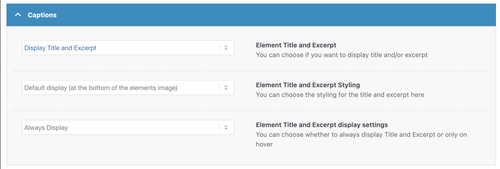
Unfortunately, it’s not possible to pull in the featured image caption without significant modifications to the theme and the masonry templates. You can either contact a freelance developer or use the link below for more customization options.
— https://kriesi.at/contact/customization
Thank you for your understanding.
Best regards,
IsmaelDecember 11, 2025 at 2:24 pm #1492420Hi Ismael,
I see your point, you’re calling it “Captions” because that is the display characteristic. However, the masonry grid content element doesn’t/can’t pull image captions. It’s not displaying a caption for an image, it’s supposed to display a post excerpt. Therefore, I humbly submit that the accordion should be called “Excerpts”. :)But I’m still confused about the differences between the Masonry Gallery, and a Masonry Content element. BOTH pull images (not a custom field). BOTH show the ability to display Image Copyright.
In fact, when I try to use that feature in the Masonry Content element, it doesn’t work–the image copyright does not display. Shouldn’t it? See the private link below. On that page, both show images, both are set to display the image copyright, both are set to show the “excerpt”. In truth, the Masonry Gallery is showing the image “caption” and the Masonry Content element is showing…er…well NOTHING since it is neither accessing the excerpt nor the image caption.
What I believe you’re saying is that the Masonry Content element cannot display the image caption…but it can (er…should) display the image copyright? Aren’t those pieces of information coming from the image?
Can the “excerpt” source be modified?
Or is there another way to access the caption dynamically?
Any guidance and assistance here so I can effectively display the content with the elements provided in the theme would be greatly appreciated.
KC
December 12, 2025 at 7:31 am #1492440Hi,
Thank you for the update.
Image captions are associated with featured images or other media attachments, which are stored as a separate post type (attachment). This is different from regular posts or portfolio items, which do not have a built-in caption field — only an excerpt if supported. It is definitely possible to retrieve the caption of the featured image attached to a post but this will require modifications to the templates, which is beyond the scope of support.
If you want to try it yourself, you can find the Masonry template in the enfold/config-templatebuilder/avia-shortcode-helpers/class-avia-masonry.php file.
Thank you for your understanding.
Best regards,
Ismael -
This topic was modified 4 months, 1 week ago by
-
AuthorPosts


- You must be logged in to reply to this topic.