

Tagged: scroll top
-
AuthorPosts
-
December 3, 2025 at 12:04 pm #1492058
Dear Support,
I tried to change the “Scroll to the Top” Element using some threads in this Forum. I wanted to achieve that the arrow inside the box is more bold and that the element itself is a little bigger. Doing that the arrow is not centered anymore. Also the element for some reason gets cut when scrolling on an iPhone. It’s only visible on mobile once you scroll up. It should always be visible. Please advise.
-
This topic was modified 4 months, 2 weeks ago by
ti2media.
December 3, 2025 at 1:42 pm #1492067Hey ti2media,
Please try this CSS as well:
#scroll-top-link.avia-svg-icon svg:first-child {
  margin-top: 7px;
}
Best regards,
RikardDecember 4, 2025 at 4:56 pm #1492120Dear Rikard,
thanks for your support. This only solved the first issue of the element not being in the center. The whole as to bee seen on the screenshot is still not visible on mobile when scrolling down.
Please advise.
Regards
StefanDecember 4, 2025 at 5:50 pm #1492128Hi,
I’m guessing that the white area in your screenshot is part of your phone, not the browser. It’s not present using Chrome on Android for example. If you should need further help, then please let us know how to reproduce the results in your screenshot.
Best regards,
RikardDecember 4, 2025 at 6:01 pm #1492131Hi Rikard,
it is the latest iPhone 17 pro using Safari 26.1.
It only appears when scrolling down on the website.Thanks for advise.
Regards
StefanDecember 4, 2025 at 6:19 pm #1492133have a look if you have already the svg usage of those standard icons. – the up-open icon is already a bold one – but you can make it bigger:
#scroll-top-link svg {
  margin-top: 3px !important;
  width: 40px !important;
  height: 40px !important;
}

#scroll-top-link svg path {
  stroke-width: 2;
  stroke: currentColor
}
see :
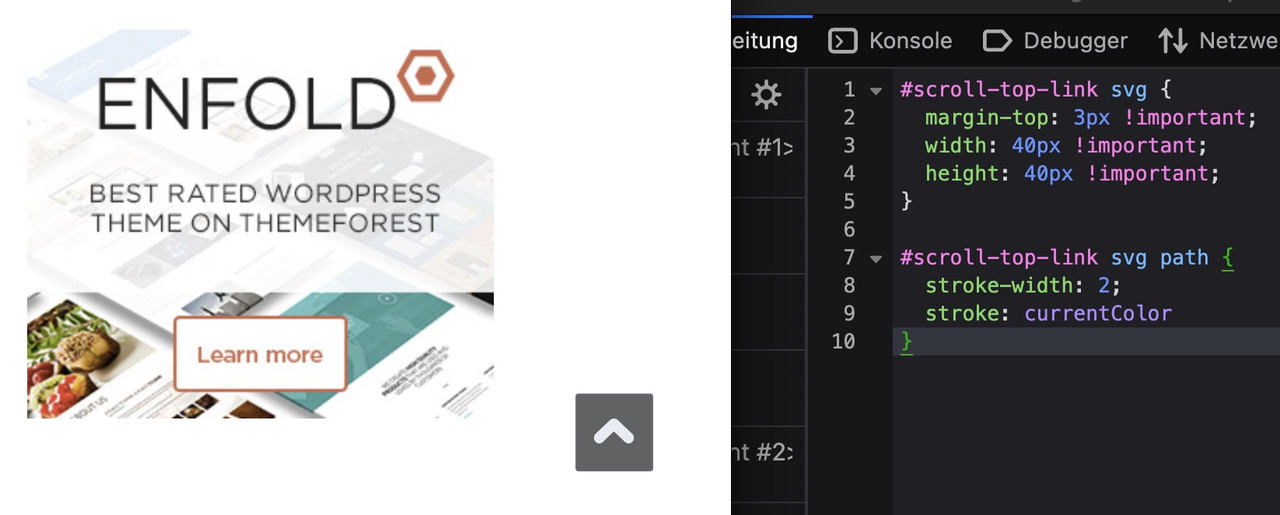
btw: on mobile ( better on smaller screens it is set to display: none )
@media only screen and (max-width: 767px) {
  .responsive #scroll-top-link {
    display: block;
  }
}
The reason for this is that many people know that double-tapping the top of the screen scrolls the window upwards.
December 6, 2025 at 2:17 am #1492190Thanks everyone.
Regards
StefanDecember 6, 2025 at 9:05 am #1492195Hi,
Glad that Guenni007 could help, thanks Guenni007, if you have further questions please open a new thread and we will try to help. Thanks for using Enfold.Best regards,
Mike -
This topic was modified 4 months, 2 weeks ago by
-
AuthorPosts


- The topic ‘Scroll to Top – Element’ is closed to new replies.