

-
AuthorPosts
-
November 1, 2025 at 1:35 pm #1490841
Hi I made some adjustments to font styling which I am struggling to amend:
I seem to remember making changes, not only in the Theme styling options, but also in custom CSS, but now would like to revert those changes in the custom CSS so I can more easily make any changes in the main Theme styling options.
The changes I am wanting to adjust were to do with heading sizes. I made the main H1 heading very large (too large really)
I think I also made some changes to relative size of fonts which made things like my button text and sidebar navigation terxt too small. But can’t remeber where I made this change. I had to add some custom css to get the sidebar navigation to show larger.
I”d like to roll back the changes I made so I can simply edit font size in the Theme styling options
-
This topic was modified 5 months, 3 weeks ago by
JennyGr.
November 1, 2025 at 3:33 pm #1490850Hey JennyGr,
We will need to login to your site to examine your H1 font sizes, there are a couple of places to change this.
You could view the Advised > Styling , if you have multiple H1 styles there the bottom one will take preference, removing all may help. If you have custom css, search for all H1 css code and remove it. These are good starting points. For your /visit-us/openday/ page what font size do you want the H1 “Open Days” to be? Is this an example that you ment?Best regards,
MikeNovember 1, 2025 at 4:15 pm #1490851HI Mike I’ve been working on the site this morning and seem to be able to change the front sizes okay in advanced styling.
One sticking point is on mobile where changes I make to the H1 size in advanced styling are not having any impact. I coudn’t find any H1 in my css code.
Can you remind me how to give you access to the site login.
Many thanks
Jenny
November 1, 2025 at 4:25 pm #1490852Hi,
To give us access, please post a admin user login & password in the private content area.Best regards,
MikeNovember 1, 2025 at 4:28 pm #1490853Hi Mike see log in in private content
November 1, 2025 at 6:08 pm #1490854Hi,
Thanks, the H1 “Open Days” is in a Special Header element, so you can chacge the mobile size by clicking the Mobile icon and choosing the size:
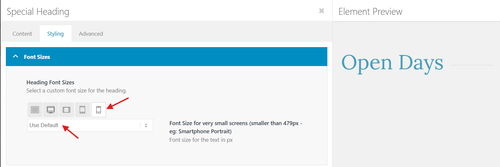
Best regards,
MikeNovember 1, 2025 at 6:36 pm #1490855Thanks Mike, the H1 header is too large on every poge for mobile, will I need to go in and change the special header element on each page, or is there a global way to do it?
November 2, 2025 at 10:02 am #1490867 -
This topic was modified 5 months, 3 weeks ago by
-
AuthorPosts


- You must be logged in to reply to this topic.