

-
AuthorPosts
-
January 7, 2020 at 1:36 pm #1171034
Hey!
I am getting a 404 error when trying to access the admin for the enfold theme:
http://SITENAME.co.uk/wp-admin/admin.php?page=aviaNothing Found
Sorry, the post you are looking for is not available. Maybe you want to perform a search?If I scroll down to the bottom of the page I can see the theme options but I can’t use or change anything and it has no CSS applied.
I’ve checked the php logs and I get this:
[07-Jan-2020 11:27:38 UTC] PHP Deprecated: Function create_function() is deprecated in /home/SITENAME/public_html/wp-content/themes/enfold/config-layerslider/LayerSlider/wp/widgets.php on line 4
[07-Jan-2020 11:27:38 UTC] PHP Warning: Invalid argument supplied for foreach() in /home/SITENAME/public_html/wp-cron.php on line 117
[07-Jan-2020 11:27:39 UTC] PHP Warning: Invalid argument supplied for foreach() in /home/SITENAME/public_html/wp-cron.php on line 117I’m on
EnfoldVersion: 4.0.7
Wordpress: 5.3.2
PHP; 7.2I’ve tried deactivating all plugins but no joy?
January 7, 2020 at 6:07 pm #1171110Hey amy_kate,
Please post us your login credentials (in the “private data” field), so we can take a look at your backend.
- Install and activate ” Temporary Login Without Password “.
- Go to ” Users > Temporary Logins ” on the left-side menu.
- Click ” Create New “.
- Add the email address for the account ( you can use (Email address hidden if logged out) ), as well as the ” Role ” making that the highest possible and the expiry about four days
( to be sure that we have enough time to debug ). - Click ” Submit “.
- You’ll now have a temporary account. Please provide us here in the private section the URL, so we can login and help you out.
When your issue is fixed, you can always remove the plugin!
If you prefer to not use the plugin, you can manually create an admin user and post the login credentials in the “private data” field.Best regards,
NikkoJanuary 8, 2020 at 10:38 am #1171378Hi Nikko,
Thanks for your help, I’ve created a login.
January 8, 2020 at 2:11 pm #1171443Hi,
I see that you have updated the theme to the latest version and that should have fixed PHP Deprecated error.
Could you please post FTP logins here privately as well? Not really sure why Enfold theme options cannot be found but we might figure it out by debugging on your server.
Best regards,
YigitJanuary 8, 2020 at 2:55 pm #1171469Hi Yigit,
Thank you for the response and your help so far. I’ve added ftp details before, please let me know if they are not correct as I’ve not had to provide access via FTP before.
-
This reply was modified 6 years, 2 months ago by
amy_kate.
January 8, 2020 at 2:57 pm #1171474January 8, 2020 at 3:00 pm #1171480Yes added that on sorry missed it off!!
January 8, 2020 at 3:06 pm #1171484Hi,
Thanks for that! It works however path seems to be wrong. Access to default FTP directory would be fine for us. Even if you have other installations or files on your server, we are not going to touch them :)
Best regards,
YigitJanuary 8, 2020 at 3:15 pm #1171487Sorry Yigit, I didn’t realise it had added a different directory on. I’ve recreated the user, I think that should now take you to the right directory?
January 8, 2020 at 4:04 pm #1171494Hi,
Thanks! It is working fine now. Did you notice the issue after making certain changes? I noticed editing pages, posts and portfolio items also return error 404.
I will ask my teammates to check this thread as i could not find out what exactly is causing the issue.
Best regards,
YigitJanuary 8, 2020 at 5:40 pm #1171535Hi Yigit,
Thank you. Recently I updated WordPress and updated the theme.
I have tried a few things myself such as:
– downgrading php version
– removing all old themes
– removing theme and reinstalling
– removing all plugins and reinstallingI really appreciate your help!
January 8, 2020 at 9:07 pm #1171610Hi amy_kate,
Best regards,
VictoriaJanuary 9, 2020 at 10:40 am #1171738Hi Victoria,
The username is slightly different to what I supplied don’t know if that would make a difference to the access.
This is the contents of the htaccess
# BEGIN WordPress
# The directives (lines) betweenBEGIN WordPressandEND WordPressare
# dynamically generated, and should only be modified via WordPress filters.
# Any changes to the directives between these markers will be overwritten.
<IfModule mod_rewrite.c>
RewriteEngine On
RewriteBase /
RewriteRule ^index\.php$ – [L]
RewriteCond %{REQUEST_FILENAME} !-f
RewriteCond %{REQUEST_FILENAME} !-d
RewriteRule . /index.php [L]
</IfModule># END WordPress
# Options -Indexes
January 9, 2020 at 12:42 pm #1171783Hi,
Thank you for the login, I see that you have tried downgrading your PHP version, but have you tried upgrading to v7.3?
The WordPress Site Health says PHP (7.2.24) is out of date.
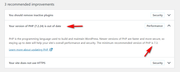
Best regards,
MikeJanuary 9, 2020 at 12:57 pm #1171788Hi Mike,
Yes I tried updating PHP to v7.3 also but this pulled the whole site down, so returned it to 7.2.
January 9, 2020 at 1:00 pm #1171789I’ve just retried that and upgraded to 7.3 then followed the advice here: https://bakemywp.com/update-wordpress-php-7-3-500-internal-server-error/ and the site now works on 7.3.
However the enfold admin error is still the same regardless :(
January 9, 2020 at 1:35 pm #1171796 -
AuthorPosts


- You must be logged in to reply to this topic.