

-
AuthorPosts
-
September 5, 2019 at 10:37 am #1134292
In the Enfold church theme: https://kriesi.at/themes/enfold-church/about/
The text field creates a “paper” like effect where the text field overlaps the background image set in the color section.I have created a new page and cannot figure out how to enable this effect. I have spent a long time searching for either page-level, section-level or other places that will allow me to set this property. What happens instead is that there is a section image and below it a full width page with text and other elements (such as widget areas etc). But no way to make them overlap.
Can you help me with that?
Regards, Rolf Jackson
September 6, 2019 at 7:37 am #1134769Hey rolfjackson,
It’s negative margin applied to the element, if you want to see exactly how that page is laid out then you can import the shortcodes for it:
You need to activate debug mode before you can copy the shortcodes to a new page: https://kriesi.at/documentation/enfold/intro-to-advanced-layout-builder/#debug-modeBest regards,
RikardSeptember 6, 2019 at 7:47 am #1134777So in short: There is no easy way to achieve this effect? No setting somewhere?
The above seems quite complicated.
Is it possible to copy the existing pages to avoid having to deal with the underlying code?
September 6, 2019 at 7:47 am #1134778And thank you for your help :o)
September 7, 2019 at 7:20 am #1135240Hi,
In short; yes there is. If you add negative margins to the layout element, you will find the options in the element options.
Best regards,
RikardSeptember 14, 2019 at 1:49 pm #1138304open the first column in your color-section
that column on church template is a 1/1 container – you see :
click to enlarge the image:
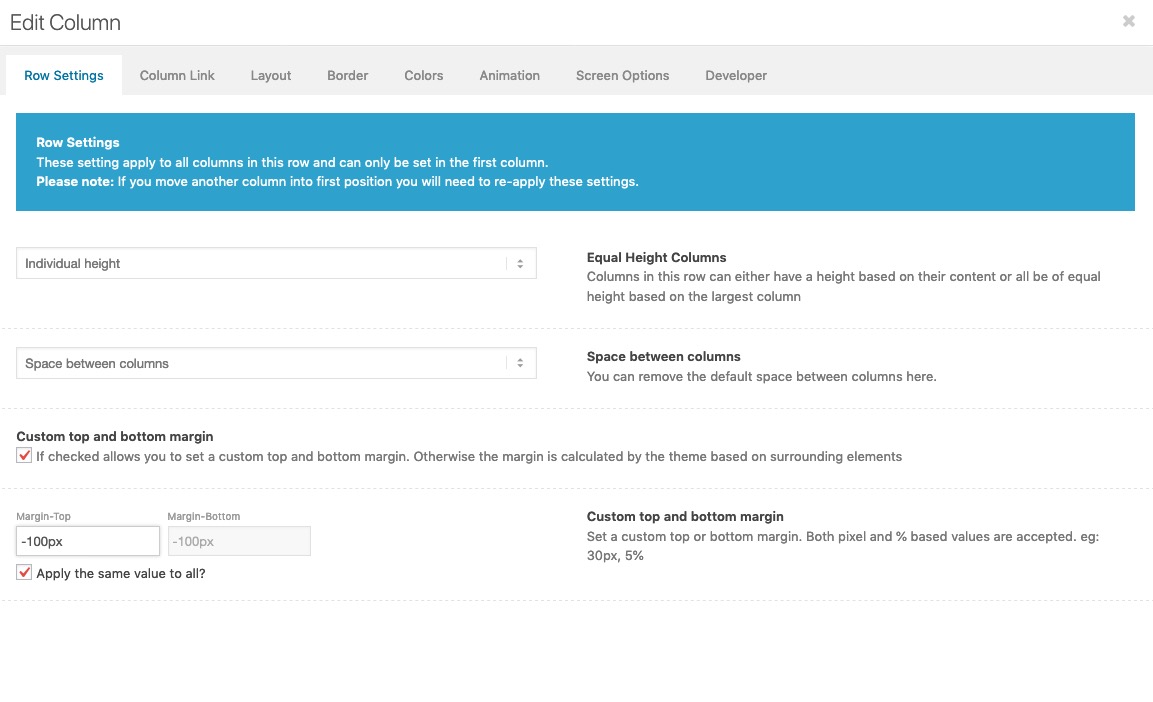
mark that field: “Custom Top and Bottom Margin”
then there will be new input fields – you can have negative Margins on top – thats itSeptember 16, 2019 at 8:44 am #1138697 -
AuthorPosts


- You must be logged in to reply to this topic.