

-
AuthorPosts
-
May 17, 2019 at 9:34 pm #1101937
Hi,
Somehow the header menu has been disappeared from the home page, and only the small menu appears when I scroll down the page. I have tried to turn it on in the settings, but nothing happened.
I’d like to see the header menu when the home page is opened, like in the Enfold 2017 theme (https://kriesi.at/themes/enfold-2017/)
Any suggestions may help, thank you!May 18, 2019 at 6:25 pm #1102072Hey blutcat,
Thanks for the link, I see you have this css causing the issue:#top .av_header_scrolldown.av_header_transparency { opacity: 0; margin-top: -250px !important; }but I will need admin access to examine the root of the css and correct.
Best regards,
MikeMay 20, 2019 at 6:40 pm #1102534Hi Mike,
Thank you for the reply and your help, I’ve created a new user for you.
And I have another problem, because I tried to made some changes on the Homepage, and I cannot update the page. I got this message instead: “Nothing Found. Sorry, the post you are looking for is not available.”
This issue happen only with the homepage and not with the other pages. Do you have an idea what could be wrong? I’m really clueless.I look forward what can be caused the problem. I appreciate your help!
Thank youMay 21, 2019 at 4:06 am #1102662Hi,
Thank you, I see that the css is in your “layout.css” on line 251, but I also see that you are using Enfold v4.0.2 with WordPress v5.2
You will need to correct some server issues and update your theme. We are now at v4.5.7
Please see the screenshot in Private Content area and ask your webhost to assist with the server issues.Best regards,
MikeMay 30, 2019 at 12:47 am #1105306Hi,
Okay, I’ve typed the Themeforest User Name and API Key to the update fields, saved the changes, reloaded the page, but it said “No Updates available. You are running the latest version! (4.0.2)”.
After I pressed “Check Manually”, it said all up to date.
It’s weird. So, what can we do now?Thank you,
TamasMay 30, 2019 at 4:55 am #1105329Hi,
First you will need to ask your webhost to correct the server settings in the screenshot above to:PHP Post Max Size: 50M
PHP Max Upload Size: 20M
PHP ZipArchive Extension: enable
PHP Multibyte String Extension: enable
PHP Multibyte Regex Functions: enableBut sorry, I meant to tell you that you will need to update your theme via FTP, because of it’s age and version.
The easiest and safest way to do this is to download the newest version from Theme Forest and rename your current theme to “enfold-old” via ftp then upload the new “enfold” and check that your site is working correctly.
Once you are happy you can delete the “enfold-old” via ftp, (not the WP theme page)
Should for some reason you wish to roll-back to the old version, it’s easy to do, simply rename the new “enfold” to “enfold-new” via ftp and then rename “enfold-old” to “enfold” then refresh your page.
Please don’t try to overwrite the theme folder, as this will leave old files behind and cause errors.**Please note that this is based on your current theme folder in /wp-content/themes/ being enfold if it’s a custom name please adjust the instructions accordingly**
Best regards,
MikeJune 15, 2019 at 6:08 pm #1110690Hi Mike,
Thank you for your help. I’ve updated the Enfold theme and it has been solved almost all the issues. I have only one problem with the grid style blog: if I turn off displaying the blog post categories and/or turn on displaying the date of the post on the Enfold Child theme / Blog Layout panel / Blog meta elements, it doesn’t work, nothing happens.
I attached the link below for the blog page.
Could you please have a look at that as well?
Thank you!June 16, 2019 at 7:19 pm #1110860Hi,
I believe that you are using a blog element on your blog page, which has it’s own settings. The Enfold Theme Options > Blog Layout > Blog meta elements controls the elements showing on the built-in blog page which is set at Enfold Theme Options > And where do you want to display the Blog?Best regards,
MikeJune 17, 2019 at 9:51 pm #1111146So, I would use the Blog Posts content element for displaying blog content, as you can see on the web page (link in the private content below). And on the Enfold Theme Options > Blog Layout panel > Blog meta elements section, I have checked only the Blog post date parameter on. Unfortunately, that is not displaying.
Furthermore, if I define the Blog grid layout to display Only the Title in the Blog Posts content, I see the category as well, which I don’t want to. (You can find the link in my previous comment.) I would like to see only the title of the post, nothing else, though.Could you please assist me what can I do to achieve that? Or is this a limitation? Maybe could be there some issues on the website?
Thank you!
TamasJune 18, 2019 at 12:56 pm #1111284Hi,
On your “events” page to only show the title, choose “Only Title” in the blog element options.
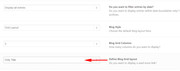
Then we will hide the categories with this css:.blog-categories.minor-meta { display: none !important; }Please clear your browser cache and check the first blog element on your events page.
Best regards,
MikeJune 24, 2019 at 9:17 pm #1113018Thank you Mike,
It works like a charm. :)Kind regards,
TamasJune 25, 2019 at 1:17 am #1113042Hi,
I’m glad this was resolved. If you need additional help, please let us know here in the forums.
Best regards,
Jordan Shannon -
AuthorPosts


- The topic ‘Header menu disappeared’ is closed to new replies.